Solved Run as Administrator???

anagc47

New member
Local time
12:22 AM
Messages
37
I was unable to print after getting an error that said something like "internet explorer was unable to print". After doing some research I was able to print after I clicked on "Run as Administrator" under Internet Explorer. Do I need to do anything to revert it back to the way it was before. I read something about potential vulnerability when using the administrator mode. I have little knowledge of technical issues and will appreciate an answer as simple as possible. Thanks, AG
 

My Computer

Computer type
Laptop
Computer Manufacturer/Model Number
HP
OS
Windows 7 Home Premium 64 bit
CPU
Intel Core i3'2350
Motherboard
2.3 GHz
Memory
6.00 GB
Graphics Card(s)
No Idea
Antivirus
Norton 360
Browser
Explorer 8
:eek: You should not surf the Internet with Administrator Rights enabled. :eek:

A better option would be to select the content you want to print and "Copy & Paste" it into a Word document.
You should not need Administrator Rights to do this. :)
 

My Computer

Computer type
PC/Desktop
Computer Manufacturer/Model Number
n/a
OS
W7 Ultimate SP1, LM19.2 MATE, W10 Home 1703, W10 Pro 1703 VM, #All 64 bit
CPU
AMD Phenom II x6 1100T, 3.3 GHz
Motherboard
ASUS M4A88T-M/USB3 (AM3)
Memory
12GB DDR3 1333 G-Skill (4GB x 2), G-Skill (2GB x 2)
Graphics Card(s)
NVIDIA GeForce GTX 660
Sound Card
Realtek?
Monitor(s) Displays
Samsung S23B350
Screen Resolution
1920x1080
Hard Drives
WD Green 2TB (SATA), WD Green 3TB (SATA), WD Blue 4TB (SATA), WD Blue 6TB (SATA)
PSU
Cooler Master
Case
Antec GX300 Tower
Cooling
3x Antec TRICOOL 120mm Fans
Mouse
Wired Optical
Internet Speed
DSL
Antivirus
Avast
Browser
Pale Moon (64 bit)
Other Info
2018-12-27 Upgraded HDDs
2015-12-10 Upgraded case, graphics card, storage
2015-08-15 Upgraded motherboard & RAM
2015-07-15 Upgraded LM17.1 to LM17.2
Thank You !

Thanks,
 

My Computer

Computer type
Laptop
Computer Manufacturer/Model Number
HP
OS
Windows 7 Home Premium 64 bit
CPU
Intel Core i3'2350
Motherboard
2.3 GHz
Memory
6.00 GB
Graphics Card(s)
No Idea
Antivirus
Norton 360
Browser
Explorer 8
One more thing, is there any way to double check that I am not shown as Administrator??? Thanks, AG
 

My Computer

Computer type
Laptop
Computer Manufacturer/Model Number
HP
OS
Windows 7 Home Premium 64 bit
CPU
Intel Core i3'2350
Motherboard
2.3 GHz
Memory
6.00 GB
Graphics Card(s)
No Idea
Antivirus
Norton 360
Browser
Explorer 8
Sorry, I rewrote my original post as it was misleading. :o

This is what I should have posted.
:eek: You should not surf the Internet with Administrator Rights enabled. :eek:

A better option would be to select the content you want to print and "Copy & Paste" it into a Word document.
You should not need Administrator Rights to do this. :)
One more thing, is there any way to double check that I am not shown as Administrator??? Thanks, AG
I'm not sure how to determine if a program is running with Administrator Rights without using a program like Process Explorer.
Process Explorer can display the "Integrity Level" of running programs.

I just tried opening "Paint" using the "Run as administrator" option:

  • Its "Integrity Level" was reported to be "High".
I then tried opening "Paint" without using the "Run as administrator" option:

  • Its "Integrity Level" was reported to be "Medium".


If you followed my original erroneous post, please run your AV program to make sure that nothing got into your PC.
 
Last edited:

My Computer

Computer type
PC/Desktop
Computer Manufacturer/Model Number
n/a
OS
W7 Ultimate SP1, LM19.2 MATE, W10 Home 1703, W10 Pro 1703 VM, #All 64 bit
CPU
AMD Phenom II x6 1100T, 3.3 GHz
Motherboard
ASUS M4A88T-M/USB3 (AM3)
Memory
12GB DDR3 1333 G-Skill (4GB x 2), G-Skill (2GB x 2)
Graphics Card(s)
NVIDIA GeForce GTX 660
Sound Card
Realtek?
Monitor(s) Displays
Samsung S23B350
Screen Resolution
1920x1080
Hard Drives
WD Green 2TB (SATA), WD Green 3TB (SATA), WD Blue 4TB (SATA), WD Blue 6TB (SATA)
PSU
Cooler Master
Case
Antec GX300 Tower
Cooling
3x Antec TRICOOL 120mm Fans
Mouse
Wired Optical
Internet Speed
DSL
Antivirus
Avast
Browser
Pale Moon (64 bit)
Other Info
2018-12-27 Upgraded HDDs
2015-12-10 Upgraded case, graphics card, storage
2015-08-15 Upgraded motherboard & RAM
2015-07-15 Upgraded LM17.1 to LM17.2
Hi, I am a bit confused now. I checked my other computer in Control Panel, Users and it also shows the picture and name that identify the computer it also shows "Administrator". I have never made any changes to this other computer. I require a password every time I get into any of the 2 computers. I think that is normal. I ran the AV and had no issues. Just want to make sure that this format is safe. Thanks, AG
 

My Computer

Computer type
Laptop
Computer Manufacturer/Model Number
HP
OS
Windows 7 Home Premium 64 bit
CPU
Intel Core i3'2350
Motherboard
2.3 GHz
Memory
6.00 GB
Graphics Card(s)
No Idea
Antivirus
Norton 360
Browser
Explorer 8
First User Account

Hi, I am a bit confused now. I checked my other computer in Control Panel, Users and it also shows the picture and name that identify the computer it also shows "Administrator". I have never made any changes to this other computer. I require a password every time I get into any of the 2 computers. I think that is normal. I ran the AV and had no issues. Just want to make sure that this format is safe. Thanks, AG
Can you post a screenshot?

Tutorial
http://www.sevenforums.com/tutorials/9733-screenshots-files-upload-post-seven-forums.html

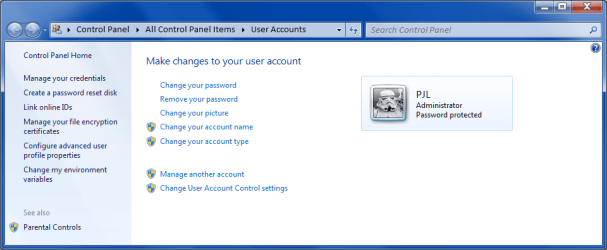
I was confused by that User Accounts window the first time I saw it too. :)
When you create your first User Account (during installation) that account will be a "Limited Administrator" account.
User Account - Default Setup.png
If you want to be more secure, you could create a new "Standard" user account and use that when you want to surf the Internet.
You could even activate the "Guest" user account (which has even more restrictions) and use that.

When you are using the "Standard" or "Guest" user accounts, the UAC prompt will ask for your Administrator password before it will allow potentially dangerous operations (like running installers).
 
Last edited:

My Computer

Computer type
PC/Desktop
Computer Manufacturer/Model Number
n/a
OS
W7 Ultimate SP1, LM19.2 MATE, W10 Home 1703, W10 Pro 1703 VM, #All 64 bit
CPU
AMD Phenom II x6 1100T, 3.3 GHz
Motherboard
ASUS M4A88T-M/USB3 (AM3)
Memory
12GB DDR3 1333 G-Skill (4GB x 2), G-Skill (2GB x 2)
Graphics Card(s)
NVIDIA GeForce GTX 660
Sound Card
Realtek?
Monitor(s) Displays
Samsung S23B350
Screen Resolution
1920x1080
Hard Drives
WD Green 2TB (SATA), WD Green 3TB (SATA), WD Blue 4TB (SATA), WD Blue 6TB (SATA)
PSU
Cooler Master
Case
Antec GX300 Tower
Cooling
3x Antec TRICOOL 120mm Fans
Mouse
Wired Optical
Internet Speed
DSL
Antivirus
Avast
Browser
Pale Moon (64 bit)
Other Info
2018-12-27 Upgraded HDDs
2015-12-10 Upgraded case, graphics card, storage
2015-08-15 Upgraded motherboard & RAM
2015-07-15 Upgraded LM17.1 to LM17.2
Back
Top