Run fixmbr from within Win 7

loaba

New member
Member
VIP
Local time
1:19 AM
Messages
161
Location
Albuquerque
Per the title, I want to know if it's possible to run fixmbr from inside Win 7...

Okay, here's why I want to do that. Once upon a time, I had dual-booted Win XP and Ubuntu on two different HDD's. I've long since abandoned Ubuntu (just got tired of the constant WIFI games and incessant tweaking), but that drive still has GRUB on it.

So, can I remove GRUB from within the Win 7 environment, or do I need to run the Recovery Console?
 

My Computer

Computer type
Laptop
Computer Manufacturer/Model Number
Sager NP9150
OS
Windows 7 Home x64
CPU
Intel Core i7-3610QM @ 2.3GHz x4
Motherboard
Clevo P15xEMx
Memory
16GBs
Graphics Card(s)
nVidia GeForce GTX 670M
Sound Card
Realtek High Def Audio
Monitor(s) Displays
Samsung SyncMaster S24B300 + Mobile Display
Screen Resolution
1920x1080 + 1920x1080 (running 1366x768)
Hard Drives
128GBt SSD
500GBt HDD
Keyboard
Logitech K360
Mouse
Logitech Anywhere Mouse MX
Internet Speed
Fat
Antivirus
Avast
Browser
Chrome
Welcome!

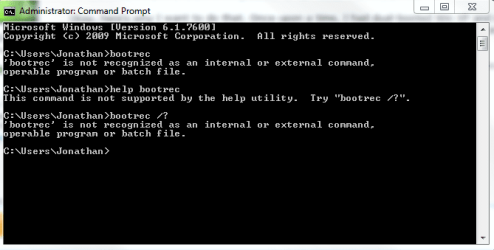
I don't think it is possible to run that command from within Windows. You can see my unsuccessful attempts.

Capture.PNG

Looks like you need to run bootrec from the recovery environment.

Good luck!
~JK
 

My Computer

Computer Manufacturer/Model Number
Custom
OS
Windows 7 Professional x64
CPU
Intel i7 2600K OC'd @ 4620 MHz
Motherboard
Asus P8Z68-V Pro
Memory
16GB GSkill Sniper 2133 Mhz (4x4GB)
Graphics Card(s)
EVGA GeForce GTX 480 SuperClocked+
Sound Card
Realtek High Definition Audio
Monitor(s) Displays
2x Acer S273HLbmii 27"
Screen Resolution
2 x 1920x1080
Hard Drives
64GB Crucial M4 SSD

Storage: Hitachi 1TB 5400RPM, Samsung 1.5TB 5400RPM
PSU
Corsair HW Series 750w (modular)
Case
Cooler Master HAF 932 Advanced Blue Edition
Cooling
CM Hyper 212+ CPU cooler, 3x 230mm + 1x 140mm case fans
Keyboard
Logitech MK320 (wireless)
Mouse
Logitech MK320 (wireless)
Internet Speed
30 Mb/s : 2 Mb/s
That's probably correct. I don't think cant edit the boot sector of a mounted partition on any OS.
 

My Computer

Computer Manufacturer/Model Number
HP Media Center
OS
Windows 7 32 bit
CPU
AMD 5200+ dual core
Memory
2 GB
Graphics Card(s)
NVidia GeForce 6150SE 128 MB
Monitor(s) Displays
CRT
Screen Resolution
1280x1024
Hard Drives
500 GB Sata internal :

SIIG USB 3.0 docking stations w/WD Caviar Black 6 Gb/s drives
Keyboard
PS/2
Mouse
PS/2 Wheel Mouse
Other Info
SIIG USB 3.0 PCIexpress card.
I know GRUB can be edited while linux is running, but it still has to restart to apply any changes.
 
You can run bootsect.exe in 4 ways:

Pop in the Install DVD and use D:\boot\bootsect ------ (where D: is your DVD drive)

Boot to either the Repair CD or Install DVD and go to the command prompt.

Pop in the Install DVD and copy the utility to your Windows\System32 folder and use an elevated command prompt to run it,

If you have EasyBCD the command is in one of their folders so you could copy it to the System32 folder.

I suppose the command you what to use is bootsect /nt60 E: (where E: is the drive letter of the Linux drive.)

Type bootsect /help to see how it works. There are additional switches /force and /mbr if you were to need them.

The fixmbr reference you make is associated with Bootrec and I don't know if it will work on another drive beside the boot drive.
 

My Computer

Computer Manufacturer/Model Number
Homebuilt
OS
Windows 7 x64
CPU
i7-2600K
Motherboard
Asus P8Z77-v Pro
Memory
8 G
Graphics Card(s)
GTX 480
Sound Card
Onboard
Monitor(s) Displays
LG W2753V
Screen Resolution
1920x1080
Hard Drives
Crucial M4 128 G SSD
Last edited:

My Computer

Computer type
Laptop
Computer Manufacturer/Model Number
Sager NP9170
OS
Win 7 Pro x64 / Win 10 Pro
CPU
Intel(R) Core(TM) i7-3630QM CPU @ 2.40GHz
Motherboard
CLEVO P170EM
Memory
12 GB
Graphics Card(s)
(1) Intel(R) HD Graphics 4000 (2) NVIDIA GeForce GTX 675M
Sound Card
(1) Realtek High Definition Audio (2) Intel(R) Display Aud
Monitor(s) Displays
17.3
Screen Resolution
1920x1080
Hard Drives
(1) Samsung 860 EVO 500GB(OS) (1) Samsung 860 EVO 500GB(Data)
Keyboard
Backlite
Antivirus
MSE, Malwarebytes Pro
Browser
Firefox
Other Info
DESKTOP: Custom-built.
OS: Win 10 Pro x64.
CASE: Rosewill R5.
CPU: Intel I5 4670K CPU @ 3.40GHz.
CPU COOLER: Cool Master Hyper 212 EVO.
MOTHERBOARD: Asus Z87-A.
MEMORY: Kingston HyperX 2x4 GB.
GPU: Nvidia Geforce 650 TI.
PSU: Corsair TX750.
DRIVES: (1) Samsung 840 120 GB SSD (2) Western Digital blue 500 GB 7200 RPM.
Use EasyBCD 2.0 beta after doing quick registration to use the beta.

Sometimes it takes deep cleaning to fully remove GRUB from HD. Use Diskpart clean all, DBAN or Partition Wizard CD to zero drive. Back up files as it is destructive.
 
Thanks, folks, for the welcome and the multiple responses.

Looks like I need to check out those apps - I'll get on this later today and post the results.


Extra Info
In a fit of Linux-itus, I installed ubuntu on the box (again) last night. Per usual, there are a few issues (like no DVD playback...). Still, I have vowed to master the ubuntu monkey and will not be so easily deterred this time around. However, this changes nothing. I still want to get rid of GRUB!

In the end, my goal is to have both of the SATA drives cleansed of GRUB and to have the Ubuntu install nicely sequestered on my remaining PATA disk (itself nicely installed in an external drive bay via cradle).

Thanks, again for the help.
Jon

PS: I am not a Linux-troll, I'm just a Windows guy who feels like I need to know and understand Ubuntu Linux.
 

My Computer

Computer type
Laptop
Computer Manufacturer/Model Number
Sager NP9150
OS
Windows 7 Home x64
CPU
Intel Core i7-3610QM @ 2.3GHz x4
Motherboard
Clevo P15xEMx
Memory
16GBs
Graphics Card(s)
nVidia GeForce GTX 670M
Sound Card
Realtek High Def Audio
Monitor(s) Displays
Samsung SyncMaster S24B300 + Mobile Display
Screen Resolution
1920x1080 + 1920x1080 (running 1366x768)
Hard Drives
128GBt SSD
500GBt HDD
Keyboard
Logitech K360
Mouse
Logitech Anywhere Mouse MX
Internet Speed
Fat
Antivirus
Avast
Browser
Chrome
...
PS: I am not a Linux-troll, I'm just a Windows guy who feels like I need to know and understand Ubuntu Linux.

Not to bash Ubuntu, I haven't tried it in a couple of years... but if you have broadband accessed through a popular network card you may want to try the One Disk Mandriva. I did the single CD install back when they called it Mandrake 9.1. It was great. It does the initial setup to get basic Linux on your HD, then the first thing it does is initialize your network card and get out on the internet. When you select packages to install, it does it right then. When you boot to an X window manager, all the stuff is there. You just log in.


3dlit.gif
 

My Computer

Computer Manufacturer/Model Number
HP Media Center
OS
Windows 7 32 bit
CPU
AMD 5200+ dual core
Memory
2 GB
Graphics Card(s)
NVidia GeForce 6150SE 128 MB
Monitor(s) Displays
CRT
Screen Resolution
1280x1024
Hard Drives
500 GB Sata internal :

SIIG USB 3.0 docking stations w/WD Caviar Black 6 Gb/s drives
Keyboard
PS/2
Mouse
PS/2 Wheel Mouse
Other Info
SIIG USB 3.0 PCIexpress card.
MilesAhead said:
Not to bash Ubuntu, I haven't tried it in a couple of years... but if you have broadband accessed through a popular network card you may want to try the One Disk Mandriva. I did the single CD install back when they called it Mandrake 9.1. It was great. It does the initial setup to get basic Linux on your HD, then the first thing it does is initialize your network card and get out on the internet. When you select packages to install, it does it right then. When you boot to an X window manager, all the stuff is there. You just log in.


Let's see, I've done 3 Ubuntu installs, on 3 different machines, over the course of 3 days.

The first install was on an older HP/Compaq nc6000 and it was a bear (which is strange given Ubuntu's excellent support for older hardware). Installing the wireless USB adapter was truly a nightmare, the hardware vendors are just not making code available for Linux developers. I gave that up and went back to XP Pro. :)

The second install was a little easier on my newer HP dv7 1245dx laptop, but I still had wireless issues. Again, it was just easier to reload a fresh install of Win 7 and get back to normal computing. The Win 7 install was a breeze BTW, it even installed almost all of the nasty HP device drivers (that is almost always a problem). I can't say this enough times, I am loving Win 7 Pro!

The third install is the one I'm working with now. I'm using 10.4 Lucid Lynx on my homebrew desktop and so far it's keeping track of wireless just fine (and the wireless installed painlessly too). Once I get this GRUB issue under control, I will be a happy man.

I will say one thing for Ubuntu, if you access the support forums (much like these), there are same great people willing to help you out with the myriad of issues that you're bound to face. I like and respect those people, they're good folks. Again, that's much like the people on these boards.
 

My Computer

Computer type
Laptop
Computer Manufacturer/Model Number
Sager NP9150
OS
Windows 7 Home x64
CPU
Intel Core i7-3610QM @ 2.3GHz x4
Motherboard
Clevo P15xEMx
Memory
16GBs
Graphics Card(s)
nVidia GeForce GTX 670M
Sound Card
Realtek High Def Audio
Monitor(s) Displays
Samsung SyncMaster S24B300 + Mobile Display
Screen Resolution
1920x1080 + 1920x1080 (running 1366x768)
Hard Drives
128GBt SSD
500GBt HDD
Keyboard
Logitech K360
Mouse
Logitech Anywhere Mouse MX
Internet Speed
Fat
Antivirus
Avast
Browser
Chrome
I've stayed away from wireless, so I don't know those pitfalls. Also there should be some real gurus on usenet. Of course things have changed quite a bit on the net, but on nntp groups I'd find a lot of guys that were system administrators for large groups of machines. Back then the biggest hurdle was convincing them you tried all the obvious searches and fixes. No patience with lazy noobs who wanted stuff handed to them. Probably the hostility level has ameliorated since I messed with it though.

Back when I did Mandrake 9.1 I had a Gateway with hardware very similar to HP setups. The Mandrake 9.1 was sort of aimed at HP hardware. I had just about zero issues. The only thing I couldn't get to work was my scanner. Because it was one level below the most popular model for that brand, nobody did a Linux driver for it.
 

My Computer

Computer Manufacturer/Model Number
HP Media Center
OS
Windows 7 32 bit
CPU
AMD 5200+ dual core
Memory
2 GB
Graphics Card(s)
NVidia GeForce 6150SE 128 MB
Monitor(s) Displays
CRT
Screen Resolution
1280x1024
Hard Drives
500 GB Sata internal :

SIIG USB 3.0 docking stations w/WD Caviar Black 6 Gb/s drives
Keyboard
PS/2
Mouse
PS/2 Wheel Mouse
Other Info
SIIG USB 3.0 PCIexpress card.
It just occurred to me that if I make the Linux drive the first boot device, what happens to the boot order when it's not there?
 

My Computer

Computer type
Laptop
Computer Manufacturer/Model Number
Sager NP9150
OS
Windows 7 Home x64
CPU
Intel Core i7-3610QM @ 2.3GHz x4
Motherboard
Clevo P15xEMx
Memory
16GBs
Graphics Card(s)
nVidia GeForce GTX 670M
Sound Card
Realtek High Def Audio
Monitor(s) Displays
Samsung SyncMaster S24B300 + Mobile Display
Screen Resolution
1920x1080 + 1920x1080 (running 1366x768)
Hard Drives
128GBt SSD
500GBt HDD
Keyboard
Logitech K360
Mouse
Logitech Anywhere Mouse MX
Internet Speed
Fat
Antivirus
Avast
Browser
Chrome
I ran a quick test in the BIOS and learned something. Whatever boot order that you set in BIOS stays there, regardless whether or not any of those devices are present at the next system boot. In my case, I have set the Linux drive before the Windows drive; whenever the Linux device is not available, the BIOS simply moves the next device up in the order.

In retrospect, I should have known that. I just never expected it to be so simple
 

My Computer

Computer type
Laptop
Computer Manufacturer/Model Number
Sager NP9150
OS
Windows 7 Home x64
CPU
Intel Core i7-3610QM @ 2.3GHz x4
Motherboard
Clevo P15xEMx
Memory
16GBs
Graphics Card(s)
nVidia GeForce GTX 670M
Sound Card
Realtek High Def Audio
Monitor(s) Displays
Samsung SyncMaster S24B300 + Mobile Display
Screen Resolution
1920x1080 + 1920x1080 (running 1366x768)
Hard Drives
128GBt SSD
500GBt HDD
Keyboard
Logitech K360
Mouse
Logitech Anywhere Mouse MX
Internet Speed
Fat
Antivirus
Avast
Browser
Chrome
Back
Top