Run game get Error 0xc000007b - Can't find working solution

enixdex010

New member
Local time
8:57 AM
Messages
3
Location
New Zealand
Hey guys

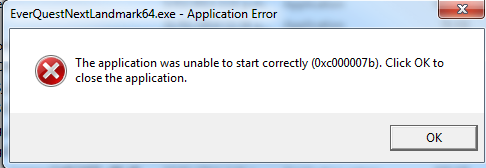
So yesterday I downloaded a game and when I ran it I got this error:

INgz3rm.png


I've searched high and low all night looking for the answer to this problem but I can't any solution that actually works for me. I've tried just about everything I can find , from what I understand about it. It has everything to with my computer and nothing to do with the game.

I was looking to see if anyone has any ideas/tips on how I could solve this issue before I ultimately just try a clean install.

Thanks!
 

My Computer My Computer

Computer type
PC/Desktop
Computer Manufacturer/Model Number
Custom
OS
Windows 7 Pro 64Bit
CPU
Intel i7 3770k
Motherboard
ASUS MAXIMUS V EXTREME
Memory
16Gigs
Graphics Card(s)
2x Nvida GTX 680
Hard Drives
250g Samsung SSD/3T WD
Hi, Welcome to forums.

That particular error code refers to an invalid image format. However, what the error code usually means is that you are trying to run a program that is intended to work with a 64 bit Windows operating system and you have 32 bit.

This issue may usually occurs due to corrupt or damaged installation file.
So, Can you please update your system specs?
Is the game legit?
 

My Computer My Computer

Computer type
PC/Desktop
Computer Manufacturer/Model Number
Custom Bulid/Self made
OS
Windows 11 x64
CPU
i5 2500K @ 3.3 GHz
Motherboard
ASUS P8 Z77 V pro
Memory
16 GB DDR 3 @ 1600Mhz
Graphics Card(s)
MSI 1050TI 4GB OC version
Sound Card
On Board (Realtek HD audio)
Monitor(s) Displays
Samsung 22" LCD
Screen Resolution
1920*1080
Hard Drives
Seagate 1 TB, WD 1TB, Seagate 2 TB ( I use a lot of space)
PSU
coolermaster 750 W
Case
Coolermaster HAF912
Cooling
Coolermaster hyper 212 EVO
Keyboard
Samsung
Mouse
Dell Wireless
Internet Speed
Wireless 50 Mbps
Antivirus
AVG 2016 Internet Security
Browser
Google Chrome
Hi, Welcome to forums.

That particular error code refers to an invalid image format. However, what the error code usually means is that you are trying to run a program that is intended to work with a 64 bit Windows operating system and you have 32 bit.

This issue may usually occurs due to corrupt or damaged installation file.
So, Can you please update your system specs?
Is the game legit?

Hey Archer

Thanks for the reply i've updated my system specs and yeah the game is legit downloaded from their website.
 

My Computer My Computer

Computer type
PC/Desktop
Computer Manufacturer/Model Number
Custom
OS
Windows 7 Pro 64Bit
CPU
Intel i7 3770k
Motherboard
ASUS MAXIMUS V EXTREME
Memory
16Gigs
Graphics Card(s)
2x Nvida GTX 680
Hard Drives
250g Samsung SSD/3T WD
Found something for you,

fix 0xc00007b error "the application was unable to start correctly"

there may be multiple reasons as to why you might receive 0xc00007b error when trying to run an application on a windows machine. 0xc000007b error usually comes from mixing up 32bit environment with 64bit one. For example 32bit application loads a 64bit dll causing 0xc000007b error.

Solution 1
In most cases it's .NET framework causing issues. This can easily fixed by re-installing latest .NET framework from [link]

Solution 2
Re-install the application that you are trying to run. It sounds simple but the application data files could be corrupt or missing. This could be caused by a installation that did not complete successfully or by a virus.

Solution 3
Running the application as an administrator could fix this error. Right click on the program shortcut or program .exe file, then click on Properties, and on the Compatibility tab. Check the Run this program as an administrator box, and click on OK


Solution 4
Restart your computer as some applications require restart after installation to function properly.


Solution 5
Run Windows update as it can provide application fixes and updates. Furthermore it installs missing drivers and updates the outdated ones like graphic card drivers. Windows 7 / 8 / 8.1 users need to search for "windows update". select all important and optional updates and click on the "install updates" button. If you use Windows XP navigate navigate to Windows Update by choosing Start > All Programs > Windows Update. When the scan is complete,Click the Review and Install Updates link. Finally press the "install now" button.

Windows 7 / 8 / 8.1


Windows XP


Solution 6
manually update the application if possible.

Solution 7
re-install Microsoft Visual C++ from [x32 link] or [x64 link]

Solution 8
re-install DirectX [link]

Solution 9
Many times hard disk problems can be repaired using the chkdsk command. If you are using windows 7 press the start button in bottom left corner of your screen. If you are using windows 8 / 8.1 press the windows key .Search for "cmd" and Right click it and select "Run as administrator". Windows XP users Click on start > run. In the Run box, type in "cmd" in the box.
Windows 7:

Windows 8 / 8.1

Windows XP


A CMD window should appear. In that window you can just type it as you see "chkdsk c: /f /r". If you have more then one drive or partition, you will need to tell it the disk (chkdsk d: /f /r).
If it is the primary windows disk c: it will ask you to schedule it for next boot. When you restart, it will do a chkdsk for you before even getting to the login screen.


Solution 10
This solution only works for a 64-bit system. It requires replacing files is system32 directory so be careful. Only attempt this solution if you are confident and if other solutions have failed. When Microsoft Visual C++ Redistributable Package is not properly configured it may cause 0xc00007b error. Firstly download the zip file [link] and decompress it. Reboot in safe mode and go to C:\Windows\System32. copy all files included in the zip package (mfc100.dll, mfc100u.dll, msvcr100.dll, msvcp100.dll and msvcr100_clr0400.dll) to C:\Windows\System32 replacing the current ones. After that reboot in normal mode.

If all the solutions above haven't worked i would consider backing up data and performing a clean install of windows


Source

 

My Computer My Computer

Computer type
PC/Desktop
Computer Manufacturer/Model Number
Custom Bulid/Self made
OS
Windows 11 x64
CPU
i5 2500K @ 3.3 GHz
Motherboard
ASUS P8 Z77 V pro
Memory
16 GB DDR 3 @ 1600Mhz
Graphics Card(s)
MSI 1050TI 4GB OC version
Sound Card
On Board (Realtek HD audio)
Monitor(s) Displays
Samsung 22" LCD
Screen Resolution
1920*1080
Hard Drives
Seagate 1 TB, WD 1TB, Seagate 2 TB ( I use a lot of space)
PSU
coolermaster 750 W
Case
Coolermaster HAF912
Cooling
Coolermaster hyper 212 EVO
Keyboard
Samsung
Mouse
Dell Wireless
Internet Speed
Wireless 50 Mbps
Antivirus
AVG 2016 Internet Security
Browser
Google Chrome
Found something for you,

fix 0xc00007b error "the application was unable to start correctly"

there may be multiple reasons as to why you might receive 0xc00007b error when trying to run an application on a windows machine. 0xc000007b error usually comes from mixing up 32bit environment with 64bit one. For example 32bit application loads a 64bit dll causing 0xc000007b error.

Solution 1
In most cases it's .NET framework causing issues. This can easily fixed by re-installing latest .NET framework from [link]

Solution 2
Re-install the application that you are trying to run. It sounds simple but the application data files could be corrupt or missing. This could be caused by a installation that did not complete successfully or by a virus.

Solution 3
Running the application as an administrator could fix this error. Right click on the program shortcut or program .exe file, then click on Properties, and on the Compatibility tab. Check the Run this program as an administrator box, and click on OK


Solution 4
Restart your computer as some applications require restart after installation to function properly.


Solution 5
Run Windows update as it can provide application fixes and updates. Furthermore it installs missing drivers and updates the outdated ones like graphic card drivers. Windows 7 / 8 / 8.1 users need to search for "windows update". select all important and optional updates and click on the "install updates" button. If you use Windows XP navigate navigate to Windows Update by choosing Start > All Programs > Windows Update. When the scan is complete,Click the Review and Install Updates link. Finally press the "install now" button.

Windows 7 / 8 / 8.1


Windows XP


Solution 6
manually update the application if possible.

Solution 7
re-install Microsoft Visual C++ from [x32 link] or [x64 link]

Solution 8
re-install DirectX [link]

Solution 9
Many times hard disk problems can be repaired using the chkdsk command. If you are using windows 7 press the start button in bottom left corner of your screen. If you are using windows 8 / 8.1 press the windows key .Search for "cmd" and Right click it and select "Run as administrator". Windows XP users Click on start > run. In the Run box, type in "cmd" in the box.
Windows 7:

Windows 8 / 8.1

Windows XP


A CMD window should appear. In that window you can just type it as you see "chkdsk c: /f /r". If you have more then one drive or partition, you will need to tell it the disk (chkdsk d: /f /r).
If it is the primary windows disk c: it will ask you to schedule it for next boot. When you restart, it will do a chkdsk for you before even getting to the login screen.


Solution 10
This solution only works for a 64-bit system. It requires replacing files is system32 directory so be careful. Only attempt this solution if you are confident and if other solutions have failed. When Microsoft Visual C++ Redistributable Package is not properly configured it may cause 0xc00007b error. Firstly download the zip file [link] and decompress it. Reboot in safe mode and go to C:\Windows\System32. copy all files included in the zip package (mfc100.dll, mfc100u.dll, msvcr100.dll, msvcp100.dll and msvcr100_clr0400.dll) to C:\Windows\System32 replacing the current ones. After that reboot in normal mode.

If all the solutions above haven't worked i would consider backing up data and performing a clean install of windows


Source
Sadly I had found that post before and I tried all of them but with no such luck none of them worked ;/
 

My Computer My Computer

Computer type
PC/Desktop
Computer Manufacturer/Model Number
Custom
OS
Windows 7 Pro 64Bit
CPU
Intel i7 3770k
Motherboard
ASUS MAXIMUS V EXTREME
Memory
16Gigs
Graphics Card(s)
2x Nvida GTX 680
Hard Drives
250g Samsung SSD/3T WD
Back
Top