
Run window does not display font correctly with custom visual style

Draizer

New member
Local time
12:10 AM
Messages
6
Hello everybody.

I recently applied a custom VS on my computer, and also changed the fonts system wide. My issue is that while I did manage to customize and change the font on the run window as well, it doesn't display like I expected. Basically, instead of the font being very light grey on the theme normal dark grey background, I find myself with the font being black on a font-only white background. See here:
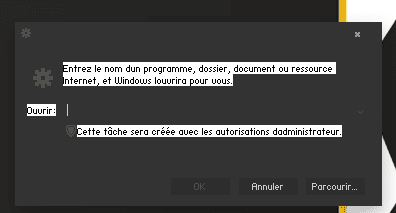
issue2.png

Also, for some reason all the apostrophes in Windows menus ( at least in right click menu on desktop and control panel ) disappeared. I know this is not because of the font itself, because I use it on Firefox as well and there's no issue there. Here's a pic I made to explain to the VS author:
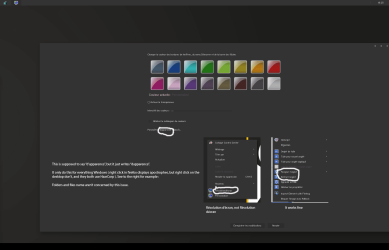
issue.png

When I asked the VS author, he told me he had no idea why this any of this is happening either.

Thanks in advance to whoever tries to help me.
 
Last edited:

My Computer My Computer

Computer type
PC/Desktop
Computer Manufacturer/Model Number
Custom build
OS
Windows 7 Pro x64
CPU
Intel 3770k
Motherboard
Asrock Z77 Extreme6
Memory
G-Skill Trident X 16Go (4x4Go)
Graphics Card(s)
AMD Radeon 7970Ghz Edition
Hard Drives
Samsung 830 Series 128Gb SSD
1To Western Digital Blue HDD
Antivirus
Microsoft Security Essentials
Browser
Firefox 25
Welcome to the Seven Forums

Post a link to the theme and I will look at it.

How did you change the font system wide?

What font did you use?

What language are you using?

Jerry
 

My Computer My Computer

Computer type
Laptop
Computer Manufacturer/Model Number
Sager NP9170
OS
Win 7 Pro x64 / Win 10 Pro
CPU
Intel(R) Core(TM) i7-3630QM CPU @ 2.40GHz
Motherboard
CLEVO P170EM
Memory
12 GB
Graphics Card(s)
(1) Intel(R) HD Graphics 4000 (2) NVIDIA GeForce GTX 675M
Sound Card
(1) Realtek High Definition Audio (2) Intel(R) Display Aud
Monitor(s) Displays
17.3
Screen Resolution
1920x1080
Hard Drives
(1) Samsung 860 EVO 500GB(OS) (1) Samsung 860 EVO 500GB(Data)
Keyboard
Backlite
Antivirus
MSE, Malwarebytes Pro
Browser
Firefox
Other Info
DESKTOP: Custom-built.
OS: Win 10 Pro x64.
CASE: Rosewill R5.
CPU: Intel I5 4670K CPU @ 3.40GHz.
CPU COOLER: Cool Master Hyper 212 EVO.
MOTHERBOARD: Asus Z87-A.
MEMORY: Kingston HyperX 2x4 GB.
GPU: Nvidia Geforce 650 TI.
PSU: Corsair TX750.
DRIVES: (1) Samsung 840 120 GB SSD (2) Western Digital blue 500 GB 7200 RPM.
Hello, thank you for your time. To answer your questions in due order:

I use the Deshou VS theme ( link here : Deshou VS by Ravmunken on deviantART ).

I changed the font by editing the registry (the Fonts and FontSubstitutes keys in HKEY LOCAL MACHINE\SOFTWARE\Microsoft\Windows NT\CurrentVersion). I removed the Segoe UI values, and replaced every font but Arial, Courier New and Times New Roman fonts with mine.

My font is HaxrCorp S8.

I'm using french.

-------------------------

So, I did figure out why the apostrophe isn't showing up : Windows use the ’ (Alt+0146) apostrophe for its menus, dialogs, etc, which my font does not have (it just have the classic ' apostrophe).

I'm currently trying to edit the font to include it (because it's much easier than to edit every single system file to switch apostrophes) , but it is harder than I anticipated.

So the only issue left is the run window issue.
 

My Computer My Computer

Computer type
PC/Desktop
Computer Manufacturer/Model Number
Custom build
OS
Windows 7 Pro x64
CPU
Intel 3770k
Motherboard
Asrock Z77 Extreme6
Memory
G-Skill Trident X 16Go (4x4Go)
Graphics Card(s)
AMD Radeon 7970Ghz Edition
Hard Drives
Samsung 830 Series 128Gb SSD
1To Western Digital Blue HDD
Antivirus
Microsoft Security Essentials
Browser
Firefox 25
Good to hear you got the font straightened out.

I downloaded and tried to fix the run window and for some reason it will not fix, the theme maker has done something that is preventing it.

Sorry
Jerry
 

My Computer My Computer

Computer type
Laptop
Computer Manufacturer/Model Number
Sager NP9170
OS
Win 7 Pro x64 / Win 10 Pro
CPU
Intel(R) Core(TM) i7-3630QM CPU @ 2.40GHz
Motherboard
CLEVO P170EM
Memory
12 GB
Graphics Card(s)
(1) Intel(R) HD Graphics 4000 (2) NVIDIA GeForce GTX 675M
Sound Card
(1) Realtek High Definition Audio (2) Intel(R) Display Aud
Monitor(s) Displays
17.3
Screen Resolution
1920x1080
Hard Drives
(1) Samsung 860 EVO 500GB(OS) (1) Samsung 860 EVO 500GB(Data)
Keyboard
Backlite
Antivirus
MSE, Malwarebytes Pro
Browser
Firefox
Other Info
DESKTOP: Custom-built.
OS: Win 10 Pro x64.
CASE: Rosewill R5.
CPU: Intel I5 4670K CPU @ 3.40GHz.
CPU COOLER: Cool Master Hyper 212 EVO.
MOTHERBOARD: Asus Z87-A.
MEMORY: Kingston HyperX 2x4 GB.
GPU: Nvidia Geforce 650 TI.
PSU: Corsair TX750.
DRIVES: (1) Samsung 840 120 GB SSD (2) Western Digital blue 500 GB 7200 RPM.
No trouble, thank you for trying to help me out.
 

My Computer My Computer

Computer type
PC/Desktop
Computer Manufacturer/Model Number
Custom build
OS
Windows 7 Pro x64
CPU
Intel 3770k
Motherboard
Asrock Z77 Extreme6
Memory
G-Skill Trident X 16Go (4x4Go)
Graphics Card(s)
AMD Radeon 7970Ghz Edition
Hard Drives
Samsung 830 Series 128Gb SSD
1To Western Digital Blue HDD
Antivirus
Microsoft Security Essentials
Browser
Firefox 25
You're welcome
 

My Computer My Computer

Computer type
Laptop
Computer Manufacturer/Model Number
Sager NP9170
OS
Win 7 Pro x64 / Win 10 Pro
CPU
Intel(R) Core(TM) i7-3630QM CPU @ 2.40GHz
Motherboard
CLEVO P170EM
Memory
12 GB
Graphics Card(s)
(1) Intel(R) HD Graphics 4000 (2) NVIDIA GeForce GTX 675M
Sound Card
(1) Realtek High Definition Audio (2) Intel(R) Display Aud
Monitor(s) Displays
17.3
Screen Resolution
1920x1080
Hard Drives
(1) Samsung 860 EVO 500GB(OS) (1) Samsung 860 EVO 500GB(Data)
Keyboard
Backlite
Antivirus
MSE, Malwarebytes Pro
Browser
Firefox
Other Info
DESKTOP: Custom-built.
OS: Win 10 Pro x64.
CASE: Rosewill R5.
CPU: Intel I5 4670K CPU @ 3.40GHz.
CPU COOLER: Cool Master Hyper 212 EVO.
MOTHERBOARD: Asus Z87-A.
MEMORY: Kingston HyperX 2x4 GB.
GPU: Nvidia Geforce 650 TI.
PSU: Corsair TX750.
DRIVES: (1) Samsung 840 120 GB SSD (2) Western Digital blue 500 GB 7200 RPM.
Back
Top