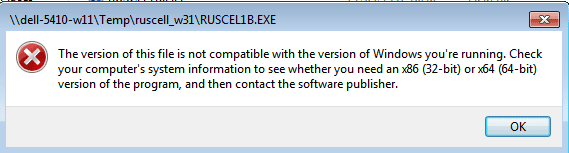
In sorting through old files, I find I have several old MS-DOS programs I would like to make operational. How do I do that?
I can read the disc(s) where the software is stored using Win7-Pro's command prompt. However, when I select Win7-Pro's command prompt and attempt to initiate the software's .exe file, I get an error message that says, more or less, that I can not run a 32 bit program on a 64 bit computer. What am I not understanding? Is there some sort of workaround I can use to make these old MS-DOS programs run?
As I am in my mid-80s and have forgotten much of what I thought I once knew (if I ever knew it originally), I need fairly simple, step-by-step, guidance. Many thanks, in advance, for guidance, instructions, or what have you.
I can read the disc(s) where the software is stored using Win7-Pro's command prompt. However, when I select Win7-Pro's command prompt and attempt to initiate the software's .exe file, I get an error message that says, more or less, that I can not run a 32 bit program on a 64 bit computer. What am I not understanding? Is there some sort of workaround I can use to make these old MS-DOS programs run?
As I am in my mid-80s and have forgotten much of what I thought I once knew (if I ever knew it originally), I need fairly simple, step-by-step, guidance. Many thanks, in advance, for guidance, instructions, or what have you.
My Computer
At a glance
Win7 Pro x86/Win7 Pro x64/Win 10 Pro x64Intel Core 2 Duo E7200 2.53 gHz/Core 2 Duo E8...
- Computer type
- PC/Desktop
- Computer Manufacturer/Model Number
- Dell Optiplex 755/Optiplex 780/Latitude E6400/Precision T3500
- OS
- Win7 Pro x86/Win7 Pro x64/Win 10 Pro x64
- CPU
- Intel Core 2 Duo E7200 2.53 gHz/Core 2 Duo E8400 3.0 gHz/
- Internet Speed
- FiOS 100 mB
- Antivirus
- Bitdefender Total Security
- Browser
- SeaMonkey/Edge