running Long calculations

bcrain

New member
Local time
5:45 PM
Messages
2
Just upgraded to W7. This problem arises, which I didn't have in XP: I run a program (one that I've developed) that does a huge number of numerical calculations. To reach its conclusion and give the answer takes hours and hours. Best to start it before bedtime, hoping to have the answer in the morning. But W7 goes into some kind of quasi-shut down mode; in the morning I see only the Intro screen where I choose the User, etc. Clicking it returns the desktop, and the program I had running all night is there, but it is frozen, with a blank screen. At the top it says something like "Program not responding." Can't find any way to revive it and show me the answer (or continue calculating, if it's not finished). I have to go to task manager and end it, losing all that overnight work. What can I do to fix that?

thanx,
Ben Crain
 

My Computer

OS
Windows 7
Fill out your System Specs so we know what kind of computer you have.

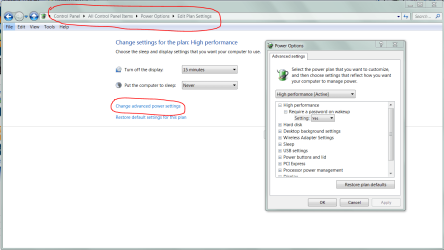
Try this:
Open Control Panel, click on Power Options.
Click on Change plan settings for which ever plan you are using.
Set Put computer to sleep to Never then click on Save Changes.

See if that helps.
 

My Computer

Computer type
PC/Desktop
Computer Manufacturer/Model Number
Lenovo IdeaCenter 450
OS
Windows 10 Pro X64
CPU
Intel Quad Core i7-4770 @ 3.4Ghz
Memory
16.0GB PC3-12800 DDR3 SDRAM 1600 MHz
Graphics Card(s)
Intel Integrated HD Graphics
Sound Card
Realtek HD Audio
Monitor(s) Displays
HP 22" LCD
Screen Resolution
1680 x 1050
Hard Drives
250GB Samsung EVO SATA-3 SSD
2TB Seagate ST2000DM001 SATA-2
1.5TB Seagate ST3150041AS SATA
Keyboard
Dell USB
Mouse
Lenovo USB
Internet Speed
Cable via Road Runner 3MB Upload, 30MB Download
Antivirus
Windows Defender, MBAM Pro, MBAE
Browser
Seamonkey
Other Info
UEFI/GPT
PLDS DVD-RW DH16AERSH
All things power...

.
 

Attachments

  • Capture.PNG
    Capture.PNG
    50.8 KB · Views: 8

My Computer

Computer Manufacturer/Model Number
Asus P5B
OS
Windows 7 Ultimate
CPU
Intel Q9550
Motherboard
Asus P5B
Memory
4x2GB HyperX
Graphics Card(s)
ATI HD3850 512
Sound Card
Creative X-Fi Platinum
Monitor(s) Displays
Samsung 50 / Samsung 24
Screen Resolution
1920*1080 / 1920*1200
Hard Drives
Multiple RAID volumes
PSU
ThermalTake ToughPower
Case
Armor
Cooling
Liquid
Keyboard
$6 2.4 gHz desktop
Internet Speed
Just this side of fast enough.
Just upgraded to W7. This problem arises, which I didn't have in XP: I run a program (one that I've developed) that does a huge number of numerical calculations. To reach its conclusion and give the answer takes hours and hours. Best to start it before bedtime, hoping to have the answer in the morning. But W7 goes into some kind of quasi-shut down mode; in the morning I see only the Intro screen where I choose the User, etc. Clicking it returns the desktop, and the program I had running all night is there, but it is frozen, with a blank screen. At the top it says something like "Program not responding." Can't find any way to revive it and show me the answer (or continue calculating, if it's not finished). I have to go to task manager and end it, losing all that overnight work. What can I do to fix that?

thanx,
Ben Crain

Sounds like Win7 decided your program was locked up and then went into standby...

Since this is your own code... you need to capture the WM_POWERBROADCAST message and respond with the DENY value to prevent system standby while your calculations are running.

Also, if you are using tight loops to do your calculations, you should imbed Sleep(0) calls in the parts of the loops that are not being timed by interprocess or interthread signals. The goal is to periodically release a time slice so the system doesn't see your program as being unresponsive.


The system natively uses only keyboard, mouse and network activity to reset the standby counters... applications that must prevent standby need to do it by the message method...
 

My Computer

Computer Manufacturer/Model Number
Homebrew
OS
XP Pro SP3 X86 / Win7 Pro X86
CPU
Amd 64 x2 4200 (2.4ghz)
Motherboard
Asus M2N-MX SE Plus
Memory
Kingston DDR2 800 2gb
Graphics Card(s)
Nvidia GF-8400
Sound Card
Realtek on Motherboard
Monitor(s) Displays
Acer x-193bw
Screen Resolution
1440 x 900
Hard Drives
Western Digital 500g
PSU
350watt In-Win
Case
In-Win
Cooling
Air
Keyboard
yes
Mouse
yes
Internet Speed
5mpbs
Other Info
Also ASRock ION 330 as HTPC (on XP).
Acer Aspire as GP netbook (on XP).
Back
Top