Running Office XP under Windows 7 - error on startup

rosb

New member
Local time
2:15 AM
Messages
3
Location
Johannesburg, South Africa
Hi

I have just bought a new laptop and it came with Windows 7 Professional 64-bit. My previous laptop was running XP (which I LOVE and am trying to get my Windows 7 to work like XP did.... but that's a different issue for another day....).

I have MS Office XP 2004 Professional on CD. When I bought my previous laptop (running XP), I had installed this and have been using it for the past 4 years without any trouble.

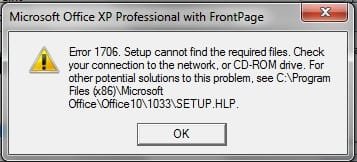
I have just loaded the CD onto my new laptop (I loaded only Word, Excel and Powerpoint because I don't need the other programs) and every time I try to start Word or Excel, I get this box:
error1.jpg

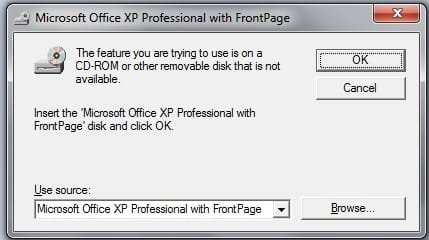
If I choose Cancel, I then get this:

error2.jpg

And if I click OK, the program then starts and seems to be OK.

But I will be driven made if I have to go through these error boxes each time I open Word or Excel. Does anyone know how I can get rid of them? I even copied across my normal.dot from my old machine, but that didn't help.

Thanks,
Ros.
 

My Computer My Computer

Computer Manufacturer/Model Number
Lenovo X220i
OS
Windows 7 Professional 64-bit
Memory
6GB

My Computer My Computer

Computer type
PC/Desktop
Computer Manufacturer/Model Number
Packard Bell
OS
Windows 7 Home Premium 64bit
CPU
Intel(R) Core(TM) i3-2120 CPU @ 3.30GHz
Motherboard
Packard Bell IPISB-AG
Memory
3.00 GB
Graphics Card(s)
(1) Intel(R) HD Graphics (2) VNC Mirror Driver
Sound Card
Realtek High Definition Audio
Monitor(s) Displays
AIO LCD
Screen Resolution
1920 x 1080
Hard Drives
WDC WD10EADX-22TDHB0 ATA Device
Fixed hard disk media
4 partitions
931.51 GB
Keyboard
Wireless
Mouse
Wireless
Antivirus
Microsoft Security Essentials
Browser
IE; Firefox
Other Info
Also:
Samsung N220 Plus Netbook - Windows 7 Home
HP laptop
iPad 5
Hopefully this MS Article will help. It does refer to Office XP 2003, but may well be relevant to Office XP 2004 too:
You receive an "Error 1706. Setup cannot find the required files

Hey Irene... thanks for the prompt reply... problem is I can't access that page you recommended... it's been loading for the past 10 minutes... to be honest, I've been trying to access quite a few different pages within the "support.microsoft.com" domain today (<sigh> this moving over to a new operating system is TOUGH! Many, many questions....) and have had very little success.
 

My Computer My Computer

Computer Manufacturer/Model Number
Lenovo X220i
OS
Windows 7 Professional 64-bit
Memory
6GB
That's strange, it loads immediately for me. Which browser are you using?

Could it possibly be a security program issue? This is just a guess...
Try rebooting your PC and try again.
 

My Computer My Computer

Computer type
PC/Desktop
Computer Manufacturer/Model Number
Packard Bell
OS
Windows 7 Home Premium 64bit
CPU
Intel(R) Core(TM) i3-2120 CPU @ 3.30GHz
Motherboard
Packard Bell IPISB-AG
Memory
3.00 GB
Graphics Card(s)
(1) Intel(R) HD Graphics (2) VNC Mirror Driver
Sound Card
Realtek High Definition Audio
Monitor(s) Displays
AIO LCD
Screen Resolution
1920 x 1080
Hard Drives
WDC WD10EADX-22TDHB0 ATA Device
Fixed hard disk media
4 partitions
931.51 GB
Keyboard
Wireless
Mouse
Wireless
Antivirus
Microsoft Security Essentials
Browser
IE; Firefox
Other Info
Also:
Samsung N220 Plus Netbook - Windows 7 Home
HP laptop
iPad 5
OK, that website finally did load.... it's probably just the usual dodgy internet connection that we have down here in Africa....

The symptom for this solution is "When you insert a Microsoft Office CD-ROM, either to repair an Office installation or to install a feature set to Installed on First Use, you may receive the following error message"

But I receive the error message each time I run the program, not when I am trying to repair an Office installation or install a feature set to "Installed on First Use".

It then states:

This problem can occur if all the following conditions are true:
  • You originally installed Office from a network administrative installation.
  • The network administrative installation is no longer available to you.
  • You are trying to use an Office CD-ROM when you are prompted by the Windows Installer for an Office source location.
  • You click Cancel when you are prompted to insert the CD.
Only the last of these conditions is true, in my case. I did not install Office from a network administrative installation.

The resolution suggested is to "Create an Administrative Installation on Your Computer's Hard Disk", but then it says "Note To create an administrative installation, you must use an Enterprise edition of Office." I don't think I have such a thing.
 

My Computer My Computer

Computer Manufacturer/Model Number
Lenovo X220i
OS
Windows 7 Professional 64-bit
Memory
6GB
Back
Top