Running programs on different harddrives

Presac

New member
Local time
3:17 AM
Messages
17
I have a computer with an 120GB SSD (C:\ where the OS is installed) and a 1GB HDD and want to know if there is any problems with installing programs on both the main SSD and the HDD.
Can I simply make a new Program files folder on the HDD and instal programs there, or do I need to make changes in the registry. I think I have read something about the "\Program files" and "\Program files (x86)" having a speciel setup in windows and was wondering whether these needed to be applied to the new folders on the HDD.
 

My Computer

Computer type
PC/Desktop
Computer Manufacturer/Model Number
Vision Computer
OS
Windows 7 Professional x64
CPU
Intel Core i7 3770K CPU @ 3.50GHz 3.90GHz
Motherboard
Gigabyte Technology Co., Ltd. Z77X-D3H
Memory
8,00GB Kingston Dual-Channel DDR3
Graphics Card(s)
NVIDIA GeForce GTX 660
Hard Drives
1TB Seagate ST1000DM ST1000DM003-1CH1 SCSI Disk Device (SATA)
120GB Samsung SSD 840 Series SCSI Disk Device (SSD)
Antivirus
Bullguard
Browser
Chrome
Simply make a folder like "Program files" or "Programs" or anything you like on HDD. Install programs there. In most installers is a question like "custom install", or "change install folder".

Don't move already installed programs! If you want to move them... uninstall and install them in folder you want.

After creating the d:\yourprograms folder do this (replace with real name and drive letter!)

Code:
cacls [COLOR=red]"d:\yourprograms"[/COLOR] /s:"D:PAI(A;;FA;;;S-1-5-80-956008885-3418522649-1831038044-1853292631-2271478464)(A;CIIO;GA;;;S-1-5-80-956008885-3418522649-1831038044-1853292631-2271478464)(A;;0x1301bf;;;SY)(A;OICIIO;GA;;;SY)(A;;0x1301bf;;;BA)(A;OICIIO;GA;;;BA)(A;;0x1200a9;;;BU)(A;OICIIO;GXGR;;;BU)(A;OICIIO;GA;;;CO)"

copy paste all code to an elevated command prompt and press enter.
 
Last edited:

My Computer

Computer type
Laptop
Computer Manufacturer/Model Number
ACER ASPIRE 5742G
OS
Microsoft Windows 7 Home Premium 64-bits 7601 Multiprocessor Free Service Pack 1
CPU
Intel(R) Core(TM) i3 CPU M 370 @ 2.40GHz
Motherboard
Acer Aspire 5742G
Memory
4,00 GB
Graphics Card(s)
ATI Mobility Radeon HD 5400 Series
Sound Card
(1) AMD High Definition Audio Device (2) Realtek High Defi
Screen Resolution
1366 x 768 x 32 bits (4294967296 colors) @ 60 Hz
Hard Drives
WDC WD5000BEVT-22ZAT0
I forgot to mention the computer is brand new, so there isn't much installed yet, But I have a tendency to install a lot of programs. The Idea I had was to only install the programs I use on a daily basis on the SSD, and install those programs I don't use that often on the HDD.
A question to the first answer:
Code:
cacls "d:\yourprograms" /s:"D:PAI(A;;FA;;;S-1-5-80-956008885-3418522649-1831038044-1853292631-2271478464)(A;CIIO;GA;;;S-1-5-80-956008885-3418522649-1831038044-1853292631-2271478464)(A;;0x1301bf;;;SY)(A;OICIIO;GA;;;SY)(A;;0x1301bf;;;BA)(A;OICIIO;GA;;;BA)(A;;0x1200a9;;;BU)(A;OICIIO;GXGR;;;BU)(A;OICIIO;GA;;;CO)"
What exactly does this do

To the second answer, I will try to move the User folder as suggested.
 

My Computer

Computer type
PC/Desktop
Computer Manufacturer/Model Number
Vision Computer
OS
Windows 7 Professional x64
CPU
Intel Core i7 3770K CPU @ 3.50GHz 3.90GHz
Motherboard
Gigabyte Technology Co., Ltd. Z77X-D3H
Memory
8,00GB Kingston Dual-Channel DDR3
Graphics Card(s)
NVIDIA GeForce GTX 660
Hard Drives
1TB Seagate ST1000DM ST1000DM003-1CH1 SCSI Disk Device (SATA)
120GB Samsung SSD 840 Series SCSI Disk Device (SSD)
Antivirus
Bullguard
Browser
Chrome
I forgot to mention the computer is brand new, so there isn't much installed yet, But I have a tendency to install a lot of programs. The Idea I had was to only install the programs I use on a daily basis on the SSD, and install those programs I don't use that often on the HDD.
A question to the first answer:
Code:
cacls "d:\yourprograms" /s:"D:PAI(A;;FA;;;S-1-5-80-956008885-3418522649-1831038044-1853292631-2271478464)(A;CIIO;GA;;;S-1-5-80-956008885-3418522649-1831038044-1853292631-2271478464)(A;;0x1301bf;;;SY)(A;OICIIO;GA;;;SY)(A;;0x1301bf;;;BA)(A;OICIIO;GA;;;BA)(A;;0x1200a9;;;BU)(A;OICIIO;GXGR;;;BU)(A;OICIIO;GA;;;CO)"
What exactly does this do

To the second answer, I will try to move the User folder as suggested.
It sets the default security permissions to the folder. C:\program files folder is protected: Normal users may not write in it, administrators may (with elevated permissions). I assume you want same protection to new folder as well? That's why I gave you the command
 

My Computer

Computer type
Laptop
Computer Manufacturer/Model Number
ACER ASPIRE 5742G
OS
Microsoft Windows 7 Home Premium 64-bits 7601 Multiprocessor Free Service Pack 1
CPU
Intel(R) Core(TM) i3 CPU M 370 @ 2.40GHz
Motherboard
Acer Aspire 5742G
Memory
4,00 GB
Graphics Card(s)
ATI Mobility Radeon HD 5400 Series
Sound Card
(1) AMD High Definition Audio Device (2) Realtek High Defi
Screen Resolution
1366 x 768 x 32 bits (4294967296 colors) @ 60 Hz
Hard Drives
WDC WD5000BEVT-22ZAT0
Oh. I will try that.
Should the D in
/s:"D:PAI(A;;FA; ...
be changed to the new drive letter to?
And as a last question, will both 64 bit and 32 bit programs both run smoothly in the new program folder?
 

My Computer

Computer type
PC/Desktop
Computer Manufacturer/Model Number
Vision Computer
OS
Windows 7 Professional x64
CPU
Intel Core i7 3770K CPU @ 3.50GHz 3.90GHz
Motherboard
Gigabyte Technology Co., Ltd. Z77X-D3H
Memory
8,00GB Kingston Dual-Channel DDR3
Graphics Card(s)
NVIDIA GeForce GTX 660
Hard Drives
1TB Seagate ST1000DM ST1000DM003-1CH1 SCSI Disk Device (SATA)
120GB Samsung SSD 840 Series SCSI Disk Device (SSD)
Antivirus
Bullguard
Browser
Chrome
Oh. I will try that.
Should the D in
/s:"D:PAI(A;;FA; ...
be changed to the new drive letter to?
And as a last question, will both 64 bit and 32 bit programs both run smoothly in the new program folder?
Leave everyting after /s as it is. D: has nothing to do with drive D
32 or 64 bits doesn't matter
 

My Computer

Computer type
Laptop
Computer Manufacturer/Model Number
ACER ASPIRE 5742G
OS
Microsoft Windows 7 Home Premium 64-bits 7601 Multiprocessor Free Service Pack 1
CPU
Intel(R) Core(TM) i3 CPU M 370 @ 2.40GHz
Motherboard
Acer Aspire 5742G
Memory
4,00 GB
Graphics Card(s)
ATI Mobility Radeon HD 5400 Series
Sound Card
(1) AMD High Definition Audio Device (2) Realtek High Defi
Screen Resolution
1366 x 768 x 32 bits (4294967296 colors) @ 60 Hz
Hard Drives
WDC WD5000BEVT-22ZAT0
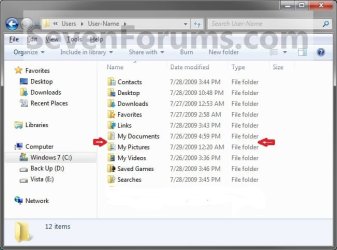
You can also move user folders very easy using cut/paste (not copy/paste!)
Make a folder called "Yourname" on HDD and paste the folders there. You may decide yourself with ones to move. But here's the list
 

Attachments

  • users.jpg
    users.jpg
    42.6 KB · Views: 3

My Computer

Computer type
Laptop
Computer Manufacturer/Model Number
ACER ASPIRE 5742G
OS
Microsoft Windows 7 Home Premium 64-bits 7601 Multiprocessor Free Service Pack 1
CPU
Intel(R) Core(TM) i3 CPU M 370 @ 2.40GHz
Motherboard
Acer Aspire 5742G
Memory
4,00 GB
Graphics Card(s)
ATI Mobility Radeon HD 5400 Series
Sound Card
(1) AMD High Definition Audio Device (2) Realtek High Defi
Screen Resolution
1366 x 768 x 32 bits (4294967296 colors) @ 60 Hz
Hard Drives
WDC WD5000BEVT-22ZAT0
Wow, Kaktussoft. Much easier. Changes the Location tab, too.
Works great and without any problems as far as I know. I did it that way. Also moved "public video", "public documents" ... all public stuff as well.
 

My Computer

Computer type
Laptop
Computer Manufacturer/Model Number
ACER ASPIRE 5742G
OS
Microsoft Windows 7 Home Premium 64-bits 7601 Multiprocessor Free Service Pack 1
CPU
Intel(R) Core(TM) i3 CPU M 370 @ 2.40GHz
Motherboard
Acer Aspire 5742G
Memory
4,00 GB
Graphics Card(s)
ATI Mobility Radeon HD 5400 Series
Sound Card
(1) AMD High Definition Audio Device (2) Realtek High Defi
Screen Resolution
1366 x 768 x 32 bits (4294967296 colors) @ 60 Hz
Hard Drives
WDC WD5000BEVT-22ZAT0
Back
Top