
Running software from 2nd hdd

RaviR

New member
Member
VIP
Local time
10:38 PM
Messages
229
Location
Trinidad
Hi there,

I recently bought a new sata hdd and i'm currently using it to store my software/files on it. The other hdd has my OS on it. The problem that i'm having is that when i try installing anything from the 2nd hdd it does not work or gives different errors. The software would install if i copy the same software installation to the original hdd. Is there any way to fix this? Or do i have to always copy them to the 1st hdd?
 

My Computer

Computer type
PC/Desktop
Computer Manufacturer/Model Number
Custom Build
OS
Microsoft Windows 7 Ultimate 64-bit 7601 Multiprocessor Free Service Pack 1
CPU
Intel(R) Core(TM) i5-3570K CPU @ 3.40GHz
Motherboard
ASUSTeK COMPUTER INC. P8Z77-V
Memory
8.00 GB
Graphics Card(s)
NVIDIA GeForce GTX 660
Sound Card
(1) USB Audio Device (2) High Definition Audio Device (3
Screen Resolution
1360 x 768 x 32 bits (4294967296 colors) @ 60 Hz
Hard Drives
(1) M4-CT128M4SSD2 ATA Device (2) WDC WD1002FAEX-00Z3A0 ATA Device (3) WDC WD10EZEX-22BN5A0 ATA Device
PSU
Corsair Enthusiast Series TX650M
Case
NZXT Phantom 410
Cooling
Cooler Master Hyper 212 EVO
Keyboard
Logitech HID-Compliant Keyboard
Mouse
Logitech HID-compliant MX320 Laser Mouse

My Computer

Computer Manufacturer/Model Number
Custom
OS
Windows 7 Professional x64
CPU
Intel i7 2600K OC'd @ 4620 MHz
Motherboard
Asus P8Z68-V Pro
Memory
16GB GSkill Sniper 2133 Mhz (4x4GB)
Graphics Card(s)
EVGA GeForce GTX 480 SuperClocked+
Sound Card
Realtek High Definition Audio
Monitor(s) Displays
2x Acer S273HLbmii 27"
Screen Resolution
2 x 1920x1080
Hard Drives
64GB Crucial M4 SSD

Storage: Hitachi 1TB 5400RPM, Samsung 1.5TB 5400RPM
PSU
Corsair HW Series 750w (modular)
Case
Cooler Master HAF 932 Advanced Blue Edition
Cooling
CM Hyper 212+ CPU cooler, 3x 230mm + 1x 140mm case fans
Keyboard
Logitech MK320 (wireless)
Mouse
Logitech MK320 (wireless)
Internet Speed
30 Mb/s : 2 Mb/s
What errors does it give?

Are you trying to install the program onto the hard drive, or are you running the installer from the hard drive?

What programs have you tried to install?

How are you copying them to the first hard drive?

Could you please post a screenshot of your problem?

http://www.sevenforums.com/general-...ed-method-uploading-posting-screen-shots.html

The installer is already on the 2nd hard drive(one with only software/files) and im trying to install them onto my OS hard drive(1st hard drive)

Skype,deamon tools, winamp, setpoint.

If the installer doesn't run i copy and paste the installer to the OS hard drive and run it from there and it will run normally.

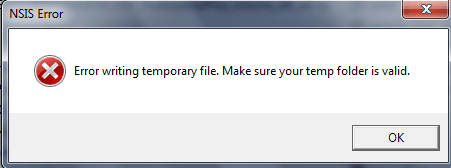
Untitled.png

either that would come up or the installer would just not open.
 

My Computer

Computer type
PC/Desktop
Computer Manufacturer/Model Number
Custom Build
OS
Microsoft Windows 7 Ultimate 64-bit 7601 Multiprocessor Free Service Pack 1
CPU
Intel(R) Core(TM) i5-3570K CPU @ 3.40GHz
Motherboard
ASUSTeK COMPUTER INC. P8Z77-V
Memory
8.00 GB
Graphics Card(s)
NVIDIA GeForce GTX 660
Sound Card
(1) USB Audio Device (2) High Definition Audio Device (3
Screen Resolution
1360 x 768 x 32 bits (4294967296 colors) @ 60 Hz
Hard Drives
(1) M4-CT128M4SSD2 ATA Device (2) WDC WD1002FAEX-00Z3A0 ATA Device (3) WDC WD10EZEX-22BN5A0 ATA Device
PSU
Corsair Enthusiast Series TX650M
Case
NZXT Phantom 410
Cooling
Cooler Master Hyper 212 EVO
Keyboard
Logitech HID-Compliant Keyboard
Mouse
Logitech HID-compliant MX320 Laser Mouse
Try running the program as administrator.

Make sure you are not infected with a virus with Malwarebytes.
 

My Computer

Computer Manufacturer/Model Number
Custom
OS
Windows 7 Professional x64
CPU
Intel i7 2600K OC'd @ 4620 MHz
Motherboard
Asus P8Z68-V Pro
Memory
16GB GSkill Sniper 2133 Mhz (4x4GB)
Graphics Card(s)
EVGA GeForce GTX 480 SuperClocked+
Sound Card
Realtek High Definition Audio
Monitor(s) Displays
2x Acer S273HLbmii 27"
Screen Resolution
2 x 1920x1080
Hard Drives
64GB Crucial M4 SSD

Storage: Hitachi 1TB 5400RPM, Samsung 1.5TB 5400RPM
PSU
Corsair HW Series 750w (modular)
Case
Cooler Master HAF 932 Advanced Blue Edition
Cooling
CM Hyper 212+ CPU cooler, 3x 230mm + 1x 140mm case fans
Keyboard
Logitech MK320 (wireless)
Mouse
Logitech MK320 (wireless)
Internet Speed
30 Mb/s : 2 Mb/s
Try running the program as administrator.

Make sure you are not infected with a virus with Malwarebytes.


Administrator was the 1st option i tried and its a new install of windows but i'll still scan with malwarebytes. I also had the problem with installing WOTLK (World of Warcraft) had to do the same thing copy it to the OS hard drive.
 

My Computer

Computer type
PC/Desktop
Computer Manufacturer/Model Number
Custom Build
OS
Microsoft Windows 7 Ultimate 64-bit 7601 Multiprocessor Free Service Pack 1
CPU
Intel(R) Core(TM) i5-3570K CPU @ 3.40GHz
Motherboard
ASUSTeK COMPUTER INC. P8Z77-V
Memory
8.00 GB
Graphics Card(s)
NVIDIA GeForce GTX 660
Sound Card
(1) USB Audio Device (2) High Definition Audio Device (3
Screen Resolution
1360 x 768 x 32 bits (4294967296 colors) @ 60 Hz
Hard Drives
(1) M4-CT128M4SSD2 ATA Device (2) WDC WD1002FAEX-00Z3A0 ATA Device (3) WDC WD10EZEX-22BN5A0 ATA Device
PSU
Corsair Enthusiast Series TX650M
Case
NZXT Phantom 410
Cooling
Cooler Master Hyper 212 EVO
Keyboard
Logitech HID-Compliant Keyboard
Mouse
Logitech HID-compliant MX320 Laser Mouse
Into what directory are you trying to install the programs to? In other words, even though you are running the installer from the secondary hard drive, are you pointing the installation to C:\Program Files (or C:\Program Files(x86))?

Are you attempting to have your operating system on one drive and all of your programs on the other drive?
 

My Computer

Computer Manufacturer/Model Number
Rig 1
OS
Windows 7 Ultimate x64
CPU
AMD Phenom II X4 940 Black Edition @ 3.4GHz (AM2+)
Motherboard
Gigabyte GA-MA790X-UD4P (AM2+)
Memory
Corsair CM2X4096-8500C5 (4 X 2GB)
Graphics Card(s)
XFX Radeon HD 5770 / Diamond Radeon HD 5770 CrossFireX
Sound Card
Asus Xonar DS (PCI)
Monitor(s) Displays
Samsung SyncMaster 932bw+ (3)
Screen Resolution
4320x900
Hard Drives
OCZ Vertex 2 80 GB - Windows 7 System --
WD Caviar Black 1TB - Music, Movies, Vids, Pics --
WD Caviar Black 640GB - User Profiles & Games --
WD My Book 320GB external
PSU
Corsair CMPSU-750TX
Case
Cooler Master HAF 932
Cooling
Corsair Hydro Series H50
Keyboard
Logitech Desktop Wave
Mouse
Logitech LX8 Laser
Internet Speed
20 down / 2 up
Other Info
LG GGC-H20L Blu-Ray / HDDVD combo --
Hauppauge HVR-1250 --
Silverstone MFP-51 --
Logitech Webcam C600
Into what directory are you trying to install the programs to? In other words, even though you are running the installer from the secondary hard drive, are you pointing the installation to C:\Program Files (or C:\Program Files(x86))?

Are you attempting to have your operating system on one drive and all of your programs on the other drive?


Its going in C:\Program Files. Yes data on one drive and OS on the other kinda going along with the idea if i happen to crash or OS fails my data will be safe. Is that a bad idea?
 

My Computer

Computer type
PC/Desktop
Computer Manufacturer/Model Number
Custom Build
OS
Microsoft Windows 7 Ultimate 64-bit 7601 Multiprocessor Free Service Pack 1
CPU
Intel(R) Core(TM) i5-3570K CPU @ 3.40GHz
Motherboard
ASUSTeK COMPUTER INC. P8Z77-V
Memory
8.00 GB
Graphics Card(s)
NVIDIA GeForce GTX 660
Sound Card
(1) USB Audio Device (2) High Definition Audio Device (3
Screen Resolution
1360 x 768 x 32 bits (4294967296 colors) @ 60 Hz
Hard Drives
(1) M4-CT128M4SSD2 ATA Device (2) WDC WD1002FAEX-00Z3A0 ATA Device (3) WDC WD10EZEX-22BN5A0 ATA Device
PSU
Corsair Enthusiast Series TX650M
Case
NZXT Phantom 410
Cooling
Cooler Master Hyper 212 EVO
Keyboard
Logitech HID-Compliant Keyboard
Mouse
Logitech HID-compliant MX320 Laser Mouse
No, that's not a bad idea.

Off the top of my head, it sounds like you're running the installer from the secondary hard drive and pointing the installation to that very same drive. For example, Windows is C:, your DVD drive is probably D:, and the second hard drive is E: (obviously, it maybe different, but try to follow :)). You have the executable on E:. You double-click the .exe file and during installation, it sounds as if you're setting the files to install to E:\... You may not be, but that's how it sounds. If that is the case, you will definitely have problems.

The best way to get around that is to create an empty folder in C:\Program Files. Go to Administrative Tools > Computer Management > Disk Management. Right click anywhere in the area representing your secondary hard drive. Select Change Drive Letter and Paths... Push the Remove button -- then Okay or Accept. Then, right-click on the same drive again, select Change Drive Letter and Paths again, this time selecting Add. Check the button Mount in the following empty NTFS folder then push Browse. Find the newly created folder and select it. Then push OK.

What you have done is to mount your secondary hard drive as a folder within C:\Program Files. Windows will not see it as a hard drive anymore and thus, there won't be a drive letter for that drive either. There shouldn't be any problems with program installations as technically, the files will be in the C:\Program Files directory. But, in actuality, the files are installed on the secondary hard drive.

I currently have my system set up in such a manner. On C:\ I have the operating system and small (less than 50MB) programs. On D:\, I have my user profiles. The same hard drive has a partition that is mounted in C:\Program Files(x86) for any program larger than 50MB.
 

My Computer

Computer Manufacturer/Model Number
Rig 1
OS
Windows 7 Ultimate x64
CPU
AMD Phenom II X4 940 Black Edition @ 3.4GHz (AM2+)
Motherboard
Gigabyte GA-MA790X-UD4P (AM2+)
Memory
Corsair CM2X4096-8500C5 (4 X 2GB)
Graphics Card(s)
XFX Radeon HD 5770 / Diamond Radeon HD 5770 CrossFireX
Sound Card
Asus Xonar DS (PCI)
Monitor(s) Displays
Samsung SyncMaster 932bw+ (3)
Screen Resolution
4320x900
Hard Drives
OCZ Vertex 2 80 GB - Windows 7 System --
WD Caviar Black 1TB - Music, Movies, Vids, Pics --
WD Caviar Black 640GB - User Profiles & Games --
WD My Book 320GB external
PSU
Corsair CMPSU-750TX
Case
Cooler Master HAF 932
Cooling
Corsair Hydro Series H50
Keyboard
Logitech Desktop Wave
Mouse
Logitech LX8 Laser
Internet Speed
20 down / 2 up
Other Info
LG GGC-H20L Blu-Ray / HDDVD combo --
Hauppauge HVR-1250 --
Silverstone MFP-51 --
Logitech Webcam C600
No, that's not a bad idea.

Off the top of my head, it sounds like you're running the installer from the secondary hard drive and pointing the installation to that very same drive. For example, Windows is C:, your DVD drive is probably D:, and the second hard drive is E: (obviously, it maybe different, but try to follow :)). You have the executable on E:. You double-click the .exe file and during installation, it sounds as if you're setting the files to install to E:\... You may not be, but that's how it sounds. If that is the case, you will definitely have problems.

The best way to get around that is to create an empty folder in C:\Program Files. Go to Administrative Tools > Computer Management > Disk Management. Right click anywhere in the area representing your secondary hard drive. Select Change Drive Letter and Paths... Push the Remove button -- then Okay or Accept. Then, right-click on the same drive again, select Change Drive Letter and Paths again, this time selecting Add. Check the button Mount in the following empty NTFS folder then push Browse. Find the newly created folder and select it. Then push OK.

What you have done is to mount your secondary hard drive as a folder within C:\Program Files. Windows will not see it as a hard drive anymore and thus, there won't be a drive letter for that drive either. There shouldn't be any problems with program installations as technically, the files will be in the C:\Program Files directory. But, in actuality, the files are installed on the secondary hard drive.

I currently have my system set up in such a manner. On C:\ I have the operating system and small (less than 50MB) programs. On D:\, I have my user profiles. The same hard drive has a partition that is mounted in C:\Program Files(x86) for any program larger than 50MB.


Its exactly like u said drive letters an all lol. So even tho the exe files are on the E drive it wont automatically install to C:\Program files?
 

My Computer

Computer type
PC/Desktop
Computer Manufacturer/Model Number
Custom Build
OS
Microsoft Windows 7 Ultimate 64-bit 7601 Multiprocessor Free Service Pack 1
CPU
Intel(R) Core(TM) i5-3570K CPU @ 3.40GHz
Motherboard
ASUSTeK COMPUTER INC. P8Z77-V
Memory
8.00 GB
Graphics Card(s)
NVIDIA GeForce GTX 660
Sound Card
(1) USB Audio Device (2) High Definition Audio Device (3
Screen Resolution
1360 x 768 x 32 bits (4294967296 colors) @ 60 Hz
Hard Drives
(1) M4-CT128M4SSD2 ATA Device (2) WDC WD1002FAEX-00Z3A0 ATA Device (3) WDC WD10EZEX-22BN5A0 ATA Device
PSU
Corsair Enthusiast Series TX650M
Case
NZXT Phantom 410
Cooling
Cooler Master Hyper 212 EVO
Keyboard
Logitech HID-Compliant Keyboard
Mouse
Logitech HID-compliant MX320 Laser Mouse
It should...

I've never had any problem on my system installing a program from another hard drive, usb drive, or cd. The installer automatically points installation to C:\Program Files or C:\Program Files(x86) on my machine.

But, if you have attempted to install a program in the past and manually changed the default install directory, then the installer may point to that location from then on. Try to run the .exe file and during installation when it asks where you want it installed, manually set it to C:\Program Files if it is not set to that already.
 

My Computer

Computer Manufacturer/Model Number
Rig 1
OS
Windows 7 Ultimate x64
CPU
AMD Phenom II X4 940 Black Edition @ 3.4GHz (AM2+)
Motherboard
Gigabyte GA-MA790X-UD4P (AM2+)
Memory
Corsair CM2X4096-8500C5 (4 X 2GB)
Graphics Card(s)
XFX Radeon HD 5770 / Diamond Radeon HD 5770 CrossFireX
Sound Card
Asus Xonar DS (PCI)
Monitor(s) Displays
Samsung SyncMaster 932bw+ (3)
Screen Resolution
4320x900
Hard Drives
OCZ Vertex 2 80 GB - Windows 7 System --
WD Caviar Black 1TB - Music, Movies, Vids, Pics --
WD Caviar Black 640GB - User Profiles & Games --
WD My Book 320GB external
PSU
Corsair CMPSU-750TX
Case
Cooler Master HAF 932
Cooling
Corsair Hydro Series H50
Keyboard
Logitech Desktop Wave
Mouse
Logitech LX8 Laser
Internet Speed
20 down / 2 up
Other Info
LG GGC-H20L Blu-Ray / HDDVD combo --
Hauppauge HVR-1250 --
Silverstone MFP-51 --
Logitech Webcam C600
hmm maybe i installed the hard drive wrong then lol..i guess i'll try and do what u said n see if that works. Thanks guys
 

My Computer

Computer type
PC/Desktop
Computer Manufacturer/Model Number
Custom Build
OS
Microsoft Windows 7 Ultimate 64-bit 7601 Multiprocessor Free Service Pack 1
CPU
Intel(R) Core(TM) i5-3570K CPU @ 3.40GHz
Motherboard
ASUSTeK COMPUTER INC. P8Z77-V
Memory
8.00 GB
Graphics Card(s)
NVIDIA GeForce GTX 660
Sound Card
(1) USB Audio Device (2) High Definition Audio Device (3
Screen Resolution
1360 x 768 x 32 bits (4294967296 colors) @ 60 Hz
Hard Drives
(1) M4-CT128M4SSD2 ATA Device (2) WDC WD1002FAEX-00Z3A0 ATA Device (3) WDC WD10EZEX-22BN5A0 ATA Device
PSU
Corsair Enthusiast Series TX650M
Case
NZXT Phantom 410
Cooling
Cooler Master Hyper 212 EVO
Keyboard
Logitech HID-Compliant Keyboard
Mouse
Logitech HID-compliant MX320 Laser Mouse
Back
Top