running star wars kotor 2 problems?

Mister6

New member
Local time
5:51 AM
Messages
10
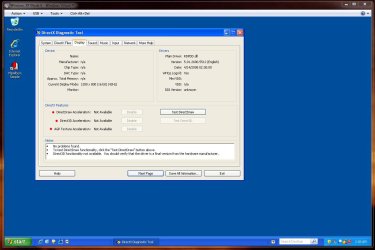
tried installing star wars kotor 2 on windows xp pro ( not activated yet)
and this is what popped up
Imageshack - errorhh.png

whats the issue? :|
moz-screenshot.png
moz-screenshot-1.png
 

My Computer My Computer

Computer Manufacturer/Model Number
hP
OS
Windows 7 home premium 64 bit
CPU
Intel core 2 duo
Memory
500 gigs
Graphics Card(s)
Intel GMA 4500 MHD
Screen Resolution
1366x768
Keyboard
laptop keyboard
Mouse
Logitech G9X series
Internet Speed
verizon

My Computer My Computer

Computer Manufacturer/Model Number
HP Pavilion dm3 (netbook) *** 27" iMac (Dual-Boot)
OS
Windows 7 Home Premium (64-bit) *** Windows XP SP3 (32-bit), OSX 10.6
CPU
AMD Athlon Neo X2 1.6GHz *** Intel Core i7 Quad Core 2.8GHz
Memory
4.00 GB *** 4.00 GB
Graphics Card(s)
ATI Radeon HD 3200, 384MB *** ATI Radeon HD 4850, 1GB
Sound Card
ATI High Definition Audio *** ATI High Definition Audio
Monitor(s) Displays
LG Flatron W2053TX
Screen Resolution
1600 x 900 (monitor), 1266 x 768 (laptop) *** 2560 x 1440
Hard Drives
300 GB SATA (internal), 500 GB HP SimpleSave (external) *** 1 TB SATA (internal), 160 GB LaCie (external)
Mouse
Logitech Cordless Optical Mouse for Notebooks
Internet Speed
Broadband
Hi Mister6,

Have you patched KOTOR 2 to the most recent version? If not, do so here: LucasArts.com | Star Wars Knights of the Old Republic II: The Sith Lords and make sure if you're using a non-US version to click the International versions link at the bottom.

Let me know how that works.

Cheers,

Walker
Windows Outreach Team

thanks for the link :)
but no it still doesn't work..
hmm
and I get back to the desktop right after the game begins to start( screen turns black)
 

My Computer My Computer

Computer Manufacturer/Model Number
hP
OS
Windows 7 home premium 64 bit
CPU
Intel core 2 duo
Memory
500 gigs
Graphics Card(s)
Intel GMA 4500 MHD
Screen Resolution
1366x768
Keyboard
laptop keyboard
Mouse
Logitech G9X series
Internet Speed
verizon
I am a little confused, your system specs say you are using Win 7 but you stated that you installed it on Win XP Pro, are you dual booting?

What video card are you using? have you updated your drivers? if so, which version? if using Nvidia, try uninstalling PhysX to see what happens then.
 

My Computer My Computer

Computer type
PC/Desktop
Computer Manufacturer/Model Number
Custom Built... Intel/Nvidia/ASRock
OS
Windows 7 x64 (Ultimate)
CPU
Intel i5-4670K
Motherboard
ASRock Z87 Extreme 6
Memory
8GBs Ripjaws 2133Mhz
Graphics Card(s)
Asus GTX660 (2GBs)
Sound Card
Onboard Realtek HD
Monitor(s) Displays
Acer AL2216W
Screen Resolution
1680 x 1050
Hard Drives
Samsung 840 SSD 120GBs
Samsung 750GB 32MB cache
1.5 TB
PSU
PC Cooling 750w Silencer
Case
Thermaltake Spedo Advance
Cooling
Std Cooler
Keyboard
Logitech G15
Mouse
Logitech G9
Internet Speed
Comcast 20Mbit
Antivirus
Avast
Browser
Firefox
I am a little confused, your system specs say you are using Win 7 but you stated that you installed it on Win XP Pro, are you dual booting?

What video card are you using? have you updated your drivers? if so, which version? if using Nvidia, try uninstalling PhysX to see what happens then.

I have a basic intel gmal 4500 mhd.. it should run kotor 2 perfectly well on high
and sorry for the mess up
yeah I guess
using VMware player..
I install windows xp pro on there, so I can use it like xp mode

talking about this : Create an XP Mode for Windows 7 Home Versions & Vista - How-To Geek

and im sure my drivers are updated
speaking of which I have had bsod's lately.. are the drivers bad or something?
 

My Computer My Computer

Computer Manufacturer/Model Number
hP
OS
Windows 7 home premium 64 bit
CPU
Intel core 2 duo
Memory
500 gigs
Graphics Card(s)
Intel GMA 4500 MHD
Screen Resolution
1366x768
Keyboard
laptop keyboard
Mouse
Logitech G9X series
Internet Speed
verizon
I really have no idea how VMware works and usually BSODs are due to corrupt drivers but it could also be many other things, w/o looking at the error code, it will be hard to say.

Have you tried installing KotOR 2 on the Win 7 OS? I know many people have been able to play with no issues on compatible mode.

Aside from this, all I can tell you is to uninstall both Audio & Video drivers, clean instances left on the registry and install updates drivers again and see what happens next.
 

My Computer My Computer

Computer type
PC/Desktop
Computer Manufacturer/Model Number
Custom Built... Intel/Nvidia/ASRock
OS
Windows 7 x64 (Ultimate)
CPU
Intel i5-4670K
Motherboard
ASRock Z87 Extreme 6
Memory
8GBs Ripjaws 2133Mhz
Graphics Card(s)
Asus GTX660 (2GBs)
Sound Card
Onboard Realtek HD
Monitor(s) Displays
Acer AL2216W
Screen Resolution
1680 x 1050
Hard Drives
Samsung 840 SSD 120GBs
Samsung 750GB 32MB cache
1.5 TB
PSU
PC Cooling 750w Silencer
Case
Thermaltake Spedo Advance
Cooling
Std Cooler
Keyboard
Logitech G15
Mouse
Logitech G9
Internet Speed
Comcast 20Mbit
Antivirus
Avast
Browser
Firefox
XP Mode does not support "hardware" accelerated 3D games, which KOTOR most certainly is. I would suggest you find another way to run the game.

Windows XP mode is narrowly focused at enabling legacy, 32-bit Windows XP apps to run on Windows 7. More importantly, it’s aimed at business applications. Bad news for gamers: one of the key features left out of Windows XP mode is virtualized access to the physical graphics cards. In other words, there’s no hardware-accelerated 3D in Windows XP mode, so no 3D games will run unless they’re much older games that shipped with a software 3D renderer.

Source - What XP Mode Is...And Isn’t : Win 7's XP Mode And VirtualBox: When You Need Windows XP

Capture.JPG

Star Wars kotor 2 is a "hardware" accelerated 3D game! - Star Wars: Knights of the Old Republic II The Sith Lords - Wikipedia, the free encyclopedia, system requirements.

Good luck.
 
Last edited:

My Computer My Computer

Computer type
PC/Desktop
Computer Manufacturer/Model Number
Custom built by me.
OS
Windows 10 Pro
CPU
Intel Core i7-4770K (3.5Ghz)
Motherboard
Gigabyte G1 Sniper 5 (F10 Bios)
Memory
32 gig Corsair Dominator Platinum (4x8Gig)
Graphics Card(s)
Sapphire Tri-X R9 Fury
Sound Card
Soundblaster ZXR
Monitor(s) Displays
NEC PA242W 24" LCD Monitor
Screen Resolution
1920 x 1200
Hard Drives
Primary - Samsung 850 Pro (512gig), Samsung 840 Pro (256gig), 2TB WD Caviar Black.
PSU
EVGA Supernova 1000 G2
Case
Cooler Master HAF X
Cooling
Corsair H100i with Corsair Air Series SP120 Quiet Fans
Keyboard
Logitech Wireless Wave
Mouse
Logitech Performance MX
Internet Speed
High Speed Cable
Antivirus
Norton Security
Browser
IE11
Other Info
Memory Timings - 1866MHz @ 9-9-9-27-1T @ 1.5 volts
sygnus, I think he's actually running a full version of XP in VMware, rather than just XP Mode. The 3D hardware acceleration shouldn't be an issue. But Mister6, I will echo AstaLaVista in saying just try to run KOTOR2 in Windows 7. Here's a guide should you need it: KOTOR 1+2: Vista Fix & Windows 7 Report - LucasForums

Cheers,

Walker
Windows Outreach Team

EDIT: If I'm wrong and neither Win7 nor XP in VMware will work, then you can try dual booting XP.
 

My Computer My Computer

Computer Manufacturer/Model Number
HP Pavilion dm3 (netbook) *** 27" iMac (Dual-Boot)
OS
Windows 7 Home Premium (64-bit) *** Windows XP SP3 (32-bit), OSX 10.6
CPU
AMD Athlon Neo X2 1.6GHz *** Intel Core i7 Quad Core 2.8GHz
Memory
4.00 GB *** 4.00 GB
Graphics Card(s)
ATI Radeon HD 3200, 384MB *** ATI Radeon HD 4850, 1GB
Sound Card
ATI High Definition Audio *** ATI High Definition Audio
Monitor(s) Displays
LG Flatron W2053TX
Screen Resolution
1600 x 900 (monitor), 1266 x 768 (laptop) *** 2560 x 1440
Hard Drives
300 GB SATA (internal), 500 GB HP SimpleSave (external) *** 1 TB SATA (internal), 160 GB LaCie (external)
Mouse
Logitech Cordless Optical Mouse for Notebooks
Internet Speed
Broadband
@ Walker, If that's the case, then I'm not sure how that would work. VM's aren't in my area of expertise so..... :confused:

But I do know (from what i've read) that "XP Mode" under "Virtual PC" does not do 3D acceleration. But again, this isn't my area of experise.

Thanks
 

My Computer My Computer

Computer type
PC/Desktop
Computer Manufacturer/Model Number
Custom built by me.
OS
Windows 10 Pro
CPU
Intel Core i7-4770K (3.5Ghz)
Motherboard
Gigabyte G1 Sniper 5 (F10 Bios)
Memory
32 gig Corsair Dominator Platinum (4x8Gig)
Graphics Card(s)
Sapphire Tri-X R9 Fury
Sound Card
Soundblaster ZXR
Monitor(s) Displays
NEC PA242W 24" LCD Monitor
Screen Resolution
1920 x 1200
Hard Drives
Primary - Samsung 850 Pro (512gig), Samsung 840 Pro (256gig), 2TB WD Caviar Black.
PSU
EVGA Supernova 1000 G2
Case
Cooler Master HAF X
Cooling
Corsair H100i with Corsair Air Series SP120 Quiet Fans
Keyboard
Logitech Wireless Wave
Mouse
Logitech Performance MX
Internet Speed
High Speed Cable
Antivirus
Norton Security
Browser
IE11
Other Info
Memory Timings - 1866MHz @ 9-9-9-27-1T @ 1.5 volts
But I do know (from what i've read) that "XP Mode" under "Virtual PC" does not do 3D acceleration.
As far as I know, that's correct. But I'm not sure if the same is true for Windows XP under VMware. I sort of assumed XP Mode was just gimped since it's available free in Professional, Enterprise, and Ultimate editions of Windows 7, but it may be that no virtualized OS is ever capable of hardware 3D acceleration... any luck yet, Mister6?

Walker
Windows Outreach Team
 

My Computer My Computer

Computer Manufacturer/Model Number
HP Pavilion dm3 (netbook) *** 27" iMac (Dual-Boot)
OS
Windows 7 Home Premium (64-bit) *** Windows XP SP3 (32-bit), OSX 10.6
CPU
AMD Athlon Neo X2 1.6GHz *** Intel Core i7 Quad Core 2.8GHz
Memory
4.00 GB *** 4.00 GB
Graphics Card(s)
ATI Radeon HD 3200, 384MB *** ATI Radeon HD 4850, 1GB
Sound Card
ATI High Definition Audio *** ATI High Definition Audio
Monitor(s) Displays
LG Flatron W2053TX
Screen Resolution
1600 x 900 (monitor), 1266 x 768 (laptop) *** 2560 x 1440
Hard Drives
300 GB SATA (internal), 500 GB HP SimpleSave (external) *** 1 TB SATA (internal), 160 GB LaCie (external)
Mouse
Logitech Cordless Optical Mouse for Notebooks
Internet Speed
Broadband
but it may be that no virtualized OS is ever capable of hardware 3D acceleration...

Hmmm.... I guess that's the question of the moment. We need a VM expert to chime in on this one.

Thanks.
 

My Computer My Computer

Computer type
PC/Desktop
Computer Manufacturer/Model Number
Custom built by me.
OS
Windows 10 Pro
CPU
Intel Core i7-4770K (3.5Ghz)
Motherboard
Gigabyte G1 Sniper 5 (F10 Bios)
Memory
32 gig Corsair Dominator Platinum (4x8Gig)
Graphics Card(s)
Sapphire Tri-X R9 Fury
Sound Card
Soundblaster ZXR
Monitor(s) Displays
NEC PA242W 24" LCD Monitor
Screen Resolution
1920 x 1200
Hard Drives
Primary - Samsung 850 Pro (512gig), Samsung 840 Pro (256gig), 2TB WD Caviar Black.
PSU
EVGA Supernova 1000 G2
Case
Cooler Master HAF X
Cooling
Corsair H100i with Corsair Air Series SP120 Quiet Fans
Keyboard
Logitech Wireless Wave
Mouse
Logitech Performance MX
Internet Speed
High Speed Cable
Antivirus
Norton Security
Browser
IE11
Other Info
Memory Timings - 1866MHz @ 9-9-9-27-1T @ 1.5 volts
Back
Top