Running Windows 7 32-bit and 64-bit simultaneously

alhamz

New member
Local time
9:22 PM
Messages
4
Hi,
I recently bought a new computer which came with Windows 7 Home Premium 64-bit SP1 pre-installed. I am trying to apply for a work position which demands that I download and install their software which is not compatible with any 64 bit OS's.

I thought I could create a separate partition on my hard drive and install a 32 bit OS (either XP or 7). In the case of XP I found I couldn't because I would need to install XP first and then Windows 7 but I do not want to format my whole computer (at least not yet). When I tried installing the Windows 7 on this partition it tells me "Windows cannot be installed to this hard disk space. The partition contains one or more dynamic volumes that are not supported for installation."

A couple of side notes would be that both the XP and Windows 7 installation trials have been done through an ISO mounting software (Daemon Tools Lite) not via an installation CD and that the 32 bit version of Windows 7 I tried to install is Ultimate as opposed to the Home Premium that I am running.

So my question here would be, is it possible to run the 32 and 64 bit version of Windows 7 simultaneously? If yes, what am I doing wrong? If no, what other options do I have here besides formatting my hard drive, installing XP first and then installing Windows 7 as well?

Thanks in advance for your help.
 

My Computer

Computer Manufacturer/Model Number
HP Pavillion g6
OS
Microsoft Windows 7 Home Premium 64-bit 7601 Multiprocessor Free Service Pack 1
CPU
AMD A6-3400M APU with Radeon(tm) HD Graphics 1.4 GHz
Motherboard
Hewlett-Packard 169B
Memory
6.00 GB
Graphics Card(s)
AMD Radeon(TM) HD 6520G
Sound Card
(1) Bluetooth Audio Device (2) AMD High Definition Audio D
Monitor(s) Displays
ATI display adapter (0x9647)
Screen Resolution
1366 x 768 x 32 bits (4294967296 colors) @ 60 Hz
Hard Drives
WDC WD75 00BPVT-60HXZT1 SATA Disk Device
Fixed hard disk media
698.64 GB
4 Partitions
Case
HP Pavillion
Keyboard
Standard PS/2
Mouse
Synaptics PS/2 Port TouchPad
Welcome to Windows Seven Forums.


Before we can help you please post a screenshot of your fully expanded disk management layout so that we can see:
  1. How many partitions you have
  2. How big they are
  3. Which ones are basic and which ones are dynamic
I can tell you now that your dynamic volumes will have to be converted back to basic volumes, but let's see your partition layout first.

http://www.sevenforums.com/tutorials/9733-screenshots-files-upload-post-seven-forums.html

http://www.sevenforums.com/tutorials/8057-dual-boot-installation-windows-7-xp.html
 
Last edited:

My Computer

Computer Manufacturer/Model Number
HP Pavilion Elite 495UK
OS
Windows 7 Ultimate SP1 64-Bit
CPU
Intel Core i7 870 @ 2.93GHz
Motherboard
MSI 2A9C (CPU1)
Memory
8Gb Dual-Channel DDR3 @ 664MHz
Graphics Card(s)
nVidia GeForce GTX 460 1024MB dedicated RAM
Sound Card
Realtek HD Audio
Monitor(s) Displays
HP2310i
Screen Resolution
1920 x 1080
Hard Drives
1x1954GB Hitachi HDS22020ALA 330 (RAID), 1x1954GB Hitachi External for backup and storage
PSU
460W
Case
HP Elite
Cooling
Air cooled
Keyboard
Logitech K750 solar-powered keyboard
Mouse
Logitech Wireless M180 mouse
Internet Speed
2Mb
Other Info
Pure Avanti Flow Internet Radio with iPod Dock, 64Gb iPod, HP USB Speakers, Sony MDR-V500 Headphones, Sony Vaio F-Series Laptop
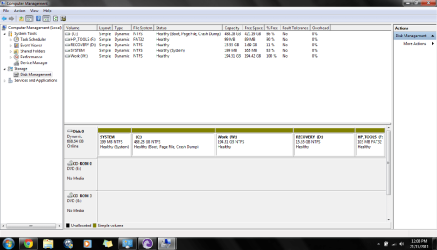
seavixen32, please find the screen shot of my disk management screen below. The partition that I am trying to install the new windows on is called Work and is labelled W:

systempartitionsnapshot.png

theog, I have updated my system specs.

Also. let me mention that I'm glad that I found and joined this forum. Very helpful. Koodos to you all.
 

My Computer

Computer Manufacturer/Model Number
HP Pavillion g6
OS
Microsoft Windows 7 Home Premium 64-bit 7601 Multiprocessor Free Service Pack 1
CPU
AMD A6-3400M APU with Radeon(tm) HD Graphics 1.4 GHz
Motherboard
Hewlett-Packard 169B
Memory
6.00 GB
Graphics Card(s)
AMD Radeon(TM) HD 6520G
Sound Card
(1) Bluetooth Audio Device (2) AMD High Definition Audio D
Monitor(s) Displays
ATI display adapter (0x9647)
Screen Resolution
1366 x 768 x 32 bits (4294967296 colors) @ 60 Hz
Hard Drives
WDC WD75 00BPVT-60HXZT1 SATA Disk Device
Fixed hard disk media
698.64 GB
4 Partitions
Case
HP Pavillion
Keyboard
Standard PS/2
Mouse
Synaptics PS/2 Port TouchPad
Unfortunately you must have ignored the warning that your HD was about to be converted to Dynamic Disk when you added a fifth partition after already having a maximum of four Primary. Dynamic Disks are meant to span the same partition over multiple HD's.

You'll need to move the data off of W, delete it then convert the HD back to Basic disk using the old verison of Partition Wizard bootable CD which still has conversion as a free feature on the Disk tab. pw422.zip ISO - Windows Live

Then convert C to Logical by rightclicking to Modify>Convert to Logical. You can then add within as many Logical subpartitions as desired. Logical partitions are meant for data and cannot be marked Active to accept System boot files, however because installing 32 bit Win7 will only update the boot files already on System partition it can be installed to a Logical sub-partition.
 
Last edited:
  • Like
Reactions: whs
I can add nothing to the excellent advice that Greg has given you.

He is one of the best that WSF has, so follow his suggestions to recover from the mess you currently find yourself in.

If there's anything you're not sure of, don't hesitate to ask, and we'll do our best to help you.
 

My Computer

Computer Manufacturer/Model Number
HP Pavilion Elite 495UK
OS
Windows 7 Ultimate SP1 64-Bit
CPU
Intel Core i7 870 @ 2.93GHz
Motherboard
MSI 2A9C (CPU1)
Memory
8Gb Dual-Channel DDR3 @ 664MHz
Graphics Card(s)
nVidia GeForce GTX 460 1024MB dedicated RAM
Sound Card
Realtek HD Audio
Monitor(s) Displays
HP2310i
Screen Resolution
1920 x 1080
Hard Drives
1x1954GB Hitachi HDS22020ALA 330 (RAID), 1x1954GB Hitachi External for backup and storage
PSU
460W
Case
HP Elite
Cooling
Air cooled
Keyboard
Logitech K750 solar-powered keyboard
Mouse
Logitech Wireless M180 mouse
Internet Speed
2Mb
Other Info
Pure Avanti Flow Internet Radio with iPod Dock, 64Gb iPod, HP USB Speakers, Sony MDR-V500 Headphones, Sony Vaio F-Series Laptop
Thanks gregrocker ... I will try that out. Thanks for your help seavixen32.
 

My Computer

Computer Manufacturer/Model Number
HP Pavillion g6
OS
Microsoft Windows 7 Home Premium 64-bit 7601 Multiprocessor Free Service Pack 1
CPU
AMD A6-3400M APU with Radeon(tm) HD Graphics 1.4 GHz
Motherboard
Hewlett-Packard 169B
Memory
6.00 GB
Graphics Card(s)
AMD Radeon(TM) HD 6520G
Sound Card
(1) Bluetooth Audio Device (2) AMD High Definition Audio D
Monitor(s) Displays
ATI display adapter (0x9647)
Screen Resolution
1366 x 768 x 32 bits (4294967296 colors) @ 60 Hz
Hard Drives
WDC WD75 00BPVT-60HXZT1 SATA Disk Device
Fixed hard disk media
698.64 GB
4 Partitions
Case
HP Pavillion
Keyboard
Standard PS/2
Mouse
Synaptics PS/2 Port TouchPad
You're very welcome.

Please keep us posted as to how things turn out.
 

My Computer

Computer Manufacturer/Model Number
HP Pavilion Elite 495UK
OS
Windows 7 Ultimate SP1 64-Bit
CPU
Intel Core i7 870 @ 2.93GHz
Motherboard
MSI 2A9C (CPU1)
Memory
8Gb Dual-Channel DDR3 @ 664MHz
Graphics Card(s)
nVidia GeForce GTX 460 1024MB dedicated RAM
Sound Card
Realtek HD Audio
Monitor(s) Displays
HP2310i
Screen Resolution
1920 x 1080
Hard Drives
1x1954GB Hitachi HDS22020ALA 330 (RAID), 1x1954GB Hitachi External for backup and storage
PSU
460W
Case
HP Elite
Cooling
Air cooled
Keyboard
Logitech K750 solar-powered keyboard
Mouse
Logitech Wireless M180 mouse
Internet Speed
2Mb
Other Info
Pure Avanti Flow Internet Radio with iPod Dock, 64Gb iPod, HP USB Speakers, Sony MDR-V500 Headphones, Sony Vaio F-Series Laptop
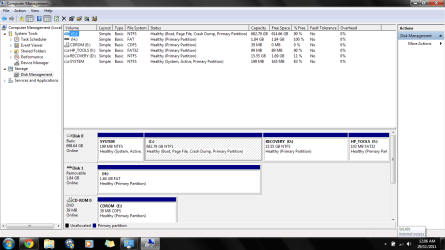
Hey people, I have successfully converted the C: partition from dynamic to basic using the pw422 boot disk (thanks to greg) But I am not able to convert this to logical as per his advice. The option to convert the disk back to logical is inactive or unselectable if you will. Any help and advice would be appreciated. I am posting how my hard drive looks like below. As a side note when I right click on the paritions 'System' and 'Recovery' I do get the option of converting them to logical.

systemsnapshot.png
 

My Computer

Computer Manufacturer/Model Number
HP Pavillion g6
OS
Microsoft Windows 7 Home Premium 64-bit 7601 Multiprocessor Free Service Pack 1
CPU
AMD A6-3400M APU with Radeon(tm) HD Graphics 1.4 GHz
Motherboard
Hewlett-Packard 169B
Memory
6.00 GB
Graphics Card(s)
AMD Radeon(TM) HD 6520G
Sound Card
(1) Bluetooth Audio Device (2) AMD High Definition Audio D
Monitor(s) Displays
ATI display adapter (0x9647)
Screen Resolution
1366 x 768 x 32 bits (4294967296 colors) @ 60 Hz
Hard Drives
WDC WD75 00BPVT-60HXZT1 SATA Disk Device
Fixed hard disk media
698.64 GB
4 Partitions
Case
HP Pavillion
Keyboard
Standard PS/2
Mouse
Synaptics PS/2 Port TouchPad
I've not seen a case yet where PW CD won't convert a Primary non-System partition to Logical.

If you're using the PW boot CD, try installing Partition Wizard to Win7 to see if it allows the choice.
 
I just wanted to say that this particular thread is the sole reason I joined this site. Thanks for a fantastic forum guys.
 

My Computer

OS
Windows 7 Home Premium 32 bit
Back
Top