
Running "Windows Fixit", getting 0x80070002

Technoir

New member
Member
Local time
2:02 AM
Messages
56
Hi,

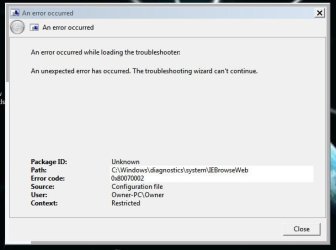
Trying to run FixIt tool Windows hangs or freezes

But when running the downloaded FixIt, I get the error code 0x80070002

I then downloaded and (successfully) ran a different FixIt tool to prevent 0x80070002, but no success. I still can not Run the first FixIt tool.

Specs:
Windows 7, 64bit
AMD Athlon 64 X2 QL-65
4GB memory

Thanks
 

Attachments
  • error.JPG
    error.JPG
    29.2 KB · Views: 5
Last edited:

My Computer

Computer type
PC/Desktop
OS
Microsoft Windows 7 Home Premium 64-bit 7601 Multiprocessor Free Service Pack 1
CPU
Intel(R) Core(TM) i7 CPU 920 @ 2.67GHz
Motherboard
DELL Inc. 0X501H
Memory
8.00 GB
Graphics Card(s)
NVIDIA GeForce GTX 1050
Sound Card
(1) Monitor Webcam (2) High Definition Audio Device (3)
Screen Resolution
2048 x 1152 x 32 bits (4294967296 colors) @ 59 Hz
Hard Drives
(1) SAMSUNG HD103SJ (2) Samsung D3 Station USB Device

My Computer

Computer type
Laptop
Computer Manufacturer/Model Number
Sony Vaio VPCEB47GM Laptop
OS
Win 7 Pro 64-bit
CPU
Intel i5 2.4 Ghz
Memory
8GB DDR3
Graphics Card(s)
Intel HD 3000
Sound Card
IDT High Definition
Monitor(s) Displays
15.6 WGXA Anti-Glare LED
Screen Resolution
1280x800
Hard Drives
640Gb 7200rpm
Antivirus
MSE
Browser
Opera (primary) with IE9 backup
Hi,

Thank you.
Option Two (system file checker) did not turn up any corrupt files after several tries.

Will System Restore erase some of my files?
Will System Restore bring back today's issue once I install updates?
 

My Computer

Computer type
PC/Desktop
OS
Microsoft Windows 7 Home Premium 64-bit 7601 Multiprocessor Free Service Pack 1
CPU
Intel(R) Core(TM) i7 CPU 920 @ 2.67GHz
Motherboard
DELL Inc. 0X501H
Memory
8.00 GB
Graphics Card(s)
NVIDIA GeForce GTX 1050
Sound Card
(1) Monitor Webcam (2) High Definition Audio Device (3)
Screen Resolution
2048 x 1152 x 32 bits (4294967296 colors) @ 59 Hz
Hard Drives
(1) SAMSUNG HD103SJ (2) Samsung D3 Station USB Device
Good to hear that the system file checker scan didn't find any problems.

System Restore can undo system changes to your computer without affecting your personal user files, such as e‑mail, documents, photos etc. But it will uninstall any programs, drivers, patches, updates, etc that were installed after the date of the selected restore point.

If an update was the cause of your issue(s) then yes, it's possible that reinstalling the problematic update will cause the issue(s) to return.
 

My Computer

Computer type
Laptop
Computer Manufacturer/Model Number
Sony Vaio VPCEB47GM Laptop
OS
Win 7 Pro 64-bit
CPU
Intel i5 2.4 Ghz
Memory
8GB DDR3
Graphics Card(s)
Intel HD 3000
Sound Card
IDT High Definition
Monitor(s) Displays
15.6 WGXA Anti-Glare LED
Screen Resolution
1280x800
Hard Drives
640Gb 7200rpm
Antivirus
MSE
Browser
Opera (primary) with IE9 backup
Hi,

Thanks for this. I did system restore, but still no improvement.

I still get 'unexpected error' upon running FixIt, and my PC still freezes :(
 

My Computer

Computer type
PC/Desktop
OS
Microsoft Windows 7 Home Premium 64-bit 7601 Multiprocessor Free Service Pack 1
CPU
Intel(R) Core(TM) i7 CPU 920 @ 2.67GHz
Motherboard
DELL Inc. 0X501H
Memory
8.00 GB
Graphics Card(s)
NVIDIA GeForce GTX 1050
Sound Card
(1) Monitor Webcam (2) High Definition Audio Device (3)
Screen Resolution
2048 x 1152 x 32 bits (4294967296 colors) @ 59 Hz
Hard Drives
(1) SAMSUNG HD103SJ (2) Samsung D3 Station USB Device

My Computer

Computer type
Laptop
Computer Manufacturer/Model Number
Sony Vaio VPCEB47GM Laptop
OS
Win 7 Pro 64-bit
CPU
Intel i5 2.4 Ghz
Memory
8GB DDR3
Graphics Card(s)
Intel HD 3000
Sound Card
IDT High Definition
Monitor(s) Displays
15.6 WGXA Anti-Glare LED
Screen Resolution
1280x800
Hard Drives
640Gb 7200rpm
Antivirus
MSE
Browser
Opera (primary) with IE9 backup
Thanks a lot.

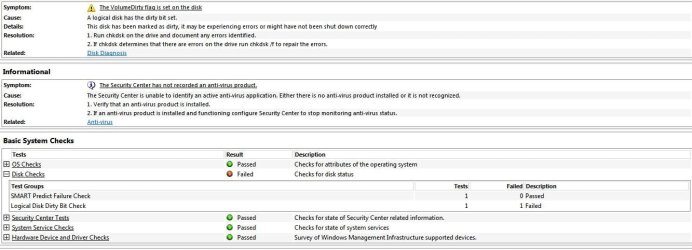
System Health Report, a Disk Error appears.
Chkdsk found no error.
Scannow found no error
I updated all drivers.
I defragmented the HD, 1% fragmented.
Memtest86 requires a USB stick, I need to get one.
CoreTemp: See attached (Min 63c Max 87c) Seems very hot by what I read online.
I don't understand what to do with Process Monitor (even after watching the video).
I did not do a BIOS update (insufficiently experienced).

Thank you.
 

Attachments

  • Syst Health Report.JPG
    Syst Health Report.JPG
    82.7 KB · Views: 1
  • Core temp.JPG
    Core temp.JPG
    29.7 KB · Views: 1
Last edited:

My Computer

Computer type
PC/Desktop
OS
Microsoft Windows 7 Home Premium 64-bit 7601 Multiprocessor Free Service Pack 1
CPU
Intel(R) Core(TM) i7 CPU 920 @ 2.67GHz
Motherboard
DELL Inc. 0X501H
Memory
8.00 GB
Graphics Card(s)
NVIDIA GeForce GTX 1050
Sound Card
(1) Monitor Webcam (2) High Definition Audio Device (3)
Screen Resolution
2048 x 1152 x 32 bits (4294967296 colors) @ 59 Hz
Hard Drives
(1) SAMSUNG HD103SJ (2) Samsung D3 Station USB Device
84C is 183.2F

Yea, that's hot. Can you put your finger on the water jacket in your car engine? I think not.

Mine runs about 140F and doesn't change much even under game loading. The GPU ranges from 90F idle to 140F loaded, but if either the GPU or the CPU ran any hotter than that I'd have the case off finding out why - and giving it the obligatory air bursts in the usual places to remove dust.

If you got it running cooler it might stop doing some of the weird things it's doing, maybe not all, but some.
 

My Computer

Computer type
PC/Desktop
Computer Manufacturer/Model Number
Custom Build
OS
Windows 7 Ultimate x64
CPU
AMD Phenom II X4 955 Processor 3.4GHz
Memory
8G
Graphics Card(s)
AMD Radeon HD 7800
Sound Card
Radeon HD/AC'97
Monitor(s) Displays
Acer 22" Flatscreen LED
Screen Resolution
1920x1080
Hard Drives
WD 1600AAKS-32V1A0 ATA Device (boot)
WD 1200JS-00MHB0 ATA Device
WD WD20EARS-00MVWB0 ATA Device
PSU
600W
Case
A cream colored box
Cooling
Fans
Keyboard
One of a hundred I've had on here - works fine.
Mouse
Microsoft Optical (2)
Internet Speed
7MBs Verizon
Antivirus
Ad-Aware
Browser
Explorer
It is very hot indeed, I can no longer use it on my lap (not that I ever do this anyway).

Sadly, it is a Gateway NV52, which means the fan can not be accessed from the bottom. I need to also remove all the top parts including motherboard etc.. and I'll need to take it to a specialty shop for that.
 

My Computer

Computer type
PC/Desktop
OS
Microsoft Windows 7 Home Premium 64-bit 7601 Multiprocessor Free Service Pack 1
CPU
Intel(R) Core(TM) i7 CPU 920 @ 2.67GHz
Motherboard
DELL Inc. 0X501H
Memory
8.00 GB
Graphics Card(s)
NVIDIA GeForce GTX 1050
Sound Card
(1) Monitor Webcam (2) High Definition Audio Device (3)
Screen Resolution
2048 x 1152 x 32 bits (4294967296 colors) @ 59 Hz
Hard Drives
(1) SAMSUNG HD103SJ (2) Samsung D3 Station USB Device
I see.

I was unaware it was a laptop. My experience deals totally with desktops, so 84C might be more 'normal', or on the high side of 'normal' for laptops. I just wouldn't know.

I sure wouldn't want to dismantle a laptop every 90 days to tackle dust bunnies, but it sounds like that's exactly what you need.

I'll defer to users with more experience on your unit.

Best Wishes.
 

My Computer

Computer type
PC/Desktop
Computer Manufacturer/Model Number
Custom Build
OS
Windows 7 Ultimate x64
CPU
AMD Phenom II X4 955 Processor 3.4GHz
Memory
8G
Graphics Card(s)
AMD Radeon HD 7800
Sound Card
Radeon HD/AC'97
Monitor(s) Displays
Acer 22" Flatscreen LED
Screen Resolution
1920x1080
Hard Drives
WD 1600AAKS-32V1A0 ATA Device (boot)
WD 1200JS-00MHB0 ATA Device
WD WD20EARS-00MVWB0 ATA Device
PSU
600W
Case
A cream colored box
Cooling
Fans
Keyboard
One of a hundred I've had on here - works fine.
Mouse
Microsoft Optical (2)
Internet Speed
7MBs Verizon
Antivirus
Ad-Aware
Browser
Explorer
Thank you very much for the input. Yes, according to my research, my temp is about 20-30c too high.

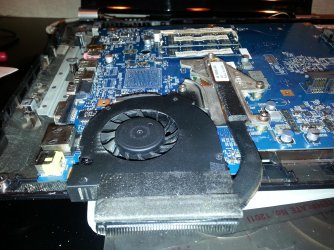
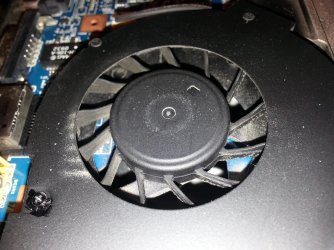
Si I took it apart, nothing looks wrong and the fan looks more or less clean. I looked inside with a flashlight, no trace of dust clouds.

I was told I may need to replace the cooling paste? How do I verify this, do I need to take apart the entire fan assembly and heat sink?
Thanks.
 

Attachments

  • 20130912_164115.jpg
    20130912_164115.jpg
    892.9 KB · Views: 1
  • 20130912_164049.jpg
    20130912_164049.jpg
    847 KB · Views: 1
Last edited:

My Computer

Computer type
PC/Desktop
OS
Microsoft Windows 7 Home Premium 64-bit 7601 Multiprocessor Free Service Pack 1
CPU
Intel(R) Core(TM) i7 CPU 920 @ 2.67GHz
Motherboard
DELL Inc. 0X501H
Memory
8.00 GB
Graphics Card(s)
NVIDIA GeForce GTX 1050
Sound Card
(1) Monitor Webcam (2) High Definition Audio Device (3)
Screen Resolution
2048 x 1152 x 32 bits (4294967296 colors) @ 59 Hz
Hard Drives
(1) SAMSUNG HD103SJ (2) Samsung D3 Station USB Device
I do not know what your experience level is, but even myself who builds PCs and does other kinds of similar stuff, I would take it somewhere for that. Like a shop that does this and knows how to do that well. (DO not take it to best buy)

Laptops are not like desktops. It is very easy to break it if you do not know what your doing.

But again, this is based on your comfort level.

It does sound like the thermal paste needs reapplied.
You could also get those laptop docks for better airflow.
 

My Computer

Computer type
PC/Desktop
Computer Manufacturer/Model Number
Custom Built
OS
Windows 10 Pro
CPU
AMD Ryzen 5 2400G Processor with Radeon RX Vega 11 Graphics
Motherboard
ASRock X470 Master SLI/AC AM4 AMD Promontory X470 SATA 6Gb/s
Memory
G.SKILL Ripjaws V Series 16GB (2 x 8GB) 288-Pin DDR4 SDRAM D
Graphics Card(s)
2047MB NVIDIA GeForce GTX 1060 6GB (EVGA)
Sound Card
Motherboard Built in
Monitor(s) Displays
Acer R240HY bidx 23.8-Inch IPS HDMI DVI VGA (1920 x 1080) Wi
Screen Resolution
1920 x 1080
Hard Drives
1TB Sandisk SSD PLUS (Main drive)
500 GB Seagate 7200 RPM (Games)
500 GB Western Digital 7200 RPM (Virtual Machines)
PSU
CORSAIR TX Series TX650M 650W 80+ Gold Modular Power Supply
Case
CORSAIR CARBIDE SPEC-02 Mid-Tower Gaming Case, Red LED Fan
Cooling
220mm, two 120mm, and four 60mm fans
Keyboard
Wired Dell keyboard
Mouse
Wireless Logitech mouse
Internet Speed
250mb down, 30mb up
Antivirus
Panda Cloud Antivirus
Browser
Chrome-ish x64
Other Info
Your awesome for reading this.
Back
Top