To make Windows Live Mail check for new mail periodically and automatically and in the background:
1)Select Options from the menu.
2)Go to the General tab.
3)Make sure Check for new messages every...... minute(s) is checked.
4)Set the interval you want.
5)Click OK.
In Options, did you tick "Play sound when new mail arrives"?
Also, go to control panel-sound-sounds tab. scroll down to "new mail notification" and ensure that a sound is assigned to it.
Do you want this? Minimise the window and it will run in the system tray, and if you allow notifications for the program, and you have done what Bill2 said hopefully it will work? I'll try it out now.
To make Windows Live Mail check for new mail periodically and automatically and in the background:
1)Select Options from the menu.
2)Go to the General tab.
3)Make sure Check for new messages every...... minute(s) is checked.
4)Set the interval you want.
5)Click OK.
i set mine to 1 min, its better becuase you know when you get email and even if you done get many you still get them quicker rather than pressing it manually,
i guess what paulpp is trying to say is this: Like Outlook Express, when you wish to run it in the backgroud, you would first need to download the HideOE stuff ( can be searched in google)
he is using Windows Live Mail, so am I. I am having the same issue.
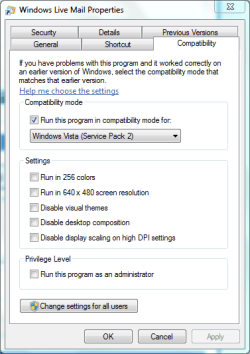
setting it up compatible for Vista SP 2 does make Windows Live Mail run in the background only if you hit the MINIMIZE button.
if you wish to keep it running, don't click on CLOSE
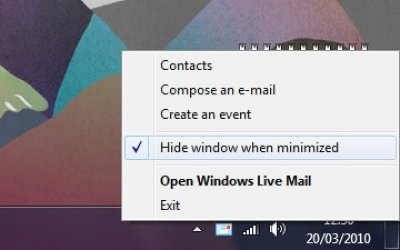
In Windows 7, when WLM is running it shows up in the System Tray as well as the Task Bar. To have it run w/o the Task Bar entry you right-click on the SysTray icon and select "Hide Window When Minimized".
My Computer
Computer type
PC/Desktop
Computer Manufacturer/Model Number
OQO 2+
OS
Windows 8 Pro w/MC 32-bit
CPU
Intel Atom 1.86 GHz
Motherboard
OQO 2+
Memory
2 GB
Graphics Card(s)
Intel GMA 500
Sound Card
IDT
Monitor(s) Displays
LCD
Screen Resolution
800 x 480 (portable) 1280 x 1024 (docked)
Hard Drives
64 GB SSD
PSU
9 Ah Battery (portable) or OQO Brick (docked)
Case
Shirt Pocket Sized
Cooling
Tiny Fan
Keyboard
Slide out (portable) DiNovo Edge (docked)
Mouse
Eraser head (portable) Logitech Bluetooth (docked)





 , now is there a way of running it when the operating system boots up?