Runtime error C drive Windows Explorer - assistance required

Melissa

New member
Power User
Local time
3:57 PM
Messages
394
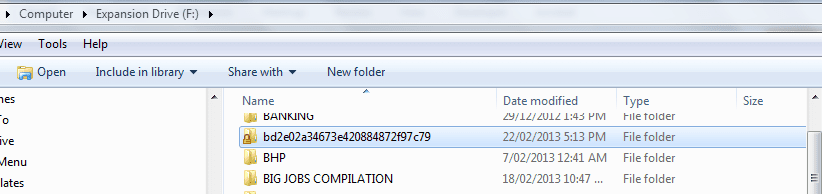
I have been given the incorrect information on this forum and noticed that I have a file on my hard drive that is locked.

The person advised me to go to

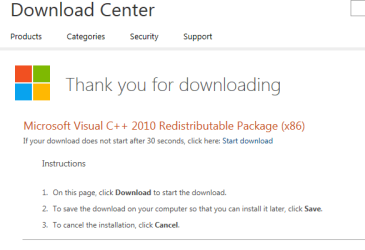
Download Microsoft Visual C++ 2010 Redistributable Package (x86) from Official Microsoft Download Center

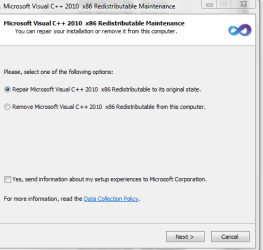
I have done this and it has come up with various screens that I am not familiar with.

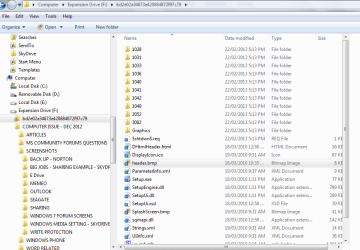
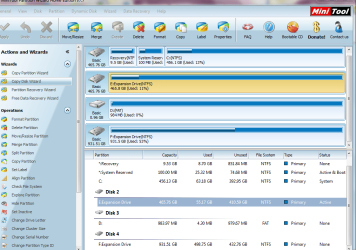
It looks like it as uploaded to my USB External Hard Disk Drive.

Can some one please advise me the correct advice?

All that happened is that I got an error and the Windows Explorer crashed and then refreshed.
 

My Computer

Computer type
Laptop
Computer Manufacturer/Model Number
Sony VAIO / E Series VPCEB46FG
OS
Windows 7 Home Premium 64bit
CPU
Windows 7 Service Pack 1 x86 NTFS
Motherboard
AMD E-350 Processor
Memory
4 GB
Hard Drives
500GB
Other Info
1.6GHz
These are all the screen shots so someone can assist me.
 

Attachments

  • runtime download to hard drive.PNG
    runtime download to hard drive.PNG
    12.3 KB · Views: 3
  • runtime download to hard drive1.PNG
    runtime download to hard drive1.PNG
    36.2 KB · Views: 6
  • runtime download to hard drive2.PNG
    runtime download to hard drive2.PNG
    11.8 KB · Views: 6
  • runtime download.PNG
    runtime download.PNG
    10 KB · Views: 6
  • runtime download1.PNG
    runtime download1.PNG
    19.3 KB · Views: 6
  • runtime error c windows explorer-exe.doc
    runtime error c windows explorer-exe.doc
    894 KB · Views: 0

My Computer

Computer type
Laptop
Computer Manufacturer/Model Number
Sony VAIO / E Series VPCEB46FG
OS
Windows 7 Home Premium 64bit
CPU
Windows 7 Service Pack 1 x86 NTFS
Motherboard
AMD E-350 Processor
Memory
4 GB
Hard Drives
500GB
Other Info
1.6GHz
...It looks like it as uploaded to my USB External Hard Disk Drive....
MS picks a drive with the most free space and creates a temp folder there for some installs. Sometimes these temp folders stay around after the install. Especially if the install crashes.

It appears as if you already had the program that you were installing - hence the option to repair it.
 

My Computer

Computer type
Laptop
Computer Manufacturer/Model Number
Employer provided Dell Latitude
OS
W7 Pro SP1 64bit
CPU
i7
Memory
8GB
Graphics Card(s)
Intel HD Graphics
Hard Drives
crappy SSD
Antivirus
Employer mandated Symantec Endpoint Protection
Browser
Pale Moon 64bit, IE11 64bit & Chrome 64bit
So do I choose the option to repair it?

I still have the screen open as I was not too sure what option to take.

I am not too sure why it would choose the 1TB External Hard Drive and then do a scan?

I just want a stable environment
 

Attachments

  • f drive partion.PNG
    f drive partion.PNG
    66.1 KB · Views: 5

My Computer

Computer type
Laptop
Computer Manufacturer/Model Number
Sony VAIO / E Series VPCEB46FG
OS
Windows 7 Home Premium 64bit
CPU
Windows 7 Service Pack 1 x86 NTFS
Motherboard
AMD E-350 Processor
Memory
4 GB
Hard Drives
500GB
Other Info
1.6GHz
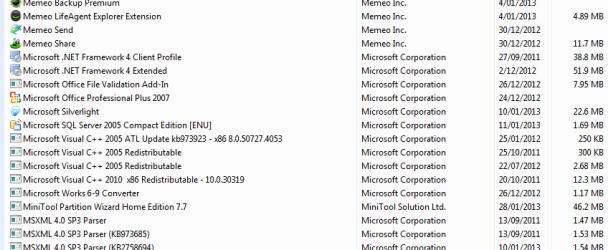
It looks to me like it has also been installed onto your external drive. Go to control panel and remove your visual c++ installation.
After you have removed the installation, unplug your USB drive then reinstall the C runtime librarys.
If you have any more problems let us know.
 

My Computer

Computer Manufacturer/Model Number
Self built
OS
Windows 7 64bit home premium
CPU
I5 3570K
Motherboard
Gigabyte Z77-DS3H
Memory
4 x 4GB Crucial Ballistix Sport DDR3 1600 Mhz
Graphics Card(s)
Gigabyte Geforce 660 TI
Sound Card
creative x-fi
Monitor(s) Displays
Primary CiBox 22" Widescreen LCD ,Secondary Dell 22" Widescr
Screen Resolution
Both 1680 x 1050
Hard Drives
2 x 500G HD (SATA) 1 x 2 TB USB
PSU
Corsair HX 620W ATX2.2 Modular SLI Complient PSU
Case
Antec 900 Ultimate Gaming Case
Cooling
3xfront 1xside 1xrear blue fan, 1 200mm blue top fan 1
Keyboard
Trust ds-3200 Wireless keyboard and mouse
Mouse
Trust ds-3200 Wireless keyboard and mouse
Internet Speed
288 / 4000
Other Info
Creative Inspire 7.1 T7900 Speakers
Trust Graphics Tablet

My Computer

Computer type
Laptop
Computer Manufacturer/Model Number
Employer provided Dell Latitude
OS
W7 Pro SP1 64bit
CPU
i7
Memory
8GB
Graphics Card(s)
Intel HD Graphics
Hard Drives
crappy SSD
Antivirus
Employer mandated Symantec Endpoint Protection
Browser
Pale Moon 64bit, IE11 64bit & Chrome 64bit
I just cancelled the install. It then disappeared from the 1TB External Hard Drive - I think that it did pick an NTFS with less free space. Very odd.

It kept on coming up with an error that it could not install. I resumed on cancelling and had to force a restart of computer. My External Hard Drives would not disconnect with the regular dismount.

I have attached the screen shots.

The assistance and explanations regarding items is far better than anywhere I have been before. I want to know that I am gaining the correct information.
 

Attachments

  • runtime download control panel1.PNG
    runtime download control panel1.PNG
    6.5 KB · Views: 9
  • runtime download control panel.PNG
    runtime download control panel.PNG
    13.5 KB · Views: 4

My Computer

Computer type
Laptop
Computer Manufacturer/Model Number
Sony VAIO / E Series VPCEB46FG
OS
Windows 7 Home Premium 64bit
CPU
Windows 7 Service Pack 1 x86 NTFS
Motherboard
AMD E-350 Processor
Memory
4 GB
Hard Drives
500GB
Other Info
1.6GHz
Does the above look alright - I will close the thread - I am not too sure what to look for.

Thank you very much for your assistance.

Melissa;)
 

My Computer

Computer type
Laptop
Computer Manufacturer/Model Number
Sony VAIO / E Series VPCEB46FG
OS
Windows 7 Home Premium 64bit
CPU
Windows 7 Service Pack 1 x86 NTFS
Motherboard
AMD E-350 Processor
Memory
4 GB
Hard Drives
500GB
Other Info
1.6GHz

My Computer

Computer type
Laptop
Computer Manufacturer/Model Number
Employer provided Dell Latitude
OS
W7 Pro SP1 64bit
CPU
i7
Memory
8GB
Graphics Card(s)
Intel HD Graphics
Hard Drives
crappy SSD
Antivirus
Employer mandated Symantec Endpoint Protection
Browser
Pale Moon 64bit, IE11 64bit & Chrome 64bit
Thank you to UsernameIssues and Roy69 for coming to this person's rescue :) I gave the advice to try the Runtime update, then I went to bed. Sorry Melissa but I'm new in the forum and was not taking into consideration our vastly differing time zones! :o As has been said, the Runtime apparently choked when it found a current installation, then just wanted to know if it should go ahead and make a repair. I, too, have found MS installations placed on a "random" hard drive and simply forgot to 'warn' you that there would be some temporary files that can later be removed if they exist after all is said and done. Anyway, I hope the SFC worked out for you, as that was another of my suggestions. BTW, if you tried to send me a popup message, I somehow lost it and it may have appeared that I did not answer it. Not a problem (was a popup blocker error), just want to reassure you that I am not hiding somewhere in a corner due to what happened! OK having made full disclosure I suggest we all keep an eye on the global clock when we are asking and giving advice. Cheers and best of luck. Alex
 

My Computer

Computer Manufacturer/Model Number
Asus CM1831 Tower
OS
Windows 7 Home Premium 64bit SP1
CPU
AMD FX 8120 3.10GHz
Memory
8GB
Browser
Google Chrome
Other Info
xplorer2; Office 2007
Back
Top