
Solved Runtime Error - Right Click on Drives

ben946210

New member
Power User
Local time
10:14 PM
Messages
236
Ever since early yesterday, I have been having an issue of right click Runtime errors that show up and end up closing the window. It only happens in the Computer window and only when right clicking on a hard drive, not any disc drives or anything else. I am not sure what caused the issue but have already tried System Restore with no avail :mad:. I can left click or press enter without any issues and can still click on the drive and then go to the menu bar to get what I need.

Any ideas what could be causing the error in such a particular spot?
 

Attachments

  • Runtime.PNG
    Runtime.PNG
    9.7 KB · Views: 6

My Computer

Computer type
PC/Desktop
Computer Manufacturer/Model Number
Custom (desktop), Custom (desktop), Lenovo U530 Touch
OS
Windows 7 Ultimate x64, Windows 7 Pro x64, Windows 10 Home x64
CPU
Intel i7-4790K , Intel i7-3770K, Intel i7-4510ULT
Motherboard
Asus Z87-PRO (main), Asus P8P67 Rev 3.1(secondary)
Memory
12GB Corsair Vengeance
Graphics Card(s)
EVGA GeForce GTX 660 2GB, 2X GIGABYTE 6890, Nvidia GT730M
Sound Card
Realtek Integrated, IDT (both laptops)
Monitor(s) Displays
Samsung S22C300H 21.5"
Screen Resolution
1920x1080 (Both machines)
Hard Drives
Main:
Muskin SSD 240GB
Seagate 320GB
Western Digital 1TB
Seagate 2TB

Seconday:
Toshiba 1TB
WD 1TB

Lenovo Laptop:
SAMSUNG SM843 SSD 480GB
PSU
Corsair GS700, COOLMAX CUL-850B (secondary)
Case
Thermaltake Chaser
Cooling
Corsair H60 Dual Fans, Stock Cooler
Keyboard
Logitech K360
Mouse
Logitech M310
Internet Speed
16Mbps
Antivirus
Comodo Internet Security Premium, MWB
Browser
Chrome, Firefox
Other Info
I have three systems listed in the specs area. My main desktop and my secondary desktop that was my previous build. The last one (in all the sections) is my Lenovo laptop.

Thanks for your interest in my machines! :)
I just noticed that the "Program:" area is blank. Don't know if that means anything but I assume it should list something.
 
Last edited:

My Computer

Computer type
PC/Desktop
Computer Manufacturer/Model Number
Custom (desktop), Custom (desktop), Lenovo U530 Touch
OS
Windows 7 Ultimate x64, Windows 7 Pro x64, Windows 10 Home x64
CPU
Intel i7-4790K , Intel i7-3770K, Intel i7-4510ULT
Motherboard
Asus Z87-PRO (main), Asus P8P67 Rev 3.1(secondary)
Memory
12GB Corsair Vengeance
Graphics Card(s)
EVGA GeForce GTX 660 2GB, 2X GIGABYTE 6890, Nvidia GT730M
Sound Card
Realtek Integrated, IDT (both laptops)
Monitor(s) Displays
Samsung S22C300H 21.5"
Screen Resolution
1920x1080 (Both machines)
Hard Drives
Main:
Muskin SSD 240GB
Seagate 320GB
Western Digital 1TB
Seagate 2TB

Seconday:
Toshiba 1TB
WD 1TB

Lenovo Laptop:
SAMSUNG SM843 SSD 480GB
PSU
Corsair GS700, COOLMAX CUL-850B (secondary)
Case
Thermaltake Chaser
Cooling
Corsair H60 Dual Fans, Stock Cooler
Keyboard
Logitech K360
Mouse
Logitech M310
Internet Speed
16Mbps
Antivirus
Comodo Internet Security Premium, MWB
Browser
Chrome, Firefox
Other Info
I have three systems listed in the specs area. My main desktop and my secondary desktop that was my previous build. The last one (in all the sections) is my Lenovo laptop.

Thanks for your interest in my machines! :)
How does it behave if you boot to Safe Mode with Networking? If better then something is starting at boot that is causing the problem.

Advanced startup options - XP
Advanced startup options - Vista
Advanced startup options - Windows 7

Use msconfig to determine what is causing the problem

These are good tutorials on using msconfig in XP, Vista or Windows 7:
How to use msconfig in Windows XP
How to use msconfig in Windows Vista
How to use msconfig in Windows 7 and Windows 8

Click on Start then Run, type msconfig and press Enter.
Click on the Startup tab (for Windows 8, the Startup tab has a link to open Task Manager/Startup tab. Use that.), record what is currently starting then click the Disable All button.
Reboot and see if it runs better.
If yes then use msconfig to enable several items at a time till you find the culprit.

If no, start msconfig and click on the Services tab.
Check the Hide All Microsoft Services box, record what is currently starting then click the Disable All button.
Again, do a regular boot, see if it runs normal.
If yes then use msconfig to enable services till you find the culprit.

Once you've found the culprit, uninstall it or find out how to eliminate it from your system. Simply disabling it in msconfig is a temporary fix at best.
Enable everything else you disabled.
 

My Computer

Computer type
PC/Desktop
Computer Manufacturer/Model Number
Lenovo IdeaCenter 450
OS
Windows 10 Pro X64
CPU
Intel Quad Core i7-4770 @ 3.4Ghz
Memory
16.0GB PC3-12800 DDR3 SDRAM 1600 MHz
Graphics Card(s)
Intel Integrated HD Graphics
Sound Card
Realtek HD Audio
Monitor(s) Displays
HP 22" LCD
Screen Resolution
1680 x 1050
Hard Drives
250GB Samsung EVO SATA-3 SSD
2TB Seagate ST2000DM001 SATA-2
1.5TB Seagate ST3150041AS SATA
Keyboard
Dell USB
Mouse
Lenovo USB
Internet Speed
Cable via Road Runner 3MB Upload, 30MB Download
Antivirus
Windows Defender, MBAM Pro, MBAE
Browser
Seamonkey
Other Info
UEFI/GPT
PLDS DVD-RW DH16AERSH
Went ahead and tried it and it still did the same thing. Maybe its explorer?
 

My Computer

Computer type
PC/Desktop
Computer Manufacturer/Model Number
Custom (desktop), Custom (desktop), Lenovo U530 Touch
OS
Windows 7 Ultimate x64, Windows 7 Pro x64, Windows 10 Home x64
CPU
Intel i7-4790K , Intel i7-3770K, Intel i7-4510ULT
Motherboard
Asus Z87-PRO (main), Asus P8P67 Rev 3.1(secondary)
Memory
12GB Corsair Vengeance
Graphics Card(s)
EVGA GeForce GTX 660 2GB, 2X GIGABYTE 6890, Nvidia GT730M
Sound Card
Realtek Integrated, IDT (both laptops)
Monitor(s) Displays
Samsung S22C300H 21.5"
Screen Resolution
1920x1080 (Both machines)
Hard Drives
Main:
Muskin SSD 240GB
Seagate 320GB
Western Digital 1TB
Seagate 2TB

Seconday:
Toshiba 1TB
WD 1TB

Lenovo Laptop:
SAMSUNG SM843 SSD 480GB
PSU
Corsair GS700, COOLMAX CUL-850B (secondary)
Case
Thermaltake Chaser
Cooling
Corsair H60 Dual Fans, Stock Cooler
Keyboard
Logitech K360
Mouse
Logitech M310
Internet Speed
16Mbps
Antivirus
Comodo Internet Security Premium, MWB
Browser
Chrome, Firefox
Other Info
I have three systems listed in the specs area. My main desktop and my secondary desktop that was my previous build. The last one (in all the sections) is my Lenovo laptop.

Thanks for your interest in my machines! :)
So doing it in Safe Mode with Networking made no difference? You had the same error?

Something is being launched/started when you right click on a hard drive in Windows Explorer, that's where the Visual C++ error window is coming from.

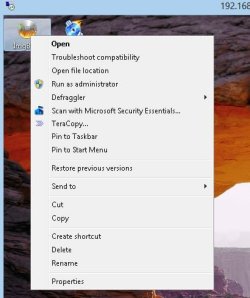
What does the right click Context menu look like when you click on a program icon on your Desktop? Is the default action set to Open? Mine looks like this in Windows 7:

ProgramContextMenu.jpg
 

My Computer

Computer type
PC/Desktop
Computer Manufacturer/Model Number
Lenovo IdeaCenter 450
OS
Windows 10 Pro X64
CPU
Intel Quad Core i7-4770 @ 3.4Ghz
Memory
16.0GB PC3-12800 DDR3 SDRAM 1600 MHz
Graphics Card(s)
Intel Integrated HD Graphics
Sound Card
Realtek HD Audio
Monitor(s) Displays
HP 22" LCD
Screen Resolution
1680 x 1050
Hard Drives
250GB Samsung EVO SATA-3 SSD
2TB Seagate ST2000DM001 SATA-2
1.5TB Seagate ST3150041AS SATA
Keyboard
Dell USB
Mouse
Lenovo USB
Internet Speed
Cable via Road Runner 3MB Upload, 30MB Download
Antivirus
Windows Defender, MBAM Pro, MBAE
Browser
Seamonkey
Other Info
UEFI/GPT
PLDS DVD-RW DH16AERSH
Mine looks the same as far as having Open as the first option. I opened process explorer in safe mode to see if I could see if something I could see what is opening. I noticed the whole time that dllhost.exe kept opening and closing. I am not sure if that is normal or if something is simply not opening.
 
Last edited:

My Computer

Computer type
PC/Desktop
Computer Manufacturer/Model Number
Custom (desktop), Custom (desktop), Lenovo U530 Touch
OS
Windows 7 Ultimate x64, Windows 7 Pro x64, Windows 10 Home x64
CPU
Intel i7-4790K , Intel i7-3770K, Intel i7-4510ULT
Motherboard
Asus Z87-PRO (main), Asus P8P67 Rev 3.1(secondary)
Memory
12GB Corsair Vengeance
Graphics Card(s)
EVGA GeForce GTX 660 2GB, 2X GIGABYTE 6890, Nvidia GT730M
Sound Card
Realtek Integrated, IDT (both laptops)
Monitor(s) Displays
Samsung S22C300H 21.5"
Screen Resolution
1920x1080 (Both machines)
Hard Drives
Main:
Muskin SSD 240GB
Seagate 320GB
Western Digital 1TB
Seagate 2TB

Seconday:
Toshiba 1TB
WD 1TB

Lenovo Laptop:
SAMSUNG SM843 SSD 480GB
PSU
Corsair GS700, COOLMAX CUL-850B (secondary)
Case
Thermaltake Chaser
Cooling
Corsair H60 Dual Fans, Stock Cooler
Keyboard
Logitech K360
Mouse
Logitech M310
Internet Speed
16Mbps
Antivirus
Comodo Internet Security Premium, MWB
Browser
Chrome, Firefox
Other Info
I have three systems listed in the specs area. My main desktop and my secondary desktop that was my previous build. The last one (in all the sections) is my Lenovo laptop.

Thanks for your interest in my machines! :)
Did you install any Windows Updates around the time this started happening? If so, try uninstalling them, see if that makes a difference.
 

My Computer

Computer type
PC/Desktop
Computer Manufacturer/Model Number
Lenovo IdeaCenter 450
OS
Windows 10 Pro X64
CPU
Intel Quad Core i7-4770 @ 3.4Ghz
Memory
16.0GB PC3-12800 DDR3 SDRAM 1600 MHz
Graphics Card(s)
Intel Integrated HD Graphics
Sound Card
Realtek HD Audio
Monitor(s) Displays
HP 22" LCD
Screen Resolution
1680 x 1050
Hard Drives
250GB Samsung EVO SATA-3 SSD
2TB Seagate ST2000DM001 SATA-2
1.5TB Seagate ST3150041AS SATA
Keyboard
Dell USB
Mouse
Lenovo USB
Internet Speed
Cable via Road Runner 3MB Upload, 30MB Download
Antivirus
Windows Defender, MBAM Pro, MBAE
Browser
Seamonkey
Other Info
UEFI/GPT
PLDS DVD-RW DH16AERSH
I checked and didn't see anything installed since the 11th. Any other ideas? I hope I can find something. I don't like putting off problems with Windows as they add up quickly, it seems.
 

My Computer

Computer type
PC/Desktop
Computer Manufacturer/Model Number
Custom (desktop), Custom (desktop), Lenovo U530 Touch
OS
Windows 7 Ultimate x64, Windows 7 Pro x64, Windows 10 Home x64
CPU
Intel i7-4790K , Intel i7-3770K, Intel i7-4510ULT
Motherboard
Asus Z87-PRO (main), Asus P8P67 Rev 3.1(secondary)
Memory
12GB Corsair Vengeance
Graphics Card(s)
EVGA GeForce GTX 660 2GB, 2X GIGABYTE 6890, Nvidia GT730M
Sound Card
Realtek Integrated, IDT (both laptops)
Monitor(s) Displays
Samsung S22C300H 21.5"
Screen Resolution
1920x1080 (Both machines)
Hard Drives
Main:
Muskin SSD 240GB
Seagate 320GB
Western Digital 1TB
Seagate 2TB

Seconday:
Toshiba 1TB
WD 1TB

Lenovo Laptop:
SAMSUNG SM843 SSD 480GB
PSU
Corsair GS700, COOLMAX CUL-850B (secondary)
Case
Thermaltake Chaser
Cooling
Corsair H60 Dual Fans, Stock Cooler
Keyboard
Logitech K360
Mouse
Logitech M310
Internet Speed
16Mbps
Antivirus
Comodo Internet Security Premium, MWB
Browser
Chrome, Firefox
Other Info
I have three systems listed in the specs area. My main desktop and my secondary desktop that was my previous build. The last one (in all the sections) is my Lenovo laptop.

Thanks for your interest in my machines! :)
Sure sounds like an extension handler problem. Give ShellExView a try. Look at the entries in pink, see if disabling then a few at a time resolves the problen.
 

My Computer

Computer type
PC/Desktop
Computer Manufacturer/Model Number
Lenovo IdeaCenter 450
OS
Windows 10 Pro X64
CPU
Intel Quad Core i7-4770 @ 3.4Ghz
Memory
16.0GB PC3-12800 DDR3 SDRAM 1600 MHz
Graphics Card(s)
Intel Integrated HD Graphics
Sound Card
Realtek HD Audio
Monitor(s) Displays
HP 22" LCD
Screen Resolution
1680 x 1050
Hard Drives
250GB Samsung EVO SATA-3 SSD
2TB Seagate ST2000DM001 SATA-2
1.5TB Seagate ST3150041AS SATA
Keyboard
Dell USB
Mouse
Lenovo USB
Internet Speed
Cable via Road Runner 3MB Upload, 30MB Download
Antivirus
Windows Defender, MBAM Pro, MBAE
Browser
Seamonkey
Other Info
UEFI/GPT
PLDS DVD-RW DH16AERSH
Hi Ztruker,

Sorry I didn't ever respond back to you, its been a busy few weeks.

I did figure out the issue; it was an extension causing it like you thought. Apparently Acronis was still on the list and it was trying to launch it even though it has been uninstalled for quite some time. I guess that is also why the "Program:" area would be blank in the error since it does not know what is trying to be launched.


Thanks for the help!
 

My Computer

Computer type
PC/Desktop
Computer Manufacturer/Model Number
Custom (desktop), Custom (desktop), Lenovo U530 Touch
OS
Windows 7 Ultimate x64, Windows 7 Pro x64, Windows 10 Home x64
CPU
Intel i7-4790K , Intel i7-3770K, Intel i7-4510ULT
Motherboard
Asus Z87-PRO (main), Asus P8P67 Rev 3.1(secondary)
Memory
12GB Corsair Vengeance
Graphics Card(s)
EVGA GeForce GTX 660 2GB, 2X GIGABYTE 6890, Nvidia GT730M
Sound Card
Realtek Integrated, IDT (both laptops)
Monitor(s) Displays
Samsung S22C300H 21.5"
Screen Resolution
1920x1080 (Both machines)
Hard Drives
Main:
Muskin SSD 240GB
Seagate 320GB
Western Digital 1TB
Seagate 2TB

Seconday:
Toshiba 1TB
WD 1TB

Lenovo Laptop:
SAMSUNG SM843 SSD 480GB
PSU
Corsair GS700, COOLMAX CUL-850B (secondary)
Case
Thermaltake Chaser
Cooling
Corsair H60 Dual Fans, Stock Cooler
Keyboard
Logitech K360
Mouse
Logitech M310
Internet Speed
16Mbps
Antivirus
Comodo Internet Security Premium, MWB
Browser
Chrome, Firefox
Other Info
I have three systems listed in the specs area. My main desktop and my secondary desktop that was my previous build. The last one (in all the sections) is my Lenovo laptop.

Thanks for your interest in my machines! :)
Your welcome, and thanks for letting me know.
 

My Computer

Computer type
PC/Desktop
Computer Manufacturer/Model Number
Lenovo IdeaCenter 450
OS
Windows 10 Pro X64
CPU
Intel Quad Core i7-4770 @ 3.4Ghz
Memory
16.0GB PC3-12800 DDR3 SDRAM 1600 MHz
Graphics Card(s)
Intel Integrated HD Graphics
Sound Card
Realtek HD Audio
Monitor(s) Displays
HP 22" LCD
Screen Resolution
1680 x 1050
Hard Drives
250GB Samsung EVO SATA-3 SSD
2TB Seagate ST2000DM001 SATA-2
1.5TB Seagate ST3150041AS SATA
Keyboard
Dell USB
Mouse
Lenovo USB
Internet Speed
Cable via Road Runner 3MB Upload, 30MB Download
Antivirus
Windows Defender, MBAM Pro, MBAE
Browser
Seamonkey
Other Info
UEFI/GPT
PLDS DVD-RW DH16AERSH
Back
Top