S/PDIF Cable not recognizing as connected

MarkN

New member
Local time
10:22 AM
Messages
3
I've been endeavoring to hook up a surround sound system to my desktop for quite some time, and because of how the standard analog cable array works, I can't get 5.1 sound without the S/PDIF cable hookup. I just went to the store and bought a 6' cord, unplugged all the other audio cords, put in the S/PDIF cable, and found that the computer did not recognize that there was any audio devices connected. The output jack is showing a red light, which I understand to mean that all is well, and I tried checking the drivers to no avail.
I filled out my system specs to the best of my ability, but I also found this link, which is the exact model of computer I have, and the only modification was replacing a slightly faulty power source
ASUS Essentio CG5275-AR003 Desktop PC Intel Core i5 650 (3.20GHz) 8GB DDR3 1TB HDD Windows 7 Home Premium 64-bit - Newegg.com
 

My Computer My Computer

Computer type
PC/Desktop
Computer Manufacturer/Model Number
Asus
OS
Windows 7 Home Premium 64bit
CPU
Intel Core i5 [email protected] 3201Mhz 2 cores/4 processors
Memory
8GB
Graphics Card(s)
On board from asus motherboard
Exactly what do you have for a speaker system? What input is required for the speaker system?

If you connect an S/PDIF cable, you may have to manually set it as the default playback device (??) Windows will only allow one default audio playback device.

Finally, not all S/PDIF's are 5.1. Many are only 2 channel stereo.
 

My Computer My Computer

Computer type
PC/Desktop
Computer Manufacturer/Model Number
My Own Build
OS
Windows 10 64 bit
CPU
Intel i7 6700K
Motherboard
ASUS ROG Maximus VIII Hero
Memory
16GB Corsair Dominator
Graphics Card(s)
Intel CPU Graphics
Sound Card
RealTek
Monitor(s) Displays
27" Dell S2719dgf
Screen Resolution
2560X1440
Hard Drives
1 TB Samsung 850 EVO SSD for Win 10 Pro
500GB Samsung 850 EVO SSD for Win 10 Insider
2 TB drive for backup
PSU
EVGA Supernova 750G2
Case
BeQuiet Silent Base 600
Cooling
Deepcool Captain 120EX
Keyboard
Microsoft Wireless 2000
Mouse
Microsoft wireless
Internet Speed
100 MB/sec (Cable)
Antivirus
Microsoft Defender and Malwarebytes
Browser
Edge/Firefox
Other Info
Cakewalk (Sonar) by BandLab and Studio One 4.1 Pro recording studio software. MOTU 896Mk3 Hybrid recording interface, Frontier Tranzport wireless control unit, Behringer X-Touch Control Surface.
Five USB connected optical drives for CD Audio production using Nero BurningROM
Connecting to a Sony... Digital Audio Control Center. Not seeing a moden number on the front, might be on the bottom but it's in an entertainment center right now. The issue I'm having is that when I plug it in, Windows is unaware that it's been plugged in. The red light in the desktop slow is showing, and the cord is showing the red light on the end that plugs into the receiver, so I don't think the cord is the issue. It's just that Windows isn't recognizing the device as active.
 

My Computer My Computer

Computer type
PC/Desktop
Computer Manufacturer/Model Number
Asus
OS
Windows 7 Home Premium 64bit
CPU
Intel Core i5 [email protected] 3201Mhz 2 cores/4 processors
Memory
8GB
Graphics Card(s)
On board from asus motherboard
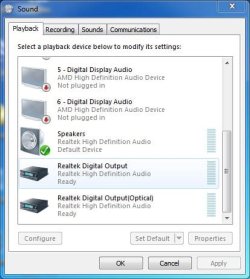
Have you tried either enabling the S/PDIF and/or making it the default audio playback device.

Control Panel/Hardware and Sound and finally the Sound Panel, playback section.

Here is my Playback Section.
 

Attachments

  • Sound Panel Capture.JPG
    Sound Panel Capture.JPG
    39.2 KB · Views: 8

My Computer My Computer

Computer type
PC/Desktop
Computer Manufacturer/Model Number
My Own Build
OS
Windows 10 64 bit
CPU
Intel i7 6700K
Motherboard
ASUS ROG Maximus VIII Hero
Memory
16GB Corsair Dominator
Graphics Card(s)
Intel CPU Graphics
Sound Card
RealTek
Monitor(s) Displays
27" Dell S2719dgf
Screen Resolution
2560X1440
Hard Drives
1 TB Samsung 850 EVO SSD for Win 10 Pro
500GB Samsung 850 EVO SSD for Win 10 Insider
2 TB drive for backup
PSU
EVGA Supernova 750G2
Case
BeQuiet Silent Base 600
Cooling
Deepcool Captain 120EX
Keyboard
Microsoft Wireless 2000
Mouse
Microsoft wireless
Internet Speed
100 MB/sec (Cable)
Antivirus
Microsoft Defender and Malwarebytes
Browser
Edge/Firefox
Other Info
Cakewalk (Sonar) by BandLab and Studio One 4.1 Pro recording studio software. MOTU 896Mk3 Hybrid recording interface, Frontier Tranzport wireless control unit, Behringer X-Touch Control Surface.
Five USB connected optical drives for CD Audio production using Nero BurningROM
Ok so yeah, that definitely fixed my output issue, which is embarrassing, because I never had disabled those devices to begin with. Now much to my confusion the output is operating fine, and the receiver just isn't playing any sound from the optical. It'll play Aux input just fine, and I've cycled the input modes to no luck, but that might be a question for a different forum,
 

My Computer My Computer

Computer type
PC/Desktop
Computer Manufacturer/Model Number
Asus
OS
Windows 7 Home Premium 64bit
CPU
Intel Core i5 [email protected] 3201Mhz 2 cores/4 processors
Memory
8GB
Graphics Card(s)
On board from asus motherboard
Back
Top