Solved ?'s re:dual boot,XP 1st-W7pro x64 sep HDD

HarveyK

New member
Local time
9:58 PM
Messages
9
Location
Florida
Greets All! First I'd like to tip my hat and raise a glass to all the fine people behind this "fabulous" forum! Great job! I've been searching, printing and studying the tutorials and threads regarding dual boot W7 and clean install W7. I'm going to put W7 on a separate HDD which would bring the total to four internal SATA HDD (no raid setup) and have easybcd in place too. I ran the Advisor and all hardware passed with flying colors. My plan is to install new HDD and boot to W7 disc (cd/dvd drive is 1st boot device) then follow the tut on clean install with partition. With so many HDD's I hope I don't get confused and pick the wrong one. Would it be wise to disconnect any or could that mess things up more? Any other tips or suggestions would be greatly appreciated.
 

My Computer My Computer

At a glance

WinXP x32 / Win 7 Pro x64Intel Core2 Quad Q6600 2.4 GHz4 GBNividia 8800GT
Computer Manufacturer/Model Number
Bare Bones
OS
WinXP x32 / Win 7 Pro x64
CPU
Intel Core2 Quad Q6600 2.4 GHz
Motherboard
Asus P5Q Turbo
Memory
4 GB
Graphics Card(s)
Nividia 8800GT
Sound Card
On board VIA HD audio deck
Monitor(s) Displays
2x Acer 22"
Hard Drives
WD 350-XP,Seagate 500-Win7 Pro x64, WD 350-Capture, WD 500-Media, External-WD 1T & Seagate 500
Case
Apevia
Internet Speed
Cable
7 not installed yet

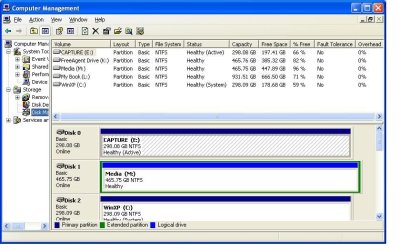
I'm adding another HDD just for W7. Hope I did the screen cap correctly! On start up: detecting Sata 2,4 and 6 are shown
 

Attachments

  • CompMgnt2.JPG
    CompMgnt2.JPG
    75.1 KB · Views: 22
Last edited:

My Computer My Computer

At a glance

WinXP x32 / Win 7 Pro x64Intel Core2 Quad Q6600 2.4 GHz4 GBNividia 8800GT
Computer Manufacturer/Model Number
Bare Bones
OS
WinXP x32 / Win 7 Pro x64
CPU
Intel Core2 Quad Q6600 2.4 GHz
Motherboard
Asus P5Q Turbo
Memory
4 GB
Graphics Card(s)
Nividia 8800GT
Sound Card
On board VIA HD audio deck
Monitor(s) Displays
2x Acer 22"
Hard Drives
WD 350-XP,Seagate 500-Win7 Pro x64, WD 350-Capture, WD 500-Media, External-WD 1T & Seagate 500
Case
Apevia
Internet Speed
Cable
Hello HarveyK, welcome to Seven Forums!


The best way would be to use the BIOS one-time boot menu to select which OS/HDD to boot instead of using a Windows managed dual boot.


Disconnect all Hard Disk Drives except the one you want to install Windows 7 to, connect that to the #1 SATA port of the motherboard and set it as second boot device after the CD/DVD drive, then boot the installation media to do a clean install to that HDD.

After the install is finished and Windows 7 is booting good, power-down and reconnect the other HDDs to the mobo and use the BIOS one-time boot menu to select which OS/HDD to boot when the PC is started/booted; in the case of ASUS mobos it's the F8 hot-key.


Be sure to post back with any further questions you may have and to keep us informed.
 

My Computer My Computer

At a glance

W 7 64-bit UltimateIntel Q9550 Yorkfield8GB Dominator 8500C5DATI : XFX 5870
Computer Manufacturer/Model Number
* BFK Customs *
OS
W 7 64-bit Ultimate
CPU
Intel Q9550 Yorkfield
Motherboard
ASUS P5Q Pro
Memory
8GB Dominator 8500C5D
Graphics Card(s)
ATI : XFX 5870
Sound Card
Realtek HD Audio 7-1
Monitor(s) Displays
1x 47" LCD HDMI & 3x 26" LCD HDMI
Screen Resolution
1920x1080P & 1920x1200
Hard Drives
1x 80GB Intel X25-M G2 SSD : 1x 500GB & 1x 640GB WD Caviar Black(s)
PSU
Corsair 620HX
Case
Cooler Master RC-690
Cooling
Tuniq Tower 120, 2x 140mm and 3x 120mm case fans
Keyboard
Microsoft 500
Mouse
Razer Diamondback 3G
Internet Speed
14 Mb/s
Other Info
1x Koutech 3Gb/s SATA HDD Hot Swap Rack
Thanks Bare Foot Kid! Sounds easy enough. The motherboard shows total of 7 sata connectors: Top row (4 orange) Sata_E1, Sata2,Sata5. Bottom row- Sata_E2(white), Sata1 and Sata3(orange). Sata_E1 is where the XP drive is connected so that's where I'll connect the W7 drive. The other 2 are in the same row. When I reconnect the others should I just keep them on the same row? User guide says _E1 & _E2 are for Sata drives only and asus utility Drive Xpert.
 

My Computer My Computer

At a glance

WinXP x32 / Win 7 Pro x64Intel Core2 Quad Q6600 2.4 GHz4 GBNividia 8800GT
Computer Manufacturer/Model Number
Bare Bones
OS
WinXP x32 / Win 7 Pro x64
CPU
Intel Core2 Quad Q6600 2.4 GHz
Motherboard
Asus P5Q Turbo
Memory
4 GB
Graphics Card(s)
Nividia 8800GT
Sound Card
On board VIA HD audio deck
Monitor(s) Displays
2x Acer 22"
Hard Drives
WD 350-XP,Seagate 500-Win7 Pro x64, WD 350-Capture, WD 500-Media, External-WD 1T & Seagate 500
Case
Apevia
Internet Speed
Cable
If this is the mobo connect the target HDD to the SATA 1 port for the install and when finished it won't matter where you connect the other HDDs, though I'd connect the XP HDD to SATA #2; Windows will auto-detect their location on the first reboot after they're reconnected.

The E1 & E2 are for a storage config if I'm correct, just disregard those from this plan.


ASUS P5Q PRO TURBO - User Guide Manual
 

My Computer My Computer

At a glance

W 7 64-bit UltimateIntel Q9550 Yorkfield8GB Dominator 8500C5DATI : XFX 5870
Computer Manufacturer/Model Number
* BFK Customs *
OS
W 7 64-bit Ultimate
CPU
Intel Q9550 Yorkfield
Motherboard
ASUS P5Q Pro
Memory
8GB Dominator 8500C5D
Graphics Card(s)
ATI : XFX 5870
Sound Card
Realtek HD Audio 7-1
Monitor(s) Displays
1x 47" LCD HDMI & 3x 26" LCD HDMI
Screen Resolution
1920x1080P & 1920x1200
Hard Drives
1x 80GB Intel X25-M G2 SSD : 1x 500GB & 1x 640GB WD Caviar Black(s)
PSU
Corsair 620HX
Case
Cooler Master RC-690
Cooling
Tuniq Tower 120, 2x 140mm and 3x 120mm case fans
Keyboard
Microsoft 500
Mouse
Razer Diamondback 3G
Internet Speed
14 Mb/s
Other Info
1x Koutech 3Gb/s SATA HDD Hot Swap Rack
Thanks again! I will keep you informed and post back with results or issues they appear!
Yes that's my board!
 
Last edited:

My Computer My Computer

At a glance

WinXP x32 / Win 7 Pro x64Intel Core2 Quad Q6600 2.4 GHz4 GBNividia 8800GT
Computer Manufacturer/Model Number
Bare Bones
OS
WinXP x32 / Win 7 Pro x64
CPU
Intel Core2 Quad Q6600 2.4 GHz
Motherboard
Asus P5Q Turbo
Memory
4 GB
Graphics Card(s)
Nividia 8800GT
Sound Card
On board VIA HD audio deck
Monitor(s) Displays
2x Acer 22"
Hard Drives
WD 350-XP,Seagate 500-Win7 Pro x64, WD 350-Capture, WD 500-Media, External-WD 1T & Seagate 500
Case
Apevia
Internet Speed
Cable
You're welcome, we'll be here! ;)
 

My Computer My Computer

At a glance

W 7 64-bit UltimateIntel Q9550 Yorkfield8GB Dominator 8500C5DATI : XFX 5870
Computer Manufacturer/Model Number
* BFK Customs *
OS
W 7 64-bit Ultimate
CPU
Intel Q9550 Yorkfield
Motherboard
ASUS P5Q Pro
Memory
8GB Dominator 8500C5D
Graphics Card(s)
ATI : XFX 5870
Sound Card
Realtek HD Audio 7-1
Monitor(s) Displays
1x 47" LCD HDMI & 3x 26" LCD HDMI
Screen Resolution
1920x1080P & 1920x1200
Hard Drives
1x 80GB Intel X25-M G2 SSD : 1x 500GB & 1x 640GB WD Caviar Black(s)
PSU
Corsair 620HX
Case
Cooler Master RC-690
Cooling
Tuniq Tower 120, 2x 140mm and 3x 120mm case fans
Keyboard
Microsoft 500
Mouse
Razer Diamondback 3G
Internet Speed
14 Mb/s
Other Info
1x Koutech 3Gb/s SATA HDD Hot Swap Rack
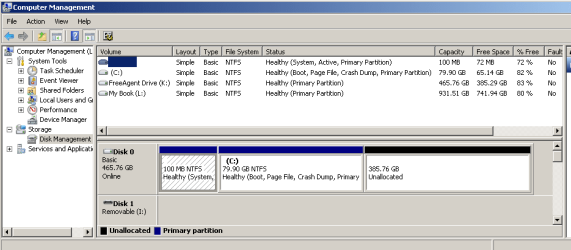
Sorry it took so long to get to this. I finally installed W7pro v64 on a sep. drive. I must have inadvertently rebooted to cd and installed or atleast created 2 partitions with sys files. I haven't reconnected the other internal drives. Here's a screen shot of computer management. What is the best way to remove the second partition? Or is this a "recovery" partition created by W7? W7 is booting/running well, and I haven't loaded any programs yet.
 

Attachments

  • CompMngt1.PNG
    CompMngt1.PNG
    13.5 KB · Views: 6
Last edited:

My Computer My Computer

At a glance

WinXP x32 / Win 7 Pro x64Intel Core2 Quad Q6600 2.4 GHz4 GBNividia 8800GT
Computer Manufacturer/Model Number
Bare Bones
OS
WinXP x32 / Win 7 Pro x64
CPU
Intel Core2 Quad Q6600 2.4 GHz
Motherboard
Asus P5Q Turbo
Memory
4 GB
Graphics Card(s)
Nividia 8800GT
Sound Card
On board VIA HD audio deck
Monitor(s) Displays
2x Acer 22"
Hard Drives
WD 350-XP,Seagate 500-Win7 Pro x64, WD 350-Capture, WD 500-Media, External-WD 1T & Seagate 500
Case
Apevia
Internet Speed
Cable
Hello again.


The 'other' partition is the new Windows 7 System Reserved partition and can be quite useful, it is auto-created by the Windows installation process in certain situations; there's really no need to remove it but if you want to just follow this tutorial starting at Step One, at the link below to recover that 100MB into the Windows 7 C: partition.
 

My Computer My Computer

At a glance

W 7 64-bit UltimateIntel Q9550 Yorkfield8GB Dominator 8500C5DATI : XFX 5870
Computer Manufacturer/Model Number
* BFK Customs *
OS
W 7 64-bit Ultimate
CPU
Intel Q9550 Yorkfield
Motherboard
ASUS P5Q Pro
Memory
8GB Dominator 8500C5D
Graphics Card(s)
ATI : XFX 5870
Sound Card
Realtek HD Audio 7-1
Monitor(s) Displays
1x 47" LCD HDMI & 3x 26" LCD HDMI
Screen Resolution
1920x1080P & 1920x1200
Hard Drives
1x 80GB Intel X25-M G2 SSD : 1x 500GB & 1x 640GB WD Caviar Black(s)
PSU
Corsair 620HX
Case
Cooler Master RC-690
Cooling
Tuniq Tower 120, 2x 140mm and 3x 120mm case fans
Keyboard
Microsoft 500
Mouse
Razer Diamondback 3G
Internet Speed
14 Mb/s
Other Info
1x Koutech 3Gb/s SATA HDD Hot Swap Rack
Man you're quick!! Thanks for that Bare Foot Kid! I think I'll leave things as is. Should I assign a drive letter or "label" this partition, say "D"recovery"? Or just leave it as is? Any links to System reserved info?
 

My Computer My Computer

At a glance

WinXP x32 / Win 7 Pro x64Intel Core2 Quad Q6600 2.4 GHz4 GBNividia 8800GT
Computer Manufacturer/Model Number
Bare Bones
OS
WinXP x32 / Win 7 Pro x64
CPU
Intel Core2 Quad Q6600 2.4 GHz
Motherboard
Asus P5Q Turbo
Memory
4 GB
Graphics Card(s)
Nividia 8800GT
Sound Card
On board VIA HD audio deck
Monitor(s) Displays
2x Acer 22"
Hard Drives
WD 350-XP,Seagate 500-Win7 Pro x64, WD 350-Capture, WD 500-Media, External-WD 1T & Seagate 500
Case
Apevia
Internet Speed
Cable

My Computer My Computer

At a glance

W 7 64-bit UltimateIntel Q9550 Yorkfield8GB Dominator 8500C5DATI : XFX 5870
Computer Manufacturer/Model Number
* BFK Customs *
OS
W 7 64-bit Ultimate
CPU
Intel Q9550 Yorkfield
Motherboard
ASUS P5Q Pro
Memory
8GB Dominator 8500C5D
Graphics Card(s)
ATI : XFX 5870
Sound Card
Realtek HD Audio 7-1
Monitor(s) Displays
1x 47" LCD HDMI & 3x 26" LCD HDMI
Screen Resolution
1920x1080P & 1920x1200
Hard Drives
1x 80GB Intel X25-M G2 SSD : 1x 500GB & 1x 640GB WD Caviar Black(s)
PSU
Corsair 620HX
Case
Cooler Master RC-690
Cooling
Tuniq Tower 120, 2x 140mm and 3x 120mm case fans
Keyboard
Microsoft 500
Mouse
Razer Diamondback 3G
Internet Speed
14 Mb/s
Other Info
1x Koutech 3Gb/s SATA HDD Hot Swap Rack
Good point! Thank you once again! I'll check it all out. I will report back after I reconnect the other internal drives. I'm sure I'll have alot more ?'s.
 

My Computer My Computer

At a glance

WinXP x32 / Win 7 Pro x64Intel Core2 Quad Q6600 2.4 GHz4 GBNividia 8800GT
Computer Manufacturer/Model Number
Bare Bones
OS
WinXP x32 / Win 7 Pro x64
CPU
Intel Core2 Quad Q6600 2.4 GHz
Motherboard
Asus P5Q Turbo
Memory
4 GB
Graphics Card(s)
Nividia 8800GT
Sound Card
On board VIA HD audio deck
Monitor(s) Displays
2x Acer 22"
Hard Drives
WD 350-XP,Seagate 500-Win7 Pro x64, WD 350-Capture, WD 500-Media, External-WD 1T & Seagate 500
Case
Apevia
Internet Speed
Cable
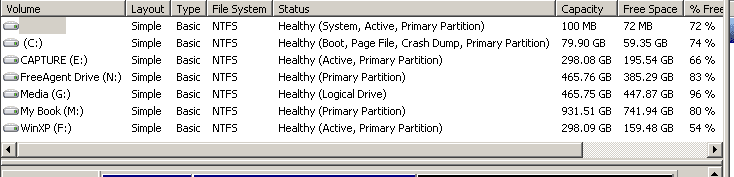
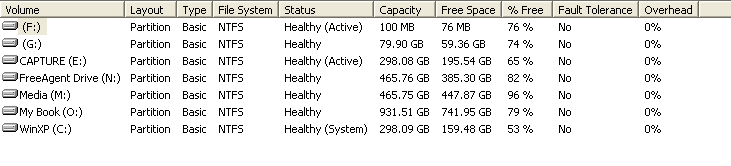
I reconnected all the drives and executed the F8 boot menu; worked splendidly! Every drive was listed in the pop up. tested with a few restarts and each OS recognizes all the drives and I'm able to browse all. I'll include a couple of screen caps. Thanks again. I'll mark this thread SOLVED!:D
 

Attachments

  • CompMngtW7.PNG
    CompMngtW7.PNG
    3.9 KB · Views: 5
  • CompMngtXP.png
    CompMngtXP.png
    3.2 KB · Views: 3

My Computer My Computer

At a glance

WinXP x32 / Win 7 Pro x64Intel Core2 Quad Q6600 2.4 GHz4 GBNividia 8800GT
Computer Manufacturer/Model Number
Bare Bones
OS
WinXP x32 / Win 7 Pro x64
CPU
Intel Core2 Quad Q6600 2.4 GHz
Motherboard
Asus P5Q Turbo
Memory
4 GB
Graphics Card(s)
Nividia 8800GT
Sound Card
On board VIA HD audio deck
Monitor(s) Displays
2x Acer 22"
Hard Drives
WD 350-XP,Seagate 500-Win7 Pro x64, WD 350-Capture, WD 500-Media, External-WD 1T & Seagate 500
Case
Apevia
Internet Speed
Cable
Well done and thanks for the update.
 

My Computer My Computer

At a glance

W 7 64-bit UltimateIntel Q9550 Yorkfield8GB Dominator 8500C5DATI : XFX 5870
Computer Manufacturer/Model Number
* BFK Customs *
OS
W 7 64-bit Ultimate
CPU
Intel Q9550 Yorkfield
Motherboard
ASUS P5Q Pro
Memory
8GB Dominator 8500C5D
Graphics Card(s)
ATI : XFX 5870
Sound Card
Realtek HD Audio 7-1
Monitor(s) Displays
1x 47" LCD HDMI & 3x 26" LCD HDMI
Screen Resolution
1920x1080P & 1920x1200
Hard Drives
1x 80GB Intel X25-M G2 SSD : 1x 500GB & 1x 640GB WD Caviar Black(s)
PSU
Corsair 620HX
Case
Cooler Master RC-690
Cooling
Tuniq Tower 120, 2x 140mm and 3x 120mm case fans
Keyboard
Microsoft 500
Mouse
Razer Diamondback 3G
Internet Speed
14 Mb/s
Other Info
1x Koutech 3Gb/s SATA HDD Hot Swap Rack
I'm sure I'll be back with other ?'s once I install the app's. Thanks again; this is by far the BEST forum (IMHO)!
 

My Computer My Computer

At a glance

WinXP x32 / Win 7 Pro x64Intel Core2 Quad Q6600 2.4 GHz4 GBNividia 8800GT
Computer Manufacturer/Model Number
Bare Bones
OS
WinXP x32 / Win 7 Pro x64
CPU
Intel Core2 Quad Q6600 2.4 GHz
Motherboard
Asus P5Q Turbo
Memory
4 GB
Graphics Card(s)
Nividia 8800GT
Sound Card
On board VIA HD audio deck
Monitor(s) Displays
2x Acer 22"
Hard Drives
WD 350-XP,Seagate 500-Win7 Pro x64, WD 350-Capture, WD 500-Media, External-WD 1T & Seagate 500
Case
Apevia
Internet Speed
Cable
Back
Top