Sacreware?

Wishmaster

New member
Guru
VIP
Local time
4:38 PM
Messages
4,513
Location
Southern Ohio
Scareware?

A friend of mine called today with a issue. Seems he got one of those viruses that locks your PC down and demands money to unlock. I forget the exact details of the message though.

At any count, its a laptop and he has no other PC around. I asked him to bring it over to me to have a look at later and Im thinking of running Malwarewarebytes from a USB in SafeMode.


Sorry I can't give any specifics I only know what I was told. Haven't actually seen it yet but he did say he couldn't do anything but see the
site where you need to pay.
I told him not to pay anything as well.

If I remember correctly, this should get him back up and running correct?
If not, any suggestions. Or anyone have hands on with this virus that can offer insight.
 
Last edited:

My Computer

Computer Manufacturer/Model Number
Custom (Self Build)
OS
Windows 7 Home Premium 64bit
CPU
Intel Core i7 2700k
Motherboard
eVGA P67 SLI
Memory
8GB Mushkin Redline Ridgebacks @1866
Graphics Card(s)
EVGA GTX570 SC
Sound Card
XiFi Titanium HD
Monitor(s) Displays
LG W2453V
Screen Resolution
1920x1080
Hard Drives
Intel 320 80GB -- Intel X25-V 40GB --WD Black 1TB x2 -- WD Blue 640GB
PSU
Seasonic x750
Case
Corsair 600T SE White
Cooling
eVGA Superclocked CPU Cooler
Keyboard
Saitek Cyborg
Antivirus
Kaspersky
Browser
IE
Other Info
LG BD/DVD
This is called ransomware, kidnapping a PC for payment. You might ask Jacee for help, I think she's dealt with these types before.
 

My Computer

Computer type
PC/Desktop
Computer Manufacturer/Model Number
Home Built Desktop By DataTech
OS
Windows 7 Ultimate X64 SP1
CPU
Intel i5-2550K, Differing ~4.4-4.8GHz No built in GPU
Motherboard
ASUS P8Z68-V PRO/GEN3
Memory
16GB G.Skill Sniper 1866MHz @ 2133MHz 2x8GB
Graphics Card(s)
ASUS GTX650TIB-DC2OC-2GD5, (650TI Boost)
Sound Card
Onboard Realtek 5-1
Monitor(s) Displays
Samsung P2570HD
Screen Resolution
1920x1080
Hard Drives
Samsung 840 Pro 256GB SSD for OS, 500GB Seagate Constellation (Enterprise drive) for Data
PSU
Corsair HX650W
Case
Inwin Dragon Rider
Cooling
Hyper 212 EVO w/two Noctua fans, push-pull, @1300 RPM
Keyboard
E-Z Eyes, bright yellow keys with large characters
Mouse
steelseries SENSEI Laser Pro Gaming
Internet Speed
48-51Mbs Mbs down, 11 Mbs up Xfinity Cable
Antivirus
Norton Internet Security 2013
Browser
IE 10, Opera, Pale Moon if needed
Other Info
4 case fans, LG BluRay-RE, ASUS DVD-RW, Mr. Fusion power supply, 1.21 gigawatts.

My Computer

Computer type
PC/Desktop
Computer Manufacturer/Model Number
Dell Inspiron 530
OS
Windows 7 Professional SP1 64-bit
CPU
Intel Core 2 Duo Processor E8300 @ 2.83GHz
Motherboard
Dell Inc. 0RY007 (Socket 775)
Memory
4.00 GB Dual-Channel DDR2 @ 332MHz (5-5-5-15)
Graphics Card(s)
Intel(R) G33/G31 Express Chipset Family
Sound Card
Integrated 7.1 Channel Audio
Monitor(s) Displays
Acer G245HQL 23.6" LED(1920x1080@60Hz)
Screen Resolution
1920 x 1080
Hard Drives
Disk 0 HITACHI 1TB OS Installed - Disk 1 HITACHI 1TB For Backups
Keyboard
Dell USB Keyboard
Mouse
Dell Optical USB Mouse
Internet Speed
DSL 10 meg
Antivirus
Symantec(SEP)
Browser
Pale Moon
Wishmaster,

If you wish, follow these instructions. I've provided them to Users, who ran them successfully, several times.

Let's use HitmanPro.Kickstart to access your computer, scan it for malware, and remove this infection. The program targets this ransomware.


Also, you may want to print these instructions, so they are available to follow.


Now, load a USB flash drive with HitmanPro.Kickstart as follows...
Note: the contents of the USB flash drive are erased during this process!


Use a clean (non-infected) computer, and download:
HitmanPro.Kickstart - Anti ransomware, politievirus, bundestrojaner, Reveton, BKA, GVU - SurfRight


Under Download (on the right) select the program applicable to the system: 64-bit?


When HitmanPro opens, click the KickStart icon at the bottom of the screen.


>>Plug in the USB flash drive.


When the USB flash drive is detected, a selection screen is presented.
Select the USB flash drive from the choices, and press: Install Kickstart
A warning that all contents of the selected flash drive will erase is presented.
Press: Yes


As the HitmanPro.Kickstart files are loaded, a progress indicator is shown on the screen.
Once the process is completed a screen is presented with the contents of HitmanPro.Kickstart

Remove the USB flash drive from the clean computer and press: Close


Now, with the ransomed computer shut down, plug the USB flash drive into a USB port, and turn on the power.


When the computer starts, press the key that brings up the Boot Menu. (On some machines its F12, F10, or F2)

From there, select to boot from the USB drive. (It may say 'Removable Drive' in the options.)
Info: How to Remove Ransomware - Select Real Security


Once you select the USB flash drive to boot from, press: Enter


A Kickstart prompt with USB boot options appears.
Select: 1 (Bypass the Master Boot Record (Default))


The system continues to boot from the hard drive and starts Windows.

If you get a message stating that Windows failed to start, etc., just select: Start Windows Normally

When Windows boots, you either get a logon screen, or the Desktop is started.
If you see a logon screen with your User name, logon with it.


In the next prompt that appears, to start the program without installing to the local hard disk, select the option to do a: One-time scan to check the computer.

To start scanning for malware press: Next


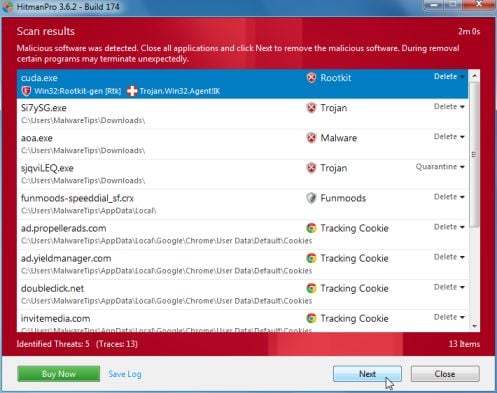
If malware is detected, the program shows what malware is present on the system using a red framed screen as shown below:
hitmanpro-scan-results.jpg

Select Next to quarantine the malware into a secure storage where it can no longer start.


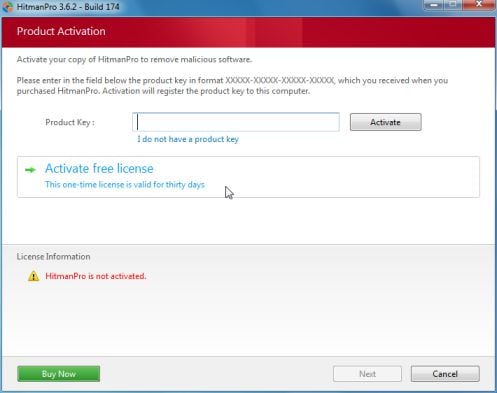
At the next screen, activate the 30-day free license:
hitmanpro-activation.jpg

After successful activation (30 days), press: Next


A screen indicating that the malware was successfully disabled or removed is presented.
Press: Next


To obtain a report of the scan results, press: Save log
>>Save the Notepad log to the Desktop<<
It has a name such as: HitmanPro_xxxxxxxx_xxxx


Remove the USB drive, and press: Reboot
If no malware is found, press: Close


After HitmanPro.Kickstart is done, you should be back into normal Windows.


Please post the HitmanPro log in your reply. <<Important!


~~~~
To remove any remnant malicious files of the ransomware...


Download RogueKiller:
Tlcharger RogueKiller (Site Officiel)

When you get to the website, go to where it says:
(Download link) Lien de téléchargement:
rendu2.png


Select the version that applies to your system: x64 (?)
Click the dark-blue button to download.
Save to the Desktop.


Close all windows and browsers.

Right-click and select: Run as Administrator


At the program console, wait for the prescan to finish. (Under Status, it says: Prescan finished.)


Press: SCAN


When done, a report opens on the Desktop: RKreport.txt

Please provide the RKreport.txt (Mode: Scan) in your reply. <<Important!


A matter of concern is whether there "something else" is in the system, so looking at these reports is a wise decision.
 
Last edited:

My Computer

Computer type
PC/Desktop
Computer Manufacturer/Model Number
An ol' eMachines
OS
Windows 7 Home Premium
Internet Speed
Fine for me...I'm retired!
Hi wishwasher,

Do you have a USB flash drive handy ? If so back it up cause creating a HitmanPro Kickstart flash drive will wipe the flash drive .

Choose your OS version x64-bit or x32-bit

Downloads - SurfRight


Open HITMAN pro on an uninfected pc click the KickStart icon( flying kick ) at the bottom of the screen.

Plug in the USB flash drive.

When the USB flash drive is detected, a selection screen is presented.
Select the USB flash drive from the choices, and press: Install Kickstart
A warning that all contents of the selected flash drive will erase is presented.
Press: Yes


Remove the USB flash drive from the clean computer and press: Close


Plug the USB flash drive into a USB port of the infected pc

When the computer starts, press the key that brings up the Boot Menu. (On some machines its F12, F10, or F2)
From there, select to boot from the USB drive. (It may say 'Removable Drive' in the options.)

Info: How to Remove Ransomware - Select Real Security

Once you select the USB flash drive to boot from, press: Enter

A Kickstart prompt with USB boot options appears.
Select: 1 (Bypass the Master Boot Record (Default))

The system continues to boot from the hard drive and starts Windows.
If you get a message stating that Windows failed to start, etc., just select: Start Windows Normally

When Windows boots, you either get a logon screen, or the Desktop is started.
If you see a logon screen with your User name, logon with it.

In the next prompt that appears, to start the program without installing to the local hard disk, select the option to do a one-time scan to check the computer.

Click Next to start the scan . If the ransomware is found click on Next

On the product activation screen activate the 30-day trial

Save the log onto your desktop by clicking on Save log and upload the log

Once you're inside Windows we will run some other scans


Don't need two of the same directions . We will be waiting for the logs .
 
Last edited:

My Computer

Computer Manufacturer/Model Number
Custom Built
OS
Windows 7 Ultimate 32-Bit & Windows 7 Ultimate 64-Bit
CPU
Intel Core i7 CPU 950 @ 3.07GHz
Motherboard
ASUS P6T DELUXE V2
Memory
OCZ 6GB (3 x 2GB) 240-Pin DDR3 SDRAM DDR3 1600 OCZ3X1600R2
Graphics Card(s)
ATI Radeon HD 5700 Series
Sound Card
OnBoard
Hard Drives
WD6400AACS-00M3B0 (640GB SATA )
PSU
CORSAIR 850w
Case
NZXT LEXA
Cooling
Intel Stock Heatsink Fan
Keyboard
Microsoft Wireless Laser Keyboard 7000
Mouse
Microsoft Wireless Laser Mouse 7000
My aunt had this issue, I fixed it running windows defender offline from a usb stick and that let me back into the machine. Then I was able to clean more junk out with malwarebytes and mse. while cleaning out some stuff manually like tool bars and add ons

There's a download link below in the article , just get the 32bit version http://blogs.technet.com/b/securit...-security-tools-windows-defender-offline.aspx

I hope I was able to help, this is what helped me out with that problem. Good luck cleaning out his machine.
 

My Computer

Computer type
PC/Desktop
Computer Manufacturer/Model Number
custom build
OS
Windows 10 64bit
CPU
AMD Phenom II X4 925 (Deneb)(2.8GHz) OC 3.4GHz
Motherboard
M5A78L-MLX Plus
Memory
Corsair Vengeance DDR3 4GBX2 (8192MB)
Graphics Card(s)
XFX HD 6870 1GB (OC)- 940MHz core, mem 1150MHz
Monitor(s) Displays
Vizio 26' 1920x1080 / Acer 1336x768
Screen Resolution
1920x1080 60Hz /1336x768
Hard Drives
Kingston Digital 60GB SSDNow V300/500gb HDD Western Digital 7200rpm (/WD 160GB HDD 7200rpm
PSU
CORSAIR CX600 600w
Case
AZZA Orion 202 EVO
Cooling
cooler master hyper TX3 cpu cooler
Keyboard
Razer DeathStalker
Mouse
Logitech Optical Gaming Mouse G400
Antivirus
Defualt on win 10
Browser
Firefox
Other Info
cpu is overclocked in bios
Never heard of this kind of virus before. Sounds interesting. How exactly does it lock you out of the computer?
 

My Computer

Computer type
Laptop
Computer Manufacturer/Model Number
Acer V3-551G
OS
Windows 7 Ultimate 32bit
CPU
AMD Quad-Core A8-4500M with Turbo Core up to 2.80GHz
Memory
8 GB DDR 3
Graphics Card(s)
AMD Radeon HD 7640G + 7670M (2GB dedicated VRAM)
Sound Card
AMD HD Audio device / Realtek HD Audio
Monitor(s) Displays
15.6" HD LED
Screen Resolution
1366 x 768 (32bit)
Hard Drives
1 TB HDD
Antivirus
AVG 2013 free edition
Browser
Google Chrome
Other Info
WEI scores:

Base score= 5.9

-Processor 6.7
-Memory (RAM) 7.2
-Graphics 5.9
-Gaming Graphics 6.2
-Primary hard disk 5.9
Never heard of this kind of virus before. Sounds interesting. How exactly does it lock you out of the computer?

Puts a big screen on your screen saying the fbi has locked your computer and that you have 24 hours to pay a ransom say like $100 to unlock your computer and drop futher charges and if you don't they will sue you. It's just a fake police alert saying they caught you downloading music or watching stuff like illegal porn ect it mentions them in the locked screen saying it could be one of those but its a load of bull and a scan with windows defender offline on a usb can get rid of it easy from my experience. Basically just doesn't let you use it at all, like if you would of put your computer in locked mode with a warning screen. Saying to pay them with bitcoin payments from the one i saw on my aunts or ask for some other way to pay and shows a link to were you can pay them to there bitcoin account or w/e they use.
 

My Computer

Computer type
PC/Desktop
Computer Manufacturer/Model Number
custom build
OS
Windows 10 64bit
CPU
AMD Phenom II X4 925 (Deneb)(2.8GHz) OC 3.4GHz
Motherboard
M5A78L-MLX Plus
Memory
Corsair Vengeance DDR3 4GBX2 (8192MB)
Graphics Card(s)
XFX HD 6870 1GB (OC)- 940MHz core, mem 1150MHz
Monitor(s) Displays
Vizio 26' 1920x1080 / Acer 1336x768
Screen Resolution
1920x1080 60Hz /1336x768
Hard Drives
Kingston Digital 60GB SSDNow V300/500gb HDD Western Digital 7200rpm (/WD 160GB HDD 7200rpm
PSU
CORSAIR CX600 600w
Case
AZZA Orion 202 EVO
Cooling
cooler master hyper TX3 cpu cooler
Keyboard
Razer DeathStalker
Mouse
Logitech Optical Gaming Mouse G400
Antivirus
Defualt on win 10
Browser
Firefox
Other Info
cpu is overclocked in bios
OK thanks everyone! :)

Wont know anything more untill tommorow but Ill let you know how it goes.
Will likely be back for more help depending on the situation.
 

My Computer

Computer Manufacturer/Model Number
Custom (Self Build)
OS
Windows 7 Home Premium 64bit
CPU
Intel Core i7 2700k
Motherboard
eVGA P67 SLI
Memory
8GB Mushkin Redline Ridgebacks @1866
Graphics Card(s)
EVGA GTX570 SC
Sound Card
XiFi Titanium HD
Monitor(s) Displays
LG W2453V
Screen Resolution
1920x1080
Hard Drives
Intel 320 80GB -- Intel X25-V 40GB --WD Black 1TB x2 -- WD Blue 640GB
PSU
Seasonic x750
Case
Corsair 600T SE White
Cooling
eVGA Superclocked CPU Cooler
Keyboard
Saitek Cyborg
Antivirus
Kaspersky
Browser
IE
Other Info
LG BD/DVD
Never heard of this kind of virus before. Sounds interesting. How exactly does it lock you out of the computer?

Puts a big screen on your screen saying the fbi has locked your computer and that you have 24 hours to pay a ransom say like $100 to unlock your computer and drop futher charges and if you don't they will sue you. It's just a fake police alert saying they caught you downloading music or watching stuff like illegal porn ect it mentions them in the locked screen saying it could be one of those but its a load of bull and a scan with windows defender offline on a usb can get rid of it easy from my experience. Basically just doesn't let you use it at all, like if you would of put your computer in locked mode with a warning screen. Saying to pay them with bitcoin payments from the one i saw on my aunts or ask for some other way to pay and shows a link to were you can pay them to there bitcoin account or w/e they use.
Wow! Sounds like a pretty advanced and creative virus. Good to hear that it isn't too hard to get rid of.
 

My Computer

Computer type
Laptop
Computer Manufacturer/Model Number
Acer V3-551G
OS
Windows 7 Ultimate 32bit
CPU
AMD Quad-Core A8-4500M with Turbo Core up to 2.80GHz
Memory
8 GB DDR 3
Graphics Card(s)
AMD Radeon HD 7640G + 7670M (2GB dedicated VRAM)
Sound Card
AMD HD Audio device / Realtek HD Audio
Monitor(s) Displays
15.6" HD LED
Screen Resolution
1366 x 768 (32bit)
Hard Drives
1 TB HDD
Antivirus
AVG 2013 free edition
Browser
Google Chrome
Other Info
WEI scores:

Base score= 5.9

-Processor 6.7
-Memory (RAM) 7.2
-Graphics 5.9
-Gaming Graphics 6.2
-Primary hard disk 5.9
Wishmaster,

Will likely be back for more help depending on the situation.

Please do. Not only does the computer have ransomware, but, there are risks of other malware being present.
 

My Computer

Computer type
PC/Desktop
Computer Manufacturer/Model Number
An ol' eMachines
OS
Windows 7 Home Premium
Internet Speed
Fine for me...I'm retired!
One thing to be aware of is cross infection. Don't put anything, USB, etc, into you PC that has been in the infected one.
 

My Computer

Computer type
PC/Desktop
Computer Manufacturer/Model Number
Home Built Desktop By DataTech
OS
Windows 7 Ultimate X64 SP1
CPU
Intel i5-2550K, Differing ~4.4-4.8GHz No built in GPU
Motherboard
ASUS P8Z68-V PRO/GEN3
Memory
16GB G.Skill Sniper 1866MHz @ 2133MHz 2x8GB
Graphics Card(s)
ASUS GTX650TIB-DC2OC-2GD5, (650TI Boost)
Sound Card
Onboard Realtek 5-1
Monitor(s) Displays
Samsung P2570HD
Screen Resolution
1920x1080
Hard Drives
Samsung 840 Pro 256GB SSD for OS, 500GB Seagate Constellation (Enterprise drive) for Data
PSU
Corsair HX650W
Case
Inwin Dragon Rider
Cooling
Hyper 212 EVO w/two Noctua fans, push-pull, @1300 RPM
Keyboard
E-Z Eyes, bright yellow keys with large characters
Mouse
steelseries SENSEI Laser Pro Gaming
Internet Speed
48-51Mbs Mbs down, 11 Mbs up Xfinity Cable
Antivirus
Norton Internet Security 2013
Browser
IE 10, Opera, Pale Moon if needed
Other Info
4 case fans, LG BluRay-RE, ASUS DVD-RW, Mr. Fusion power supply, 1.21 gigawatts.
The Hitman method worked beautifully.

Also ran Malwarebytes once back in and it found a couple minor issues that were resolved as well.

All appears clean now.
 

My Computer

Computer Manufacturer/Model Number
Custom (Self Build)
OS
Windows 7 Home Premium 64bit
CPU
Intel Core i7 2700k
Motherboard
eVGA P67 SLI
Memory
8GB Mushkin Redline Ridgebacks @1866
Graphics Card(s)
EVGA GTX570 SC
Sound Card
XiFi Titanium HD
Monitor(s) Displays
LG W2453V
Screen Resolution
1920x1080
Hard Drives
Intel 320 80GB -- Intel X25-V 40GB --WD Black 1TB x2 -- WD Blue 640GB
PSU
Seasonic x750
Case
Corsair 600T SE White
Cooling
eVGA Superclocked CPU Cooler
Keyboard
Saitek Cyborg
Antivirus
Kaspersky
Browser
IE
Other Info
LG BD/DVD
Did you run ROGUEKILLER from Post #4?
 

My Computer

Computer Manufacturer/Model Number
Custom Built
OS
Windows 7 Ultimate 32-Bit & Windows 7 Ultimate 64-Bit
CPU
Intel Core i7 CPU 950 @ 3.07GHz
Motherboard
ASUS P6T DELUXE V2
Memory
OCZ 6GB (3 x 2GB) 240-Pin DDR3 SDRAM DDR3 1600 OCZ3X1600R2
Graphics Card(s)
ATI Radeon HD 5700 Series
Sound Card
OnBoard
Hard Drives
WD6400AACS-00M3B0 (640GB SATA )
PSU
CORSAIR 850w
Case
NZXT LEXA
Cooling
Intel Stock Heatsink Fan
Keyboard
Microsoft Wireless Laser Keyboard 7000
Mouse
Microsoft Wireless Laser Mouse 7000
Wishmaster,

Delighted that all went well. Have provided the detailed instructions for HitmanPro.Kikstart several times to individuals with a variety of ransomware, and every time there is good news.:D

It is in you best interest to run RogueKiller. It is a program that performs a short scan, and detects whether there may be any other issue of concern. Ransomeware sometimes comes along with undesirables that are also difficult to remove.

I'll be glad to take a look at it, and hopefully all will be well.
 

My Computer

Computer type
PC/Desktop
Computer Manufacturer/Model Number
An ol' eMachines
OS
Windows 7 Home Premium
Internet Speed
Fine for me...I'm retired!
Back
Top