
Safe Dual Boot Question

steve-pressman

New member
Guru
VIP
Local time
12:23 AM
Messages
842
Location
Droitwich Spa, England
I have win 7 on my SSD drive and I also want to install Win XP on my 1TB drive, I know what to do and how, my question is that I have noticed that the installation folder 100 MB from Win 7 is also located on my 1TB drive. Can I still install XP on that safely? I don't want to dual boot off the SSD.

Steve
 

My Computer

Computer Manufacturer/Model Number
Over Clockers Ultima Viper 2.80Ghz
OS
Windows 7 Ultimate 64 - OEM Service Pack 1
CPU
Intel Core i7 930 2.80Ghz Bloomfield Socket LGA 1366
Motherboard
Gigabyte GA-X58A-UD3R Intel X58 Socket 1366 DDR3
Memory
Patriot Viper 6GB 3x2GB DDR3 PC3-1200C9 1600Mhz Tri Channel
Graphics Card(s)
Asus ATI Radeon HD 5770 CuCore 1024MB GDDR5 PCI Express
Sound Card
Realtek ALC889 @ Intel 82801JB ICH10 - High Definition Audio
Monitor(s) Displays
Samsung SyncMaster 920N 19"
Screen Resolution
1280*1024
Hard Drives
1 x OCZ Vertex2 Series 120GB 2.5" SATA-II SSD
1 x Seagate Barracuda 7200.12 1TB SATA-II 32MB Cache
1 x Western Digital Caviar Green 2TB SATA-II 64 MB Cache
PSU
Corsair TX 650W ATX SLi
Case
Antec 902 Ultimate Gaming Case Black
Cooling
Prolimatech Megahalems Rev B CPU Cooler Socket 775/1156/1366
Keyboard
Microsoft Comfort Curve Keyboard
Mouse
Microsoft Optical USB
Internet Speed
ADSL24 FTTC 34.2 Mbps Down 7.1Mbps Up
Other Info
OcUK 22x DVDSATA ReWriter Black
Akasa AK-FN058 Apache Black Super Silent 120mm Fan
Printer Epson Stylus Photo R300
Scanner Canon Canoscan 8000F
I have win 7 on my SSD drive and I also want to install Win XP on my 1TB drive, I know what to do and how, my question is that I have noticed that the installation folder 100 MB from Win 7 is also located on my 1TB drive. Can I still install XP on that safely? I don't want to dual boot off the SSD.

Steve

You need that 100 Mb folder. If you create a seperate partition for XP shouldnt be a problem, but backup just in case.

Ken
 

My Computer

Computer Manufacturer/Model Number
HP Pavillion dv-7 1005 Tx
OS
Win 8 Release candidate 8400
CPU
[email protected]
Memory
4 gigs
Graphics Card(s)
Nvidia 9600M
Sound Card
HD built-in
Monitor(s) Displays
17" Wxga
Screen Resolution
1440x900
Cooling
none
Internet Speed
45Mb down 5Mb up
Ken
The 100MB folder is invisible to my computer, the 1TB drive is naked. I don't really want to partition the 1TB drive, can I not just go ahead and install XP on it ?

Steve
 

My Computer

Computer Manufacturer/Model Number
Over Clockers Ultima Viper 2.80Ghz
OS
Windows 7 Ultimate 64 - OEM Service Pack 1
CPU
Intel Core i7 930 2.80Ghz Bloomfield Socket LGA 1366
Motherboard
Gigabyte GA-X58A-UD3R Intel X58 Socket 1366 DDR3
Memory
Patriot Viper 6GB 3x2GB DDR3 PC3-1200C9 1600Mhz Tri Channel
Graphics Card(s)
Asus ATI Radeon HD 5770 CuCore 1024MB GDDR5 PCI Express
Sound Card
Realtek ALC889 @ Intel 82801JB ICH10 - High Definition Audio
Monitor(s) Displays
Samsung SyncMaster 920N 19"
Screen Resolution
1280*1024
Hard Drives
1 x OCZ Vertex2 Series 120GB 2.5" SATA-II SSD
1 x Seagate Barracuda 7200.12 1TB SATA-II 32MB Cache
1 x Western Digital Caviar Green 2TB SATA-II 64 MB Cache
PSU
Corsair TX 650W ATX SLi
Case
Antec 902 Ultimate Gaming Case Black
Cooling
Prolimatech Megahalems Rev B CPU Cooler Socket 775/1156/1366
Keyboard
Microsoft Comfort Curve Keyboard
Mouse
Microsoft Optical USB
Internet Speed
ADSL24 FTTC 34.2 Mbps Down 7.1Mbps Up
Other Info
OcUK 22x DVDSATA ReWriter Black
Akasa AK-FN058 Apache Black Super Silent 120mm Fan
Printer Epson Stylus Photo R300
Scanner Canon Canoscan 8000F
Steve, can you please post back a screenshot of your full Disk Management drive map, using SNipping Tool in Start Menu?

If the 100mb partiition you refer to doesn't show, then please install free Partition Wizard to get a Snip since it should show it.

It is highly unusual for Win7 installer to place the 100mb on a separate HD from Win7. I personally would remove it and recover the SYstem MBR into Win7, unless you use bitlocker or want the "Repair My Computer" console which it places on Advanced Boot Tools accessed by tapping F8 at startup.

If you want, we can give you the steps to recover the System MBR into Win7 so you can delete the 100mb partition, then unplug Win7 while you install XP to the 1tb HD. Or you can even move the 100mb onto Win7 HD using PW bootable CD if you prefer.
 
Greg/Ken

I didn't install windows it came pre-installed at my request, I guess the reason it chose the 1TB drive is to save space on my C Drive which is the SSD.


Steve
 

Attachments

  • Drives Image.jpg
    Drives Image.jpg
    270.2 KB · Views: 15

My Computer

Computer Manufacturer/Model Number
Over Clockers Ultima Viper 2.80Ghz
OS
Windows 7 Ultimate 64 - OEM Service Pack 1
CPU
Intel Core i7 930 2.80Ghz Bloomfield Socket LGA 1366
Motherboard
Gigabyte GA-X58A-UD3R Intel X58 Socket 1366 DDR3
Memory
Patriot Viper 6GB 3x2GB DDR3 PC3-1200C9 1600Mhz Tri Channel
Graphics Card(s)
Asus ATI Radeon HD 5770 CuCore 1024MB GDDR5 PCI Express
Sound Card
Realtek ALC889 @ Intel 82801JB ICH10 - High Definition Audio
Monitor(s) Displays
Samsung SyncMaster 920N 19"
Screen Resolution
1280*1024
Hard Drives
1 x OCZ Vertex2 Series 120GB 2.5" SATA-II SSD
1 x Seagate Barracuda 7200.12 1TB SATA-II 32MB Cache
1 x Western Digital Caviar Green 2TB SATA-II 64 MB Cache
PSU
Corsair TX 650W ATX SLi
Case
Antec 902 Ultimate Gaming Case Black
Cooling
Prolimatech Megahalems Rev B CPU Cooler Socket 775/1156/1366
Keyboard
Microsoft Comfort Curve Keyboard
Mouse
Microsoft Optical USB
Internet Speed
ADSL24 FTTC 34.2 Mbps Down 7.1Mbps Up
Other Info
OcUK 22x DVDSATA ReWriter Black
Akasa AK-FN058 Apache Black Super Silent 120mm Fan
Printer Epson Stylus Photo R300
Scanner Canon Canoscan 8000F
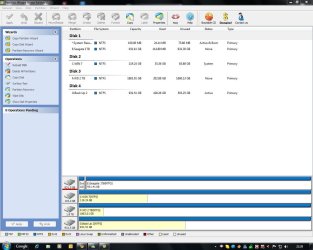
Ken and others may have a different perspective but I think your best move is to delete the SysReserved partition from DISK0 and recover the MBR into Win7.

This way you benefit from having the OS's on two separate HD's which can boot via the BIOS and remain independent to come and go as you please.

Back up your files and a Win7 Backup image so you can start over if necessary.

Use Partition Wizard bootable CD. Rightclick Sys Reserved partition>Delete, OK. You can Resize the adjacent partition to include the deleted space or make a partition space for XP at the same time, but use the booted XP CD later to Create and Format the XP partition as the partition table is slightly different.

Now rightclick Win7 partition>Modify>Set to Active, OK, Apply all steps.

Make sure Win7 HD is set to boot first in BIOS setup, after DVD drive.

Now boot Win7 DVD Repair console or Repair CD, click through to Recovery Tools list to run Startup Repair up to 3 separate times to write the MBR to Win7 now that it is marked Active.

When installing XP, unplug the WIn7 HD so that XP creates its own System Active MBR and the two remain independent booting via the BIOS.

Set your preferred OS HD to boot first (after DVD) in BIOS boot order, then boot the other HD using the F-key given for Boot Menu on the first bootup screen.

If you don't want to lose the Sys Reserved partition, then it is possible to copy it to DISK1 after Resizing Win7 to make room for it. You'd need to repair the MBR afterward using DVD.
 
Ok Greg thanks It is 1:43 in the morning here and I think i will study what you have said later today when I am more awake and see how to proceed :)

Many Thanks as always


Steve
 

My Computer

Computer Manufacturer/Model Number
Over Clockers Ultima Viper 2.80Ghz
OS
Windows 7 Ultimate 64 - OEM Service Pack 1
CPU
Intel Core i7 930 2.80Ghz Bloomfield Socket LGA 1366
Motherboard
Gigabyte GA-X58A-UD3R Intel X58 Socket 1366 DDR3
Memory
Patriot Viper 6GB 3x2GB DDR3 PC3-1200C9 1600Mhz Tri Channel
Graphics Card(s)
Asus ATI Radeon HD 5770 CuCore 1024MB GDDR5 PCI Express
Sound Card
Realtek ALC889 @ Intel 82801JB ICH10 - High Definition Audio
Monitor(s) Displays
Samsung SyncMaster 920N 19"
Screen Resolution
1280*1024
Hard Drives
1 x OCZ Vertex2 Series 120GB 2.5" SATA-II SSD
1 x Seagate Barracuda 7200.12 1TB SATA-II 32MB Cache
1 x Western Digital Caviar Green 2TB SATA-II 64 MB Cache
PSU
Corsair TX 650W ATX SLi
Case
Antec 902 Ultimate Gaming Case Black
Cooling
Prolimatech Megahalems Rev B CPU Cooler Socket 775/1156/1366
Keyboard
Microsoft Comfort Curve Keyboard
Mouse
Microsoft Optical USB
Internet Speed
ADSL24 FTTC 34.2 Mbps Down 7.1Mbps Up
Other Info
OcUK 22x DVDSATA ReWriter Black
Akasa AK-FN058 Apache Black Super Silent 120mm Fan
Printer Epson Stylus Photo R300
Scanner Canon Canoscan 8000F
Back
Top