Safe (Free) "online" places to save log-in info !

guitarfiend

Banned
VIP
Local time
7:21 PM
Messages
114
I know this sounds like somewhat of a "security" issue BUT...does anyone know if there's a safe way (free) where I can save all of my log-ins/passwords ? I've had a couple of hard drive crashes now and I'm nsick of losing all that info ! I've actually been savin all of my log-in info to a folder in my webmail.BUT,....THAT'S TEDIOUS ! AND...I tend to only update that about once a month !! :( I need something like a "social" (But,not "public") place where I can save all of of my log-in info that's safe (Other than my pc) ??????? And,if it makes any difference (In case,there's an add-on) I generally use Firefox for my browser.
 

My Computer My Computer

At a glance

windows 7 home premium 64 64 bit
Computer type
Laptop
Computer Manufacturer/Model Number
Hewlet Packard Compaq Presario cq 57-229wm
OS
windows 7 home premium 64 64 bit
Antivirus
avast
Browser
Firefox,Internet Explorer,Google Chrome,Palemoon
If you want to use LastPass browser extension to manage passwords and logins you can also use LastPass Pocket (download app to USB) and run it from there to open your encrypted LastPass file and store your logins in the portable app.

LastPass via USB | User Manual scroll down to see LastPass Pocket

Get browser extension here. (Not LastPass Universal Windows Installer) see other links on the page

Download LastPass | LastPass
 
Last edited:

My Computer My Computer

At a glance

Microsoft Windows 7 Home Premium 64-bit 7601 ...AMD C-60 APU with Radeon(tm) HD Graphics4.00 GBAMD Radeon HD 6290 Graphics
Computer type
Laptop
Computer Manufacturer/Model Number
ASUS
OS
Microsoft Windows 7 Home Premium 64-bit 7601 Multiprocessor Free Service Pack 1
CPU
AMD C-60 APU with Radeon(tm) HD Graphics
Motherboard
ASUSTeK COMPUTER INC. X501U
Memory
4.00 GB
Graphics Card(s)
AMD Radeon HD 6290 Graphics
Sound Card
(1) AMD High Definition Audio Device (2) Realtek High Defi
Screen Resolution
1366 x 768 x 32 bits (4294967296 colors) @ 60 Hz
Hard Drives
Hitachi HTS545050A7E380 SATA Disk Device
Antivirus
Comodo CIS & FW, SecureAplus App Whitelisting, Threatfire
Browser
Cyberfox 64bit, Opera 64bit, Airfox
Other Info
Spy-The-Spy, HitmanPro.Alert, Norton Connect Safe, MJRegWatcher, BitDefender TrafficLight, Voodoo Shield, Zemana AntiMalware
Callender-thank you fopr you reply.Not certain that is nwhat I'm looking for,though :)( NO...I'm NOT drunk !! He,he./Thank you,my friend.
 

My Computer My Computer

At a glance

windows 7 home premium 64 64 bit
Computer type
Laptop
Computer Manufacturer/Model Number
Hewlet Packard Compaq Presario cq 57-229wm
OS
windows 7 home premium 64 64 bit
Antivirus
avast
Browser
Firefox,Internet Explorer,Google Chrome,Palemoon
Save logins online? LastPass does that via browser extension.

EDIT: You need one master password to access them.

Back them up? LastPass Pocket does that via USB.
 

My Computer My Computer

At a glance

Microsoft Windows 7 Home Premium 64-bit 7601 ...AMD C-60 APU with Radeon(tm) HD Graphics4.00 GBAMD Radeon HD 6290 Graphics
Computer type
Laptop
Computer Manufacturer/Model Number
ASUS
OS
Microsoft Windows 7 Home Premium 64-bit 7601 Multiprocessor Free Service Pack 1
CPU
AMD C-60 APU with Radeon(tm) HD Graphics
Motherboard
ASUSTeK COMPUTER INC. X501U
Memory
4.00 GB
Graphics Card(s)
AMD Radeon HD 6290 Graphics
Sound Card
(1) AMD High Definition Audio Device (2) Realtek High Defi
Screen Resolution
1366 x 768 x 32 bits (4294967296 colors) @ 60 Hz
Hard Drives
Hitachi HTS545050A7E380 SATA Disk Device
Antivirus
Comodo CIS & FW, SecureAplus App Whitelisting, Threatfire
Browser
Cyberfox 64bit, Opera 64bit, Airfox
Other Info
Spy-The-Spy, HitmanPro.Alert, Norton Connect Safe, MJRegWatcher, BitDefender TrafficLight, Voodoo Shield, Zemana AntiMalware
KeePass is also a great password safe KeePass Password Safe - I use that for saving all my internet, banking, software and hardware passwords (and a lot more besides). OK, you have to remember one password to get into KeePass but then you can get in from any Windows PC if you do what I do and keep the password file in a DropBox folder. Also, there are variants of the program for Android & iPad/iPhone (see this page) Downloads - KeePass - I can recommend KeePass2Android which I use on an Android tablet.
 

My Computer My Computer

At a glance

Windows 7 Home Premium x64Intel P6100 2.00 GHz4 GBIntel Integrated
Computer Manufacturer/Model Number
Lenovo G560 Notebook
OS
Windows 7 Home Premium x64
CPU
Intel P6100 2.00 GHz
Motherboard
Lenovo
Memory
4 GB
Graphics Card(s)
Intel Integrated
Sound Card
Conexant Integrated
Monitor(s) Displays
Integrated
Hard Drives
250 GB WD
PSU
Lenovo
Case
N/A
Cooling
Integrated
Save logins online? LastPass does that via browser extension.

EDIT: You need one master password to access them.

Back them up? LastPass Pocket does that via USB.

Callender...thank you very much for your reply.I've downloaded lastpass.But,I'm having nothing ut problems with it.At this point,I don't even trust.Firefox tells me "Your connection is not secure"."The owner of links.t.lastpass.com has configured their website improperly. To protect your information from being stolen, Firefox has not connected to this website".

links.t.lastpass.com uses an invalid security certificate. The certificate is only valid for the following names: *.pages00.net, *.silverpop.com, *.engage.spqa1.com, *.engage0.silverpop.com, *.engage1.silverpop.com, *.engage2.silverpop.com, *.engage3.silverpop.com, *.engage4.silverpop.com, *.engage5.silverpop.com, *.engage6.silverpop.com, *.links.mkt31.net, *.links.mkt41.net, *.links.mkt51.net, *.links.mkt61.net, *.login.spqa1.com, *.login0.silverpop.com, *.login1.silverpop.com, *.login2.silverpop.com, *.login3.silverpop.com, *.login4.silverpop.com, *.login5.silverpop.com, *.login6.silverpop.com, *.marketer1.silverpop.com, *.marketer2.silverpop.com, *.marketer3.silverpop.com, *.marketer4.silverpop.com, *.pages.spqa1.com, *.pages01.net, *.pages02.net, *.pages03.net, *.pages04.net, *.pages05.net, *.pages06.net, *.recp.pages.spqa1.com, *.recp.spqa1.com, *.rm02.net, *.rm04.net, *.sc.pages01.net, *.sc.pages02.net, *.sc.pages03.net, *.sc.pages04.net, *.sc.pages05.net, *.spqa1.com, *.sc.pages06.net Error code: SSL_ERROR_BAD_CERT_DOMAIN
 

My Computer My Computer

At a glance

windows 7 home premium 64 64 bit
Computer type
Laptop
Computer Manufacturer/Model Number
Hewlet Packard Compaq Presario cq 57-229wm
OS
windows 7 home premium 64 64 bit
Antivirus
avast
Browser
Firefox,Internet Explorer,Google Chrome,Palemoon
That means that your Firefox installation has a problem. It's either not up to date or configuration is wrong.

Have a look at this:

No connection to any sites in Firefox

Check your antivirus as per this thread: Your connection is not Secure

Maybe get FEBE Extension for Firefox to create a profile backup before fully removing them fresh installing Firefox?

a problem with firefox

Before you consider any of the above report any problems found when visiting these sites:

How's My SSL?

Qualys SSL Labs - Projects / SSL Client Test

Also in Firefox enable "Menu Bar" and check for updates.

Firefox Start Page.jpg

Right click blue part of Firefox window and tick "Menu Bar"

From the drop down list under "Help" - choose "About Firefox" to check for and download updates.
 

My Computer My Computer

At a glance

Microsoft Windows 7 Home Premium 64-bit 7601 ...AMD C-60 APU with Radeon(tm) HD Graphics4.00 GBAMD Radeon HD 6290 Graphics
Computer type
Laptop
Computer Manufacturer/Model Number
ASUS
OS
Microsoft Windows 7 Home Premium 64-bit 7601 Multiprocessor Free Service Pack 1
CPU
AMD C-60 APU with Radeon(tm) HD Graphics
Motherboard
ASUSTeK COMPUTER INC. X501U
Memory
4.00 GB
Graphics Card(s)
AMD Radeon HD 6290 Graphics
Sound Card
(1) AMD High Definition Audio Device (2) Realtek High Defi
Screen Resolution
1366 x 768 x 32 bits (4294967296 colors) @ 60 Hz
Hard Drives
Hitachi HTS545050A7E380 SATA Disk Device
Antivirus
Comodo CIS & FW, SecureAplus App Whitelisting, Threatfire
Browser
Cyberfox 64bit, Opera 64bit, Airfox
Other Info
Spy-The-Spy, HitmanPro.Alert, Norton Connect Safe, MJRegWatcher, BitDefender TrafficLight, Voodoo Shield, Zemana AntiMalware
The ideas of "online" and "safe" are mutually exclusive, choose one and throw the other away. Basically, there is no safest place than your own computer put put sensitive information, specially passwords.

Many programs claim safe storage, but more often than not they don't properly secure their storage or make it too easy to crack, and even if they do, you must put your trust in them that they'll not look at your passwords. It's simply to risky to use someone's else system (marketed as "the cloud") to store your most valuable secrets.

Use a good password manager, but an entirely local one. Make sure you set a good password (or even better, a keyfile) for it. Then you can upload to some file-sharing service with confidence they'll not be able to decrypt it (assuming the software has no bugs.......) or just carry the database in a pendrive. That gives you safety, but not "online".


That means that your Firefox installation has a problem. It's either not up to date or configuration is wrong.

That's a very dangerous assumption. How do you know that it's really the case?
In the vast majority of cases, certificate errors means a security compromise or site mismanagement. The only case I would deem it as a false positive is a wrong local date, or a known browser bug.
 

My Computer My Computer

At a glance

Windows 7 Ultimate x64Intel Core i7-740QM8 GB DDR3NVIDIA GeForce 330GT
Computer type
Laptop
Computer Manufacturer/Model Number
Toshiba Sattelite A665-S6092
OS
Windows 7 Ultimate x64
CPU
Intel Core i7-740QM
Memory
8 GB DDR3
Graphics Card(s)
NVIDIA GeForce 330GT
Screen Resolution
1366x768
Hard Drives
Samsung 840 SSD 500GB
1TB USB3 external HD
Cooling
Coolermaster Notepal U3 notebook cooling pad
Internet Speed
3mbps ASDL
Antivirus
ClamWin 0.98.7
Browser
Opera 12.17 x86 (main), Firefox 38 (sec), IE11 (last resort)
That's a very dangerous assumption. How do you know that it's really the case?
In the vast majority of cases, certificate errors means a security compromise or site mismanagement. The only case I would deem it as a false positive is a wrong local date, or a known browser bug.

Because I don't get that issue on my machine at home or my machine at work.

From LastPass support:

LastPass - Why does my browser indicate that LastPass has an invalid or expired security certificate?

Why does my browser indicate that LastPass has an invalid or expired security certificate?

Most certificate warnings are caused because your PC's clock is not set correctly. Verify that your clock is set to the correct day, month, and year and retry.

If you still experience the issue, then your PC may have had its default list of certificates modified in some manner.

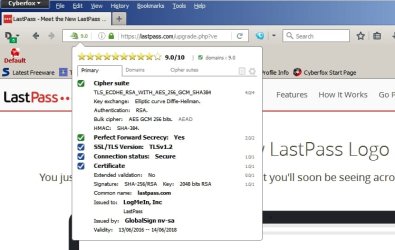
Would like to see any SSL/ Certificate problem listed as requested.

Check computer clock here:

Accurate Time

Also suggest:

Get RCC.zip from here: Index of /files

Run it and it will scan FF Certificate Store.

From my machine - no problem with certificate.

LastPass 1.jpg

LastPass 2.jpg

LastPass - My Account.jpg
 
Last edited:

My Computer My Computer

At a glance

Microsoft Windows 7 Home Premium 64-bit 7601 ...AMD C-60 APU with Radeon(tm) HD Graphics4.00 GBAMD Radeon HD 6290 Graphics
Computer type
Laptop
Computer Manufacturer/Model Number
ASUS
OS
Microsoft Windows 7 Home Premium 64-bit 7601 Multiprocessor Free Service Pack 1
CPU
AMD C-60 APU with Radeon(tm) HD Graphics
Motherboard
ASUSTeK COMPUTER INC. X501U
Memory
4.00 GB
Graphics Card(s)
AMD Radeon HD 6290 Graphics
Sound Card
(1) AMD High Definition Audio Device (2) Realtek High Defi
Screen Resolution
1366 x 768 x 32 bits (4294967296 colors) @ 60 Hz
Hard Drives
Hitachi HTS545050A7E380 SATA Disk Device
Antivirus
Comodo CIS & FW, SecureAplus App Whitelisting, Threatfire
Browser
Cyberfox 64bit, Opera 64bit, Airfox
Other Info
Spy-The-Spy, HitmanPro.Alert, Norton Connect Safe, MJRegWatcher, BitDefender TrafficLight, Voodoo Shield, Zemana AntiMalware
Because I don't get that issue on my machine at home or my machine at work.

That only means that the connection has been safely established from YOUR computer, not necesarily the OP's. The "works for me" catchphrase is nice and all, but bad to blindly follow specially in case of security, even more concerning a site that you want to give all your passwords to (which is of course a terrible idea in itself).

Seeing the exact error would allow us to determine the real cause of the warning.
 

My Computer My Computer

At a glance

Windows 7 Ultimate x64Intel Core i7-740QM8 GB DDR3NVIDIA GeForce 330GT
Computer type
Laptop
Computer Manufacturer/Model Number
Toshiba Sattelite A665-S6092
OS
Windows 7 Ultimate x64
CPU
Intel Core i7-740QM
Memory
8 GB DDR3
Graphics Card(s)
NVIDIA GeForce 330GT
Screen Resolution
1366x768
Hard Drives
Samsung 840 SSD 500GB
1TB USB3 external HD
Cooling
Coolermaster Notepal U3 notebook cooling pad
Internet Speed
3mbps ASDL
Antivirus
ClamWin 0.98.7
Browser
Opera 12.17 x86 (main), Firefox 38 (sec), IE11 (last resort)
LastPass data is held and decrypted locally. The only password at risk is the master password used to access logins but it's useless without the local file.

LastPass - What encryption is being used?

Agree on the need to see the exact error.
 

My Computer My Computer

At a glance

Microsoft Windows 7 Home Premium 64-bit 7601 ...AMD C-60 APU with Radeon(tm) HD Graphics4.00 GBAMD Radeon HD 6290 Graphics
Computer type
Laptop
Computer Manufacturer/Model Number
ASUS
OS
Microsoft Windows 7 Home Premium 64-bit 7601 Multiprocessor Free Service Pack 1
CPU
AMD C-60 APU with Radeon(tm) HD Graphics
Motherboard
ASUSTeK COMPUTER INC. X501U
Memory
4.00 GB
Graphics Card(s)
AMD Radeon HD 6290 Graphics
Sound Card
(1) AMD High Definition Audio Device (2) Realtek High Defi
Screen Resolution
1366 x 768 x 32 bits (4294967296 colors) @ 60 Hz
Hard Drives
Hitachi HTS545050A7E380 SATA Disk Device
Antivirus
Comodo CIS & FW, SecureAplus App Whitelisting, Threatfire
Browser
Cyberfox 64bit, Opera 64bit, Airfox
Other Info
Spy-The-Spy, HitmanPro.Alert, Norton Connect Safe, MJRegWatcher, BitDefender TrafficLight, Voodoo Shield, Zemana AntiMalware
LastPass data is held and decrypted locally. The only password at risk is the master password used to access logins but it's useless without the local file.

What they didn't say is that the encryption they're using is not strong enough, and there are vulnerabilities already detected in the password handling.
Look at this paper that took LastPass as a test subject: http://www.cs.uccs.edu/~cyue/papers/ASEScience13.pdf

It's a few years old, and maybe it's already fixed, but how do we can know that? Or that they didn't add any new hole?

Another issue is the master password you mention. Assuming perfect software, the security of the whole thing relies on the safety of the master password. Using a weak one means that brute forcing it will be trivial and anyone can ultimately reveal your passwords.

Due to that, and the general unreliability of anything "cloud", I'm only suggesting software that does NOT interact with any servers directly (at least as an option) and specially in the case of passwords managers must be open source, so we can verify what it really does. And having serious research to back that up is an important part in my choice.
 

My Computer My Computer

At a glance

Windows 7 Ultimate x64Intel Core i7-740QM8 GB DDR3NVIDIA GeForce 330GT
Computer type
Laptop
Computer Manufacturer/Model Number
Toshiba Sattelite A665-S6092
OS
Windows 7 Ultimate x64
CPU
Intel Core i7-740QM
Memory
8 GB DDR3
Graphics Card(s)
NVIDIA GeForce 330GT
Screen Resolution
1366x768
Hard Drives
Samsung 840 SSD 500GB
1TB USB3 external HD
Cooling
Coolermaster Notepal U3 notebook cooling pad
Internet Speed
3mbps ASDL
Antivirus
ClamWin 0.98.7
Browser
Opera 12.17 x86 (main), Firefox 38 (sec), IE11 (last resort)
I would not store anything like that in the cloud or let any program handle it.

If you can`t remember your passwords in your head, then you should right them down along with what they go with.
 

My Computer My Computer

At a glance

Windows 10 Pro x64Intel Core i7 6700KGSkill TridentZ RGB 16GB 3600 16-16-16-36EVGA GTX 980 Ti SC x2
Computer type
PC/Desktop
Computer Manufacturer/Model Number
Skylake Special #666
OS
Windows 10 Pro x64
CPU
Intel Core i7 6700K
Motherboard
Asus Sabertooth Z170 Mark 1
Memory
GSkill TridentZ RGB 16GB 3600 16-16-16-36
Graphics Card(s)
EVGA GTX 980 Ti SC x2
Sound Card
Realtek High Definition
Monitor(s) Displays
AOC G2460PG
Screen Resolution
1920 x 1080 144Hz
Hard Drives
Samsung 860 Pro 256GB, Seagate Barracuda 4TB x2
PSU
EVGA 1000 P2, EVGA White Custom Braided Cables
Case
Corsair Vengeance C70 Gunmetal Black
Cooling
Corsair H100i v2, Corsair ML120 x2, Thermal Grizzly Kryonaut
Keyboard
Logitech G910 Orion Spectrum
Mouse
Logitech G700s
Internet Speed
Verizon Fios Quantum Gateway 75/75
Antivirus
Windows Defender, Malwarebytes Free 3.8.3
Browser
Chrome
Other Info
Corsair SP120 x4, LG Blu-ray Drive, Durabrand HT-395 100 Watt Dolby Digital Amp, Corsair H2100 Wireless 7.1 Headset
Okay here's an alternative view:

Bad news! LastPass breached. Good news! You should be OK… – Naked Security

What about getting back to the original question?

I know this sounds like somewhat of a "security" issue BUT...does anyone know if there's a safe way (free) where I can save all of my log-ins/passwords ? I've had a couple of hard drive crashes now and I'm nsick of losing all that info ! I've actually been savin all of my log-in info to a folder in my webmail.BUT,....THAT'S TEDIOUS ! AND...I tend to only update that about once a month !! :( I need something like a "social" (But,not "public") place where I can save all of of my log-in info that's safe (Other than my pc) ??????? And,if it makes any difference (In case,there's an add-on) I generally use Firefox for my browser.

Saving passwords into a webmail folder indeed.

I would not store anything like that in the cloud or let any program handle it.

If you can`t remember your passwords in your head, then you should right them down along with what they go with.

It's lucky that I'm not some sort of hacker of identity thief considering the number of work colleagues and relatives passwords that I have seen written down. Never mind about the number of passwords that are stored by their browser's password manager.

I use a password manager because I can use different complex passwords for many (unimportant) sites without needing to remember them or write them down or type them into the password field. I certainly do not use a password manager for anything important like banking logins or email logins. Those stay in my head. If I want to access my bank account online - login requires me to place my card into a portable card reader and enter my PIN number. Then the card reader generates a unique code on it's screen that needs to be typed into the browser in order to continue. There's no way it can be hacked.

I'm comfortable with using LastPass. It meets my needs for unimportant logins.
 

My Computer My Computer

At a glance

Microsoft Windows 7 Home Premium 64-bit 7601 ...AMD C-60 APU with Radeon(tm) HD Graphics4.00 GBAMD Radeon HD 6290 Graphics
Computer type
Laptop
Computer Manufacturer/Model Number
ASUS
OS
Microsoft Windows 7 Home Premium 64-bit 7601 Multiprocessor Free Service Pack 1
CPU
AMD C-60 APU with Radeon(tm) HD Graphics
Motherboard
ASUSTeK COMPUTER INC. X501U
Memory
4.00 GB
Graphics Card(s)
AMD Radeon HD 6290 Graphics
Sound Card
(1) AMD High Definition Audio Device (2) Realtek High Defi
Screen Resolution
1366 x 768 x 32 bits (4294967296 colors) @ 60 Hz
Hard Drives
Hitachi HTS545050A7E380 SATA Disk Device
Antivirus
Comodo CIS & FW, SecureAplus App Whitelisting, Threatfire
Browser
Cyberfox 64bit, Opera 64bit, Airfox
Other Info
Spy-The-Spy, HitmanPro.Alert, Norton Connect Safe, MJRegWatcher, BitDefender TrafficLight, Voodoo Shield, Zemana AntiMalware
Problem with storing passwords in your head is that human brains are much weaker for storing random things, which happen to be excellent passwords, but excel in remembering patterns and familiar things, which make very predictable passwords.

The more important a login is, the more important is to use a password manager, for this very reason. For example, can you remember a password like this?
Code:
BF`]C]!zGv"u0-Ky{a.0
And even then, can you create it? Most people I know would say "no". Passwords managers make both of those trivial. And this makes them so important for vital accounts. I would use them for my main email, bank account and a few more, but maybe go without one for unimportant things like forums. But since I already use it, there is no reason not to use it everywhere :p

Of course, all of this refers to local password managers, where the data remains with you under your control. Uploading that to internet is of course an immense risk.
 

My Computer My Computer

At a glance

Windows 7 Ultimate x64Intel Core i7-740QM8 GB DDR3NVIDIA GeForce 330GT
Computer type
Laptop
Computer Manufacturer/Model Number
Toshiba Sattelite A665-S6092
OS
Windows 7 Ultimate x64
CPU
Intel Core i7-740QM
Memory
8 GB DDR3
Graphics Card(s)
NVIDIA GeForce 330GT
Screen Resolution
1366x768
Hard Drives
Samsung 840 SSD 500GB
1TB USB3 external HD
Cooling
Coolermaster Notepal U3 notebook cooling pad
Internet Speed
3mbps ASDL
Antivirus
ClamWin 0.98.7
Browser
Opera 12.17 x86 (main), Firefox 38 (sec), IE11 (last resort)
Back
Top