
You are using an out of date browser. It may not display this or other websites correctly.
You should upgrade or use an alternative browser.
You should upgrade or use an alternative browser.
Safe Mode
- Thread starter JeffW
- Start date

zigzag3143
New member
- Local time
- 8:08 AM
- Messages
- 27,140
Hi,
An application I tried to install would not install because it said I might be in safe mode.
HOw do I check this? I am logged in as administrator.
Thanks
Safe mode (F8) will show a list of files as it is logging on. if it boots normally chances its not in safe mode. what app were you trying to install?
Ken
My Computer
- Computer Manufacturer/Model Number
- HP Pavillion dv-7 1005 Tx
- OS
- Win 8 Release candidate 8400
- Memory
- 4 gigs
- Graphics Card(s)
- Nvidia 9600M
- Sound Card
- HD built-in
- Monitor(s) Displays
- 17" Wxga
- Screen Resolution
- 1440x900
- Cooling
- none
- Internet Speed
- 45Mb down 5Mb up

Hello JeffW, welcome to Seven Forums!
Does it say safe mode in the 4 corners on the monitor? If not, then it's not in safe mode; you have to boot into safe mode and you'd know you'd done that.
Does it say safe mode in the 4 corners on the monitor? If not, then it's not in safe mode; you have to boot into safe mode and you'd know you'd done that.
My Computer
- Computer Manufacturer/Model Number
- * BFK Customs *
- OS
- W 7 64-bit Ultimate
- CPU
- Intel Q9550 Yorkfield
- Motherboard
- ASUS P5Q Pro
- Memory
- 8GB Dominator 8500C5D
- Graphics Card(s)
- ATI : XFX 5870
- Sound Card
- Realtek HD Audio 7-1
- Monitor(s) Displays
- 1x 47" LCD HDMI & 3x 26" LCD HDMI
- Screen Resolution
- 1920x1080P & 1920x1200
- Hard Drives
- 1x 80GB Intel X25-M G2 SSD : 1x 500GB & 1x 640GB WD Caviar Black(s)
- PSU
- Corsair 620HX
- Case
- Cooler Master RC-690
- Cooling
- Tuniq Tower 120, 2x 140mm and 3x 120mm case fans
- Keyboard
- Microsoft 500
- Mouse
- Razer Diamondback 3G
- Internet Speed
- 14 Mb/s
- Other Info
- 1x Koutech 3Gb/s SATA HDD Hot Swap Rack
It doesnt say safe mode in the corners. So I guess I am regularly logged on.
I was trying to install this..
Download the Microsoft Web Platform
I typed: %temp%\webpi_launcher.txt
and got the error message:
Method '_wspawnl' failed. Failure: 0x643
Failed to install the Web Platform Installer MSI. Unable to launch Web Platform Installer.
Does that help"?
I was trying to install this..
Download the Microsoft Web Platform
I typed: %temp%\webpi_launcher.txt
and got the error message:
Method '_wspawnl' failed. Failure: 0x643
Failed to install the Web Platform Installer MSI. Unable to launch Web Platform Installer.
Does that help"?
My Computer
- Computer Manufacturer/Model Number
- Lenovo
- OS
- Windows 7
- CPU
- i7 Core
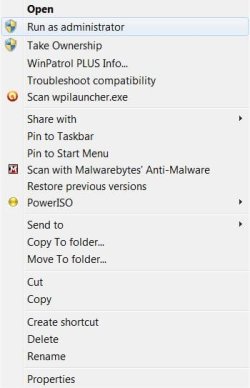
Try r clicking the installer and select "Run as Administrator" to see what happens then.
My Computer
- Computer Manufacturer/Model Number
- * BFK Customs *
- OS
- W 7 64-bit Ultimate
- CPU
- Intel Q9550 Yorkfield
- Motherboard
- ASUS P5Q Pro
- Memory
- 8GB Dominator 8500C5D
- Graphics Card(s)
- ATI : XFX 5870
- Sound Card
- Realtek HD Audio 7-1
- Monitor(s) Displays
- 1x 47" LCD HDMI & 3x 26" LCD HDMI
- Screen Resolution
- 1920x1080P & 1920x1200
- Hard Drives
- 1x 80GB Intel X25-M G2 SSD : 1x 500GB & 1x 640GB WD Caviar Black(s)
- PSU
- Corsair 620HX
- Case
- Cooler Master RC-690
- Cooling
- Tuniq Tower 120, 2x 140mm and 3x 120mm case fans
- Keyboard
- Microsoft 500
- Mouse
- Razer Diamondback 3G
- Internet Speed
- 14 Mb/s
- Other Info
- 1x Koutech 3Gb/s SATA HDD Hot Swap Rack
For some reason, right clicking does not give that option.
I am logged on as an administrator.
 It is a windows installer package, if that helps.
I am logged on as an administrator.
Last edited by a moderator:
My Computer
- Computer Manufacturer/Model Number
- Lenovo
- OS
- Windows 7
- CPU
- i7 Core
I just d'l that same prog ( from the link you posted) to my desktop and that snip came from the installer when I r clicked on it.
My Computer
- Computer Manufacturer/Model Number
- * BFK Customs *
- OS
- W 7 64-bit Ultimate
- CPU
- Intel Q9550 Yorkfield
- Motherboard
- ASUS P5Q Pro
- Memory
- 8GB Dominator 8500C5D
- Graphics Card(s)
- ATI : XFX 5870
- Sound Card
- Realtek HD Audio 7-1
- Monitor(s) Displays
- 1x 47" LCD HDMI & 3x 26" LCD HDMI
- Screen Resolution
- 1920x1080P & 1920x1200
- Hard Drives
- 1x 80GB Intel X25-M G2 SSD : 1x 500GB & 1x 640GB WD Caviar Black(s)
- PSU
- Corsair 620HX
- Case
- Cooler Master RC-690
- Cooling
- Tuniq Tower 120, 2x 140mm and 3x 120mm case fans
- Keyboard
- Microsoft 500
- Mouse
- Razer Diamondback 3G
- Internet Speed
- 14 Mb/s
- Other Info
- 1x Koutech 3Gb/s SATA HDD Hot Swap Rack
I tried running as the administrator - for the "wpilauncher" but that gave me the same error.
COuld there be a problem with my computer?
Is there a way to check if I have administrator privaledges on my computer?
COuld there be a problem with my computer?
Is there a way to check if I have administrator privaledges on my computer?
Last edited by a moderator:
My Computer
- Computer Manufacturer/Model Number
- Lenovo
- OS
- Windows 7
- CPU
- i7 Core
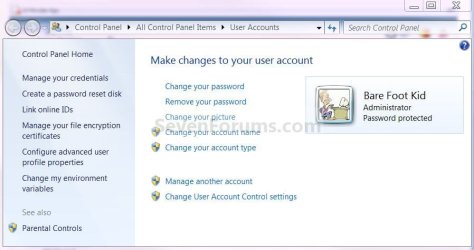
Yes in the start menu click your user picture at the very top right and you'll get a window like this.
My Computer
- Computer Manufacturer/Model Number
- * BFK Customs *
- OS
- W 7 64-bit Ultimate
- CPU
- Intel Q9550 Yorkfield
- Motherboard
- ASUS P5Q Pro
- Memory
- 8GB Dominator 8500C5D
- Graphics Card(s)
- ATI : XFX 5870
- Sound Card
- Realtek HD Audio 7-1
- Monitor(s) Displays
- 1x 47" LCD HDMI & 3x 26" LCD HDMI
- Screen Resolution
- 1920x1080P & 1920x1200
- Hard Drives
- 1x 80GB Intel X25-M G2 SSD : 1x 500GB & 1x 640GB WD Caviar Black(s)
- PSU
- Corsair 620HX
- Case
- Cooler Master RC-690
- Cooling
- Tuniq Tower 120, 2x 140mm and 3x 120mm case fans
- Keyboard
- Microsoft 500
- Mouse
- Razer Diamondback 3G
- Internet Speed
- 14 Mb/s
- Other Info
- 1x Koutech 3Gb/s SATA HDD Hot Swap Rack
If yours says "Administrator" on it.
My Computer
- Computer Manufacturer/Model Number
- * BFK Customs *
- OS
- W 7 64-bit Ultimate
- CPU
- Intel Q9550 Yorkfield
- Motherboard
- ASUS P5Q Pro
- Memory
- 8GB Dominator 8500C5D
- Graphics Card(s)
- ATI : XFX 5870
- Sound Card
- Realtek HD Audio 7-1
- Monitor(s) Displays
- 1x 47" LCD HDMI & 3x 26" LCD HDMI
- Screen Resolution
- 1920x1080P & 1920x1200
- Hard Drives
- 1x 80GB Intel X25-M G2 SSD : 1x 500GB & 1x 640GB WD Caviar Black(s)
- PSU
- Corsair 620HX
- Case
- Cooler Master RC-690
- Cooling
- Tuniq Tower 120, 2x 140mm and 3x 120mm case fans
- Keyboard
- Microsoft 500
- Mouse
- Razer Diamondback 3G
- Internet Speed
- 14 Mb/s
- Other Info
- 1x Koutech 3Gb/s SATA HDD Hot Swap Rack