Safe Mode

Puddin Man

New member
Local time
4:10 PM
Messages
63
I've installed Win7 HP 64 on new hardware. Had hoped to add MSE for security, but a validation problem prevented it.

I had to install Avast to get on the net safely. I think I now need to boot safe mode, disable Avast resident shield, and install MSE.

I cant get Safe Mode. I tap f8 as the bios runs and get the bios boot order screen, then Win7 boots normally. I've tried several times.

If F8 doesn't work, is there another way to enter Safe Mode?

Thx,
P
 

My Computer

Computer Manufacturer/Model Number
White Box
OS
Win7 Home Prem. 64 OEM
CPU
Intel i5-650
Motherboard
Asus P7H55D-M EVO
Memory
G. Skill Ripjaws 4gb
Graphics Card(s)
<None>
Sound Card
On-board Realtec
Monitor(s) Displays
Asus 10" LCD
Hard Drives
2 Samsung Spin-point 500 gb
PSU
Corsair 400w
Case
Antec
Cooling
5 fans + Std Intel cpu
I've installed Win7 HP 64 on new hardware. Had hoped to add MSE for security, but a validation problem prevented it.

I had to install Avast to get on the net safely. I think I now need to boot safe mode, disable Avast resident shield, and install MSE.

I cant get Safe Mode. I tap f8 as the bios runs and get the bios boot order screen, then Win7 boots normally. I've tried several times.

If F8 doesn't work, is there another way to enter Safe Mode?

Thx,
P

F8 to enter safe mode is std on most computers, if it is not for you either it isnt enabled in BIOS, or there is another key combo.

Check BIOS, and find out what the key combo is for your computer

Ke
 

My Computer

Computer Manufacturer/Model Number
HP Pavillion dv-7 1005 Tx
OS
Win 8 Release candidate 8400
CPU
[email protected]
Memory
4 gigs
Graphics Card(s)
Nvidia 9600M
Sound Card
HD built-in
Monitor(s) Displays
17" Wxga
Screen Resolution
1440x900
Cooling
none
Internet Speed
45Mb down 5Mb up
I've installed Win7 HP 64 on new hardware. Had hoped to add MSE for security, but a validation problem prevented it.

I had to install Avast to get on the net safely. I think I now need to boot safe mode, disable Avast resident shield, and install MSE.

I cant get Safe Mode. I tap f8 as the bios runs and get the bios boot order screen, then Win7 boots normally. I've tried several times.

If F8 doesn't work, is there another way to enter Safe Mode?

Thx,
P

Hi.
After I installed my Win7 I was already hooked up to the internet via cable modem. It only takes a second to validate Win7 while online. I then immediately downloaded MS Secudirty Essentials and did the updates.

I think you will be safe doing it that way. If you feel something may happen you can do a full scan with MSE.
 

My Computer

Computer type
PC/Desktop
Computer Manufacturer/Model Number
Self Built
OS
Windows 10 Pro
CPU
Intel i5
Motherboard
I have a fatherboard
Memory
I'm old and lost a few chips
Graphics Card(s)
Yup
Sound Card
Yup
Monitor(s) Displays
Samsung 32" UHD
Screen Resolution
3840 x 2160
Hard Drives
Samsung 860 EVO drives
PSU
450 Watt and some fans that blow
Case
Small tower
Cooling
Yes I am cool. lol
Keyboard
Who needs a keyboard?
Mouse
Logitech Laser G7 wireless
Internet Speed
Zippy fast UP and DOWN
Antivirus
I got a shot
Browser
The new Improved EDGE 2020
A desperate way to get into safe mode is to hold down the Power switch till your computer shuts down. Now, when you start the computer, you should get into a black screen saying "windows did not shut down properly...." and present you with several options including safe mode.

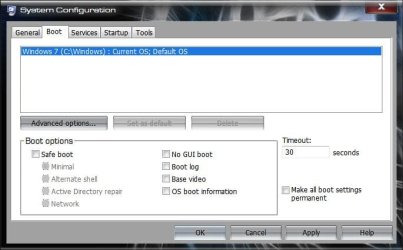
Another way is to enable safe mode option at boot is in MSCONFIG->Boot options.

And what exactly do you mean by "validation problem"? I hope you are running a legit windows copy.
 

My Computer

Computer Manufacturer/Model Number
Too many to describe...
OS
Windows 7 x64 pro/ Windows 7 x86 Pro/ XP SP3 x86
If as Bill2 says, you don't have deeper issues, to just get into safe mode when F8 won't work:

Start> Search Box> Type msconfig

Run.jpg

In System Configuration window. Click on the Boot tab

Boot.jpg

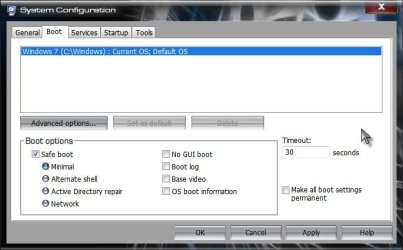
Check the option titled Safe Mode. Minimal Safe Mode is the default Safe Mode option.

SafeBoot.jpg

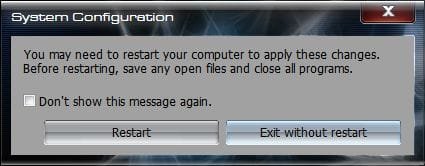
Click the OK button, you will be asked if you want to restart

Restart.jpg

Click the Restart button

After you are done, you can repeat and unclick the safe boot if necessary.

A Guy
 

My Computer

Computer type
PC/Desktop
OS
Windows 10 Home x64
CPU
INTEL Core i5-750 Quad-Core 3.37GHz
Motherboard
ASUS P7P55D
Memory
HyperX Fury Black Series 8GB (2 x 4GB) 1866Mhz
Graphics Card(s)
EVGA GeForce GTX 750 Superclocked 1GB 128-Bit GDDR5
Monitor(s) Displays
LG 32MA68HY 32" IPS
Screen Resolution
1920 x 1080
Hard Drives
Samsung 840 Evo 120GB, SEAGATE 500GB Barracuda® 7200.12, SATA 3 Gb/s, 7200 RPM, 16MB cache
PSU
ANTEC TruePower New TP-550, 80 PLUS, 550W
Case
ANTEC Three Hundred Illusion
Cooling
COOLER MASTER Hyper 212 Plus, 4 x 120mm 1 x 140mm Noctua's
Internet Speed
85 + Mbps
Antivirus
Avast
Browser
Vivaldi
...

Another way is to enable safe mode option at boot is in MSCONFIG->Boot options.

...

This works. I'll have to use MSCONFIG: F8 is evidently a no-go with my bios.

Thx,
P
 

My Computer

Computer Manufacturer/Model Number
White Box
OS
Win7 Home Prem. 64 OEM
CPU
Intel i5-650
Motherboard
Asus P7H55D-M EVO
Memory
G. Skill Ripjaws 4gb
Graphics Card(s)
<None>
Sound Card
On-board Realtec
Monitor(s) Displays
Asus 10" LCD
Hard Drives
2 Samsung Spin-point 500 gb
PSU
Corsair 400w
Case
Antec
Cooling
5 fans + Std Intel cpu
I've installed Win7 HP 64 on new hardware. Had hoped to add MSE for security, but a validation problem prevented it.

I had to install Avast to get on the net safely. I think I now need to boot safe mode, disable Avast resident shield, and install MSE.

I cant get Safe Mode. I tap f8 as the bios runs and get the bios boot order screen, then Win7 boots normally. I've tried several times.

If F8 doesn't work, is there another way to enter Safe Mode?

Thx,
P

I had the same problem trying to Safe Mode for another reason - my PC would boot normally. I had to choose "Safe Mode with Networking" option to get my PC to boot into Safe Mode.

Rgds
Rod
 

My Computer

Computer Manufacturer/Model Number
System Model: HP d530 CMT(PD203PA)
OS
Dual boot Win7 Home Premium and Vista Home Premium SP2
CPU
Intel(R) Pentium(R) 4 CPU 3.00GHz (2 CPUs), ~3.0GHz
Motherboard
System Model: HP d530 CMT(PD203PA)
Memory
4GB
Graphics Card(s)
Radeon X1550 Dual PCI (NOT PCI Express!)
Sound Card
C Media PCI
Monitor(s) Displays
ASUS VW192T
Screen Resolution
1440x900
Hard Drives
1x750GB Partioned into C Drive 500GB Vista and W Drive 250GB Win7

1x500GB D drive for storage
1x1GB Removable USB Drive
PSU
?
Case
Tower?
Cooling
none
Keyboard
Microsoft Wireless 1000
Mouse
Microsoft Wireless Laser 5000
Internet Speed
DSL
Other Info
Wacom Bamboo Tablet
HP C4280 Printer/Scanner/Copier
Back
Top