Safe removal of Vista partition on a Dual Boot.

Greg, I clearly said I wasn't complaining and that I am grateful for your support. I don't expect quick responses, I just made a value judgement as to how to go forward. And I thought you California guys were supposed to be laid back and us Brits uptight! :)

I'll report back shortly.
 

My Computer My Computer

At a glance

Windows 7 Professional 64 bit2.13 Ghz Intel6 GB
Computer type
PC/Desktop
Computer Manufacturer/Model Number
Dell
OS
Windows 7 Professional 64 bit
CPU
2.13 Ghz Intel
Memory
6 GB
Hard Drives
300 GB
Antivirus
Microsoft Essentials
Browser
Chrome
OK, I burned a fresh copy of PW to a CD and booted it. I expected to be able to do the necessary from the "dos" screen but instead it ran through some settings very quickly, without giving me the option to input, and then rebooted in the normal way.

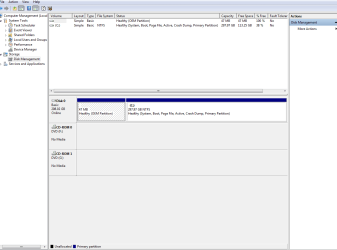
So I went through to the Win7 desktop and completed the procedure from there on PW. The system rebooted to apply the changes are the snip shows it was successful.

However, I still have to make a choice between Win7 and Vista when I boot and I don't have as much free space as I thought I would have. I'll look into that tomorrow but could you help me with resolving the boot issue please?

Regards.

Paul
 

Attachments

  • Capture2.PNG
    Capture2.PNG
    21.5 KB · Views: 3

My Computer My Computer

At a glance

Windows 7 Professional 64 bit2.13 Ghz Intel6 GB
Computer type
PC/Desktop
Computer Manufacturer/Model Number
Dell
OS
Windows 7 Professional 64 bit
CPU
2.13 Ghz Intel
Memory
6 GB
Hard Drives
300 GB
Antivirus
Microsoft Essentials
Browser
Chrome
I have never had Partition Wizard do anything without me telling it to, even then you have to click ok for it to proceed so...

Yes it looks like you only have 113 GB free of 298. Did you format the entire 298 GBs ? Maybe you have a windows.old folder.

You can install EasyBCD ( Free ) to get rid of the Vista Boot choice.

http://neosmart.net/EasyBCD/

Or delete it from the boot tab using msconfig.

Click start, then type msconfig in the search box.
 
Last edited:

My Computer My Computer

At a glance

Windows 10 Pro x64Intel Core i7 6700KGSkill TridentZ RGB 16GB 3600 16-16-16-36EVGA GTX 980 Ti SC x2
Computer type
PC/Desktop
Computer Manufacturer/Model Number
Skylake Special #666
OS
Windows 10 Pro x64
CPU
Intel Core i7 6700K
Motherboard
Asus Sabertooth Z170 Mark 1
Memory
GSkill TridentZ RGB 16GB 3600 16-16-16-36
Graphics Card(s)
EVGA GTX 980 Ti SC x2
Sound Card
Realtek High Definition
Monitor(s) Displays
AOC G2460PG
Screen Resolution
1920 x 1080 144Hz
Hard Drives
Samsung 860 Pro 256GB, Seagate Barracuda 4TB x2
PSU
EVGA 1000 P2, EVGA White Custom Braided Cables
Case
Corsair Vengeance C70 Gunmetal Black
Cooling
Corsair H100i v2, Corsair ML120 x2, Thermal Grizzly Kryonaut
Keyboard
Logitech G910 Orion Spectrum
Mouse
Logitech G700s
Internet Speed
Verizon Fios Quantum Gateway 75/75
Antivirus
Windows Defender, Malwarebytes Free 3.8.3
Browser
Chrome
Other Info
Corsair SP120 x4, LG Blu-ray Drive, Durabrand HT-395 100 Watt Dolby Digital Amp, Corsair H2100 Wireless 7.1 Headset
Thanks guys.
 

My Computer My Computer

At a glance

Windows 7 Professional 64 bit2.13 Ghz Intel6 GB
Computer type
PC/Desktop
Computer Manufacturer/Model Number
Dell
OS
Windows 7 Professional 64 bit
CPU
2.13 Ghz Intel
Memory
6 GB
Hard Drives
300 GB
Antivirus
Microsoft Essentials
Browser
Chrome
Back
Top