"Safely remove" drive before hibernation?

Alonzo Poodle

New member
Member
Local time
10:37 AM
Messages
21
Do one have to "safely remove" (with that icon in the system tray) a drive (e.g. an external USB hdd) before hibernation? Or can one plug the plug off when / while the computer / Notebook hibernates?
 

My Computer My Computer

Computer type
Laptop
OS
Windows 7 Home Premium 64-bit SP1
It would be very smart to, it may show up as unallocated one day ;)

You should only be hooking up an external when you`re using it, there is no reason to have it hooked up any other time.
 

My Computer My Computer

Computer type
PC/Desktop
Computer Manufacturer/Model Number
Skylake Special #666
OS
Windows 10 Pro x64
CPU
Intel Core i7 6700K
Motherboard
Asus Sabertooth Z170 Mark 1
Memory
GSkill TridentZ RGB 16GB 3600 16-16-16-36
Graphics Card(s)
EVGA GTX 980 Ti SC x2
Sound Card
Realtek High Definition
Monitor(s) Displays
AOC G2460PG
Screen Resolution
1920 x 1080 144Hz
Hard Drives
Samsung 860 Pro 256GB, Seagate Barracuda 4TB x2
PSU
EVGA 1000 P2, EVGA White Custom Braided Cables
Case
Corsair Vengeance C70 Gunmetal Black
Cooling
Corsair H100i v2, Corsair ML120 x2, Thermal Grizzly Kryonaut
Keyboard
Logitech G910 Orion Spectrum
Mouse
Logitech G700s
Internet Speed
Verizon Fios Quantum Gateway 75/75
Antivirus
Windows Defender, Malwarebytes Free 3.8.3
Browser
Chrome
Other Info
Corsair SP120 x4, LG Blu-ray Drive, Durabrand HT-395 100 Watt Dolby Digital Amp, Corsair H2100 Wireless 7.1 Headset
Hi,
I usually just shutdown to connect and disconnect external hdd's in an enclosure
About the safest way in win-7 there is.
Flash drives I'll use safe to remove option.
 

My Computer My Computer

Computer type
PC/Desktop
Computer Manufacturer/Model Number
Custom assembled by me :}
OS
Win-7-Pro64bit 7-H-Prem-64bit
CPU
i7-5930K 2nd i9-9940x both water blocked VRM's too
Motherboard
ASUS SABERTOOTH X99 2nd ASUS x299 Apex
Memory
Trident-z 3200C14 2nd Trident-z 3600C16
Graphics Card(s)
EVGA 1080ti ftw3 2nd Titan Xp both water blocked
Sound Card
Built-in Realtek
Monitor(s) Displays
1-AOC G2460PG 24"G-Sync 144Hz/ 2nd 1-ASUS VG248QE 24" 144Hz
Screen Resolution
1920 x 1080 144Hz
Hard Drives
2-Samsung M.2 Evo & Evo Plus
2-Samsung 850 EVO 500GB SSD's/ 3-2.5 W.D. Black 1tb-&3-1tb/3-3.5 WD Black 1tb hdd's
PSU
EVGA SuperNOVA 1000-P2 2nd 1200-P2
Case
2-Corsair Obsidian Series 450D Black ATX Mid Tower
Cooling
Custom water loops
Keyboard
Logitech G710+/ 2nd Logitech G910
Mouse
2-RedDragon M901 Perdition 16400 dpi Gaming mouse = wired
Internet Speed
Comcast Ping 19ms 89.31mbps download speed 6.12mbps upload
Antivirus
Malwarebytes Pro/ Superantispyware Pro
Browser
FireFox & Pale moon
Other Info
2nd ASUS X299 Apex/Intel i9-9940x with Custom water loop/7H-Prem-x64/Corsair 450D case/Ram Trident-z 3600C16 4x8gb / Samsung970Evo plus 500gb SSD/Dual ssd EZ swap evo/PSU EVGA SuperNova 1200w-P2 80+Platinum/GPU Titan Xp /8-ML-140 on push-pull on 2-280GTX rads
I agree with AddRAM

When a computer goes into hibernation the contents of RAM is saved to disk. This includes portions of the disk that may be in the file cache. It is critical that this cached copy remains in sync with the data on the drive or results are unpredictable, but generally unpleasant. With a local disk it is difficult to be otherwise. Normally Windows will flush the cache of removable drives before hibernation. The problem is that sometimes removable drives do not get recognized as such and then you have a potentially serious problem. If you use the safe removal procedure the cache will be flushed properly and no problems should occur.
 

My Computer My Computer

Computer type
PC/Desktop
Computer Manufacturer/Model Number
HP
OS
Windows 7 Pro 64 bit
CPU
Xeon W3520
Memory
8 GB
Graphics Card(s)
Nvidia Geforce 210
Hear! Hear!

I agree with AddRAM & for precisely the reason that LMiller7 has described!

(I can't say I always practice what I preach though, I've often done what ThrashZone suggests but it's a "BIG FAT do it @ your own risk scenario. Unwise if you have important data stored on it - and what else, pray tell, would one have on such a drive? Hmm..) :sarc: ....Now that's a real thinker!
 

My Computer My Computer

Computer Manufacturer/Model Number
Custom self build - Desktop
OS
MS Windows 7 Home Premium SP1 64-bit (Family Pack Lic.) Upgrade
CPU
AMD Phenom II X6: Black Ed 1090T - AM3 / 3.2GHz / 8MB
Motherboard
Biostar TA790XE3
Memory
2 dual ch sets OCZ DDR3 PC3-10666 Platinum 1333MHz 8GB total
Graphics Card(s)
Onboard
Sound Card
Onboard 5.1 channel HD
Monitor(s) Displays
SyncMaster "Legal-sized" LCD (rotatable)
Screen Resolution
unknown (8.5"x15")? pixels are not known
Hard Drives
HDD1: WD RE3 Enterprize [p/n: WD500ABYS-NDW]
________SATA-II (3Gb/s) 500GB/7200rpm/16MB

HDD2: Deskstar 7K1000.C [p/n: HDS721010CLA332]
________SATA-II (3Gb/s) 1TB/7200rpm/32MB
PSU
Antec 900W mATX 20+4 w/6-8SATA;2MLX;4x6(+2)PCIe[p/n HCG-900]
Case
Mid 10-bay tower - free space design interior & well vented
Cooling
CPU HS cooler, 14.5" Case-sysfan1, dual sysfan2, exhaust
Keyboard
Blue Star Ergonomic - ps/2
Mouse
LED coorded w/v. roller wheel - ps/2
Internet Speed
GbLAN 10/100/1000 & WLAN - on T1 (Peer Network)
Other Info
Harmon-Karden speakers (L,R @ sub)

APC (Lead/Acid Batt backup UPC+Surge protector+etc)

Sony DVD SATA(300) - RW DVD/CD SATA-II(300)
Many thanks.

It would be very smart to, it may show up as unallocated one day
So that is the answer to my first question. It sounds very frightening, it really can be like that (after hibernation)?

I usually just shutdown to connect and disconnect external hdd's in an enclosure
But it might be a bit inconvenient and if you need the computer kept running not possible.

Very often it is not possible to remove a drive safely, a message is often shown saying either an unknown error occurred the drive cannot be removed or some process is accessing it. But I cannot find any process accessing the drive, e.g. "Unlocker" does not show any. And if shutting down the computer is not possible at the moment...

When a computer goes into hibernation the contents of RAM is saved to disk. This includes portions of the disk that may be in the file cache. It is critical that this cached copy remains in sync with the data on the drive or results are unpredictable, but generally unpleasant. With a local disk it is difficult to be otherwise. Normally Windows will flush the cache of removable drives before hibernation. The problem is that sometimes removable drives do not get recognized as such and then you have a potentially serious problem. If you use the safe removal procedure the cache will be flushed properly and no problems should occur.

Sorry, I do not understand, if an external drive is not recognized (as such) why is it accessible?

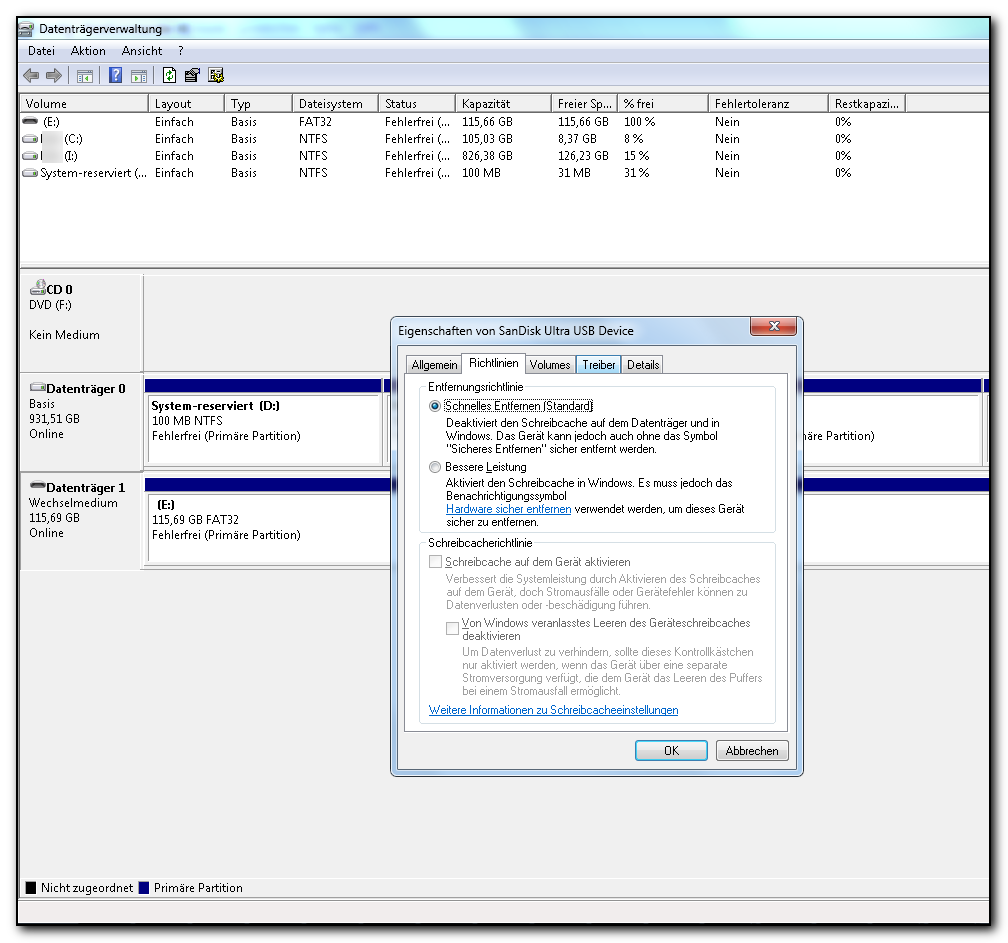
Actually I would have thought according to the default settings (deactivated cache on the external drives) (screenshot) something like that, data loss, cannot / should not happen.

DoA82jz.png


All of what is being said here applies to Win 10 also?
 

My Computer My Computer

Computer type
Laptop
OS
Windows 7 Home Premium 64-bit SP1
Sorry, I do not understand, if an external drive is not recognized (as such) why is it accessible?

I meant that sometimes a external drive gets recognized as an internal drive and not as an external. This is usually a driver issue.

The screenshot refers to the drives internal cache, not the system file cache which is usually much larger. This must remain consistent with the data on the drive or results are unpredictable.

The basic principles of hibernation haven't changed since it was introduced so everything said applies to all versions.

I don't have a great deal of experience with hibernation but I do understand how it works quite well and the potential dangers. This isn't apparent to the user but the details of hibernation are really very complex.
 

My Computer My Computer

Computer type
PC/Desktop
Computer Manufacturer/Model Number
HP
OS
Windows 7 Pro 64 bit
CPU
Xeon W3520
Memory
8 GB
Graphics Card(s)
Nvidia Geforce 210
I meant that sometimes a external drive gets recognized as an internal drive and not as an external. This is usually a driver issue.
I understand, I have never encountered such a problem.

The screenshot refers to the drives internal cache, not the system file cache which is usually much larger. This must remain consistent with the data on the drive or results are unpredictable.

I am not quite sure, the text says "deactivates the writing cache of the drive and in Windows" and "the drive can be removed without using the icon 'safely remove'".

I don't have a great deal of experience with hibernation but I do understand how it works quite well and the potential dangers. This isn't apparent to the user but the details of hibernation are really very complex.
Yes, I could imagine that. What are the "potential dangers"?

Many thanks
 

My Computer My Computer

Computer type
Laptop
OS
Windows 7 Home Premium 64-bit SP1
I personally have no need to leave a machine on 24/7... so shutdown works for me :)
Startup times are pretty good too and a small inconvenience that does a more effective job with external drives as described by them being confused with internal drives ;)

I get used to it I have a dual ssd evo hot swap device so I switch ssd's with operating system on it fairly often as a safer way to dual boot.
Amazon.com: Vantec 2.5-Inch Dual Bay Trayless SATA III - 6G Mobile Rack (MRK-225S6-BK): Computers & Accessories
 

My Computer My Computer

Computer type
PC/Desktop
Computer Manufacturer/Model Number
Custom assembled by me :}
OS
Win-7-Pro64bit 7-H-Prem-64bit
CPU
i7-5930K 2nd i9-9940x both water blocked VRM's too
Motherboard
ASUS SABERTOOTH X99 2nd ASUS x299 Apex
Memory
Trident-z 3200C14 2nd Trident-z 3600C16
Graphics Card(s)
EVGA 1080ti ftw3 2nd Titan Xp both water blocked
Sound Card
Built-in Realtek
Monitor(s) Displays
1-AOC G2460PG 24"G-Sync 144Hz/ 2nd 1-ASUS VG248QE 24" 144Hz
Screen Resolution
1920 x 1080 144Hz
Hard Drives
2-Samsung M.2 Evo & Evo Plus
2-Samsung 850 EVO 500GB SSD's/ 3-2.5 W.D. Black 1tb-&3-1tb/3-3.5 WD Black 1tb hdd's
PSU
EVGA SuperNOVA 1000-P2 2nd 1200-P2
Case
2-Corsair Obsidian Series 450D Black ATX Mid Tower
Cooling
Custom water loops
Keyboard
Logitech G710+/ 2nd Logitech G910
Mouse
2-RedDragon M901 Perdition 16400 dpi Gaming mouse = wired
Internet Speed
Comcast Ping 19ms 89.31mbps download speed 6.12mbps upload
Antivirus
Malwarebytes Pro/ Superantispyware Pro
Browser
FireFox & Pale moon
Other Info
2nd ASUS X299 Apex/Intel i9-9940x with Custom water loop/7H-Prem-x64/Corsair 450D case/Ram Trident-z 3600C16 4x8gb / Samsung970Evo plus 500gb SSD/Dual ssd EZ swap evo/PSU EVGA SuperNova 1200w-P2 80+Platinum/GPU Titan Xp /8-ML-140 on push-pull on 2-280GTX rads
I understand, thank you for the link.
 

My Computer My Computer

Computer type
Laptop
OS
Windows 7 Home Premium 64-bit SP1
@Alonzo Poodle

I stand by everything I have said. But I do not have time to explain everything.
 

My Computer My Computer

Computer type
PC/Desktop
Computer Manufacturer/Model Number
HP
OS
Windows 7 Pro 64 bit
CPU
Xeon W3520
Memory
8 GB
Graphics Card(s)
Nvidia Geforce 210
Windows 7 releases all drives and devices on shutdown is my main point possibly with the exception to drives used in a raid.
Of course win-10 is also an exception because it uses fake shut down that is hibernation on steroids unless inside win-10 a user disables fast startup
I've had a couple drives with nothing really on them except transfer files from 7 to 10
One drive always prompted check disk to initialize it before use or check for errors commonly caused by not disconnecting it properly = fake shut down in win-10 ;)
Second time it turned a transfer drive in to RAW :p
 

My Computer My Computer

Computer type
PC/Desktop
Computer Manufacturer/Model Number
Custom assembled by me :}
OS
Win-7-Pro64bit 7-H-Prem-64bit
CPU
i7-5930K 2nd i9-9940x both water blocked VRM's too
Motherboard
ASUS SABERTOOTH X99 2nd ASUS x299 Apex
Memory
Trident-z 3200C14 2nd Trident-z 3600C16
Graphics Card(s)
EVGA 1080ti ftw3 2nd Titan Xp both water blocked
Sound Card
Built-in Realtek
Monitor(s) Displays
1-AOC G2460PG 24"G-Sync 144Hz/ 2nd 1-ASUS VG248QE 24" 144Hz
Screen Resolution
1920 x 1080 144Hz
Hard Drives
2-Samsung M.2 Evo & Evo Plus
2-Samsung 850 EVO 500GB SSD's/ 3-2.5 W.D. Black 1tb-&3-1tb/3-3.5 WD Black 1tb hdd's
PSU
EVGA SuperNOVA 1000-P2 2nd 1200-P2
Case
2-Corsair Obsidian Series 450D Black ATX Mid Tower
Cooling
Custom water loops
Keyboard
Logitech G710+/ 2nd Logitech G910
Mouse
2-RedDragon M901 Perdition 16400 dpi Gaming mouse = wired
Internet Speed
Comcast Ping 19ms 89.31mbps download speed 6.12mbps upload
Antivirus
Malwarebytes Pro/ Superantispyware Pro
Browser
FireFox & Pale moon
Other Info
2nd ASUS X299 Apex/Intel i9-9940x with Custom water loop/7H-Prem-x64/Corsair 450D case/Ram Trident-z 3600C16 4x8gb / Samsung970Evo plus 500gb SSD/Dual ssd EZ swap evo/PSU EVGA SuperNova 1200w-P2 80+Platinum/GPU Titan Xp /8-ML-140 on push-pull on 2-280GTX rads
Yes, of course, I really understand, that's very cool.
 

My Computer My Computer

Computer type
Laptop
OS
Windows 7 Home Premium 64-bit SP1
I think the first thing one might think on is hibernation needed or just wanted. If it is not needed don't use it. That eliminates hibernation problems.
Today's computers boot in less than 60 seconds. Computer like to have a fresh boot.

Unlike LMiller7 I don't have the knowledge of all the in's and out's of hibernation but by reading many posts their are many problems that people have with hibernation. Most of those people have no need for hibernation. They git one hibernation problems fixed and up pops another one. Because their are so many different system their is no one answer to one hibernation problem.
Because I'm just a layman in class 101 I would suggest if you don't need hibernation don't use it.

I also use HotSwap bays for ssd's that comes in very handy.
 

My Computer My Computer

Computer type
PC/Desktop
Computer Manufacturer/Model Number
Home made Desktop
OS
Windows 10 Pro. 64/ version 1709 Windows 7 Pro/64
CPU
Intel i7-6800K @ 4.3
Motherboard
ASUS X-99 Deluxe II
Memory
Corsair Platinum 16 gig @2400
Graphics Card(s)
EVGA GTX 1070 OC
Monitor(s) Displays
Asus 27" LED LCD/VE278Q
Screen Resolution
1920-1080 or 1280-720 HDMI
Hard Drives
INTEL SSD 730-240 Gb Sata 3.0/
PSU
EVGA Platium 1200W
Case
Phanteks Luxe Tempered Glass 8 fans/ one radiator
Cooling
XSPC/ Water Cooled CPU
Keyboard
Das 4 Professional
Mouse
Logitech M705/MX Anywhere 2-S
Internet Speed
100 mbits
Antivirus
Microsoft Security Essentials/ Malwarebytes Premium 3.0/ SAS
Browser
I.E. 11 default/Firefox/ ISP Time Warner Cable/Spectrum
Other Info
LG BluRay Burner/
Sound system-KLipsch-THX/
Icy Dock ssd Hot Swap bays.
Sorry, my last post referred to LMiller7, thanks again.

Windows 7 releases all drives and devices on shutdown is my main point possibly with the exception to drives used in a raid.
Actually it appears to be quite inconvenient, but often it seems to be the only way to properly / safely get a drive removed since it is often not possible to get rid of it by using that safely remove icon although there is not shown any process accessing that drive. So it is often much more inconvenient to search for such a process.

Of course win-10 is also an exception because it uses fake shut down that is hibernation on steroids unless inside win-10 a user disables fast startup
I've had a couple drives with nothing really on them except transfer files from 7 to 10
One drive always prompted check disk to initialize it before use or check for errors commonly caused by not disconnecting it properly = fake shut down in win-10
Second time it turned a transfer drive in to RAW

I do not have any idea of anything, but that does not sound very good. So what does that mean? What should one do to safely remove drives (I am also using Win 10 since some weeks).

I think the first thing one might think on is hibernation needed or just wanted.
Well, it is easier to handle, you can go on where you stopped working, no need to reopen windows, programs, mount drives, etc.

That eliminates hibernation problems.
What kind of problems?

Today's computers boot in less than 60 seconds.
My last Notebook needed about 15, 20 minutes to boot including opening all of the programs. The Notebook I use now, it has an SSD, needs - still (I guess it will become slower after some time) - about 10 seconds to start from hibernation, the programs I need already being opened. I could not recognize any problems caused by hibernation, may be there have been some, I do not know.

 

My Computer My Computer

Computer type
Laptop
OS
Windows 7 Home Premium 64-bit SP1
CPU
Intel Core i3 390M @ 2.67GHz Arrandale 32nm Technology
Motherboard
MEDION P6630 (CPU 1)
Memory
4,00GB Dual-Channel DDR3 @ 532MHz (7-7-7-20)
Graphics Card(s)
PnP-Monitor (Standard) (1366x768@60Hz) Intel HD Graphics (Wi
Sound Card
NVIDIA Virtual Audio Device (Wave Extensible) (WDM)
Hard Drives
Western Digital, WD Elements, 3TB
Western Digital, WD Elements, 4TB
Western Digital, MyBook, 3TB
Western Digital, MyBook, 4TB

My Computer My Computer

Computer type
PC/Desktop
Computer Manufacturer/Model Number
Custom assembled by me :}
OS
Win-7-Pro64bit 7-H-Prem-64bit
CPU
i7-5930K 2nd i9-9940x both water blocked VRM's too
Motherboard
ASUS SABERTOOTH X99 2nd ASUS x299 Apex
Memory
Trident-z 3200C14 2nd Trident-z 3600C16
Graphics Card(s)
EVGA 1080ti ftw3 2nd Titan Xp both water blocked
Sound Card
Built-in Realtek
Monitor(s) Displays
1-AOC G2460PG 24"G-Sync 144Hz/ 2nd 1-ASUS VG248QE 24" 144Hz
Screen Resolution
1920 x 1080 144Hz
Hard Drives
2-Samsung M.2 Evo & Evo Plus
2-Samsung 850 EVO 500GB SSD's/ 3-2.5 W.D. Black 1tb-&3-1tb/3-3.5 WD Black 1tb hdd's
PSU
EVGA SuperNOVA 1000-P2 2nd 1200-P2
Case
2-Corsair Obsidian Series 450D Black ATX Mid Tower
Cooling
Custom water loops
Keyboard
Logitech G710+/ 2nd Logitech G910
Mouse
2-RedDragon M901 Perdition 16400 dpi Gaming mouse = wired
Internet Speed
Comcast Ping 19ms 89.31mbps download speed 6.12mbps upload
Antivirus
Malwarebytes Pro/ Superantispyware Pro
Browser
FireFox & Pale moon
Other Info
2nd ASUS X299 Apex/Intel i9-9940x with Custom water loop/7H-Prem-x64/Corsair 450D case/Ram Trident-z 3600C16 4x8gb / Samsung970Evo plus 500gb SSD/Dual ssd EZ swap evo/PSU EVGA SuperNova 1200w-P2 80+Platinum/GPU Titan Xp /8-ML-140 on push-pull on 2-280GTX rads
Many thanks
 

My Computer My Computer

Computer type
Laptop
OS
Windows 7 Home Premium 64-bit SP1
CPU
Intel Core i3 390M @ 2.67GHz Arrandale 32nm Technology
Motherboard
MEDION P6630 (CPU 1)
Memory
4,00GB Dual-Channel DDR3 @ 532MHz (7-7-7-20)
Graphics Card(s)
PnP-Monitor (Standard) (1366x768@60Hz) Intel HD Graphics (Wi
Sound Card
NVIDIA Virtual Audio Device (Wave Extensible) (WDM)
Hard Drives
Western Digital, WD Elements, 3TB
Western Digital, WD Elements, 4TB
Western Digital, MyBook, 3TB
Western Digital, MyBook, 4TB
Back
Top