
infested999
New member
Just lik normal my computer has a "Safely Remove Hardware" button to stop their flash drives form being in use. Mine has the same for my USB devices but with a little bug in it.
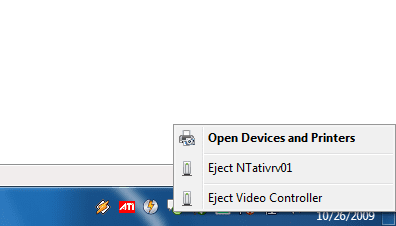
See the 'NTativrv01'? That is my grafics card :sarc:
When i press eject my computer will still work perfectly fine, but the DVI plugs at the back of my computer will not give off any signal at all to the monitor! I did it once and all i could do was just turn off the computer and restart.
This is not really a issue with windows but i just thought it is a funny thing to point out Maybe there should be some kind of "Permanently Ignore This Device" option so that i wont constantly have that icon there. Other than that everything works perfectly fine! I have had this ever since my install of W7.
ATI RADEON X850XT PE
All latest drivers from ATI installed, CCC working perfectly.
And also, this post can be in ether this section or the graphics section, but the problem is actually in the Safely Remove hardware section, so it actually belongs here.
See the 'NTativrv01'? That is my grafics card :sarc:
When i press eject my computer will still work perfectly fine, but the DVI plugs at the back of my computer will not give off any signal at all to the monitor! I did it once and all i could do was just turn off the computer and restart.
This is not really a issue with windows but i just thought it is a funny thing to point out
Maybe there should be some kind of "Permanently Ignore This Device" option so that i wont constantly have that icon there. Other than that everything works perfectly fine! I have had this ever since my install of W7.ATI RADEON X850XT PE
All latest drivers from ATI installed, CCC working perfectly.
And also, this post can be in ether this section or the graphics section, but the problem is actually in the Safely Remove hardware section, so it actually belongs here.
My Computer
- OS
- Windows 7
- CPU
- Intel P4 3.0 GHz @ 3.4 GHz
- Memory
- 1GB
- Graphics Card(s)
- ATI RADEON X850XT PE
- Monitor(s) Displays
- 17 BENQ LCD
- Hard Drives
- 300 GB IDE (For Main OS)
500 GB SATA (For Extra Space)
- PSU
- 400 Watt
- Cooling
- Stock

