"Safely remove hardware" not displaying balloon

Themiddleman93

New member
Local time
8:59 PM
Messages
4
The "Safely Remove Hardware" icon in the notification area will not display the balloon-type notification upon removal of a USB drive or other device. I have mucked about all through my computer's settings, fiddled with the group policy editor and the registry, but to no avail. I attempted to customize the notification areas and set the icon to display icon and notifications, still nothing. At one point the icon wouldn't even recognize that I was right-clicking on it. It recognized my clicks after I tried a system restore but nothing else has worked.

tl;dr I want to have a balloon appear when I remove my USB drive
 

My Computer

Computer type
PC/Desktop
Computer Manufacturer/Model Number
Acer TravelMate 7750G
OS
Windows 7 Professional x64
CPU
Inetl Core i5-2450M
Motherboard
Acer BA70_HR
Memory
8.00 GB
Graphics Card(s)
ATI AMD Radeon HD 6470M
Sound Card
AMD High Definition Audio Device & Realtek High Definition A
Monitor(s) Displays
Generic PnP Monitor on AMD Radeon HD 6470M & Generic Non-PnP
Screen Resolution
1600x900 & 1024 x 768
Hard Drives
Hitachi HTS545050B9A300 (500GB)
WDC WD32 00AAKS-75L9A0 USB Device (300 GB)
Keyboard
Standard Ps/2 Keyboard
Mouse
ELAN PS/2 Port Smart-Pad & HID-compliant optical mouse
Internet Speed
9.07 Mbps Down & 5.52 Mb Up; 66 ms ping
Antivirus
Malwarebytes Anti-Malware
Browser
Google Chrome
Other Info
.speccy file available on request.
Welcome to the forums Themiddleman93!

Have you tried a sfc/scannow to find and possibly fix any corrupted system files? We have many fine tutorials here at the forums, written by some very knowledgeable people. Here's one o how to do that if you haven't before, just click on the link : http://www.sevenforums.com/tutorials/1538-sfc-scannow-command-system-file-checker.html

I would be EXTREMELY careful about mucking around in the registry. I'm not quite sure by what you mean by "tl;dr I want to have a balloon appear when I remove my USB drive". If you click on the icon and and select "Safely remove Hardware and Eject Media", then click on the usb you want removed, the balloon will appear when its safe to do so.
 
Last edited:

My Computer

Computer type
Laptop
Computer Manufacturer/Model Number
MSI GE72VR Apache Pro-416
OS
Windows 10x64 Build 1709
CPU
Intel i7 7700HQ Kaby Lake
Motherboard
Micro-Star Intl. MS-179B (U3C1)
Memory
16 GB DDR4 @2400
Graphics Card(s)
Nvidia Geforce GTX 1060
Screen Resolution
1920x1080 120Hz
Hard Drives
256 GB Nvme M.2 SSD

1TB HDD@7200
Cooling
Cooler Blast 4
Keyboard
Steel Series
Antivirus
Bit Defender Free
Browser
Edge
Thank you.
My apologies, allow me to explain. "tl;dr" is a convention from another forum meaning "too long; didn't read." It's used to summarize the post's message in a sort of short-hand.

I'm running the system scan now, thank you for the link.

I am always careful to change only what I want to in the registry. In this case my "mucking about" consisted of adding an item that would enable balloon notifications. Unfortunately it didn't work and was promptly deleted.

The problem is that when I click on the icon and eject a USB drive the balloon DOESN'T appear when it's safe. I want it to but it absolutely refuses to. Neither registry, nor notification area settings, nor policy edits will coax the balloon into appearing.
 

My Computer

Computer type
PC/Desktop
Computer Manufacturer/Model Number
Acer TravelMate 7750G
OS
Windows 7 Professional x64
CPU
Inetl Core i5-2450M
Motherboard
Acer BA70_HR
Memory
8.00 GB
Graphics Card(s)
ATI AMD Radeon HD 6470M
Sound Card
AMD High Definition Audio Device & Realtek High Definition A
Monitor(s) Displays
Generic PnP Monitor on AMD Radeon HD 6470M & Generic Non-PnP
Screen Resolution
1600x900 & 1024 x 768
Hard Drives
Hitachi HTS545050B9A300 (500GB)
WDC WD32 00AAKS-75L9A0 USB Device (300 GB)
Keyboard
Standard Ps/2 Keyboard
Mouse
ELAN PS/2 Port Smart-Pad & HID-compliant optical mouse
Internet Speed
9.07 Mbps Down & 5.52 Mb Up; 66 ms ping
Antivirus
Malwarebytes Anti-Malware
Browser
Google Chrome
Other Info
.speccy file available on request.
Another way to be assured it is safe to remove:

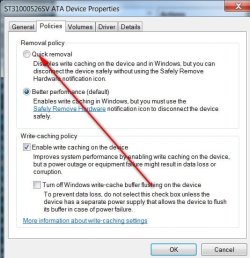
Dev mgr>right click on drive >Policies.
 

Attachments

  • QUICK REMOVAL PIC.jpg
    QUICK REMOVAL PIC.jpg
    53.8 KB · Views: 9

My Computer

Computer type
PC/Desktop
Computer Manufacturer/Model Number
Self-Built
OS
Windows 7 Professional X64
CPU
Core i7 (2nd gen) i7-2600K / 3.40GHz
Motherboard
ASUS P8Z77-V Intel 7 Series Motherboard
Memory
DDR3 2400MHz (OC) 16gb
Graphics Card(s)
Intel(R) HD Graphics 3000, -1988 Mb
Sound Card
8 ChannelsAudio Chipset Realtek ALC892
Monitor(s) Displays
LG 29UM65 Black 29"
Screen Resolution
2560 x 1080
Hard Drives
840 EVO 250 GB SSD ;2tb (2);Seagate;1tb Seagate; 750 gb Seagate; wd ext (2) 750 gb,WD 2tb X 2;WD 3TB Black
PSU
750 watt
Case
Thermaltake RX -1
Cooling
2120mm Fans Included 1Other Fan Ports 5x 200mm Fan Ports
Keyboard
Microsoft Digital Media Pro
Mouse
Microsoft Wireless 6000
Internet Speed
U-verse 18 mbps
Antivirus
MSE
Browser
Firefox, Chrome and my favorite: Pale Moon
Other Info
HdHomerun Dual Tuner.
SRS Audio Lab,
Pioneer BDR 208-DBK
PS3-What a difference in my Surround Sound Receiver!
HP 4540s - My new Toy.
Epson R280 Printer- To personalize my Dvds.
Canon MP 560 - For scanning.
Another way to be assured it is safe to remove:

Dev mgr>right click on drive >Policies.

That's how it's set on all of my USBs, I tried setting it for better performance as well, but nothing changed. Still no balloon.
 

My Computer

Computer type
PC/Desktop
Computer Manufacturer/Model Number
Acer TravelMate 7750G
OS
Windows 7 Professional x64
CPU
Inetl Core i5-2450M
Motherboard
Acer BA70_HR
Memory
8.00 GB
Graphics Card(s)
ATI AMD Radeon HD 6470M
Sound Card
AMD High Definition Audio Device & Realtek High Definition A
Monitor(s) Displays
Generic PnP Monitor on AMD Radeon HD 6470M & Generic Non-PnP
Screen Resolution
1600x900 & 1024 x 768
Hard Drives
Hitachi HTS545050B9A300 (500GB)
WDC WD32 00AAKS-75L9A0 USB Device (300 GB)
Keyboard
Standard Ps/2 Keyboard
Mouse
ELAN PS/2 Port Smart-Pad & HID-compliant optical mouse
Internet Speed
9.07 Mbps Down & 5.52 Mb Up; 66 ms ping
Antivirus
Malwarebytes Anti-Malware
Browser
Google Chrome
Other Info
.speccy file available on request.
If you have it set for "safe removal," that's all you need.

You can also bring up the box - go to Run > type in RunDll32.exe shell32.dll,Control_RunDLL hotplug.dll
 

My Computer

Computer type
PC/Desktop
Computer Manufacturer/Model Number
Self-Built
OS
Windows 7 Professional X64
CPU
Core i7 (2nd gen) i7-2600K / 3.40GHz
Motherboard
ASUS P8Z77-V Intel 7 Series Motherboard
Memory
DDR3 2400MHz (OC) 16gb
Graphics Card(s)
Intel(R) HD Graphics 3000, -1988 Mb
Sound Card
8 ChannelsAudio Chipset Realtek ALC892
Monitor(s) Displays
LG 29UM65 Black 29"
Screen Resolution
2560 x 1080
Hard Drives
840 EVO 250 GB SSD ;2tb (2);Seagate;1tb Seagate; 750 gb Seagate; wd ext (2) 750 gb,WD 2tb X 2;WD 3TB Black
PSU
750 watt
Case
Thermaltake RX -1
Cooling
2120mm Fans Included 1Other Fan Ports 5x 200mm Fan Ports
Keyboard
Microsoft Digital Media Pro
Mouse
Microsoft Wireless 6000
Internet Speed
U-verse 18 mbps
Antivirus
MSE
Browser
Firefox, Chrome and my favorite: Pale Moon
Other Info
HdHomerun Dual Tuner.
SRS Audio Lab,
Pioneer BDR 208-DBK
PS3-What a difference in my Surround Sound Receiver!
HP 4540s - My new Toy.
Epson R280 Printer- To personalize my Dvds.
Canon MP 560 - For scanning.
If you have it set for "safe removal," that's all you need.

You can also bring up the box - go to Run > type in RunDll32.exe shell32.dll,Control_RunDLL hotplug.dll

Clearly that's not all I need considering that the issue isn't being able to eject them, it's the balloon not appearing. I know about that setting, that's not the issue. The issue is that whatever I do the balloon notification refuses to appear.
 

My Computer

Computer type
PC/Desktop
Computer Manufacturer/Model Number
Acer TravelMate 7750G
OS
Windows 7 Professional x64
CPU
Inetl Core i5-2450M
Motherboard
Acer BA70_HR
Memory
8.00 GB
Graphics Card(s)
ATI AMD Radeon HD 6470M
Sound Card
AMD High Definition Audio Device & Realtek High Definition A
Monitor(s) Displays
Generic PnP Monitor on AMD Radeon HD 6470M & Generic Non-PnP
Screen Resolution
1600x900 & 1024 x 768
Hard Drives
Hitachi HTS545050B9A300 (500GB)
WDC WD32 00AAKS-75L9A0 USB Device (300 GB)
Keyboard
Standard Ps/2 Keyboard
Mouse
ELAN PS/2 Port Smart-Pad & HID-compliant optical mouse
Internet Speed
9.07 Mbps Down & 5.52 Mb Up; 66 ms ping
Antivirus
Malwarebytes Anti-Malware
Browser
Google Chrome
Other Info
.speccy file available on request.
Back
Top