Safely Remove Hardware PROb

Wicca

New member
Local time
7:54 PM
Messages
546
Safely Remove Hardware appears in my right bottom
i icon how do i get rid of it i have no usbs connected
and it says when i right click it to eject
my hard drive c or d
 

My Computer

Computer Manufacturer/Model Number
i power x8870
OS
7
CPU
intel 2 core quad Q6600 2.40 ghz
Memory
3.00GB 350 mhz each
Graphics Card(s)
geforce 8800gtx
Sound Card
realtek
Screen Resolution
1440by900
Hard Drives
5400rpm 2 of them
PSU
OCZ 600 watt power supply
Internet Speed
nvidia nforce networking controller 90kb/s
Other Info
total virtual memory is 7.88 GB
this is a 32-bit system
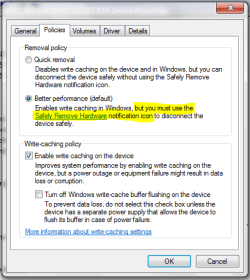
Win7 is assuming that both drives are removable, which is true to in a way because SATA ports are designed for hot-swapping. Go to Device Manager (type in "Device Manager" in your Start menu search box then press enter). Look under Disk Drives and for each drive:

Right-click on the name and select Properties
Go to the Policies tab
Make sure the drive is set for Performance, not for Quick Removal

let us know if that helps.

Edit: Typo. Set the drive for Quick removal, not Performance. Thanks to TVeblen.
 
Last edited:

My Computer

Computer Manufacturer/Model Number
Too many to describe...
OS
Windows 7 x64 pro/ Windows 7 x86 Pro/ XP SP3 x86
Make sure the drive is set for Performance, not for Quick Removal

Wouldn't that be the other way around for the OP?
 

Attachments

  • Capture.PNG
    Capture.PNG
    16.6 KB · Views: 14

My Computer

Computer type
PC/Desktop
Computer Manufacturer/Model Number
Home Built - Jan 2013
OS
Windows 7 64 Bit Home Premium SP1
CPU
i7-3820
Motherboard
Asus P9X79-PRO - Bios 4608
Memory
GSkill F3-14900CL9Q - 16GB
Graphics Card(s)
EVGA GeForce GTX660 - Driver 352.86
Sound Card
On board Realtek ALC898
Monitor(s) Displays
Acer S271HL
Screen Resolution
1920 x 1080
Hard Drives
#1- Samsung 840 Pro Series
#2- Western Digital WD1002FAEX Sata3 Black
#3- Western Digital WD1002FAEX Sata3 Black
PSU
Corsair CMPSU-850TX-V2 - 850 watt (by Seasonic)
Case
Corsair Obsidian 550D
Cooling
Standard 3 120mm case fans, Cooler Master Hyper 212 EVO
Keyboard
MS KC-0405
Mouse
Intellimouse 5-button
Internet Speed
56 Mbits/Sec (on a good day)
Antivirus
Avast & Malwarebytes
Browser
Firefox
Other Info
Asus DVD - DRW-24B1ST 24X
Oops!! Typo, sorry. Thanks for pointing out! Am editing the post.
 

My Computer

Computer Manufacturer/Model Number
Too many to describe...
OS
Windows 7 x64 pro/ Windows 7 x86 Pro/ XP SP3 x86
Although I personally opt for Better Performance and just ignore the Safely Remove Icon.
 

My Computer

Computer type
PC/Desktop
Computer Manufacturer/Model Number
Home Built - Jan 2013
OS
Windows 7 64 Bit Home Premium SP1
CPU
i7-3820
Motherboard
Asus P9X79-PRO - Bios 4608
Memory
GSkill F3-14900CL9Q - 16GB
Graphics Card(s)
EVGA GeForce GTX660 - Driver 352.86
Sound Card
On board Realtek ALC898
Monitor(s) Displays
Acer S271HL
Screen Resolution
1920 x 1080
Hard Drives
#1- Samsung 840 Pro Series
#2- Western Digital WD1002FAEX Sata3 Black
#3- Western Digital WD1002FAEX Sata3 Black
PSU
Corsair CMPSU-850TX-V2 - 850 watt (by Seasonic)
Case
Corsair Obsidian 550D
Cooling
Standard 3 120mm case fans, Cooler Master Hyper 212 EVO
Keyboard
MS KC-0405
Mouse
Intellimouse 5-button
Internet Speed
56 Mbits/Sec (on a good day)
Antivirus
Avast & Malwarebytes
Browser
Firefox
Other Info
Asus DVD - DRW-24B1ST 24X
Although I personally opt for Better Performance and just ignore the Safely Remove Icon.
Theres no need really to DO anything about it since its quite normal. Of course windows should have been smart enough NOT to see it as a removable device but till then...

But you'll be surprised at the no. of people this thing bothers. One can tweak a registry key to get windows to see it as an internal drive but that apparently resets upon reboot, so not much of a help. One workaround is to right click in the icon notification area and choose "Customize Notification Icons". Then select the remove hardware thing and set it to always hide.
 

My Computer

Computer Manufacturer/Model Number
Too many to describe...
OS
Windows 7 x64 pro/ Windows 7 x86 Pro/ XP SP3 x86
Yep. Count me as one of those people!

I tried the "Hide Notification" idea, but then you get no notice for external drives, etc. None-the-good.

I've often wondered what would happen if you ejected the system drive while Windows was running. Sparks?
 

My Computer

Computer type
PC/Desktop
Computer Manufacturer/Model Number
Home Built - Jan 2013
OS
Windows 7 64 Bit Home Premium SP1
CPU
i7-3820
Motherboard
Asus P9X79-PRO - Bios 4608
Memory
GSkill F3-14900CL9Q - 16GB
Graphics Card(s)
EVGA GeForce GTX660 - Driver 352.86
Sound Card
On board Realtek ALC898
Monitor(s) Displays
Acer S271HL
Screen Resolution
1920 x 1080
Hard Drives
#1- Samsung 840 Pro Series
#2- Western Digital WD1002FAEX Sata3 Black
#3- Western Digital WD1002FAEX Sata3 Black
PSU
Corsair CMPSU-850TX-V2 - 850 watt (by Seasonic)
Case
Corsair Obsidian 550D
Cooling
Standard 3 120mm case fans, Cooler Master Hyper 212 EVO
Keyboard
MS KC-0405
Mouse
Intellimouse 5-button
Internet Speed
56 Mbits/Sec (on a good day)
Antivirus
Avast & Malwarebytes
Browser
Firefox
Other Info
Asus DVD - DRW-24B1ST 24X
It wouldnt let you eject the system drive while windows was running. Would probably throw up an error or "In use..." message.
 

My Computer

Computer Manufacturer/Model Number
Too many to describe...
OS
Windows 7 x64 pro/ Windows 7 x86 Pro/ XP SP3 x86
Back
Top