Samsung Bx2331 Response time modes

Evilclive

New member
Local time
7:57 PM
Messages
42
Anyone know the difference between the normal, faster, fastest settings on these new Samsung monitors? This monitor is suppose to have 2ms response time, which one of those settings is 2ms? Is "normal" 2ms and the other two even better or is the "fastest" setting 2ms?

The "fastest" setting gives a weird rainbow effect artifacts. So i plan on using the "faster" setting, but i want to know if its slower than 2ms. Any help would be appreciated.
 

My Computer My Computer

OS
Windows 7 Home Premium 64-bit
CPU
Intel Core i5-750 Lynnfield 2.66 Quad Core
Motherboard
Intel BOXDP55WB LGA 1156
Memory
Kingston 4GB 240-Pin DDR3 SDRAM DDR3 1066
Graphics Card(s)
Asus 6870 1GB
Sound Card
Realtek ALC888
Monitor(s) Displays
Samsung BX2331
Screen Resolution
1920x1080
Hard Drives
Western Digital Caviar Blue WD6400AAKS 640GB 7200 RPM 16MB Cache SATA 3.0Gb/s 3.5
PSU
COOLMAX CL-700B 700W
Hello Evilclive,

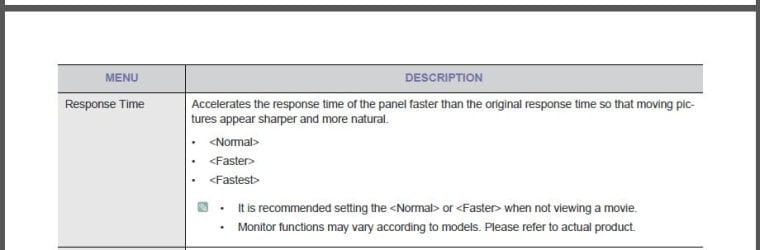
Here's what it says pn page 35 of your monitor's manual. It isn't a detail description, but the monitor will only have at best a 2ms response time. It seems like it may be some sort of artificial software enhancement feature to help make fast moving object on the display appear smoother.

Manual.jpg

Hope this helps some,
Shawn
 

My Computer My Computer

Computer type
PC/Desktop
Computer Manufacturer/Model Number
Self built custom
OS
64-bit Windows 11 Pro for Workstations
CPU
Intel i7-8700K OC'd to 5 GHz
Motherboard
ASUS ROG Maximus XI Formula Z390
Memory
64 GB (4x16GB) G.SKILL TridentZ RGB DDR4 3600 MHz
Graphics Card(s)
ASUS ROG-STRIX-GTX1080TI-O11G-GAMING
Sound Card
Integrated
Monitor(s) Displays
2 x Samsung Odyssey G7 27"
Screen Resolution
2560x1440
Hard Drives
1TB Samsung 990 PRO M.2,
4TB Samsung 990 PRO PRO M.2,
TerraMaster F8 SSD Plus NAS
PSU
Seasonic Prime Titanium 850W
Case
Thermaltake Core P3
Cooling
Corsair Hydro H115i
Keyboard
Logitech wireless K800
Mouse
Logitech MX Master 4
Internet Speed
2 Gb/s Download and 100 Mb/s Upload
Antivirus
Malwarebyte Anti-Malware Premium
Browser
Google Chrome
Other Info
Logitech Z625 speaker system,
Logitech BRIO 4K Pro webcam,
HP Color LaserJet Pro MFP M477fdn,
APC SMART-UPS RT 1000 XL - SURT1000XLI,
Galaxy S23 Plus phone
Recommends to use normal or faster when not watching a movie. Will using "fastest" at all times shorten the life of the monitor in anyway?
 

My Computer My Computer

OS
Windows 7 Home Premium 64-bit
CPU
Intel Core i5-750 Lynnfield 2.66 Quad Core
Motherboard
Intel BOXDP55WB LGA 1156
Memory
Kingston 4GB 240-Pin DDR3 SDRAM DDR3 1066
Graphics Card(s)
Asus 6870 1GB
Sound Card
Realtek ALC888
Monitor(s) Displays
Samsung BX2331
Screen Resolution
1920x1080
Hard Drives
Western Digital Caviar Blue WD6400AAKS 640GB 7200 RPM 16MB Cache SATA 3.0Gb/s 3.5
PSU
COOLMAX CL-700B 700W
It's possible that it could shorten it's life span some if cranked up to "fastest", but who knows by how much if that much.

You might consider trying each setting for a day or few hours to see if you notice any difference between the two. If not, then it may be best to stick with "Normal" or whatever the default setting is.
 

My Computer My Computer

Computer type
PC/Desktop
Computer Manufacturer/Model Number
Self built custom
OS
64-bit Windows 11 Pro for Workstations
CPU
Intel i7-8700K OC'd to 5 GHz
Motherboard
ASUS ROG Maximus XI Formula Z390
Memory
64 GB (4x16GB) G.SKILL TridentZ RGB DDR4 3600 MHz
Graphics Card(s)
ASUS ROG-STRIX-GTX1080TI-O11G-GAMING
Sound Card
Integrated
Monitor(s) Displays
2 x Samsung Odyssey G7 27"
Screen Resolution
2560x1440
Hard Drives
1TB Samsung 990 PRO M.2,
4TB Samsung 990 PRO PRO M.2,
TerraMaster F8 SSD Plus NAS
PSU
Seasonic Prime Titanium 850W
Case
Thermaltake Core P3
Cooling
Corsair Hydro H115i
Keyboard
Logitech wireless K800
Mouse
Logitech MX Master 4
Internet Speed
2 Gb/s Download and 100 Mb/s Upload
Antivirus
Malwarebyte Anti-Malware Premium
Browser
Google Chrome
Other Info
Logitech Z625 speaker system,
Logitech BRIO 4K Pro webcam,
HP Color LaserJet Pro MFP M477fdn,
APC SMART-UPS RT 1000 XL - SURT1000XLI,
Galaxy S23 Plus phone
Back
Top