Samsung new laptop

channa

New member
Local time
7:43 AM
Messages
15
Hello all new to the forum,completley useless with computers past surfing the web.I bought this laptop yesterday read a post about the easy partion manager and made drive c around 110 and drive D had the rest...

Problem windows installed 40 updates and i installed itunes,Tom tom and firefox and all these saved in c drive drastically filling it up.Now i thought with what i read that c would be back upfiles andD would save everything else...Obviously mebeing an idiot ive read and understood wrong....

All my other laptops have had just a normal c drive which everything went onto and a little folder to the right that says recovery.

Is there anybody that could conect to my laptop and correct my drives for me please as im usless with this sort of thing,manythanks for your time and help...

Regards Tim
 

My Computer My Computer

Computer Manufacturer/Model Number
samsung
OS
windows 7 home premium x 64
Do not let anyone connect to your computer unless they are known to you,that is really begging for trouble.
We can help you do it yourself without logging on to your computer.
There are a few ways to do this, all depending on your setup.
If you have nothing on drive D you can delete the D drive and then extend C drive then make another D drive.
You can uninstall the programs you put in C and reinstall them in D (they will give you the option as to where you want to install them).
Post back with what you want to do and we will help you to achieve it.
 

My Computer My Computer

Computer type
PC/Desktop
Computer Manufacturer/Model Number
Self Built Custom Computer.
OS
Windows 10 Pro x64
CPU
i7-4770K
Motherboard
Asus Z87 Sabertooth
Memory
16Gig DDR3-2400
Graphics Card(s)
Gigabyte GT740
Sound Card
Onboard
Monitor(s) Displays
Benq 27" - Dell 23' - Benq 22"
Screen Resolution
1680x1050
Hard Drives
Samsung 840 Pro 128g SSD
1xWestern Digital Caviar Green 1tb
2xWestern Digital Caviar Green 2 tb
PSU
Seasonic 760 watt Platinum
Case
Coolermaster Haf - X
Cooling
Noctua NH-C12P CPU Cooler
Keyboard
Logitech illuminated keyboard
Mouse
Logitech Perfomance MX
Internet Speed
Cable = speeds to 20Mbps downsteam and 512kbps upsteam
Antivirus
Avast Internet Security
Browser
Firefox
Hello Kodi thank you for your reply...Ideally ide like to just get it out the box again and have my 500gb of storage.I don't understand it at all why do i need two sides to the hdd anyway? Theres nothing on the D drive so if possible could i just delete this and have that space back?

Regards Tim
 

My Computer My Computer

Computer Manufacturer/Model Number
samsung
OS
windows 7 home premium x 64
If there is nothing on D, you should be able to go into Windows Disk Management, highlight D, right click, and delete it. And then extend C into that space.

But---there are advantages to having a C and a D. And it is very odd that your C drive of 110 GB is full after 1 day of use---unless you have installed some large games? I have no idea what Tom Tom is.

On a standard installation, I would expect C to be under 50 GB on average. Mine is only 28 GB.
 

My Computer My Computer

Computer type
PC/Desktop
Computer Manufacturer/Model Number
Ignatz Special; 4 speed manual gearbox; factory air conditioning; one of one
OS
Windows 7 Home Premium SP1, 64-bit
CPU
Intel Skylake i5-6600K, not overclocked
Motherboard
AsRock Z170M Extreme 4, micro ATX
Memory
8 GB HyperX DDR4-2666 (2 x 4 GB)
Graphics Card(s)
none; graphics are integrated on CPU
Sound Card
onboard: Realtek ALC1150; external: USB Behringer UF0-202
Monitor(s) Displays
Dell S2340M 23 inch IPS
Screen Resolution
1600 x 900
Hard Drives
System: Crucial MX100 series SSD, 128 GB;
Data: Samsung Spinpoint 103SJ, 1 TB;
Backup: WD Caviar Green WD30EZRX-00D8PB0, 3 TB
PSU
Rosewill SilentNight 500 watt fanless, semi-modular
Case
Antec Solo II
Cooling
Noctua NH-U12S; Noctua F12 intake, Noctua S12A exhaust
Keyboard
Microsoft 200 6JH-00001 USB
Mouse
Dell or Microsoft optical wired; USB
Antivirus
Microsoft Security Essentials and Malwarebytes Premium
Browser
Pale Moon
Other Info
All fans PWM; speeds at idle: CPU circa 500 rpm; intake circa 600 rpm; exhaust circa 600 rpm; CPU temps 27 idle and 47 C load in a warm room (27 C/81 F) when running Intel Extreme Tuning Utility stress test.
Hi yes it did fill up rather fast windows installed 40updates in one sitting...Ok where do i find windows disk management? What are the advantages and how am i to use them correctly? sorry im a idiot but this sort of thing is not one of my strongest attributes.
 

My Computer My Computer

Computer Manufacturer/Model Number
samsung
OS
windows 7 home premium x 64

My Computer My Computer

Computer type
PC/Desktop
Computer Manufacturer/Model Number
Ignatz Special; 4 speed manual gearbox; factory air conditioning; one of one
OS
Windows 7 Home Premium SP1, 64-bit
CPU
Intel Skylake i5-6600K, not overclocked
Motherboard
AsRock Z170M Extreme 4, micro ATX
Memory
8 GB HyperX DDR4-2666 (2 x 4 GB)
Graphics Card(s)
none; graphics are integrated on CPU
Sound Card
onboard: Realtek ALC1150; external: USB Behringer UF0-202
Monitor(s) Displays
Dell S2340M 23 inch IPS
Screen Resolution
1600 x 900
Hard Drives
System: Crucial MX100 series SSD, 128 GB;
Data: Samsung Spinpoint 103SJ, 1 TB;
Backup: WD Caviar Green WD30EZRX-00D8PB0, 3 TB
PSU
Rosewill SilentNight 500 watt fanless, semi-modular
Case
Antec Solo II
Cooling
Noctua NH-U12S; Noctua F12 intake, Noctua S12A exhaust
Keyboard
Microsoft 200 6JH-00001 USB
Mouse
Dell or Microsoft optical wired; USB
Antivirus
Microsoft Security Essentials and Malwarebytes Premium
Browser
Pale Moon
Other Info
All fans PWM; speeds at idle: CPU circa 500 rpm; intake circa 600 rpm; exhaust circa 600 rpm; CPU temps 27 idle and 47 C load in a warm room (27 C/81 F) when running Intel Extreme Tuning Utility stress test.
....................
 

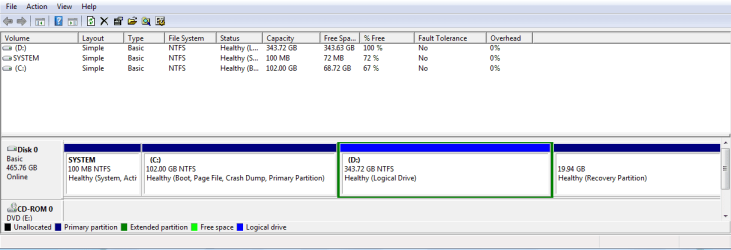
Attachments

  • Capture.PNG
    Capture.PNG
    13.2 KB · Views: 16

My Computer My Computer

Computer Manufacturer/Model Number
samsung
OS
windows 7 home premium x 64
God knows how i did that pure luck i couldnt do it again
 

My Computer My Computer

Computer Manufacturer/Model Number
samsung
OS
windows 7 home premium x 64
Good job.

That pic shows that C is only 1/3 full----about 34 used of 102 total.

Your first post said "drastically filling it up".

What do you mean and why the panic?

It looks perfectly OK to me.
 

My Computer My Computer

Computer type
PC/Desktop
Computer Manufacturer/Model Number
Ignatz Special; 4 speed manual gearbox; factory air conditioning; one of one
OS
Windows 7 Home Premium SP1, 64-bit
CPU
Intel Skylake i5-6600K, not overclocked
Motherboard
AsRock Z170M Extreme 4, micro ATX
Memory
8 GB HyperX DDR4-2666 (2 x 4 GB)
Graphics Card(s)
none; graphics are integrated on CPU
Sound Card
onboard: Realtek ALC1150; external: USB Behringer UF0-202
Monitor(s) Displays
Dell S2340M 23 inch IPS
Screen Resolution
1600 x 900
Hard Drives
System: Crucial MX100 series SSD, 128 GB;
Data: Samsung Spinpoint 103SJ, 1 TB;
Backup: WD Caviar Green WD30EZRX-00D8PB0, 3 TB
PSU
Rosewill SilentNight 500 watt fanless, semi-modular
Case
Antec Solo II
Cooling
Noctua NH-U12S; Noctua F12 intake, Noctua S12A exhaust
Keyboard
Microsoft 200 6JH-00001 USB
Mouse
Dell or Microsoft optical wired; USB
Antivirus
Microsoft Security Essentials and Malwarebytes Premium
Browser
Pale Moon
Other Info
All fans PWM; speeds at idle: CPU circa 500 rpm; intake circa 600 rpm; exhaust circa 600 rpm; CPU temps 27 idle and 47 C load in a warm room (27 C/81 F) when running Intel Extreme Tuning Utility stress test.
ive reset to factory settings today it had alot more last night,i reset hoping to get the rest of the hdd,but it dosent work like that does it?

So how do i just leave it as it is? Will i not need that drive D?

Ive yet to put my pictures music and films on will C drive be ok as everything seems to save on this drive...

Thanks for your patience Tim
 

My Computer My Computer

Computer Manufacturer/Model Number
samsung
OS
windows 7 home premium x 64
Tim:

See comments in bold

ive reset to factory settings today it had alot more last night,i reset hoping to get the rest of the hdd,but it dosent work like that does it?

You now have a D drive. A "reset to factory settings" should have taken you back to the way the PC was when you got it---presumably without a D drive.

So I am guessing your attempt at "reset to factory settings" did not actually go through. If you originally did not have D, a factory restore should not have D either.

So that is a bit of a mystery. Exactly how did you do this "reset"?


So how do i just leave it as it is? Will i not need that drive D?

To leave it as it is, don't do anything. You will have a D.

If you don't want the D, you can get rid of it.

Why did you originally make a D? What was your intent?


Ive yet to put my pictures music and films on will C drive be ok as everything seems to save on this drive...

The typical reason to use a D is to put pictures, music, and films on D rather than C, and use C only for Windows itself.

Doing so generally simplifies your backup strategy.

But we don't know why you made a D to begin with.

You have to decide if you want C alone, or C and D.

Either works.

Can you describe your backup strategy as it is right now, if you have one?
 

My Computer My Computer

Computer type
PC/Desktop
Computer Manufacturer/Model Number
Ignatz Special; 4 speed manual gearbox; factory air conditioning; one of one
OS
Windows 7 Home Premium SP1, 64-bit
CPU
Intel Skylake i5-6600K, not overclocked
Motherboard
AsRock Z170M Extreme 4, micro ATX
Memory
8 GB HyperX DDR4-2666 (2 x 4 GB)
Graphics Card(s)
none; graphics are integrated on CPU
Sound Card
onboard: Realtek ALC1150; external: USB Behringer UF0-202
Monitor(s) Displays
Dell S2340M 23 inch IPS
Screen Resolution
1600 x 900
Hard Drives
System: Crucial MX100 series SSD, 128 GB;
Data: Samsung Spinpoint 103SJ, 1 TB;
Backup: WD Caviar Green WD30EZRX-00D8PB0, 3 TB
PSU
Rosewill SilentNight 500 watt fanless, semi-modular
Case
Antec Solo II
Cooling
Noctua NH-U12S; Noctua F12 intake, Noctua S12A exhaust
Keyboard
Microsoft 200 6JH-00001 USB
Mouse
Dell or Microsoft optical wired; USB
Antivirus
Microsoft Security Essentials and Malwarebytes Premium
Browser
Pale Moon
Other Info
All fans PWM; speeds at idle: CPU circa 500 rpm; intake circa 600 rpm; exhaust circa 600 rpm; CPU temps 27 idle and 47 C load in a warm room (27 C/81 F) when running Intel Extreme Tuning Utility stress test.
When i first got it home it said Samsung smart partition choose carefully as you can only do this once so i looked on the web and read that c should be smaller than D...The recommendations was to make C around 100g and the rest allocated to D...I have no idea why i need 2 drives or why i had to partion it never had a laptop ask to do this before...The recommendations came from the net so i followed that...Now i find that everything i install be it windows stuff or itunes it all saves on C leaving me with D drive and 300g of space that i don't know how to use...You say that it's best to have the two drives which is fine by me,but then i need to know what im doing with them I.E what do i store in what and how do i move these to the correct drives plus how do i sort out which drive to put in future downloads?

Ive just downloaded tom tom home for my sat nav and it automatically goes into drive C...As for back up ino nothing of it or how it works so no i have no back up plan...

Again thank you for your help in this matter it is greatly appreaciated and i understand it must be hard for you trying to help a complete numpty that knows nothing ofwhat you speak but please bear with me im trying tolearn fast...

Regards Tim
 

My Computer My Computer

Computer Manufacturer/Model Number
samsung
OS
windows 7 home premium x 64
See more comments in bold:


When i first got it home it said Samsung smart partition choose carefully as you can only do this once so i looked on the web and read that c should be smaller than D...The recommendations was to make C around 100g and the rest allocated to D...I have no idea why i need 2 drives or why i had to partion it never had a laptop ask to do this before...

Like you, I never heard of being asked to partition a store-bought laptop either. Must be peculiar to Samsung.

Before you did anything the day you bought it, the PC presumably had 3 partitions: System Reserved, C, and Recovery. After you used "smart partition", whatever that is, D was added, for a total of 4 partitions.

I have no idea if you can go back to the 3 partition arrangement, without D. I would have expected a "factory reset" to do that, but according to you it did not.

Since I know nothing about Samsungs, it's up to you or others reading this to find out if you can go back to the "no D drive" arrangement.


The recommendations came from the net so i followed that...Now i find that everything i install be it windows stuff or itunes it all saves on C leaving me with D drive and 300g of space that i don't know how to use...

If you in fact keep C and D, then C of 100 GB is a decent size.

You say you have not restored your pictures, etc. What is the total size of all of your personal data and where is it sitting now?

If you keep D, the general idea would be to install ALL programs to C, not D. That's probably what would happen by default.

And then to use the D drive for all of your pictures, music, etc.

"User" folders are normally on C, but there is a way of re-routing them to D, which is what you would have to do if you want to keep D.

I assume that traditionally you have kept your personal data somewhere in "user" folders on C?

I don't use the "user" folders at all, so I am not the person to ask about how to get them onto the D drive, but it's commonly done and there are tutorials on this site to tell you how.


As for back up ino nothing of it or how it works so no i have no back up plan...

I'm sure you know that hard drives fail. How disappointed would you be if all of your pictures, music, and films disappeared?

If the answer is "highly", you should back up. Backups are typically done to an external drive and I wonder if you now have one?

You should probably decide if you are going to back up before you decide on what to do about C and D.

You can back up your data only, the Windows installation only, or both. In my opinion, you should certainly back up your data. Backing up Windows is not nearly as important--many people don't do it at all.


My Computer My Computer

Computer type
PC/Desktop
Computer Manufacturer/Model Number
Ignatz Special; 4 speed manual gearbox; factory air conditioning; one of one
OS
Windows 7 Home Premium SP1, 64-bit
CPU
Intel Skylake i5-6600K, not overclocked
Motherboard
AsRock Z170M Extreme 4, micro ATX
Memory
8 GB HyperX DDR4-2666 (2 x 4 GB)
Graphics Card(s)
none; graphics are integrated on CPU
Sound Card
onboard: Realtek ALC1150; external: USB Behringer UF0-202
Monitor(s) Displays
Dell S2340M 23 inch IPS
Screen Resolution
1600 x 900
Hard Drives
System: Crucial MX100 series SSD, 128 GB;
Data: Samsung Spinpoint 103SJ, 1 TB;
Backup: WD Caviar Green WD30EZRX-00D8PB0, 3 TB
PSU
Rosewill SilentNight 500 watt fanless, semi-modular
Case
Antec Solo II
Cooling
Noctua NH-U12S; Noctua F12 intake, Noctua S12A exhaust
Keyboard
Microsoft 200 6JH-00001 USB
Mouse
Dell or Microsoft optical wired; USB
Antivirus
Microsoft Security Essentials and Malwarebytes Premium
Browser
Pale Moon
Other Info
All fans PWM; speeds at idle: CPU circa 500 rpm; intake circa 600 rpm; exhaust circa 600 rpm; CPU temps 27 idle and 47 C load in a warm room (27 C/81 F) when running Intel Extreme Tuning Utility stress test.
Keep it simple leave it as it is (C and D drives) any programs you install put them on C everything else (pictures ,music etc) store them on D.
Definitely agree that you should get an external drive and backup to it.
 

My Computer My Computer

Computer type
PC/Desktop
Computer Manufacturer/Model Number
Self Built Custom Computer.
OS
Windows 10 Pro x64
CPU
i7-4770K
Motherboard
Asus Z87 Sabertooth
Memory
16Gig DDR3-2400
Graphics Card(s)
Gigabyte GT740
Sound Card
Onboard
Monitor(s) Displays
Benq 27" - Dell 23' - Benq 22"
Screen Resolution
1680x1050
Hard Drives
Samsung 840 Pro 128g SSD
1xWestern Digital Caviar Green 1tb
2xWestern Digital Caviar Green 2 tb
PSU
Seasonic 760 watt Platinum
Case
Coolermaster Haf - X
Cooling
Noctua NH-C12P CPU Cooler
Keyboard
Logitech illuminated keyboard
Mouse
Logitech Perfomance MX
Internet Speed
Cable = speeds to 20Mbps downsteam and 512kbps upsteam
Antivirus
Avast Internet Security
Browser
Firefox
Ok matey ...Ill try to answer you best i can!

Like you, I never heard of being asked to partition a store-bought laptop either. Must be peculiar to Samsung.

Before you did anything the day you bought it, the PC presumably had 3 partitions: System Reserved, C, and Recovery. After you used "smart partition", whatever that is, D was added, for a total of 4 partitions.

When bought new from the store it runs first setup,now it dosen't go to the main screen of the laptop untill its done this smart partition thing...It's like the first thing that comes up before you go to the main screen (welcome to windows) screen...This may help you understand more than i can explain buddy...Samsung PC Software - Easy Partition Manager - YouTube

You say you have not restored your pictures, etc. What is the total size of all of your personal data and where is it sitting now?

There is none stored on this new laptop fortunately all this is on my ipad,ipod,and iphone so ican just sync them to itunes when ready and have all my pictures music and movies back on here...


If you keep D, the general idea would be to install ALL programs to C, not D. That's probably what would happen by default.

And then to use the D drive for all of your pictures, music, etc.

Yes everything seems to go on to C drive...Is it easy enough to move things to D drive you also mention user files mate Ive no idea what these are...I'm assuming that what i have done is a good thing i just need to learn how to use the drives effectively??

I'm sure you know that hard drives fail. How disappointed would you be if all of your pictures, music, and films disappeared?

If the answer is "highly", you should back up. Backups are typically done to an external drive and I wonder if you now have one?

You should probably decide if you are going to back up before you decide on what to do about C and D.

You can back up your data only, the Windows installation only, or both. In my opinion, you should certainly back up your data. Backing up Windows is not nearly as important--many people don't do it at all.

Mate if you could get me through a back up great stuff itunes is always telling me to back up my account but it seems only to want to back up to cd which unfortunately would mean a lot of cd's...You speak of an external hard drive? Ok tell me what i need to go and get and then what i need to do...

Again thank you so much for your help and patience with this you are a star man... Thank you to you to Kodi
 

My Computer My Computer

Computer Manufacturer/Model Number
samsung
OS
windows 7 home premium x 64
Is it easy enough to move things to D drive you also mention user files mate Ive no idea what these are...I'm assuming that what i have done is a good thing i just need to learn how to use the drives effectively??

Mate if you could get me through a back up great stuff itunes is always telling me to back up my account but it seems only to want to back up to cd which unfortunately would mean a lot of cd's...You speak of an external hard drive? Ok tell me what i need to go and get and then what i need to do...

I don't use the user folders for my data, but here is a tutorial on how to get them to another location:

http://www.sevenforums.com/tutorials/87555-user-profile-change-default-location.html?ltr=U

You might want to start a thread on that particular subject if you have questions about the procedure.

If I understand you correctly, you have none of your personal data on a PC---it's all on Apple devices such as iPods and iPhones??

Exactly why did you then buy the laptop?? Normally, people develop a lot of personal data and must decide where to store it. In your case, that would be on the D drive assuming you want to keep it.

I have an Apple-free household, but I'd certainly be worried about my iPod or iPhone failing and not having any backup.

I think most people keep their data on the PC and then sync it as necessary to external devices. And then also back data up from the PC to an external drive.

There are numerous programs that can help you back up data from any location on a hard drive to an external drive.
 

My Computer My Computer

Computer type
PC/Desktop
Computer Manufacturer/Model Number
Ignatz Special; 4 speed manual gearbox; factory air conditioning; one of one
OS
Windows 7 Home Premium SP1, 64-bit
CPU
Intel Skylake i5-6600K, not overclocked
Motherboard
AsRock Z170M Extreme 4, micro ATX
Memory
8 GB HyperX DDR4-2666 (2 x 4 GB)
Graphics Card(s)
none; graphics are integrated on CPU
Sound Card
onboard: Realtek ALC1150; external: USB Behringer UF0-202
Monitor(s) Displays
Dell S2340M 23 inch IPS
Screen Resolution
1600 x 900
Hard Drives
System: Crucial MX100 series SSD, 128 GB;
Data: Samsung Spinpoint 103SJ, 1 TB;
Backup: WD Caviar Green WD30EZRX-00D8PB0, 3 TB
PSU
Rosewill SilentNight 500 watt fanless, semi-modular
Case
Antec Solo II
Cooling
Noctua NH-U12S; Noctua F12 intake, Noctua S12A exhaust
Keyboard
Microsoft 200 6JH-00001 USB
Mouse
Dell or Microsoft optical wired; USB
Antivirus
Microsoft Security Essentials and Malwarebytes Premium
Browser
Pale Moon
Other Info
All fans PWM; speeds at idle: CPU circa 500 rpm; intake circa 600 rpm; exhaust circa 600 rpm; CPU temps 27 idle and 47 C load in a warm room (27 C/81 F) when running Intel Extreme Tuning Utility stress test.
OEM'S are following the trend to provide a data partition so User data can be separated from the OS/Programs to keep the image smaller and more manageable so it doesn;t take up an entire external or secondary HD.

Easiest method to utliize such an arrangement is copy your User folders to D and then rightclick each to add to the related Library - Include a Folder - Windows 7 Forums.

If you don't care about that then you can delete D in Disk Mgmt as Ignatz suggested and extend C into the space: Partition or Volume - Extend
 
Back
Top