Samsung Smart Panel problem (x64 build 7100)

Geezzer

New member
Local time
10:34 AM
Messages
9
Has anyone got Samsung Smart Panel (printer application) working with Win7 x64 build 7100? It worked fine with x86 builds 7000, 7057 and 7068. Then I installed (clean install) x64 build 7100 (RC) and Smart Panel does not install correctly anymore. Installation does finish but there are some error messages during installation that some files cannot be found (SPaddon.exe and SSMMgr.exe). After installation Smart Panel folder in Start menu has shortcut to SSMMgr.exe in subfolder under Windows folder... but strange thing is that subfolder does not even exist. As said there was something wrong with installation process. Any ideas how to get this application work?
 

My Computer

OS
Windows 7 x64 build 7201
The application may not be 64-bit compatible. First, check and see if Samsung provides a 64-bit version of the application.

Does the application installation return any error messages?
 

My Computer

Computer Manufacturer/Model Number
Asus EEE PC 900HD
OS
Windows XP
CPU
Intel Celeron ULV (max 900 mhz; set to 630 mhz)
Memory
1 GB DDR2
Graphics Card(s)
Intel GMA 900 64 MB
Sound Card
Realtek HD Audio
Monitor(s) Displays
8.9 inch LED backlight display
Screen Resolution
1024 by 600
Hard Drives
160 GB
PSU
35 watt
Keyboard
just fine
Mouse
multi-touch touchpad
Internet Speed
slow
Other Info
Using a netbook currently for travel. Also own a Dell 755 and a T500 and a Toshiba P105.
According to Samsung web site supported OSs are: Win 2000/XP/2003/Vista/2008. Nothing is said about 32 or 64 bit support.

Installation program itself does not return any error messages but instead separate windows are opened to inform that those two exe files cannot be located. I think that installation program tries to start those services(?) during installation process.

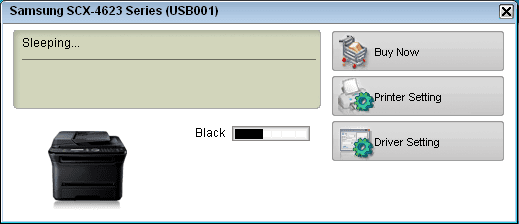
Well... this application is not absolutely necessary, it's just "nice-to-have" because it indicates ink levels separately for each color.
 

My Computer

OS
Windows 7 x64 build 7201
I use build 7077 and got the same errormessages. I got rid of the error messages when I copied the files from the \C:\Program Files (x86)\Samsung\Samsung SCX-4500 Series\SPanel\PSU\Data folder to c:\windows\

I also did a lot of other stuff - mainly moving stuff around. The contents of the SPanel folder I definately copied somewhere too. Sorry, but I've been working on this so long, that I don't remember all the steps, and they might even not be necesarry all of them, but the psu-->windows you should definately try.
 
I have a Samsung SCX-4725FN and I had the same problem with Samsung software on 7 x64 b7100. I think this is a UAC elevation issue because the files are not being written to the proper places by the installer for some reason. I've had other programs fail to do UAC properly (Directory Opus, for one).

I got this to work by first installing to a Vista box and copying the entire contents of C:\Windows\Samsung and C:\Program Files (x86)\Samsung\Samsung SCX-4725 Series from the Vista box to the 7 box and doing the UAC elevations manually. Now that the files are there, I simply run the Samsung installers again and everything goes smoothly.
 

My Computer

OS
Windows 7 RC build 7100
Just ran into this thread, w/Google query: samsung Smart Panel -mac -youtube
Code:
https://www.google.com/search?q=samsung+Smart+Panel+-mac+-youtube
&&
Well... this application is not absolutely necessary, it's just "nice-to-have" because it indicates ink levels separately for each color.
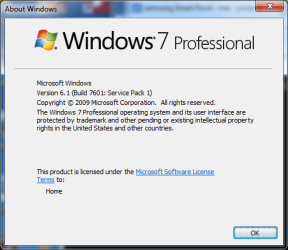
.. There aren't any problems w/it, whatsoever.

(0ld-455 thread, eye know!..:) && granted, there might've been problems w/old(er) ver.)
P.S.

=)
 

Attachments

  • winver.png
    winver.png
    15.9 KB · Views: 7
  • SSMMgr.png
    SSMMgr.png
    7.5 KB · Views: 7
Last edited:

My Computer

Computer type
PC/Desktop
Computer Manufacturer/Model Number
Custom
OS
Windows 7 Professional x64 Service Pack 1
CPU
i7-3770 Ivy, MSI OC genie OC'd (default)
Motherboard
Z68A-G43 (G3), MSI
Memory
Vengeance 2x4GB 2133MHz (OC'd)
Graphics Card(s)
GTX 650 Gainward
Monitor(s) Displays
BenQ E2200HD
Screen Resolution
1920x1080
Hard Drives
WD 1TB 64MB sATA; LC-Power LC-PRO-25WU; IT-350SA
PSU
LC7600v2.3
Case
ALTO winwin.rs/
Cooling
Stock / standard
Keyboard
Logitech Alto
Mouse
Genius DeathTaker
Internet Speed
25 (megabits / second) = 3125 KBps = (25.600/2.048)
Antivirus
Comodo
Browser
Mozilla
Other Info
http://valid.canardpc.com/mcdty0
Back
Top