Samsung Syncmaster B2030 - no option to set resolution to 1600 x 900

  1. I have a B2030, 20 inch monitor
  2. win 7 thought it was a B2230, 22 inch monitor
  3. I changed the driver manually to B2030, 20 inch monitor
  4. The device manager shows B2030, 20 inch monitor BUT the res. settings window shows it as B2230 still and only supports 1920 x 1080, whereas I actually want 1600 x 900.
Thanks for help so far - I am currently trying all of the suggestions and will get back to you
 

My Computer My Computer

At a glance

Windows 7 Professional 32bitIntel(R) Core(TM) i3-2100 CPU @ 3.10Ghz (x4)4.00GB (3.16 Usable)Intel(R) HD Graphics Family
Computer Manufacturer/Model Number
Dell Optiplex 390
OS
Windows 7 Professional 32bit
CPU
Intel(R) Core(TM) i3-2100 CPU @ 3.10Ghz (x4)
Motherboard
ACPI x86-based PC
Memory
4.00GB (3.16 Usable)
Graphics Card(s)
Intel(R) HD Graphics Family
Sound Card
Conexant HD Audio
Monitor(s) Displays
SyncMaster B2030 (Digital)
then it's a function of your built in video and how they implemented. best u can do is update your video driver and see if it appears.

any resolution you set that meets your monitors 1.77 (or 16:9 if u prefer) aspect ratio will look ok.

Have updated from intel website and still not working..
 

My Computer My Computer

At a glance

Windows 7 Professional 32bitIntel(R) Core(TM) i3-2100 CPU @ 3.10Ghz (x4)4.00GB (3.16 Usable)Intel(R) HD Graphics Family
Computer Manufacturer/Model Number
Dell Optiplex 390
OS
Windows 7 Professional 32bit
CPU
Intel(R) Core(TM) i3-2100 CPU @ 3.10Ghz (x4)
Motherboard
ACPI x86-based PC
Memory
4.00GB (3.16 Usable)
Graphics Card(s)
Intel(R) HD Graphics Family
Sound Card
Conexant HD Audio
Monitor(s) Displays
SyncMaster B2030 (Digital)

My Computer My Computer

At a glance

Windows 7 Professional 32bitIntel(R) Core(TM) i3-2100 CPU @ 3.10Ghz (x4)4.00GB (3.16 Usable)Intel(R) HD Graphics Family
Computer Manufacturer/Model Number
Dell Optiplex 390
OS
Windows 7 Professional 32bit
CPU
Intel(R) Core(TM) i3-2100 CPU @ 3.10Ghz (x4)
Motherboard
ACPI x86-based PC
Memory
4.00GB (3.16 Usable)
Graphics Card(s)
Intel(R) HD Graphics Family
Sound Card
Conexant HD Audio
Monitor(s) Displays
SyncMaster B2030 (Digital)
unlikely the exact monitor model is relevant to this problem.

Actually it is very relevant. His computer thinks it has two different monitors connected,

1 - B2030 which is a 20" monitor with a native resolution of 1600x900

2 - SMB2230 (or likely B2230) which is a 22" monitor with a native resolution of 1920x1080

of which the 1st shouldn't be able to even run at the higher resolution.

leonsegal let's see if we can't at least get Windows to detect the correct monitor. Start with setting Device Manager to show hidden and disconnected/ghost devices,

http://www.sevenforums.com/tutorials/77614-device-manager-hidden-devices.html

Under monitors right click and delete/remove any that are showing, and also tick the box to remove any software/driver. If there is more than one don't restart until all are removed. Once restarted hopefully that will force Windows to detect and install the monitor correctly. If not then install the monitor driver from Samsung I posted earlier.


cool. now explain to me how this affects the driver/chipset's offering of video modes.
we were already aware of the monitor listings but I am baffled as to how this supports claims of relevance. Please school me.
because I've always had modes offered that my monitors didn't support, on every system i've ever built or configured.
to the best of my knowledge the system pays no attention at all to the monitors capability, that's up to you. If it did, there would never be a video res offered that your monitor couldn't use, but there they are, on the list.
the monitor has always been the most completely neutral piece of hardware you can plug into a system.
Those aren't 'native resolutions' by the way. They are maximum resolutions that reflect the native aspect ratio.
 
Last edited:

My Computer My Computer

At a glance

W7 64bitAMD Phenom II X4 975 Black Edition @3.9GHz8GB Corsair Vengeance 8GB PC15000 DDR3 1866MH...ASUS ENGTX 460 1GB DDR5
Computer Manufacturer/Model Number
self built
OS
W7 64bit
CPU
AMD Phenom II X4 975 Black Edition @3.9GHz
Motherboard
ASUS Crosshair IV Formula AMD 890FX AM3
Memory
8GB Corsair Vengeance 8GB PC15000 DDR3 1866MHz CL9
Graphics Card(s)
ASUS ENGTX 460 1GB DDR5
Sound Card
...On MB nvidia
Monitor(s) Displays
..Samsung T260
Screen Resolution
1440 x 900
Hard Drives
2x WD Caviar 320GB SATA-3G HD 7200/16MB/SATA-6G Raid 1
PSU
750 W
Case
minitower, it's got a cool spider design on the front
Cooling
all the fans i can cram in, water cooled cpu
Keyboard
walmart
Mouse
Kensington Expert Mouse "gods own trackball"
Internet Speed
30 Mb/s
Are you connected by VGA cable of HDMI? I find info on the net that tells me users often get more video res choices via VGA connect than HDMI. This surprises me...I kept a list of about 100 video modes when I switched over to hdmi last month but it might be worth looking into.
 

My Computer My Computer

At a glance

W7 64bitAMD Phenom II X4 975 Black Edition @3.9GHz8GB Corsair Vengeance 8GB PC15000 DDR3 1866MH...ASUS ENGTX 460 1GB DDR5
Computer Manufacturer/Model Number
self built
OS
W7 64bit
CPU
AMD Phenom II X4 975 Black Edition @3.9GHz
Motherboard
ASUS Crosshair IV Formula AMD 890FX AM3
Memory
8GB Corsair Vengeance 8GB PC15000 DDR3 1866MHz CL9
Graphics Card(s)
ASUS ENGTX 460 1GB DDR5
Sound Card
...On MB nvidia
Monitor(s) Displays
..Samsung T260
Screen Resolution
1440 x 900
Hard Drives
2x WD Caviar 320GB SATA-3G HD 7200/16MB/SATA-6G Raid 1
PSU
750 W
Case
minitower, it's got a cool spider design on the front
Cooling
all the fans i can cram in, water cooled cpu
Keyboard
walmart
Mouse
Kensington Expert Mouse "gods own trackball"
Internet Speed
30 Mb/s
If you're getting that then you either,

a. have something not installed or configured properly

b. your monitor isn't working properly if a LCD.

Monitors have this,

Extended display identification data - Wikipedia, the free encyclopedia

for a reason.

Extended display identification data (EDID) is a data structure provided by a digital display to describe its capabilities to a video source (e.g. graphics card, Set-top box). It is what enables a modern personal computer to know what kinds of monitors are connected to it. EDID is defined by a standard published by the Video Electronics Standards Association (VESA). The EDID includes manufacturer name and serial number, product type, phosphor or filter type, timings supported by the display, display size, luminance data and (for digital displays only) pixel mapping data.
 

My Computer My Computer

At a glance

Win 7 Ultimate x64FX-8350 @ 4.6 GHz so farADATA XPG V1 Series Black 8GB DDR3 1600Sapphire R9 270x Dual-X
Computer type
PC/Desktop
Computer Manufacturer/Model Number
Me
OS
Win 7 Ultimate x64
CPU
FX-8350 @ 4.6 GHz so far
Motherboard
Asus M5A97 EVO
Memory
ADATA XPG V1 Series Black 8GB DDR3 1600
Graphics Card(s)
Sapphire R9 270x Dual-X
Sound Card
Xonar DGX w/ Corsair Vengence 1300
Monitor(s) Displays
Acer S232HL Abid
Screen Resolution
1920x1080
Hard Drives
120 GB OCZ Vertex 3
500 GB Seagate 7200.12
PSU
Antec Earthwatts 650W Green
Case
Antec Three Hundred
Cooling
Cooler Master 212 EVO
Keyboard
Logitech G510
Mouse
Logitech G500s
Internet Speed
35000/3000
If you're getting that then you either,

a. have something not installed or configured properly

b. your monitor isn't working properly if a LCD.

Monitors have this,

Extended display identification data - Wikipedia, the free encyclopedia

for a reason.

Extended display identification data (EDID) is a data structure provided by a digital display to describe its capabilities to a video source (e.g. graphics card, Set-top box). It is what enables a modern personal computer to know what kinds of monitors are connected to it. EDID is defined by a standard published by the Video Electronics Standards Association (VESA). The EDID includes manufacturer name and serial number, product type, phosphor or filter type, timings supported by the display, display size, luminance data and (for digital displays only) pixel mapping data.

and yet...modes monitors can't show continue to show up on the choice list. do they not?
besides which, both monitors are capable of the vid mode we're persuing.
 

My Computer My Computer

At a glance

W7 64bitAMD Phenom II X4 975 Black Edition @3.9GHz8GB Corsair Vengeance 8GB PC15000 DDR3 1866MH...ASUS ENGTX 460 1GB DDR5
Computer Manufacturer/Model Number
self built
OS
W7 64bit
CPU
AMD Phenom II X4 975 Black Edition @3.9GHz
Motherboard
ASUS Crosshair IV Formula AMD 890FX AM3
Memory
8GB Corsair Vengeance 8GB PC15000 DDR3 1866MHz CL9
Graphics Card(s)
ASUS ENGTX 460 1GB DDR5
Sound Card
...On MB nvidia
Monitor(s) Displays
..Samsung T260
Screen Resolution
1440 x 900
Hard Drives
2x WD Caviar 320GB SATA-3G HD 7200/16MB/SATA-6G Raid 1
PSU
750 W
Case
minitower, it's got a cool spider design on the front
Cooling
all the fans i can cram in, water cooled cpu
Keyboard
walmart
Mouse
Kensington Expert Mouse "gods own trackball"
Internet Speed
30 Mb/s
The basis of this disagreement by the way is based on my own system. Besides past experience, my current samsung t260 has a maximum res of 1920x1200. my list of available resolutions include (and i'm looking at it at this moment)
2048x1152, 2048x1280, up to 2560x1440. So you will understand my confusion with your information.
 

My Computer My Computer

At a glance

W7 64bitAMD Phenom II X4 975 Black Edition @3.9GHz8GB Corsair Vengeance 8GB PC15000 DDR3 1866MH...ASUS ENGTX 460 1GB DDR5
Computer Manufacturer/Model Number
self built
OS
W7 64bit
CPU
AMD Phenom II X4 975 Black Edition @3.9GHz
Motherboard
ASUS Crosshair IV Formula AMD 890FX AM3
Memory
8GB Corsair Vengeance 8GB PC15000 DDR3 1866MHz CL9
Graphics Card(s)
ASUS ENGTX 460 1GB DDR5
Sound Card
...On MB nvidia
Monitor(s) Displays
..Samsung T260
Screen Resolution
1440 x 900
Hard Drives
2x WD Caviar 320GB SATA-3G HD 7200/16MB/SATA-6G Raid 1
PSU
750 W
Case
minitower, it's got a cool spider design on the front
Cooling
all the fans i can cram in, water cooled cpu
Keyboard
walmart
Mouse
Kensington Expert Mouse "gods own trackball"
Internet Speed
30 Mb/s
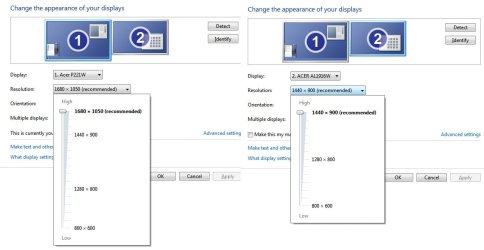
Not when everything is working as it should. I have two monitors connected, a 22" with native 1680z1050 and a 19" with native 1440x900, and neither of them can be set higher than their native resolutions,

screenres.jpg

besides which, both monitors are capable of the vid mode we're persuing.

No they are not. Once again,

B2030 is a 20" monitor and has a native/max resolution of 1600x900

B2230 is a 22" monitor and has a native/max resolution of 1920x1080

The only thing they have in common is they are both have a 16:9 aspect ratio.

The basis of this disagreement by the way is based on my own system. Besides past experience, my current samsung t260 has a maximum res of 1920x1200. my list of available resolutions include (and i'm looking at it at this moment)
2048x1152, 2048x1280, up to 2560x1440. So you will understand my confusion with your information.

Try setting it that high and see what happens. They shouldn't be available at all if the monitor is reporting its capabilities correctly, and the driver for both the monitor and video card are installed and working properly.
 

My Computer My Computer

At a glance

Win 7 Ultimate x64FX-8350 @ 4.6 GHz so farADATA XPG V1 Series Black 8GB DDR3 1600Sapphire R9 270x Dual-X
Computer type
PC/Desktop
Computer Manufacturer/Model Number
Me
OS
Win 7 Ultimate x64
CPU
FX-8350 @ 4.6 GHz so far
Motherboard
Asus M5A97 EVO
Memory
ADATA XPG V1 Series Black 8GB DDR3 1600
Graphics Card(s)
Sapphire R9 270x Dual-X
Sound Card
Xonar DGX w/ Corsair Vengence 1300
Monitor(s) Displays
Acer S232HL Abid
Screen Resolution
1920x1080
Hard Drives
120 GB OCZ Vertex 3
500 GB Seagate 7200.12
PSU
Antec Earthwatts 650W Green
Case
Antec Three Hundred
Cooling
Cooler Master 212 EVO
Keyboard
Logitech G510
Mouse
Logitech G500s
Internet Speed
35000/3000
aha..this actually got me interested enough to poke around a little. and i thought the magic was completely gone after 25+ years.
right click desktop -> screen resolution -> advanced settings -> monitor tab

is the little box next to 'hide modes that this monitor cannot display' checked?
uncheck it , refresh the list. Now what do u see?
 

My Computer My Computer

At a glance

W7 64bitAMD Phenom II X4 975 Black Edition @3.9GHz8GB Corsair Vengeance 8GB PC15000 DDR3 1866MH...ASUS ENGTX 460 1GB DDR5
Computer Manufacturer/Model Number
self built
OS
W7 64bit
CPU
AMD Phenom II X4 975 Black Edition @3.9GHz
Motherboard
ASUS Crosshair IV Formula AMD 890FX AM3
Memory
8GB Corsair Vengeance 8GB PC15000 DDR3 1866MHz CL9
Graphics Card(s)
ASUS ENGTX 460 1GB DDR5
Sound Card
...On MB nvidia
Monitor(s) Displays
..Samsung T260
Screen Resolution
1440 x 900
Hard Drives
2x WD Caviar 320GB SATA-3G HD 7200/16MB/SATA-6G Raid 1
PSU
750 W
Case
minitower, it's got a cool spider design on the front
Cooling
all the fans i can cram in, water cooled cpu
Keyboard
walmart
Mouse
Kensington Expert Mouse "gods own trackball"
Internet Speed
30 Mb/s
Not when everything is working as it should. I have two monitors connected, a 22" with native 1680z1050 and a 19" with native 1440x900, and neither of them can be set higher than their native resolutions,

View attachment 167366

besides which, both monitors are capable of the vid mode we're persuing.
No they are not. Once again,

B2030 is a 20" monitor and has a native/max resolution of 1600x900

B2230 is a 22" monitor and has a native/max resolution of 1920x1080

The only thing they have in common is they are both have a 16:9 aspect ratio.

The basis of this disagreement by the way is based on my own system. Besides past experience, my current samsung t260 has a maximum res of 1920x1200. my list of available resolutions include (and i'm looking at it at this moment)
2048x1152, 2048x1280, up to 2560x1440. So you will understand my confusion with your information.
Try setting it that high and see what happens. They shouldn't be available at all if the monitor is reporting its capabilities correctly, and the driver for both the monitor and video card are installed and working properly.

both monitors support 1600x900 according to mfg specs. max res (or native..new term..u got me on that one) is not relevant.
of course my monitor will fail to show pic if i set it that high. it's beyond spec. what does that prove?
 

My Computer My Computer

At a glance

W7 64bitAMD Phenom II X4 975 Black Edition @3.9GHz8GB Corsair Vengeance 8GB PC15000 DDR3 1866MH...ASUS ENGTX 460 1GB DDR5
Computer Manufacturer/Model Number
self built
OS
W7 64bit
CPU
AMD Phenom II X4 975 Black Edition @3.9GHz
Motherboard
ASUS Crosshair IV Formula AMD 890FX AM3
Memory
8GB Corsair Vengeance 8GB PC15000 DDR3 1866MHz CL9
Graphics Card(s)
ASUS ENGTX 460 1GB DDR5
Sound Card
...On MB nvidia
Monitor(s) Displays
..Samsung T260
Screen Resolution
1440 x 900
Hard Drives
2x WD Caviar 320GB SATA-3G HD 7200/16MB/SATA-6G Raid 1
PSU
750 W
Case
minitower, it's got a cool spider design on the front
Cooling
all the fans i can cram in, water cooled cpu
Keyboard
walmart
Mouse
Kensington Expert Mouse "gods own trackball"
Internet Speed
30 Mb/s
Ok..a little poking around and I see the point now.

Native resolution - Wikipedia, the free encyclopedia

"But in practice, most monitors apply a smoothing algorithm to all smaller resolutions, so the quality still suffers for these "half" modes (for a VGA connection, when the monitor is responsible for scaling). In the case of a DVI connection, the scaling is provided by the video adapter, not the monitor."

Thus the importance of the computer seeing the correct monitor and NATIVE resolution..yes..if he's connected HDMI or DVI the samsungs monitors capability to scale the image is turned off and the video card takes over scaling.
Dell might well not have built that in. it costs money. Actually interesting. thanks.
 

My Computer My Computer

At a glance

W7 64bitAMD Phenom II X4 975 Black Edition @3.9GHz8GB Corsair Vengeance 8GB PC15000 DDR3 1866MH...ASUS ENGTX 460 1GB DDR5
Computer Manufacturer/Model Number
self built
OS
W7 64bit
CPU
AMD Phenom II X4 975 Black Edition @3.9GHz
Motherboard
ASUS Crosshair IV Formula AMD 890FX AM3
Memory
8GB Corsair Vengeance 8GB PC15000 DDR3 1866MHz CL9
Graphics Card(s)
ASUS ENGTX 460 1GB DDR5
Sound Card
...On MB nvidia
Monitor(s) Displays
..Samsung T260
Screen Resolution
1440 x 900
Hard Drives
2x WD Caviar 320GB SATA-3G HD 7200/16MB/SATA-6G Raid 1
PSU
750 W
Case
minitower, it's got a cool spider design on the front
Cooling
all the fans i can cram in, water cooled cpu
Keyboard
walmart
Mouse
Kensington Expert Mouse "gods own trackball"
Internet Speed
30 Mb/s
aha..this actually got me interested enough to poke around a little. and i thought the magic was completely gone after 25+ years.
right click desktop -> screen resolution -> advanced settings -> monitor tab

is the little box next to 'hide modes that this monitor cannot display' checked?
uncheck it , refresh the list. Now what do u see?

still nothing :(

I am starting to wonder if it is because there is an integrated vid card? will getting a different one fix it?
 

My Computer My Computer

At a glance

Windows 7 Professional 32bitIntel(R) Core(TM) i3-2100 CPU @ 3.10Ghz (x4)4.00GB (3.16 Usable)Intel(R) HD Graphics Family
Computer Manufacturer/Model Number
Dell Optiplex 390
OS
Windows 7 Professional 32bit
CPU
Intel(R) Core(TM) i3-2100 CPU @ 3.10Ghz (x4)
Motherboard
ACPI x86-based PC
Memory
4.00GB (3.16 Usable)
Graphics Card(s)
Intel(R) HD Graphics Family
Sound Card
Conexant HD Audio
Monitor(s) Displays
SyncMaster B2030 (Digital)
my connection is a blue headed (standard?) cable - is that the problem?
 

My Computer My Computer

At a glance

Windows 7 Professional 32bitIntel(R) Core(TM) i3-2100 CPU @ 3.10Ghz (x4)4.00GB (3.16 Usable)Intel(R) HD Graphics Family
Computer Manufacturer/Model Number
Dell Optiplex 390
OS
Windows 7 Professional 32bit
CPU
Intel(R) Core(TM) i3-2100 CPU @ 3.10Ghz (x4)
Motherboard
ACPI x86-based PC
Memory
4.00GB (3.16 Usable)
Graphics Card(s)
Intel(R) HD Graphics Family
Sound Card
Conexant HD Audio
Monitor(s) Displays
SyncMaster B2030 (Digital)
Also known as VGA. It could be. If you have one available try a DVI cable instead.
 

My Computer My Computer

At a glance

Win 7 Ultimate x64FX-8350 @ 4.6 GHz so farADATA XPG V1 Series Black 8GB DDR3 1600Sapphire R9 270x Dual-X
Computer type
PC/Desktop
Computer Manufacturer/Model Number
Me
OS
Win 7 Ultimate x64
CPU
FX-8350 @ 4.6 GHz so far
Motherboard
Asus M5A97 EVO
Memory
ADATA XPG V1 Series Black 8GB DDR3 1600
Graphics Card(s)
Sapphire R9 270x Dual-X
Sound Card
Xonar DGX w/ Corsair Vengence 1300
Monitor(s) Displays
Acer S232HL Abid
Screen Resolution
1920x1080
Hard Drives
120 GB OCZ Vertex 3
500 GB Seagate 7200.12
PSU
Antec Earthwatts 650W Green
Case
Antec Three Hundred
Cooling
Cooler Master 212 EVO
Keyboard
Logitech G510
Mouse
Logitech G500s
Internet Speed
35000/3000
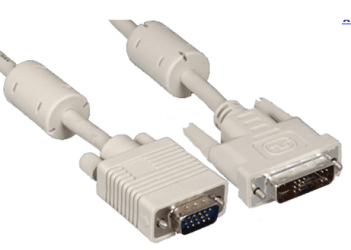
Here is a comparison of VGA, on the left, and DVI connectors, in this case both white. Some DVI plugs have more pins too.
VGA DVI.PNG
 

My Computer My Computer

At a glance

Windows 7 Ultimate X64 SP1Intel i5-2550K, Differing ~4.4-4.8GHz No buil...16GB G.Skill Sniper 1866MHz @ 2133MHz 2x8GBASUS GTX650TIB-DC2OC-2GD5, (650TI Boost)
Computer type
PC/Desktop
Computer Manufacturer/Model Number
Home Built Desktop By DataTech
OS
Windows 7 Ultimate X64 SP1
CPU
Intel i5-2550K, Differing ~4.4-4.8GHz No built in GPU
Motherboard
ASUS P8Z68-V PRO/GEN3
Memory
16GB G.Skill Sniper 1866MHz @ 2133MHz 2x8GB
Graphics Card(s)
ASUS GTX650TIB-DC2OC-2GD5, (650TI Boost)
Sound Card
Onboard Realtek 5-1
Monitor(s) Displays
Samsung P2570HD
Screen Resolution
1920x1080
Hard Drives
Samsung 840 Pro 256GB SSD for OS, 500GB Seagate Constellation (Enterprise drive) for Data
PSU
Corsair HX650W
Case
Inwin Dragon Rider
Cooling
Hyper 212 EVO w/two Noctua fans, push-pull, @1300 RPM
Keyboard
E-Z Eyes, bright yellow keys with large characters
Mouse
steelseries SENSEI Laser Pro Gaming
Internet Speed
48-51Mbs Mbs down, 11 Mbs up Xfinity Cable
Antivirus
Norton Internet Security 2013
Browser
IE 10, Opera, Pale Moon if needed
Other Info
4 case fans, LG BluRay-RE, ASUS DVD-RW, Mr. Fusion power supply, 1.21 gigawatts.
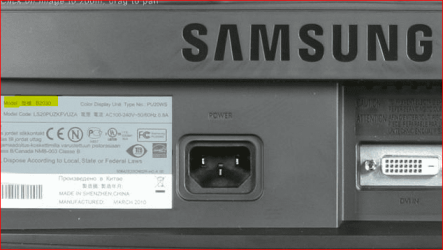
B2030 doesnt support dvi, sadly (B2230 does though apparently when I went back to the store)!

I am running out of ideas - I might just take it to someone who can look at it for me
 

My Computer My Computer

At a glance

Windows 7 Professional 32bitIntel(R) Core(TM) i3-2100 CPU @ 3.10Ghz (x4)4.00GB (3.16 Usable)Intel(R) HD Graphics Family
Computer Manufacturer/Model Number
Dell Optiplex 390
OS
Windows 7 Professional 32bit
CPU
Intel(R) Core(TM) i3-2100 CPU @ 3.10Ghz (x4)
Motherboard
ACPI x86-based PC
Memory
4.00GB (3.16 Usable)
Graphics Card(s)
Intel(R) HD Graphics Family
Sound Card
Conexant HD Audio
Monitor(s) Displays
SyncMaster B2030 (Digital)

My Computer My Computer

At a glance

Windows10 Pro - 64Bit vs.10547i7-965 Extreme Edition (8 Cores) at 3.3GHz (n...12G Corsair Dominator DDR3 - tripled2xAMD SapphireNITRO R9 380(4G) crossfire
Computer type
PC/Desktop
Computer Manufacturer/Model Number
benchtec, built to personal specs
OS
Windows10 Pro - 64Bit vs.10547
CPU
i7-965 Extreme Edition (8 Cores) at 3.3GHz (no OC)
Motherboard
BloodRageX58 (Socket1366)
Memory
12G Corsair Dominator DDR3 - tripled
Graphics Card(s)
2xAMD SapphireNITRO R9 380(4G) crossfire
Sound Card
Sonar(SB)X-Fi onboard
Monitor(s) Displays
SyncMaster P2050 20"
Screen Resolution
1600x900 (widescreen)
Hard Drives
480G\OCZSolid3SSD, 64G\OCZVertex3SSD,60G\OCZVertex2SSD, 1TB\spinpointF1SATAHDD
PSU
1200w Power Station Gold
Case
ANTEC 900/2 all blue lights, etc..
Cooling
Noctua SE1366 NH-U12P - a tight fit, but a monster cooler!!
Keyboard
Logitech G19 (wired)
Mouse
Logitech G9 Laser (wired)
Internet Speed
150mb unlimited
Browser
IE11(RP)
Other Info
Xbox One, Nokia735 Windows10 mobile, LG HD/DVD/Blu-Ray r/w, CyberlinkPowerDVD15, LogitechZ5500-SS(5.1), LogitechG35Phones-SS(7.1),MSOffice 2007,CorelDrawX7,Painter2016, Wacom Intuos Pro-SE

My Computer My Computer

At a glance

Windows 7 Professional 32bitIntel(R) Core(TM) i3-2100 CPU @ 3.10Ghz (x4)4.00GB (3.16 Usable)Intel(R) HD Graphics Family
Computer Manufacturer/Model Number
Dell Optiplex 390
OS
Windows 7 Professional 32bit
CPU
Intel(R) Core(TM) i3-2100 CPU @ 3.10Ghz (x4)
Motherboard
ACPI x86-based PC
Memory
4.00GB (3.16 Usable)
Graphics Card(s)
Intel(R) HD Graphics Family
Sound Card
Conexant HD Audio
Monitor(s) Displays
SyncMaster B2030 (Digital)

My Computer My Computer

At a glance

Win 7 Ultimate x64FX-8350 @ 4.6 GHz so farADATA XPG V1 Series Black 8GB DDR3 1600Sapphire R9 270x Dual-X
Computer type
PC/Desktop
Computer Manufacturer/Model Number
Me
OS
Win 7 Ultimate x64
CPU
FX-8350 @ 4.6 GHz so far
Motherboard
Asus M5A97 EVO
Memory
ADATA XPG V1 Series Black 8GB DDR3 1600
Graphics Card(s)
Sapphire R9 270x Dual-X
Sound Card
Xonar DGX w/ Corsair Vengence 1300
Monitor(s) Displays
Acer S232HL Abid
Screen Resolution
1920x1080
Hard Drives
120 GB OCZ Vertex 3
500 GB Seagate 7200.12
PSU
Antec Earthwatts 650W Green
Case
Antec Three Hundred
Cooling
Cooler Master 212 EVO
Keyboard
Logitech G510
Mouse
Logitech G500s
Internet Speed
35000/3000
Back
Top