Solved sandboxie and ramdisk for extra security and performance?

WindowsOP

New member
Local time
6:42 PM
Messages
60
Hi,

I am running 6GB of RAM ( 4gb+2gb) on my laptop not shown in my system specs profile.

Can I setup a ramdisk of 2GB and then install sandboxie on ramdisk. then use firefox under sandboxie. Is this possible to setup on my Laptop?

or I should just setup a ramdisk for 512mb, install sandboxie on my hdd/sdd and run firefox under sandboxie and Install for Browser Cache File Storage for firefox to sandboxie using this link - http://www.sevenforums.com/tutorials/312031-ram-disk-install-browser-cache-file-storage.html


I want to utilize ramdisk for the performance and sandboxie for the extra security (everything gets deleted after done using computer)

but since ramdisk auto deletes everything, how do I keep sandboxie from not being deleted?
 
Last edited:

My Computer My Computer

Computer type
Laptop
Computer Manufacturer/Model Number
Dell D620
OS
Windows Ultimate x64
CPU
Intel Core 2 Duo TP5500 1.6Ghz
Memory
3GB
Graphics Card(s)
Intel 945 Chipset
Sound Card
HD Audio Device
Screen Resolution
1440x900
Hard Drives
80GB HDD
Internet Speed
25 down 5 up
Antivirus
Avast, Malwarebytes
Browser
Chrome
As a general rule a RAMDisk is an inefficient use of memory. Back in the days of DOS a RAMDisk was a useful thing but modern operating systems have a sophisticated caching system that provides most of the benefits with fewer problems.

How much RAM do you have? If it is really only 3 GB as shown in your profile a RAMDisk large enough to be useful would require more RAM than you can spare. A 2 GB RAMDisk would severely impair performance.
 

My Computer My Computer

Computer type
PC/Desktop
Computer Manufacturer/Model Number
HP
OS
Windows 7 Pro 64 bit
CPU
Xeon W3520
Memory
8 GB
Graphics Card(s)
Nvidia Geforce 210
As a general rule a RAMDisk is an inefficient use of memory. Back in the days of DOS a RAMDisk was a useful thing but modern operating systems have a sophisticated caching system that provides most of the benefits with fewer problems.

How much RAM do you have? If it is really only 3 GB as shown in your profile a RAMDisk large enough to be useful would require more RAM than you can spare. A 2 GB RAMDisk would severely impair performance.

I have a total of 6GB or ram, 2GB + 4GB sticks. That's a different laptop but I apologize for not mentioning that in my post. I've never ever heard anyone mention "ramdisk" but I feel so late. I juts got a new laptop running with a 256gb ssd ( not updated in my profile yet). Along with the guide posted on sevenforums, I'm also considering using Ram Disk To Reduce Writes On Solid State Drives as well.

I remember using sandboxie and it was really slow when using firefox/chrome. That's why the idea of having a ramdisk of 2gb and installing sandboxie, running firefox would be possible and if thats a good idea?

http://www.ghacks.net/2010/06/10/use-a-ram-disk-to-reduce-writes-on-solid-state-drives/
 

My Computer My Computer

Computer type
Laptop
Computer Manufacturer/Model Number
Dell D620
OS
Windows Ultimate x64
CPU
Intel Core 2 Duo TP5500 1.6Ghz
Memory
3GB
Graphics Card(s)
Intel 945 Chipset
Sound Card
HD Audio Device
Screen Resolution
1440x900
Hard Drives
80GB HDD
Internet Speed
25 down 5 up
Antivirus
Avast, Malwarebytes
Browser
Chrome
RamDisk. It's better to just run FF under Sandboxie both installed on your windows partition and move the FF cache to Ramdisk.

I use a RamDisk for performance rather than privacy reasons and the data on the RamDisk is saved on each shut down rather then wiped. It's possible to set up a non persistent RamDisk though.

If you use Cyberfox instead of Firefox there's a Clear RAM Cache option available. You can also over-ride and clear cache via Options> Advanced> Network. Also just type about:cache into the address bar to view entries.

If your aim is privacy and prevention of recovery of your cache date then use RamDisk by all means. But if you just want faster browsing the using RamDisk for that purpose alone is overkill.
 

My Computer My Computer

Computer type
Laptop
Computer Manufacturer/Model Number
ASUS
OS
Microsoft Windows 7 Home Premium 64-bit 7601 Multiprocessor Free Service Pack 1
CPU
AMD C-60 APU with Radeon(tm) HD Graphics
Motherboard
ASUSTeK COMPUTER INC. X501U
Memory
4.00 GB
Graphics Card(s)
AMD Radeon HD 6290 Graphics
Sound Card
(1) AMD High Definition Audio Device (2) Realtek High Defi
Screen Resolution
1366 x 768 x 32 bits (4294967296 colors) @ 60 Hz
Hard Drives
Hitachi HTS545050A7E380 SATA Disk Device
Antivirus
Comodo CIS & FW, SecureAplus App Whitelisting, Threatfire
Browser
Cyberfox 64bit, Opera 64bit, Airfox
Other Info
Spy-The-Spy, HitmanPro.Alert, Norton Connect Safe, MJRegWatcher, BitDefender TrafficLight, Voodoo Shield, Zemana AntiMalware
RamDisk. It's better to just run FF under Sandboxie both installed on your windows partition and move the FF cache to Ramdisk.

I use a RamDisk for performance rather than privacy reasons and the data on the RamDisk is saved on each shut down rather then wiped. It's possible to set up a non persistent RamDisk though.

If you use Cyberfox instead of Firefox there's a Clear RAM Cache option available. You can also over-ride and clear cache via Options> Advanced> Network. Also just type about:cache into the address bar to view entries.

If your aim is privacy and prevention of recovery of your cache date then use RamDisk by all means. But if you just want faster browsing the using RamDisk for that purpose alone is overkill.

How do you have RamDisk saved on each shut down rather than being wiped?

Buy a premium/paid version of the software version?
 

My Computer My Computer

Computer type
Laptop
Computer Manufacturer/Model Number
Dell D620
OS
Windows Ultimate x64
CPU
Intel Core 2 Duo TP5500 1.6Ghz
Memory
3GB
Graphics Card(s)
Intel 945 Chipset
Sound Card
HD Audio Device
Screen Resolution
1440x900
Hard Drives
80GB HDD
Internet Speed
25 down 5 up
Antivirus
Avast, Malwarebytes
Browser
Chrome
Save Ramdisk

Hi,

I don't use any paid for Ramdisk solution. Here's what I currently use (free):

SoftPerfect RAM Disk : high-performance RAM Disk for Windows

Manual: SoftPerfect RAM Disk - Online user manual, Introduction - see "Getting started" section for options on wiping or making persistent.

Previously I created my own Ramdisks using the imdisk driver and the instructions here:

Using ImDisk to set up RAM disk(s) in Windows with no limit on disk size

Be warned that the tutorial on Guru3D does leave out some important steps. A reboot is required once the Ramdisk has been set up then it needs to be formatted.

Performance: I didn't see any real performance gains when moving browser caches to Ramdisk. I do see real gains when opening files or performing data intensive tasks. These gains were not seen until prefetch EDIT: (meant to say superfetch) was disabled as essentially a Ramdisk does the same job as prefetch but anything up to 50 times faster.

Personal preference: I use a 1GB Ramdisk with 4Gb installed RAM. That means that 1GB of system RAM is always allocated for Ramdisk usage. Usage has never got anywhere near that 1Gb maximum so if you are only interested in performance then I wouldn't bother with anything larger.

As for installing applications - it's best to install them on Windows and move temp files like this:

Environment Variables.jpg

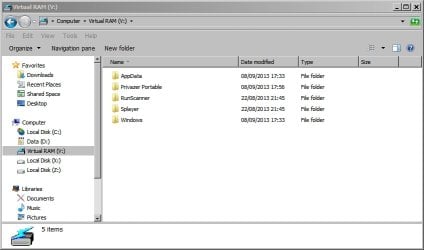
I only run portable apps directly from Ramdisk. Currently a media player, PrivaZer (privacy cleaning app), and Runscanner (Startup & Hijack Analyzer). They run much faster form a Ramdisk. Here's a screenshot of mine:

Virtual RAM (V_).jpg

Messing about with Ramdisks left me with a non-booting machine the first few times I attempted to set one up. It was a learning process. Suggest making a system image backup before going ahead so that you can get things back to the way they were in the event of problems.
 
Last edited:

My Computer My Computer

Computer type
Laptop
Computer Manufacturer/Model Number
ASUS
OS
Microsoft Windows 7 Home Premium 64-bit 7601 Multiprocessor Free Service Pack 1
CPU
AMD C-60 APU with Radeon(tm) HD Graphics
Motherboard
ASUSTeK COMPUTER INC. X501U
Memory
4.00 GB
Graphics Card(s)
AMD Radeon HD 6290 Graphics
Sound Card
(1) AMD High Definition Audio Device (2) Realtek High Defi
Screen Resolution
1366 x 768 x 32 bits (4294967296 colors) @ 60 Hz
Hard Drives
Hitachi HTS545050A7E380 SATA Disk Device
Antivirus
Comodo CIS & FW, SecureAplus App Whitelisting, Threatfire
Browser
Cyberfox 64bit, Opera 64bit, Airfox
Other Info
Spy-The-Spy, HitmanPro.Alert, Norton Connect Safe, MJRegWatcher, BitDefender TrafficLight, Voodoo Shield, Zemana AntiMalware
I use FF 27.0 Portable. If the cache is set to 0 it will use a little less than 2 GB Ram on my 4 GB Laptop. The only thing slow is loading off a busy HD, With SSD you shouldn't have that issue. I don't know how Sandboxie will fit in. I stopped using SB a couple of years ago.
 

My Computer My Computer

Computer Manufacturer/Model Number
HP Media Center
OS
Windows 7 32 bit
CPU
AMD 5200+ dual core
Memory
2 GB
Graphics Card(s)
NVidia GeForce 6150SE 128 MB
Monitor(s) Displays
CRT
Screen Resolution
1280x1024
Hard Drives
500 GB Sata internal :

SIIG USB 3.0 docking stations w/WD Caviar Black 6 Gb/s drives
Keyboard
PS/2
Mouse
PS/2 Wheel Mouse
Other Info
SIIG USB 3.0 PCIexpress card.
FF cache set to zero

I use FF 27.0 Portable. If the cache is set to 0 it will use a little less than 2 GB Ram on my 4 GB Laptop. The only thing slow is loading off a busy HD, With SSD you shouldn't have that issue. I don't know how Sandboxie will fit in. I stopped using SB a couple of years ago.

Ditto. :)

Cyberfox-Options.jpg
 

My Computer My Computer

Computer type
Laptop
Computer Manufacturer/Model Number
ASUS
OS
Microsoft Windows 7 Home Premium 64-bit 7601 Multiprocessor Free Service Pack 1
CPU
AMD C-60 APU with Radeon(tm) HD Graphics
Motherboard
ASUSTeK COMPUTER INC. X501U
Memory
4.00 GB
Graphics Card(s)
AMD Radeon HD 6290 Graphics
Sound Card
(1) AMD High Definition Audio Device (2) Realtek High Defi
Screen Resolution
1366 x 768 x 32 bits (4294967296 colors) @ 60 Hz
Hard Drives
Hitachi HTS545050A7E380 SATA Disk Device
Antivirus
Comodo CIS & FW, SecureAplus App Whitelisting, Threatfire
Browser
Cyberfox 64bit, Opera 64bit, Airfox
Other Info
Spy-The-Spy, HitmanPro.Alert, Norton Connect Safe, MJRegWatcher, BitDefender TrafficLight, Voodoo Shield, Zemana AntiMalware
Sandboxie gives you high security but is very cumbersome to use. I prefer using a Linux virtual system for internet operation. It is a much more flexible approach and just as safe. Here is how.

A RAMdisk does not really yield anything - especially not with such a small RAM of only 6GB.
 

My Computer My Computer

Computer Manufacturer/Model Number
HP, Dell, Gateway, Toshiba - 4 laptops and 2 desktops
OS
Vista, Windows7, Mint Mate, Zorin, Windows 8
CPU
from 1.6GHz Duo to i7
Monitor(s) Displays
2x HP w2207
Hard Drives
5x HDD, 7x SSD, 12x Externals
Keyboard
with trackball - no mices
Mouse
Trackball mice
Internet Speed
DSL 6000
I just set up a few VMs using VMWare Player in the last few weeks. For guest OS it's really intuitive. About the only thing "extra" is installing the tools for each OS to get transparent clipboard and file drag and drop between host and guest. It couldn't be much easier. Very nice free software.
 
Last edited:

My Computer My Computer

Computer Manufacturer/Model Number
HP Media Center
OS
Windows 7 32 bit
CPU
AMD 5200+ dual core
Memory
2 GB
Graphics Card(s)
NVidia GeForce 6150SE 128 MB
Monitor(s) Displays
CRT
Screen Resolution
1280x1024
Hard Drives
500 GB Sata internal :

SIIG USB 3.0 docking stations w/WD Caviar Black 6 Gb/s drives
Keyboard
PS/2
Mouse
PS/2 Wheel Mouse
Other Info
SIIG USB 3.0 PCIexpress card.
VMWare Player vs Linux

I use both VMWare Player and Linux but notice that when I install Windows 7 HP on WMWare Player and activate the license I only get Home Basic. Never figured out why that is.

As for Linux I use a few versions for different reasons but tend to mostly use Tails run from USB as it's pretty easy to simply mount the Windows partition and copy/ save files straight to it although depending upon the file this could in theory be a security risk!
 

My Computer My Computer

Computer type
Laptop
Computer Manufacturer/Model Number
ASUS
OS
Microsoft Windows 7 Home Premium 64-bit 7601 Multiprocessor Free Service Pack 1
CPU
AMD C-60 APU with Radeon(tm) HD Graphics
Motherboard
ASUSTeK COMPUTER INC. X501U
Memory
4.00 GB
Graphics Card(s)
AMD Radeon HD 6290 Graphics
Sound Card
(1) AMD High Definition Audio Device (2) Realtek High Defi
Screen Resolution
1366 x 768 x 32 bits (4294967296 colors) @ 60 Hz
Hard Drives
Hitachi HTS545050A7E380 SATA Disk Device
Antivirus
Comodo CIS & FW, SecureAplus App Whitelisting, Threatfire
Browser
Cyberfox 64bit, Opera 64bit, Airfox
Other Info
Spy-The-Spy, HitmanPro.Alert, Norton Connect Safe, MJRegWatcher, BitDefender TrafficLight, Voodoo Shield, Zemana AntiMalware
Sandboxie gives you high security but is very cumbersome to use. I prefer using a Linux virtual system for internet operation. It is a much more flexible approach and just as safe. Here is how.

A RAMdisk does not really yield anything - especially not with such a small RAM of only 6GB.

How much RAM does VMWare player & Linux use or is it similar to Virtual Box where you set up how much RAM you want to use?
 

My Computer My Computer

Computer type
Laptop
Computer Manufacturer/Model Number
Dell D620
OS
Windows Ultimate x64
CPU
Intel Core 2 Duo TP5500 1.6Ghz
Memory
3GB
Graphics Card(s)
Intel 945 Chipset
Sound Card
HD Audio Device
Screen Resolution
1440x900
Hard Drives
80GB HDD
Internet Speed
25 down 5 up
Antivirus
Avast, Malwarebytes
Browser
Chrome
RAM Usage VWWare Player vs Linux

Sandboxie gives you high security but is very cumbersome to use. I prefer using a Linux virtual system for internet operation. It is a much more flexible approach and just as safe. Here is how.

A RAMdisk does not really yield anything - especially not with such a small RAM of only 6GB.

How much RAM does VMWare player & Linux use or is it similar to Virtual Box where you set up how much RAM you want to use?

VMWare Player - it's adjustable. See:

https://www.vmware.com/support/ws55/doc/ws_performance_mem_host.html

As for Tails RAM usage - sorry I don't have a clue. It runs entirely in RAM anyway! All I know is that it requires a minimum of 1GB RAM to run.
 

My Computer My Computer

Computer type
Laptop
Computer Manufacturer/Model Number
ASUS
OS
Microsoft Windows 7 Home Premium 64-bit 7601 Multiprocessor Free Service Pack 1
CPU
AMD C-60 APU with Radeon(tm) HD Graphics
Motherboard
ASUSTeK COMPUTER INC. X501U
Memory
4.00 GB
Graphics Card(s)
AMD Radeon HD 6290 Graphics
Sound Card
(1) AMD High Definition Audio Device (2) Realtek High Defi
Screen Resolution
1366 x 768 x 32 bits (4294967296 colors) @ 60 Hz
Hard Drives
Hitachi HTS545050A7E380 SATA Disk Device
Antivirus
Comodo CIS & FW, SecureAplus App Whitelisting, Threatfire
Browser
Cyberfox 64bit, Opera 64bit, Airfox
Other Info
Spy-The-Spy, HitmanPro.Alert, Norton Connect Safe, MJRegWatcher, BitDefender TrafficLight, Voodoo Shield, Zemana AntiMalware
As was said, the RAM allocation in VMware Player is a use choice. I use 1GB or 2GB depending on the PC I am running on.

Linux can run in as little as 256MB but will typically be between 512MB and 1GB. It will also highly depend on the distro you are using. Ubuntu will use more the Puppy. With Mint Mate I have noticed RAM usage up to 2.5GB. That was when I ran it from a USB stick where Mint could use all the RAM it wanted from a total of 8GB on that particular PC.
 

My Computer My Computer

Computer Manufacturer/Model Number
HP, Dell, Gateway, Toshiba - 4 laptops and 2 desktops
OS
Vista, Windows7, Mint Mate, Zorin, Windows 8
CPU
from 1.6GHz Duo to i7
Monitor(s) Displays
2x HP w2207
Hard Drives
5x HDD, 7x SSD, 12x Externals
Keyboard
with trackball - no mices
Mouse
Trackball mice
Internet Speed
DSL 6000
As was said, the RAM allocation in VMware Player is a use choice. I use 1GB or 2GB depending on the PC I am running on.

Linux can run in as little as 256MB but will typically be between 512MB and 1GB. It will also highly depend on the distro you are using. Ubuntu will use more the Puppy. With Mint Mate I have noticed RAM usage up to 2.5GB. That was when I ran it from a USB stick where Mint could use all the RAM it wanted from a total of 8GB on that particular PC.

What distro are you referring to that runs with 256mb to 1gb? that's reasonable for me as my laptop has 6GB
 

My Computer My Computer

Computer type
Laptop
Computer Manufacturer/Model Number
Dell D620
OS
Windows Ultimate x64
CPU
Intel Core 2 Duo TP5500 1.6Ghz
Memory
3GB
Graphics Card(s)
Intel 945 Chipset
Sound Card
HD Audio Device
Screen Resolution
1440x900
Hard Drives
80GB HDD
Internet Speed
25 down 5 up
Antivirus
Avast, Malwarebytes
Browser
Chrome
I was not really referring to any particular distro. I tried about a dozen distros and that is what I found. 256MB is really tight and will only work well with very small systems like Puppy. But in 1GB you can run any Linux distro - at least that's what I saw during my trials.

Of course you will get a bit better performance with 2GBs if you run the higher level distros such as Ubuntu or Mint. And with 6GB of RAM you should have no problem allocating 2GBs - unless you want to run several virtual systems along with the host system at the same time - as I sometimes do, see here.
 

My Computer My Computer

Computer Manufacturer/Model Number
HP, Dell, Gateway, Toshiba - 4 laptops and 2 desktops
OS
Vista, Windows7, Mint Mate, Zorin, Windows 8
CPU
from 1.6GHz Duo to i7
Monitor(s) Displays
2x HP w2207
Hard Drives
5x HDD, 7x SSD, 12x Externals
Keyboard
with trackball - no mices
Mouse
Trackball mice
Internet Speed
DSL 6000
I use the AMD RAMDISK. I made it 256Mb in size. I put my firefox cache and IE cache there. I also changed my systems ENVIRONMENT VARIABLES in TEMP and TMP to that drive. I put my windows 7 pagefile to that drive at only 16MB size.

My machine runs so much better now.

8GB RAM and only used 256MB for the ram drive and all firefox cache and IE cache and system temp stuff is used in ram now and it's amazing how nice it is compared to all that R/W to my drives.
 

My Computer My Computer

Computer type
PC/Desktop
Computer Manufacturer/Model Number
I build PC's I built this one.
OS
Windows 7 Ultimate x64
CPU
FX-6300
Motherboard
AMD
Memory
8GB
Graphics Card(s)
HD RADEON 6850 (OC'D)
Monitor(s) Displays
38" HDTV
Screen Resolution
1920X1080
Hard Drives
WD 7800RPS
Internet Speed
50Mbps
Antivirus
I dont use Antivirus. I'm not stupid enough to get a virus.
Browser
FIREFOX
Back
Top