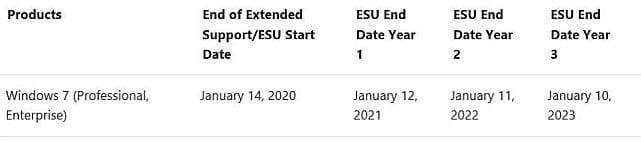
The Extended Security Update (ESU) program is a last resort for customers who need to run certain legacy Microsoft products past the end of support. Support for the following versions of Windows and Windows Server ended on January 14, 2020:
If your organization has been unable to update devices running the versions of Windows listed above to a currently supported version before January 12, 2021, ESU can provide security updates to those devices through January 11, 2022—helping protect those devices while you complete your Windows and Windows Server upgrade projects.
- Windows 7 SP1 (Professional, Enterprise)
- Windows 7 Professional for Embedded Systems
- Windows Server 2008 R2 SP1 and Windows Server 2008 SP2
- Windows Server 2008 R2 SP1 for Embedded Systems and Windows Server 2008 SP2 for Embedded Systems
Many organizations have made the transition to the latest version of Windows 10 or Windows Server. Those who deployed Windows 10 benefit from strong protection against threats plus the latest security and manageability features such as Microsoft Defender Antivirus, richer device management policies, and Windows Autopilot. Other organizations running legacy applications shifted their Windows 7 devices to Windows Virtual Desktop, which includes ESU for Windows 7 virtual desktops at no additional cost, enabling you to continue running critical line-of-business apps while you continue your migration to Windows 10. As a last resort, however, a number of organizations purchased, installed, and activated their first year of ESU to receive security updates for eligible devices through January 12, 2021.
What you need to know about year two coverage for ESU
Because ESU are available as separate SKUs for each of the years in which they are offered (2020, 2021, and 2022)—and because ESU can only be purchased in specific 12-month periods—you will need to purchase the second year of ESU coverage separately and activate a new key on each applicable device in order for your devices to continue receiving security updates in 2021. If your organization did not purchase the first year of ESU coverage, you will need to purchase both Year 1 and Year 2 ESU for your applicable Windows 7 or Windows Server devices before installing and activating the Year 2 MAK keys to receive updates.
The steps to install, activate, and deploy ESUs are the same for first and second year coverage. For more information, see Obtaining Extended Security Updates for eligible Windows devices for the Volume Licensing process and Purchasing Windows 7 ESUs as a Cloud Solution Provider for the CSP process. For embedded devices, contact your original equipment manufacturer (OEM).
We recommend that you prepare now to install and activate the second year of ESU coverage for the devices in your organization that require it. To learn more about ESU, please watch our Microsoft Ignite 2019 session on How to manage Windows 7 Extended Security Updates (ESU) for on-premises and cloud environments.
We're here to help
We understand that everyone is at a different point in the upgrade process, which is why we offer assistance with tools like Desktop Analytics and services like Microsoft App Assure—as well as monthly Office Hours to help you deploy and stay current with Windows 10 across your organization. More information on ESU for Windows 7 and Windows Server 2008 and 2008 R2 is available in the Windows 7 end of support FAQ and Windows Server 2008 and 2008 R2 FAQ.
Source: https://techcommunity.microsoft.com...pdates-for-windows-7-and-windows/ba-p/1872910
My Computer
- Computer type
- PC/Desktop
- Computer Manufacturer/Model Number
- Self built custom
- OS
- 64-bit Windows 11 Pro for Workstations
- CPU
- Intel i7-8700K OC'd to 5 GHz
- Motherboard
- ASUS ROG Maximus XI Formula Z390
- Memory
- 64 GB (4x16GB) G.SKILL TridentZ RGB DDR4 3600 MHz
- Graphics Card(s)
- ASUS ROG-STRIX-GTX1080TI-O11G-GAMING
- Sound Card
- Integrated
- Monitor(s) Displays
- 2 x Samsung Odyssey G7 27"
- Screen Resolution
- 2560x1440
- Hard Drives
- 1TB Samsung 990 PRO M.2,
4TB Samsung 990 PRO PRO M.2,
TerraMaster F8 SSD Plus NAS
- PSU
- Seasonic Prime Titanium 850W
- Case
- Thermaltake Core P3
- Cooling
- Corsair Hydro H115i
- Keyboard
- Logitech wireless K800
- Mouse
- Logitech MX Master 4
- Internet Speed
- 2 Gb/s Download and 100 Mb/s Upload
- Antivirus
- Malwarebyte Anti-Malware Premium
- Browser
- Google Chrome
- Other Info
- Logitech Z625 speaker system,
Logitech BRIO 4K Pro webcam,
HP Color LaserJet Pro MFP M477fdn,
APC SMART-UPS RT 1000 XL - SURT1000XLI,
Galaxy S23 Plus phone