SATA 6 Gb/s to SATA 1.5 Gb/s possible or not?

sportsfanatic

New member
Local time
4:41 AM
Messages
24
I wish to replace my old laptop hdd(WD2500BEVS-250 GB) at SATA 1.5 Gb/s with a new one(HTS721010A9E630-1TB) at SATA 6Gb/s.Will this downgradation from 6 to 1.5 work on the laptop with:
CPU:Intel Core 2 Duo [email protected] GHz
Ram:4GB
Motherboard:Lenovo 2743A92
HDD:WD2500BEVS (250 GB)
Also both the drives have identical dimensions.
Please Help Thank You
 

My Computer My Computer

At a glance

Windows 7 Ultimate x64Intel Core [email protected] GHz(the bottleneck)8 GB @ 1333XFX AMD Radeon hd 7970
Computer type
PC/Desktop
Computer Manufacturer/Model Number
Custom Build
OS
Windows 7 Ultimate x64
CPU
Intel Core [email protected] GHz(the bottleneck)
Motherboard
Gigabyte H61m- S1
Memory
8 GB @ 1333
Graphics Card(s)
XFX AMD Radeon hd 7970
Monitor(s) Displays
Samsung SyncMaster S19B150 (47cm)
Screen Resolution
1366*768
Hard Drives
Seagate Barracuda 500GB (ST500DM002)
Seagate Barracuda 1TB (ST1000DM003)
PSU
Antec VP650P V2
Case
Corsair Carbide 500R (I'm lovin it)
Cooling
(Stock-cpu)+(4x120mm case fans)
Keyboard
Logitech MK200(Very Basic)
Mouse
Dragonwar Thor(3200 dpi cheap gaming mouse)
Antivirus
Kaspersy Internet Security
Browser
Mozilla Firefox
Any Sata drive should work. Your Sata bus is probably 3Gb/sec and data transfer will work at that speed.
 

My Computer My Computer

At a glance

Vista, Windows7, Mint Mate, Zorin, Windows 8from 1.6GHz Duo to i7
Computer Manufacturer/Model Number
HP, Dell, Gateway, Toshiba - 4 laptops and 2 desktops
OS
Vista, Windows7, Mint Mate, Zorin, Windows 8
CPU
from 1.6GHz Duo to i7
Monitor(s) Displays
2x HP w2207
Hard Drives
5x HDD, 7x SSD, 12x Externals
Keyboard
with trackball - no mices
Mouse
Trackball mice
Internet Speed
DSL 6000
Hey there sportsfanatic,

SATA 1, 2 and 3 are backwards compatible and the HGST drive should work just fine in there at reduced speed (most probably SATA 3 Gb/s).
As for the old drive, I could advise you to run the WD Data Lifeguard Diagnostic tool to make sure it does not have any issues and use it as a backup for you more important information. Here's a link: WD Support / Downloads / Other Products / Data Lifeguard Diagnostic for Windows

Hope this helps,

CaptainWD.
 

My Computer My Computer

At a glance

Windows 7 Professional x64
Computer type
PC/Desktop
Computer Manufacturer/Model Number
Dell
OS
Windows 7 Professional x64
:cool:
Much appreciated
Any Sata drive should work. Your Sata bus is probably 3Gb/sec and data transfer will work at that speed.
 

My Computer My Computer

At a glance

Windows 7 Ultimate x64Intel Core [email protected] GHz(the bottleneck)8 GB @ 1333XFX AMD Radeon hd 7970
Computer type
PC/Desktop
Computer Manufacturer/Model Number
Custom Build
OS
Windows 7 Ultimate x64
CPU
Intel Core [email protected] GHz(the bottleneck)
Motherboard
Gigabyte H61m- S1
Memory
8 GB @ 1333
Graphics Card(s)
XFX AMD Radeon hd 7970
Monitor(s) Displays
Samsung SyncMaster S19B150 (47cm)
Screen Resolution
1366*768
Hard Drives
Seagate Barracuda 500GB (ST500DM002)
Seagate Barracuda 1TB (ST1000DM003)
PSU
Antec VP650P V2
Case
Corsair Carbide 500R (I'm lovin it)
Cooling
(Stock-cpu)+(4x120mm case fans)
Keyboard
Logitech MK200(Very Basic)
Mouse
Dragonwar Thor(3200 dpi cheap gaming mouse)
Antivirus
Kaspersy Internet Security
Browser
Mozilla Firefox
:party:
Thank You
Hey there sportsfanatic,

SATA 1, 2 and 3 are backwards compatible and the HGST drive should work just fine in there at reduced speed (most probably SATA 3 Gb/s).
As for the old drive, I could advise you to run the WD Data Lifeguard Diagnostic tool to make sure it does not have any issues and use it as a backup for you more important information. Here's a link: WD Support / Downloads / Other Products / Data Lifeguard Diagnostic for Windows

Hope this helps,

CaptainWD.
 

My Computer My Computer

At a glance

Windows 7 Ultimate x64Intel Core [email protected] GHz(the bottleneck)8 GB @ 1333XFX AMD Radeon hd 7970
Computer type
PC/Desktop
Computer Manufacturer/Model Number
Custom Build
OS
Windows 7 Ultimate x64
CPU
Intel Core [email protected] GHz(the bottleneck)
Motherboard
Gigabyte H61m- S1
Memory
8 GB @ 1333
Graphics Card(s)
XFX AMD Radeon hd 7970
Monitor(s) Displays
Samsung SyncMaster S19B150 (47cm)
Screen Resolution
1366*768
Hard Drives
Seagate Barracuda 500GB (ST500DM002)
Seagate Barracuda 1TB (ST1000DM003)
PSU
Antec VP650P V2
Case
Corsair Carbide 500R (I'm lovin it)
Cooling
(Stock-cpu)+(4x120mm case fans)
Keyboard
Logitech MK200(Very Basic)
Mouse
Dragonwar Thor(3200 dpi cheap gaming mouse)
Antivirus
Kaspersy Internet Security
Browser
Mozilla Firefox
This is what WD support team told me

"On the drive side, your understanding is correct, SATA interface speed is downgrade-able, that means that SATA 6Gb/s drive can work in 3Gb/s or 1.5Gb/s line with ease. However, on the motherboard side, there are older motherboards which do not recognise a SATA 6Gb/s drive at all, the drive needs to be recognised first before it can handshake the interface speed to go to the lower interface speed.

In such scenerio, we would advise customer to find a SATA 6Gb/s system first, then plug the SATA 6Gb/s drive in and run a utility to lower the drive interface speed lower to that of 1.5Gb/s."

My Question:Will i be needing to lower the drive interface speed to 1.5 Gb/s to be able to run it on my laptop?
 

My Computer My Computer

At a glance

Windows 7 Ultimate x64Intel Core [email protected] GHz(the bottleneck)8 GB @ 1333XFX AMD Radeon hd 7970
Computer type
PC/Desktop
Computer Manufacturer/Model Number
Custom Build
OS
Windows 7 Ultimate x64
CPU
Intel Core [email protected] GHz(the bottleneck)
Motherboard
Gigabyte H61m- S1
Memory
8 GB @ 1333
Graphics Card(s)
XFX AMD Radeon hd 7970
Monitor(s) Displays
Samsung SyncMaster S19B150 (47cm)
Screen Resolution
1366*768
Hard Drives
Seagate Barracuda 500GB (ST500DM002)
Seagate Barracuda 1TB (ST1000DM003)
PSU
Antec VP650P V2
Case
Corsair Carbide 500R (I'm lovin it)
Cooling
(Stock-cpu)+(4x120mm case fans)
Keyboard
Logitech MK200(Very Basic)
Mouse
Dragonwar Thor(3200 dpi cheap gaming mouse)
Antivirus
Kaspersy Internet Security
Browser
Mozilla Firefox
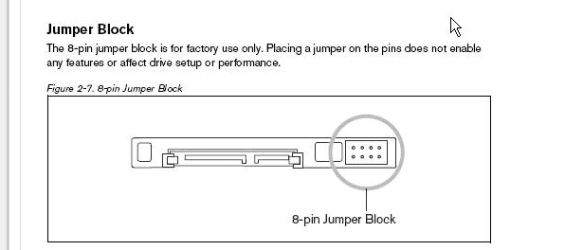
Can you please elaborate on the jumper settings as i am a layman to this subject? I can't find the jumper settings for this drive.
Where can i find it?
 

My Computer My Computer

At a glance

Windows 7 Ultimate x64Intel Core [email protected] GHz(the bottleneck)8 GB @ 1333XFX AMD Radeon hd 7970
Computer type
PC/Desktop
Computer Manufacturer/Model Number
Custom Build
OS
Windows 7 Ultimate x64
CPU
Intel Core [email protected] GHz(the bottleneck)
Motherboard
Gigabyte H61m- S1
Memory
8 GB @ 1333
Graphics Card(s)
XFX AMD Radeon hd 7970
Monitor(s) Displays
Samsung SyncMaster S19B150 (47cm)
Screen Resolution
1366*768
Hard Drives
Seagate Barracuda 500GB (ST500DM002)
Seagate Barracuda 1TB (ST1000DM003)
PSU
Antec VP650P V2
Case
Corsair Carbide 500R (I'm lovin it)
Cooling
(Stock-cpu)+(4x120mm case fans)
Keyboard
Logitech MK200(Very Basic)
Mouse
Dragonwar Thor(3200 dpi cheap gaming mouse)
Antivirus
Kaspersy Internet Security
Browser
Mozilla Firefox

My Computer My Computer

At a glance

Windows 7 Ultimate x64Intel Core [email protected] GHz(the bottleneck)8 GB @ 1333XFX AMD Radeon hd 7970
Computer type
PC/Desktop
Computer Manufacturer/Model Number
Custom Build
OS
Windows 7 Ultimate x64
CPU
Intel Core [email protected] GHz(the bottleneck)
Motherboard
Gigabyte H61m- S1
Memory
8 GB @ 1333
Graphics Card(s)
XFX AMD Radeon hd 7970
Monitor(s) Displays
Samsung SyncMaster S19B150 (47cm)
Screen Resolution
1366*768
Hard Drives
Seagate Barracuda 500GB (ST500DM002)
Seagate Barracuda 1TB (ST1000DM003)
PSU
Antec VP650P V2
Case
Corsair Carbide 500R (I'm lovin it)
Cooling
(Stock-cpu)+(4x120mm case fans)
Keyboard
Logitech MK200(Very Basic)
Mouse
Dragonwar Thor(3200 dpi cheap gaming mouse)
Antivirus
Kaspersy Internet Security
Browser
Mozilla Firefox
Check the jumper settings for your WD drive on the WD website..
 

My Computer My Computer

At a glance

ME/XP/Vista/Win7
OS
ME/XP/Vista/Win7

My Computer My Computer

At a glance

Windows 7 Ultimate x64Intel Core [email protected] GHz(the bottleneck)8 GB @ 1333XFX AMD Radeon hd 7970
Computer type
PC/Desktop
Computer Manufacturer/Model Number
Custom Build
OS
Windows 7 Ultimate x64
CPU
Intel Core [email protected] GHz(the bottleneck)
Motherboard
Gigabyte H61m- S1
Memory
8 GB @ 1333
Graphics Card(s)
XFX AMD Radeon hd 7970
Monitor(s) Displays
Samsung SyncMaster S19B150 (47cm)
Screen Resolution
1366*768
Hard Drives
Seagate Barracuda 500GB (ST500DM002)
Seagate Barracuda 1TB (ST1000DM003)
PSU
Antec VP650P V2
Case
Corsair Carbide 500R (I'm lovin it)
Cooling
(Stock-cpu)+(4x120mm case fans)
Keyboard
Logitech MK200(Very Basic)
Mouse
Dragonwar Thor(3200 dpi cheap gaming mouse)
Antivirus
Kaspersy Internet Security
Browser
Mozilla Firefox
Okay lets start from scratch i want to my laptop (1.5 Gbps interface support) to recognize a drive(HTS721010A9E630) supporting 6 Gbps. So can the interface speed be lowered using a desktop (the HDD being a 2.5 inch) and how do i connect it to the desktop since the ports are not same.
 

My Computer My Computer

At a glance

Windows 7 Ultimate x64Intel Core [email protected] GHz(the bottleneck)8 GB @ 1333XFX AMD Radeon hd 7970
Computer type
PC/Desktop
Computer Manufacturer/Model Number
Custom Build
OS
Windows 7 Ultimate x64
CPU
Intel Core [email protected] GHz(the bottleneck)
Motherboard
Gigabyte H61m- S1
Memory
8 GB @ 1333
Graphics Card(s)
XFX AMD Radeon hd 7970
Monitor(s) Displays
Samsung SyncMaster S19B150 (47cm)
Screen Resolution
1366*768
Hard Drives
Seagate Barracuda 500GB (ST500DM002)
Seagate Barracuda 1TB (ST1000DM003)
PSU
Antec VP650P V2
Case
Corsair Carbide 500R (I'm lovin it)
Cooling
(Stock-cpu)+(4x120mm case fans)
Keyboard
Logitech MK200(Very Basic)
Mouse
Dragonwar Thor(3200 dpi cheap gaming mouse)
Antivirus
Kaspersy Internet Security
Browser
Mozilla Firefox
Ok i searched and got this : Specifications for the WD Scorpio Blue SATA 3.0 Gb/s, SATA 1.5 GB/s, and PATA 2.5" drives which has jumper settings for drives models similar to mines as they have 4 pin but differ in size. otherwise same so can they be used for my drive WD2500BEVS.

WD said:
WDC WD2500BEVS


wdc.custhelp.com/app/answers/list/.../WDC%20WD2500BEVS/.../1


Results 1 - 8 of 8 for WDC WD2500BEVS. Recommended Links. Specifications for the WD Scorpio Blue SATA 3.0 Gb/s, SATA 1.5 GB/s, and PATA 2.5" drives

Which is the link in your post above.
 

My Computer My Computer

At a glance

ME/XP/Vista/Win7
OS
ME/XP/Vista/Win7
Last edited:

My Computer My Computer

At a glance

Windows 7 Ultimate x64Intel Core [email protected] GHz(the bottleneck)8 GB @ 1333XFX AMD Radeon hd 7970
Computer type
PC/Desktop
Computer Manufacturer/Model Number
Custom Build
OS
Windows 7 Ultimate x64
CPU
Intel Core [email protected] GHz(the bottleneck)
Motherboard
Gigabyte H61m- S1
Memory
8 GB @ 1333
Graphics Card(s)
XFX AMD Radeon hd 7970
Monitor(s) Displays
Samsung SyncMaster S19B150 (47cm)
Screen Resolution
1366*768
Hard Drives
Seagate Barracuda 500GB (ST500DM002)
Seagate Barracuda 1TB (ST1000DM003)
PSU
Antec VP650P V2
Case
Corsair Carbide 500R (I'm lovin it)
Cooling
(Stock-cpu)+(4x120mm case fans)
Keyboard
Logitech MK200(Very Basic)
Mouse
Dragonwar Thor(3200 dpi cheap gaming mouse)
Antivirus
Kaspersy Internet Security
Browser
Mozilla Firefox
You should search for "Reduced Power Spinup (RPS)Mode"

I've attached a .pdf file from Western Digital for you...

Okay lets start from scratch i want to my laptop (1.5 Gbps interface support) to recognize a drive(HTS721010A9E630) supporting 6 Gbps. So can the interface speed be lowered using a desktop (the HDD being a 2.5 inch) and how do i connect it to the desktop since the ports are not same.

For this you will need an external adapter to connect from desktop.
 

Attachments

My Computer My Computer

At a glance

Windows 7 Professional SP1 - x64 [Non-UEFI Boot]Ivy Bridge Core i5 3570K (Delidded)G.Skill "Ares" DDR3 PC3-12800 - 1600MHz (16Gb)Asus Dual-RX480-O4G
Computer type
PC/Desktop
Computer Manufacturer/Model Number
Custom Build
OS
Windows 7 Professional SP1 - x64 [Non-UEFI Boot]
CPU
Ivy Bridge Core i5 3570K (Delidded)
Motherboard
Asus P8Z77-V LE PLUS
Memory
G.Skill "Ares" DDR3 PC3-12800 - 1600MHz (16Gb)
Graphics Card(s)
Asus Dual-RX480-O4G
Sound Card
Creative Sound Blaster Z w/5.1 sound system
Monitor(s) Displays
Asus IPS 23"
Screen Resolution
16/9
Hard Drives
Internal:
500Go Sata 6Gb/s (x2)
500Go Sata 3Gb/s (x2)
SSD 60Go Sata 6Gb/s
PSU
In Win C 900W Series 80+ Platinum
Case
Thermaltake Chaser A71
Cooling
Custom Water Cooling Loop
Keyboard
Cooler Master QuickFire XTi
Mouse
Razer Imperator 2012 (4G)
Antivirus
MSE
Browser
IE 11.0.xxx Rtm
Other Info
"Raid0" with Intel Smart Response Technology (HDD/SSD)
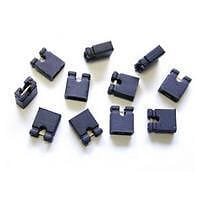
I don't have a jumper shunt connector nor can i find one online.
 

My Computer My Computer

At a glance

Windows 7 Ultimate x64Intel Core [email protected] GHz(the bottleneck)8 GB @ 1333XFX AMD Radeon hd 7970
Computer type
PC/Desktop
Computer Manufacturer/Model Number
Custom Build
OS
Windows 7 Ultimate x64
CPU
Intel Core [email protected] GHz(the bottleneck)
Motherboard
Gigabyte H61m- S1
Memory
8 GB @ 1333
Graphics Card(s)
XFX AMD Radeon hd 7970
Monitor(s) Displays
Samsung SyncMaster S19B150 (47cm)
Screen Resolution
1366*768
Hard Drives
Seagate Barracuda 500GB (ST500DM002)
Seagate Barracuda 1TB (ST1000DM003)
PSU
Antec VP650P V2
Case
Corsair Carbide 500R (I'm lovin it)
Cooling
(Stock-cpu)+(4x120mm case fans)
Keyboard
Logitech MK200(Very Basic)
Mouse
Dragonwar Thor(3200 dpi cheap gaming mouse)
Antivirus
Kaspersy Internet Security
Browser
Mozilla Firefox
I wish to replace my old laptop hdd...


Do you actually bought the SATA 3 disk or just planning to buy it ?.
 

My Computer My Computer

At a glance

Windows 7 Ultimate x64
Computer type
PC/Desktop
OS
Windows 7 Ultimate x64
Back
Top