sata disk disappear while formatting

TheOneWinged

New member
Local time
9:07 PM
Messages
6
Hello everyone
I'm trying to install Windows 7 home premium 64 for about 5 hours...
The farthest i went once was at the % screen. It stucked at 0% ... :cry:

I'm trying to install this on a newly purchased computer with a Western digital 640Go caviar SE.

So my problem comes at the disk list screen, when i have to format my HDD.

I get several error messages [0x80300001;0x80300024;0x80300025;0x80300007; and some other i cant remember], sometimes the disk disapear (and sometimes it does in bios too), and there's no way to continue the install...

I tried many different solutions i found on the net:
Changed my sata cable
Changed my HDD power cable
jumpered pin 1&2 (first time i did this, it passed to the percent page, but stucked at 0%)
switched IDE & AHCI in bios
install mobo drivers
...

I cant format it with the prompt, it say there's no drive...
----

I can't test anything on other computers, it is too old to be compatible.


I'm going crazy !
Thanks in advance for any help you can bring me.
 

My Computer

OS
Windows 7 home premium 64
CPU
i7 860
Motherboard
gigabyte p55a-ud3
Memory
2*2Go dual channel Gskill
Graphics Card(s)
sapphire radeon 5850
Hard Drives
640Go WD caviar SE 16mo
Welcome to the Seven Forums! TheOneWinged

First you will want to change the bios setting back to the Native ide setting. That only causes problems for any Windows installation without a set of AHCI drivers added for that type of custom install. You can see a guide for that. http://www.sevenforums.com/tutorials/61869-ahci-enable-windows-7-vista.html

Next to get through pointing to the guide available here at SF it also depends on what type of 7 installation media you are using there. For a full version disk, http://www.sevenforums.com/tutorials/1649-clean-install-windows-7-a.html

For an upgrade disk to see a clean install, http://www.sevenforums.com/tutorials/31402-clean-install-upgrade-windows-7-version.html

Having a Gigabyte board here and running WD drives the first thing found was the need for the Native ide setting for both Sata II and Sata III installs. 7 should generally go right on without a hitch. The clean install also runs far better with the ide mode set from the start.

The one thing you may end up needing since the errors seem to point out the need for the Sata?Raid driver disk is downloading them to make a driver disk using a cd-rw while both Vista and 7 rarely need that for the newer boards. Yet this seems to work in some cases for both Vista and 7. Note the thread seen at SF's sister site. Vista Installation error 0x80300001 - Operating Systems
 

My Computers

System One System Two

  • Computer type
    PC/Desktop
    Computer Manufacturer/Model Number
    Custom builds = 2
    OS
    W7 Ultimate x64/W10 Pro x64/W11 Pro Triple Boot - Main PC W7 Remote PC Micro ATX W7 Pro x64/W11 Pro
    CPU
    AMD Phenom II X4 975 Deneb 3.6ghz - 965 2nd remote pc
    Motherboard
    Gigabyte GA-790XTA-UD4-Gigabyte GA-880GM-D2H remote pc
    Memory
    Kingston Hyper X DDR3 1600 1.5v 16gb - Hyper X Fury 8gb 2nd
    Graphics Card(s)
    MSI HD Radeon 5750 1gb - MSI HD Radeon 6450 on mini tower
    Sound Card
    Creative Labs X-Fi Xtreme Audio P - Realtek onooard 2nd case
    Monitor(s) Displays
    ASUS VW199T-P 19" HP 2082a Main-HP 2082a 20" remote pc
    Screen Resolution
    Asus 1440x900 - HP 1600x900
    Hard Drives
    WD Black 1TB HD per OS W7, W10, and pending W11 presently on 500gb OS Drive - Pending Triple 1TB HDs for Spanned Storage/backup volume
    Single 2TB external USB enclosure, single 1TB System 7 Host/Boot drive, Pending 8TB external HD for system image b
    PSU
    Corsair 750TX - primary / Corsair CX600 - second
    Case
    Antec 900-2 - SSD compatible / NZXT Vulcan mini tower
    Cooling
    Zalman CNPS9900A
    Keyboard
    AZIO L70 Backlit Letters Gaming - ONN Cordless/USB
    Mouse
    MSI DS200 Programmable, Logitech Cordless
    Internet Speed
    30mbps upgrade - primary hard wired - mini tower usb WiFi
    Antivirus
    GFI VIPRE Internet Security 2014 on W7 2016 beta on W10,
    Browser
    Cyberfox, WaterFox 64bit FF variants, FireFox x64, Pale Moon
    Other Info
    Accomdata fan cooled usb 2.0 PIDE/Sata II, III external enclosure.
    Sambient usb/eSata PATA/Sata II, III external enclosure.
  • Computer type
    PC/Desktop
    System Manufacturer/Model Number
    CUSTOM ASSEMBLY
    OS
    W7 Pro x64/W11 Pro
    CPU
    AMD Deneb 3.6ghz - 965
    Motherboard
    Gigabyte GA-880GM-D2H remote pc
    Memory
    Kingston Hyper X Fury 8gb
    Graphics Card(s)
    MSI HD Radeon 6450 DVI Output
    Sound Card
    Realtek onooard Creative or Other separate PENDING
    Monitor(s) Displays
    VIZIO 32" LCD TV Separate LCD Pending
    Screen Resolution
    1600x1080
    Hard Drives
    WD 500GB OS Host/Boot WD Green 1TB Storage/Backup
    PSU
    Corsair 600W - THERMALTAKE 600W spare case
    Case
    NZXT Vulcan mini tower
    Cooling
    Twin 120mm Top Fans - 240mm Side Cover
    Keyboard
    ONN Cordless/USB Logitech Cordless
    Mouse
    ONN USB/Cordless - Logitech Cordless
    Internet Speed
    DSL 5G
    Browser
    MS Edge, FireFox, WaterFox x64, FireFox Nightly
    Other Info
    OS Testing-Remote Access to Main TeamViewer
Try opening a command prompt by pressing Shift F10 key at first screen after booting DVD, then wipe the HD of all code: http://www.sevenforums.com/tutorials/91339-ssd-hdd-optimize-windows-reinstallation.html

If the HD is only intermittently being recognized in BIOS then the problem could be a bad cable, port or HD. Test by swapping cable, then booting HD maker's diag/repair CD to do full scan: Hard Drive Diagnostics Tools and Utilities (Storage) - TACKtech Corp.

Next run from booted Win7 DVD command line http://www.sevenforums.com/tutorials/433-disk-check.html
 
TheOneWinged,


Let's backtrack.

What I would like you to do is:

Boot from your Win 7 DVD.

At the very first screen use SHIFT F10 key combo to get to a command prompt.

Now you will wipe the entire disk clean. This is to put your disk back to a "virgin" condition.

[FONT=&quot]WIPE A DISK CLEAN[/FONT]

· type DiskPart, Enter key
· type List disk, Enter key
note the numeral of the disk you want to clean
for example purposes, I’ll be using the numeral 2
· type Select disk 2, Enter key
· type Detail disk, Enter key
this info will let you know if you selected correctly
· type Clean ALL, Enter key
your entire disk is being overwritten with zeros.
This can take a considerable amount of time
· type EXIT, Enter key (only after Clean is finished)
· type EXIT, Enter key (this gets you back where you were)

Now you can continue and let Windows format.
 

My Computer

Computer Manufacturer/Model Number
Toshiba Satellite S875D-S7239 laptop
OS
MS Windows 7 Ultimate SP1 64-bit
CPU
AMD A10-4600M
Motherboard
AMD Pumori (Socket FT1)
Memory
6.00 GB Dual-Channel DDR3 @ 798MHz (11-11-12-28)
Graphics Card(s)
AMD Radeon HD 7660G
Sound Card
High Definition Audio Device
Monitor(s) Displays
Generic PnP Monitor (1600x900@60Hz)
Screen Resolution
1600x900@60Hz
Hard Drives
SSD 119GB Corsair CSSD-V128GB2 ATA Device
Keyboard
Standard PS/2 Keyboard
Mouse
HP Wireless Optical Mobile Mouse Model FHA-3410
Internet Speed
What the local pub, local coffee shop offers.
Other Info
Optical Drive:MATSHITA BD-CMB UJ160B ATA Device


Also have an Asus ha1002xp netbook with Win 7 Ultimate installed.

My Computers

System One System Two

  • Computer type
    PC/Desktop
    Computer Manufacturer/Model Number
    Custom builds = 2
    OS
    W7 Ultimate x64/W10 Pro x64/W11 Pro Triple Boot - Main PC W7 Remote PC Micro ATX W7 Pro x64/W11 Pro
    CPU
    AMD Phenom II X4 975 Deneb 3.6ghz - 965 2nd remote pc
    Motherboard
    Gigabyte GA-790XTA-UD4-Gigabyte GA-880GM-D2H remote pc
    Memory
    Kingston Hyper X DDR3 1600 1.5v 16gb - Hyper X Fury 8gb 2nd
    Graphics Card(s)
    MSI HD Radeon 5750 1gb - MSI HD Radeon 6450 on mini tower
    Sound Card
    Creative Labs X-Fi Xtreme Audio P - Realtek onooard 2nd case
    Monitor(s) Displays
    ASUS VW199T-P 19" HP 2082a Main-HP 2082a 20" remote pc
    Screen Resolution
    Asus 1440x900 - HP 1600x900
    Hard Drives
    WD Black 1TB HD per OS W7, W10, and pending W11 presently on 500gb OS Drive - Pending Triple 1TB HDs for Spanned Storage/backup volume
    Single 2TB external USB enclosure, single 1TB System 7 Host/Boot drive, Pending 8TB external HD for system image b
    PSU
    Corsair 750TX - primary / Corsair CX600 - second
    Case
    Antec 900-2 - SSD compatible / NZXT Vulcan mini tower
    Cooling
    Zalman CNPS9900A
    Keyboard
    AZIO L70 Backlit Letters Gaming - ONN Cordless/USB
    Mouse
    MSI DS200 Programmable, Logitech Cordless
    Internet Speed
    30mbps upgrade - primary hard wired - mini tower usb WiFi
    Antivirus
    GFI VIPRE Internet Security 2014 on W7 2016 beta on W10,
    Browser
    Cyberfox, WaterFox 64bit FF variants, FireFox x64, Pale Moon
    Other Info
    Accomdata fan cooled usb 2.0 PIDE/Sata II, III external enclosure.
    Sambient usb/eSata PATA/Sata II, III external enclosure.
  • Computer type
    PC/Desktop
    System Manufacturer/Model Number
    CUSTOM ASSEMBLY
    OS
    W7 Pro x64/W11 Pro
    CPU
    AMD Deneb 3.6ghz - 965
    Motherboard
    Gigabyte GA-880GM-D2H remote pc
    Memory
    Kingston Hyper X Fury 8gb
    Graphics Card(s)
    MSI HD Radeon 6450 DVI Output
    Sound Card
    Realtek onooard Creative or Other separate PENDING
    Monitor(s) Displays
    VIZIO 32" LCD TV Separate LCD Pending
    Screen Resolution
    1600x1080
    Hard Drives
    WD 500GB OS Host/Boot WD Green 1TB Storage/Backup
    PSU
    Corsair 600W - THERMALTAKE 600W spare case
    Case
    NZXT Vulcan mini tower
    Cooling
    Twin 120mm Top Fans - 240mm Side Cover
    Keyboard
    ONN Cordless/USB Logitech Cordless
    Mouse
    ONN USB/Cordless - Logitech Cordless
    Internet Speed
    DSL 5G
    Browser
    MS Edge, FireFox, WaterFox x64, FireFox Nightly
    Other Info
    OS Testing-Remote Access to Main TeamViewer
Some more informations :
I have an official windows 7 home premium OEM DvD (it wasn't burned by me)
and my disk is empty, not formated. it is 6hours old (or a bit more), its first ignition was the first time i tried to install seven.

Ok, so i tested all what you said:

@Night Hawk:

I changed the bios back to default settings (wich include native ide). Yet, i don't really care about AHCI, i just want to install seven, so i'll see later for it.

So i followed the clean install tutorial, and i unplugged one memory stick (I have now oly 2Gb, as recommended), and at step 7 (that must be a joke...:( ) i didn't seen my HDD...

So i tried to install raid drivers (even if i don't have 2 disk to put them in raid), seven doesn't let me do.. then the mainboard drivers... and it's the same problem...


@gregrocker & karlsnooks:
i already switched the sata cable, port and power cable with no effects... also reversed sata cable (we never know... :huh: )

when i type list disk in the prompt, he say there's no fixed disk to be shawn

ok, so at this step i tried a list volume, ant it said me that i have only a dvdrom...

---

I'll try to find a way to make my disk appear again, and then to do this again...

But, do you know how i can test my disk ? knowing that i don't have any other sata equiped computer ?
 

My Computer

OS
Windows 7 home premium 64
CPU
i7 860
Motherboard
gigabyte p55a-ud3
Memory
2*2Go dual channel Gskill
Graphics Card(s)
sapphire radeon 5850
Hard Drives
640Go WD caviar SE 16mo
What about the other steps I listed?

Try opening a command prompt by pressing Shift F10 key at first screen after booting DVD, then wipe the HD of all code: http://www.sevenforums.com/tutorials/91339-ssd-hdd-optimize-windows-reinstallation.html

...Burn to CD on another computer and then boot HD maker's diag/repair CD to do full scan: Hard Drive Diagnostics Tools and Utilities (Storage) - TACKtech Corp.

Next run from booted Win7 DVD command line http://www.sevenforums.com/tutorials/433-disk-check.html
 
Powser up your computer.
Hit F2 (or whatever you computer uses to get into the bios)
Does the bios show your hard drive?
 

My Computer

Computer Manufacturer/Model Number
Toshiba Satellite S875D-S7239 laptop
OS
MS Windows 7 Ultimate SP1 64-bit
CPU
AMD A10-4600M
Motherboard
AMD Pumori (Socket FT1)
Memory
6.00 GB Dual-Channel DDR3 @ 798MHz (11-11-12-28)
Graphics Card(s)
AMD Radeon HD 7660G
Sound Card
High Definition Audio Device
Monitor(s) Displays
Generic PnP Monitor (1600x900@60Hz)
Screen Resolution
1600x900@60Hz
Hard Drives
SSD 119GB Corsair CSSD-V128GB2 ATA Device
Keyboard
Standard PS/2 Keyboard
Mouse
HP Wireless Optical Mobile Mouse Model FHA-3410
Internet Speed
What the local pub, local coffee shop offers.
Other Info
Optical Drive:MATSHITA BD-CMB UJ160B ATA Device


Also have an Asus ha1002xp netbook with Win 7 Ultimate installed.
Sorry, i'm a bit tired, i forgot some things...

I can't run a chkdisk, because there's no letter for my disk, and i tried the WD tool, but i'm not sure i did it the right way... it said me that it don't have the right system to run the image...

And now, it don't want to appear anymore... so i'm trying to switch again sata ports, but the best i get is some noise...
a kind of regular "Tac.... Tac ... Tac ..." (around 1 sec interval)


And i've done the windows memory test, and it say there is no problem... but at this point, i realy think my DD is defective...


i'll keep trying make him appear... If he does in the past, why is he still hidding ?

-------------------------
edit :

I also noticed that sometimes my dvdrom appears in BIOS as "Optiarc DVD RW AD-52..." and some other times as "Nonearc DVD RW AD-52..." is there any link ?
 

My Computer

OS
Windows 7 home premium 64
CPU
i7 860
Motherboard
gigabyte p55a-ud3
Memory
2*2Go dual channel Gskill
Graphics Card(s)
sapphire radeon 5850
Hard Drives
640Go WD caviar SE 16mo
You want the DOS download of Data Lifeguard, however I use a better version which works on all models: http://support.gateway.com/support/drivers/getFile.asp?id=21280&dscr=GWSCAN%205.12&uid=27543171 The installer extracts to c:cabs where you can click on the ISO to burn to CD with Windows Img Burner.

If you are able to salvage your HD with the surface test, then next burn to CD free Partition Wizard bootable CD which will check the file system for you. Free Download Magic Partition Manager Software – Partition Wizard Online Create a Primary NTFS partition, mark it Active to try installing to.

You say this is a new computer. Have you called tech support yet to get help since it should still be under warranty. You may need to RMA the HD. They should help you test it, too.
 
TheOneWinged,
Get some sleep. Take or return unit to where you got it.
 

My Computer

Computer Manufacturer/Model Number
Toshiba Satellite S875D-S7239 laptop
OS
MS Windows 7 Ultimate SP1 64-bit
CPU
AMD A10-4600M
Motherboard
AMD Pumori (Socket FT1)
Memory
6.00 GB Dual-Channel DDR3 @ 798MHz (11-11-12-28)
Graphics Card(s)
AMD Radeon HD 7660G
Sound Card
High Definition Audio Device
Monitor(s) Displays
Generic PnP Monitor (1600x900@60Hz)
Screen Resolution
1600x900@60Hz
Hard Drives
SSD 119GB Corsair CSSD-V128GB2 ATA Device
Keyboard
Standard PS/2 Keyboard
Mouse
HP Wireless Optical Mobile Mouse Model FHA-3410
Internet Speed
What the local pub, local coffee shop offers.
Other Info
Optical Drive:MATSHITA BD-CMB UJ160B ATA Device


Also have an Asus ha1002xp netbook with Win 7 Ultimate installed.
I didn't call the support yet, because it's 8am here... i spent all night on this...

I must go to bed now (i start working in 3 hours...)
I'll bring my disk to a friend this afternoon, and see with him if his computer recognise it.

I realy don't have the courage to make the bootable CD at this hour, especially because i need to unmount my dvdrom from the new pc to put it on thisone (i have only 1)...

So i'll check it like that, i'll tell you how it goes.

Good night, i'm back in... 7 or 8 hours ^^ :sleepy:


(I know someone who will look like a zombie at work ^^)
Anyway, thanks for keeping to help me :D


---

And i still didn't succeed in making him reappear...
 

My Computer

OS
Windows 7 home premium 64
CPU
i7 860
Motherboard
gigabyte p55a-ud3
Memory
2*2Go dual channel Gskill
Graphics Card(s)
sapphire radeon 5850
Hard Drives
640Go WD caviar SE 16mo
The constant ticking sound would be the arm the read/write heads are on slapping against the main drive spindle showing the drive was no good to start with. If the drive is new return it for a replacement under the dealer's return policy. A defective or failed drive won't be seen anywhere.
 

My Computers

System One System Two

  • Computer type
    PC/Desktop
    Computer Manufacturer/Model Number
    Custom builds = 2
    OS
    W7 Ultimate x64/W10 Pro x64/W11 Pro Triple Boot - Main PC W7 Remote PC Micro ATX W7 Pro x64/W11 Pro
    CPU
    AMD Phenom II X4 975 Deneb 3.6ghz - 965 2nd remote pc
    Motherboard
    Gigabyte GA-790XTA-UD4-Gigabyte GA-880GM-D2H remote pc
    Memory
    Kingston Hyper X DDR3 1600 1.5v 16gb - Hyper X Fury 8gb 2nd
    Graphics Card(s)
    MSI HD Radeon 5750 1gb - MSI HD Radeon 6450 on mini tower
    Sound Card
    Creative Labs X-Fi Xtreme Audio P - Realtek onooard 2nd case
    Monitor(s) Displays
    ASUS VW199T-P 19" HP 2082a Main-HP 2082a 20" remote pc
    Screen Resolution
    Asus 1440x900 - HP 1600x900
    Hard Drives
    WD Black 1TB HD per OS W7, W10, and pending W11 presently on 500gb OS Drive - Pending Triple 1TB HDs for Spanned Storage/backup volume
    Single 2TB external USB enclosure, single 1TB System 7 Host/Boot drive, Pending 8TB external HD for system image b
    PSU
    Corsair 750TX - primary / Corsair CX600 - second
    Case
    Antec 900-2 - SSD compatible / NZXT Vulcan mini tower
    Cooling
    Zalman CNPS9900A
    Keyboard
    AZIO L70 Backlit Letters Gaming - ONN Cordless/USB
    Mouse
    MSI DS200 Programmable, Logitech Cordless
    Internet Speed
    30mbps upgrade - primary hard wired - mini tower usb WiFi
    Antivirus
    GFI VIPRE Internet Security 2014 on W7 2016 beta on W10,
    Browser
    Cyberfox, WaterFox 64bit FF variants, FireFox x64, Pale Moon
    Other Info
    Accomdata fan cooled usb 2.0 PIDE/Sata II, III external enclosure.
    Sambient usb/eSata PATA/Sata II, III external enclosure.
  • Computer type
    PC/Desktop
    System Manufacturer/Model Number
    CUSTOM ASSEMBLY
    OS
    W7 Pro x64/W11 Pro
    CPU
    AMD Deneb 3.6ghz - 965
    Motherboard
    Gigabyte GA-880GM-D2H remote pc
    Memory
    Kingston Hyper X Fury 8gb
    Graphics Card(s)
    MSI HD Radeon 6450 DVI Output
    Sound Card
    Realtek onooard Creative or Other separate PENDING
    Monitor(s) Displays
    VIZIO 32" LCD TV Separate LCD Pending
    Screen Resolution
    1600x1080
    Hard Drives
    WD 500GB OS Host/Boot WD Green 1TB Storage/Backup
    PSU
    Corsair 600W - THERMALTAKE 600W spare case
    Case
    NZXT Vulcan mini tower
    Cooling
    Twin 120mm Top Fans - 240mm Side Cover
    Keyboard
    ONN Cordless/USB Logitech Cordless
    Mouse
    ONN USB/Cordless - Logitech Cordless
    Internet Speed
    DSL 5G
    Browser
    MS Edge, FireFox, WaterFox x64, FireFox Nightly
    Other Info
    OS Testing-Remote Access to Main TeamViewer
Sleep well, you've learned a lot. Never a good idea to get too tired doing these things.

Tech support isn't very good nowadays, so you can't count on them to help you with the testing although you can try. It might be best to be armed with test results ahead. You may end up guiding them.

It's good to shake it all out during the first year so you can RMA the whole rig if it isn't right.

Or you can take it back.
 
I know it's quite dangerous to manipulate those things when you're beaten...
Once I've plugged the ram on the wrong way... I know it isn't easy, but i was tired and annoyed of all the tests i was doing... i didn't lit the lamp, under the desk... and i burned my mobo... :p


So my friend is quite occupated right now (because of his girlfriend...) so i've just phoned the after sale service, and they'll send me another one in one week...

One more week... :(
I have some games waiting for me...


So i'll try to install seven on the second disk of this computer, (which is in PATA, not SATA), and see how it goes...
 

My Computer

OS
Windows 7 home premium 64
CPU
i7 860
Motherboard
gigabyte p55a-ud3
Memory
2*2Go dual channel Gskill
Graphics Card(s)
sapphire radeon 5850
Hard Drives
640Go WD caviar SE 16mo
I know that one well from trying to debug things after a long day or night! Often it will turn out to be something small and simple instead of any major hardware/software issue. You just don't see what it is until you walk away for some time and have a fresh look later.
 

My Computers

System One System Two

  • Computer type
    PC/Desktop
    Computer Manufacturer/Model Number
    Custom builds = 2
    OS
    W7 Ultimate x64/W10 Pro x64/W11 Pro Triple Boot - Main PC W7 Remote PC Micro ATX W7 Pro x64/W11 Pro
    CPU
    AMD Phenom II X4 975 Deneb 3.6ghz - 965 2nd remote pc
    Motherboard
    Gigabyte GA-790XTA-UD4-Gigabyte GA-880GM-D2H remote pc
    Memory
    Kingston Hyper X DDR3 1600 1.5v 16gb - Hyper X Fury 8gb 2nd
    Graphics Card(s)
    MSI HD Radeon 5750 1gb - MSI HD Radeon 6450 on mini tower
    Sound Card
    Creative Labs X-Fi Xtreme Audio P - Realtek onooard 2nd case
    Monitor(s) Displays
    ASUS VW199T-P 19" HP 2082a Main-HP 2082a 20" remote pc
    Screen Resolution
    Asus 1440x900 - HP 1600x900
    Hard Drives
    WD Black 1TB HD per OS W7, W10, and pending W11 presently on 500gb OS Drive - Pending Triple 1TB HDs for Spanned Storage/backup volume
    Single 2TB external USB enclosure, single 1TB System 7 Host/Boot drive, Pending 8TB external HD for system image b
    PSU
    Corsair 750TX - primary / Corsair CX600 - second
    Case
    Antec 900-2 - SSD compatible / NZXT Vulcan mini tower
    Cooling
    Zalman CNPS9900A
    Keyboard
    AZIO L70 Backlit Letters Gaming - ONN Cordless/USB
    Mouse
    MSI DS200 Programmable, Logitech Cordless
    Internet Speed
    30mbps upgrade - primary hard wired - mini tower usb WiFi
    Antivirus
    GFI VIPRE Internet Security 2014 on W7 2016 beta on W10,
    Browser
    Cyberfox, WaterFox 64bit FF variants, FireFox x64, Pale Moon
    Other Info
    Accomdata fan cooled usb 2.0 PIDE/Sata II, III external enclosure.
    Sambient usb/eSata PATA/Sata II, III external enclosure.
  • Computer type
    PC/Desktop
    System Manufacturer/Model Number
    CUSTOM ASSEMBLY
    OS
    W7 Pro x64/W11 Pro
    CPU
    AMD Deneb 3.6ghz - 965
    Motherboard
    Gigabyte GA-880GM-D2H remote pc
    Memory
    Kingston Hyper X Fury 8gb
    Graphics Card(s)
    MSI HD Radeon 6450 DVI Output
    Sound Card
    Realtek onooard Creative or Other separate PENDING
    Monitor(s) Displays
    VIZIO 32" LCD TV Separate LCD Pending
    Screen Resolution
    1600x1080
    Hard Drives
    WD 500GB OS Host/Boot WD Green 1TB Storage/Backup
    PSU
    Corsair 600W - THERMALTAKE 600W spare case
    Case
    NZXT Vulcan mini tower
    Cooling
    Twin 120mm Top Fans - 240mm Side Cover
    Keyboard
    ONN Cordless/USB Logitech Cordless
    Mouse
    ONN USB/Cordless - Logitech Cordless
    Internet Speed
    DSL 5G
    Browser
    MS Edge, FireFox, WaterFox x64, FireFox Nightly
    Other Info
    OS Testing-Remote Access to Main TeamViewer
So, here is the sollution :

I sent my HDD back at the after sale service, and they'll send me a new one in one week...

But, i dont want to wait so long, so i bought a new disk yesterday (in a mall near my home), and i installed seven without any trouble...


So i'll have more than 1To, and i don't know what i'll do with this, but no matters, it's not lost...

Thanks for your help everybody !!

(i'm still wondering how often it happens to have a burned new disk... i'm really unlucky...)

Have a good afternoon !
 

My Computer

OS
Windows 7 home premium 64
CPU
i7 860
Motherboard
gigabyte p55a-ud3
Memory
2*2Go dual channel Gskill
Graphics Card(s)
sapphire radeon 5850
Hard Drives
640Go WD caviar SE 16mo
Hello again.


Good to see you found a solution and thanks for the update.
 

My Computer

Computer Manufacturer/Model Number
* BFK Customs *
OS
W 7 64-bit Ultimate
CPU
Intel Q9550 Yorkfield
Motherboard
ASUS P5Q Pro
Memory
8GB Dominator 8500C5D
Graphics Card(s)
ATI : XFX 5870
Sound Card
Realtek HD Audio 7-1
Monitor(s) Displays
1x 47" LCD HDMI & 3x 26" LCD HDMI
Screen Resolution
1920x1080P & 1920x1200
Hard Drives
1x 80GB Intel X25-M G2 SSD : 1x 500GB & 1x 640GB WD Caviar Black(s)
PSU
Corsair 620HX
Case
Cooler Master RC-690
Cooling
Tuniq Tower 120, 2x 140mm and 3x 120mm case fans
Keyboard
Microsoft 500
Mouse
Razer Diamondback 3G
Internet Speed
14 Mb/s
Other Info
1x Koutech 3Gb/s SATA HDD Hot Swap Rack
Glad to hear you have that one solved! :thumbsup:

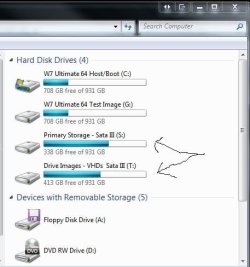
What to do with that extra drive you will be getting in? hhhhmmm.... storage, backup, full system images,,,
 

Attachments

  • Drives Fill Fast Always Back Things Up.jpg
    Drives Fill Fast Always Back Things Up.jpg
    35 KB · Views: 5

My Computers

System One System Two

  • Computer type
    PC/Desktop
    Computer Manufacturer/Model Number
    Custom builds = 2
    OS
    W7 Ultimate x64/W10 Pro x64/W11 Pro Triple Boot - Main PC W7 Remote PC Micro ATX W7 Pro x64/W11 Pro
    CPU
    AMD Phenom II X4 975 Deneb 3.6ghz - 965 2nd remote pc
    Motherboard
    Gigabyte GA-790XTA-UD4-Gigabyte GA-880GM-D2H remote pc
    Memory
    Kingston Hyper X DDR3 1600 1.5v 16gb - Hyper X Fury 8gb 2nd
    Graphics Card(s)
    MSI HD Radeon 5750 1gb - MSI HD Radeon 6450 on mini tower
    Sound Card
    Creative Labs X-Fi Xtreme Audio P - Realtek onooard 2nd case
    Monitor(s) Displays
    ASUS VW199T-P 19" HP 2082a Main-HP 2082a 20" remote pc
    Screen Resolution
    Asus 1440x900 - HP 1600x900
    Hard Drives
    WD Black 1TB HD per OS W7, W10, and pending W11 presently on 500gb OS Drive - Pending Triple 1TB HDs for Spanned Storage/backup volume
    Single 2TB external USB enclosure, single 1TB System 7 Host/Boot drive, Pending 8TB external HD for system image b
    PSU
    Corsair 750TX - primary / Corsair CX600 - second
    Case
    Antec 900-2 - SSD compatible / NZXT Vulcan mini tower
    Cooling
    Zalman CNPS9900A
    Keyboard
    AZIO L70 Backlit Letters Gaming - ONN Cordless/USB
    Mouse
    MSI DS200 Programmable, Logitech Cordless
    Internet Speed
    30mbps upgrade - primary hard wired - mini tower usb WiFi
    Antivirus
    GFI VIPRE Internet Security 2014 on W7 2016 beta on W10,
    Browser
    Cyberfox, WaterFox 64bit FF variants, FireFox x64, Pale Moon
    Other Info
    Accomdata fan cooled usb 2.0 PIDE/Sata II, III external enclosure.
    Sambient usb/eSata PATA/Sata II, III external enclosure.
  • Computer type
    PC/Desktop
    System Manufacturer/Model Number
    CUSTOM ASSEMBLY
    OS
    W7 Pro x64/W11 Pro
    CPU
    AMD Deneb 3.6ghz - 965
    Motherboard
    Gigabyte GA-880GM-D2H remote pc
    Memory
    Kingston Hyper X Fury 8gb
    Graphics Card(s)
    MSI HD Radeon 6450 DVI Output
    Sound Card
    Realtek onooard Creative or Other separate PENDING
    Monitor(s) Displays
    VIZIO 32" LCD TV Separate LCD Pending
    Screen Resolution
    1600x1080
    Hard Drives
    WD 500GB OS Host/Boot WD Green 1TB Storage/Backup
    PSU
    Corsair 600W - THERMALTAKE 600W spare case
    Case
    NZXT Vulcan mini tower
    Cooling
    Twin 120mm Top Fans - 240mm Side Cover
    Keyboard
    ONN Cordless/USB Logitech Cordless
    Mouse
    ONN USB/Cordless - Logitech Cordless
    Internet Speed
    DSL 5G
    Browser
    MS Edge, FireFox, WaterFox x64, FireFox Nightly
    Other Info
    OS Testing-Remote Access to Main TeamViewer
Back
Top