SATA driver for Windows XP Slipstream

Diadem

New member
Local time
1:35 PM
Messages
9
I would like to try installing a dual boot of Windows XP Professional x86 with Windows 7 Professional x64 on a single hard drive. I gave up last time but decided to try one last time.

My question is about the SATA driver for my Seagate Barracuda HD.

Now, the XP Professional x86 I am going to install is obviously a 32-bit OS. My W7 is a 64-bit OS.

The only driver I could find for my HD was from HP's website. It lists 32-bit and 64-bit drivers for Windows Vista and Windows 7 operating systems.

The specific driver is described as, "Original driver for the AMD AHCI Compatible RAID Controller solutions." Is this the one I would need?

And, also, am I looking for a 32-bit driver (XP is 32-bit) or 64-bit (W7 is 64-bit)?

Thank you.
 

My Computer

Computer Manufacturer/Model Number
Hewlett Packard p6314f
OS
Windows 7 Professional x64; Ubuntu 10.04 lTS
CPU
AMD Phenom II X4 970 Black Edition 3.5 GHz
Motherboard
Aloe/ HP micro-ATX
Memory
G.Skill 16 GB DDR3 PC3-8600 1333 MHz
Graphics Card(s)
AMD Radeon HD 5870 Eyefinity 6
Sound Card
Integrated
Monitor(s) Displays
HP 2711x 27" LED
Hard Drives
Seagate Barracuda ST3750528AS 7200.12 7200 rpm 750 GB internal hard drive; Western Digital My Book Essential 500 GB external hard drive
PSU
Corsair TX750 750-watt non-modular
Case
Corsair Graphite 600T
Cooling
Corsair H70
First check for all the Win XP drivers for your hardware.
http://welcome.hp.com/country/us/en/support.html
If your Win XP CD, does not support your Sata Controller, you will need to load drivers to uses at F6.
Load Sata Controller drivers with a floppy disk is the best way.
http://www.sevenforums.com/tutorials/66010-sata-drivers-load-windows-xp-setup-dual-boot.html
OR
http://www.sevenforums.com/tutorials/72185-sata-drivers-slipstream-into-windows-xp-cd.html

You can download your F6 Sata Controller drivers from here:
General XP Downgrade Guide for HP Laptops - HP Support Forum

If you are using more than 4gb of ram, use XP Mode.
http://www.sevenforums.com/tutorials/8247-windows-xp-mode-install-setup.html
http://www.sevenforums.com/tutorials/8254-windows-virtual-pc-create-virtual-machine.html
 

My Computer

OS
ME/XP/Vista/Win7
First check for all the Win XP drivers for your hardware.
http://welcome.hp.com/country/us/en/support.html
If your Win XP CD, does not support your Sata Controller, you will need to load drivers to uses at F6.
Load Sata Controller drivers with a floppy disk is the best way.
http://www.sevenforums.com/tutorials/66010-sata-drivers-load-windows-xp-setup-dual-boot.html
OR
http://www.sevenforums.com/tutorials/72185-sata-drivers-slipstream-into-windows-xp-cd.html

You can download your F6 Sata Controller drivers from here:
General XP Downgrade Guide for HP Laptops - HP Support Forum

If you are using more than 4gb of ram, use XP Mode.
http://www.sevenforums.com/tutorials/8247-windows-xp-mode-install-setup.html
http://www.sevenforums.com/tutorials/8254-windows-virtual-pc-create-virtual-machine.html
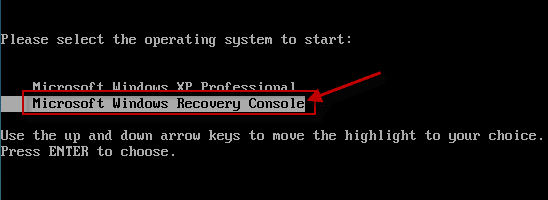
I would use Virtual Mode, but I need to have access to the XP Recovery Console for class purposes. AKAIK, you can't access the Recovery Console from Virtual XP Mode.
 

My Computer

Computer Manufacturer/Model Number
Hewlett Packard p6314f
OS
Windows 7 Professional x64; Ubuntu 10.04 lTS
CPU
AMD Phenom II X4 970 Black Edition 3.5 GHz
Motherboard
Aloe/ HP micro-ATX
Memory
G.Skill 16 GB DDR3 PC3-8600 1333 MHz
Graphics Card(s)
AMD Radeon HD 5870 Eyefinity 6
Sound Card
Integrated
Monitor(s) Displays
HP 2711x 27" LED
Hard Drives
Seagate Barracuda ST3750528AS 7200.12 7200 rpm 750 GB internal hard drive; Western Digital My Book Essential 500 GB external hard drive
PSU
Corsair TX750 750-watt non-modular
Case
Corsair Graphite 600T
Cooling
Corsair H70
Use a virtual machine, and yes you can access the recovery console. Just manually install Windows in the virtual machine as you would a normal computer. Just do not use the image provided by Microsoft.
 

My Computer

Computer type
PC/Desktop
Computer Manufacturer/Model Number
Alienware Aurora ALX R4
OS
Windows 10 Pro (x64)
CPU
Intel Core i7-3930K (3.2GHz - 4.5GHz)
Motherboard
Alienware Aurora-R4 x79
Memory
4x Samsung 4GB PC3-12800 DDR3 (16GB 1600MHz)
Graphics Card(s)
Nvidia Geforce GTX 690
Sound Card
SteelSeries Siberia Elite
Monitor(s) Displays
Dell UltraSharp U3011
Screen Resolution
2560x1600
Hard Drives
Samsung 850 Pro 256 GB, Seagate 1TB Desktop Hybrid HDD, 2x Western Digital 4TB Green HDD
PSU
875W Some Dell PSU <.<
Case
Alienware Aurora ALX
Cooling
Custom Liquid Cooling (EK CPU & GPU blocks) dual EK 480RAD
Keyboard
Logitech G710+ Mechanical
Mouse
Logitech G700s
Internet Speed
Verizon Fios (50 mbps average)
Other Info
Server: Intel NUC D54250WYK: i5-4250U, 16GB, 256 GB mSATA, Windows Server 2012 R2
Use a virtual machine, and yes you can access the recovery console. Just manually install Windows in the virtual machine as you would a normal computer. Just do not use the image provided by Microsoft.
Anywhere I can find a tutorial for that? Right now I have XP Mode installed in Windows Virtual Machine (downloaded both from microsoft.com). So, do I need to uninstall XP mode? Where do I go from there? I also have XP Pro on a disc I burned from Microsoft Academic Alliance site.

I thought you could only access the Recovery Console from the boot screen, and since I don't get a boot screen when entering the VM, I don't know how I would access the Recovery Console.
 

My Computer

Computer Manufacturer/Model Number
Hewlett Packard p6314f
OS
Windows 7 Professional x64; Ubuntu 10.04 lTS
CPU
AMD Phenom II X4 970 Black Edition 3.5 GHz
Motherboard
Aloe/ HP micro-ATX
Memory
G.Skill 16 GB DDR3 PC3-8600 1333 MHz
Graphics Card(s)
AMD Radeon HD 5870 Eyefinity 6
Sound Card
Integrated
Monitor(s) Displays
HP 2711x 27" LED
Hard Drives
Seagate Barracuda ST3750528AS 7200.12 7200 rpm 750 GB internal hard drive; Western Digital My Book Essential 500 GB external hard drive
PSU
Corsair TX750 750-watt non-modular
Case
Corsair Graphite 600T
Cooling
Corsair H70
Yup. It works. I'm excited! :D I did the install last night.

Just put the disc in and open VM. It will begin installing. Just make sure you don't have any Service Packs installed because you'll get the "disc is newer than blah blah blah" error message. Install the Recovery Console immediately after you install XP.
 

My Computer

Computer Manufacturer/Model Number
Hewlett Packard p6314f
OS
Windows 7 Professional x64; Ubuntu 10.04 lTS
CPU
AMD Phenom II X4 970 Black Edition 3.5 GHz
Motherboard
Aloe/ HP micro-ATX
Memory
G.Skill 16 GB DDR3 PC3-8600 1333 MHz
Graphics Card(s)
AMD Radeon HD 5870 Eyefinity 6
Sound Card
Integrated
Monitor(s) Displays
HP 2711x 27" LED
Hard Drives
Seagate Barracuda ST3750528AS 7200.12 7200 rpm 750 GB internal hard drive; Western Digital My Book Essential 500 GB external hard drive
PSU
Corsair TX750 750-watt non-modular
Case
Corsair Graphite 600T
Cooling
Corsair H70
Well done.:thumbsup:

Have fun with your class work.:D:D
 

My Computer

OS
ME/XP/Vista/Win7
Back
Top