Sata problems with IDE drive

moults

New member
Local time
4:49 AM
Messages
19
Hi

I have recently upgraded to Windows 7 and installed onto a Sata 250g drive which runs with no problems. However i also have 2 x IDE drives i use as storage and as soon as i connect them and reboot the system just hangs for hours.

I have tried removing the sata drive and installing on the smaller (80gb) IDE drive and all goes well until i connect any other drive.

This driving me nuts as i need to access the larger IDE drive as it stores all my music and photo's etc.

I can run 7 on either drive but not when both types are connected.

Help please
 

My Computer

Computer Manufacturer/Model Number
OWN BUILT
OS
windows 7
CPU
2.40 INTEL CORE 2 DUO
Motherboard
MSI MS-7346 1.0
Memory
4GB
Graphics Card(s)
RADEON X1950 PRO
Sound Card
ON BOARD
Monitor(s) Displays
SAMSUNG SYNCMASTER 226
Hard Drives
1 X 80GB IDE
1 X 250GB IDE
1 X 250GB SATA
PSU
550W
Hi

I have recently upgraded to Windows 7 and installed onto a Sata 250g drive which runs with no problems. However i also have 2 x IDE drives i use as storage and as soon as i connect them and reboot the system just hangs for hours.

I have tried removing the sata drive and installing on the smaller (80gb) IDE drive and all goes well until i connect any other drive.

This driving me nuts as i need to access the larger IDE drive as it stores all my music and photo's etc.

I can run 7 on either drive but not when both types are connected.

Help please

make sure that the ide drives are set to master and slave and connect to their ribbon cable in the correct order. even though you have a sata drive on a lot of mobos if your ide drives are not jumpered correctly the system will just hang during hardware detection.
 

My Computer

OS
windows
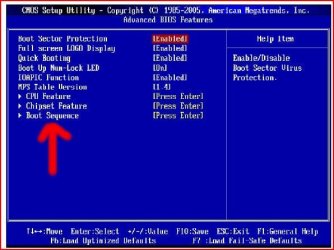
Make sure your SATA is first in BIOS.
 

Attachments

  • Capture3.JPG
    Capture3.JPG
    43.1 KB · Views: 223
Last edited:

My Computer

OS
ME/XP/Vista/Win7
thanks for the swift response but i have done both of these things but to no avail.
 

My Computer

Computer Manufacturer/Model Number
OWN BUILT
OS
windows 7
CPU
2.40 INTEL CORE 2 DUO
Motherboard
MSI MS-7346 1.0
Memory
4GB
Graphics Card(s)
RADEON X1950 PRO
Sound Card
ON BOARD
Monitor(s) Displays
SAMSUNG SYNCMASTER 226
Hard Drives
1 X 80GB IDE
1 X 250GB IDE
1 X 250GB SATA
PSU
550W
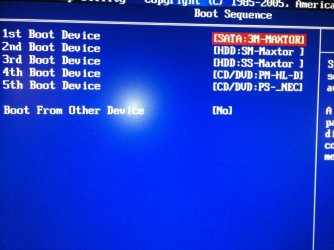
Can you list the BOOT SEQUENCE?
 

Attachments

  • Capture4.JPG
    Capture4.JPG
    29.7 KB · Views: 18

My Computer

OS
ME/XP/Vista/Win7
My boot sequence is

1st SATA drive
2nd DVD Drive
3rd 2nd dvd drive
4th Master hdd
5th Slave hdd

All works fine until i try to start with all drives connected.:confused:
 

My Computer

Computer Manufacturer/Model Number
OWN BUILT
OS
windows 7
CPU
2.40 INTEL CORE 2 DUO
Motherboard
MSI MS-7346 1.0
Memory
4GB
Graphics Card(s)
RADEON X1950 PRO
Sound Card
ON BOARD
Monitor(s) Displays
SAMSUNG SYNCMASTER 226
Hard Drives
1 X 80GB IDE
1 X 250GB IDE
1 X 250GB SATA
PSU
550W
Theog i notice you live in Hampshire. I moved to Cornwall from hants.
 

My Computer

Computer Manufacturer/Model Number
OWN BUILT
OS
windows 7
CPU
2.40 INTEL CORE 2 DUO
Motherboard
MSI MS-7346 1.0
Memory
4GB
Graphics Card(s)
RADEON X1950 PRO
Sound Card
ON BOARD
Monitor(s) Displays
SAMSUNG SYNCMASTER 226
Hard Drives
1 X 80GB IDE
1 X 250GB IDE
1 X 250GB SATA
PSU
550W
My boot sequence is

1st SATA drive
2nd DVD Drive
3rd 2nd dvd drive
4th Master hdd
5th Slave hdd

All works fine until i try to start with all drives connected.:confused:

now are your dvd drives sata or ide? if ide they need to be mastered and slaved. you could also try disconnecting them and try booting with the 3 hdd's.
 

My Computer

OS
windows
I've just done a fresh install of XP pro and all drives show and work properly. This must be a windows 7 bug surely. I upgraded from xp pro 32 bit to windows 7 64 bit.

Now i have all drives working maybe i should try to reinstall 7 but i'm loathed to remove the other 2 drives in case they don't work after the install. Is there a problem installing 7 onto my sata drive while the other 2 are connected?
 

My Computer

Computer Manufacturer/Model Number
OWN BUILT
OS
windows 7
CPU
2.40 INTEL CORE 2 DUO
Motherboard
MSI MS-7346 1.0
Memory
4GB
Graphics Card(s)
RADEON X1950 PRO
Sound Card
ON BOARD
Monitor(s) Displays
SAMSUNG SYNCMASTER 226
Hard Drives
1 X 80GB IDE
1 X 250GB IDE
1 X 250GB SATA
PSU
550W
I've just done a fresh install of XP pro and all drives show and work properly. This must be a windows 7 bug surely. I upgraded from xp pro 32 bit to windows 7 64 bit.

Now i have all drives working maybe i should try to reinstall 7 but i'm loathed to remove the other 2 drives in case they don't work after the install. Is there a problem installing 7 onto my sata drive while the other 2 are connected?

No, a BIOS setting.

Have a read of this tutorial:

http://www.sevenforums.com/tutorials/8057-dual-boot-installation-windows-7-xp.html?ltr=D
 

My Computer

OS
ME/XP/Vista/Win7
thanks again for the swift response but i don't want a dual boot system i just want to replace xp pro with 7
 

My Computer

Computer Manufacturer/Model Number
OWN BUILT
OS
windows 7
CPU
2.40 INTEL CORE 2 DUO
Motherboard
MSI MS-7346 1.0
Memory
4GB
Graphics Card(s)
RADEON X1950 PRO
Sound Card
ON BOARD
Monitor(s) Displays
SAMSUNG SYNCMASTER 226
Hard Drives
1 X 80GB IDE
1 X 250GB IDE
1 X 250GB SATA
PSU
550W
screenshot
 

Attachments

  • boot sequence.JPG
    boot sequence.JPG
    80.4 KB · Views: 7

My Computer

Computer Manufacturer/Model Number
OWN BUILT
OS
windows 7
CPU
2.40 INTEL CORE 2 DUO
Motherboard
MSI MS-7346 1.0
Memory
4GB
Graphics Card(s)
RADEON X1950 PRO
Sound Card
ON BOARD
Monitor(s) Displays
SAMSUNG SYNCMASTER 226
Hard Drives
1 X 80GB IDE
1 X 250GB IDE
1 X 250GB SATA
PSU
550W
Was a solution ever found for this? I am having the identical problem. Single SATA connected boots fine. Add IDE storage drives, check and recheck boot sequence, and I can't get system to boot. "No OS found". Even though the boot sequence is set to sata first it will only attempt to boot from IDE once they are connected.
 

My Computer

OS
Windows 7 64bit
CPU
AMD Phenom II X4 955 BE C3
Motherboard
Gigabyte GA-MA785GT-UD3h
Memory
4GB GSKILL DDR3 1333
Graphics Card(s)
on board 4200

My Computer

OS
ME/XP/Vista/Win7
Are you refering to something o page 47 specifically that I'm overlooking or advanced bios in general?

Was a solution ever found for this? I am having the identical problem. Single SATA connected boots fine. Add IDE storage drives, check and recheck boot sequence, and I can't get system to boot. "No OS found". Even though the boot sequence is set to sata first it will only attempt to boot from IDE once they are connected.
 

My Computer

OS
Windows 7 64bit
CPU
AMD Phenom II X4 955 BE C3
Motherboard
Gigabyte GA-MA785GT-UD3h
Memory
4GB GSKILL DDR3 1333
Graphics Card(s)
on board 4200
Are you refering to something o page 47 specifically that I'm overlooking or advanced bios in general?

Was a solution ever found for this? I am having the identical problem. Single SATA connected boots fine. Add IDE storage drives, check and recheck boot sequence, and I can't get system to boot. "No OS found". Even though the boot sequence is set to sata first it will only attempt to boot from IDE once they are connected.

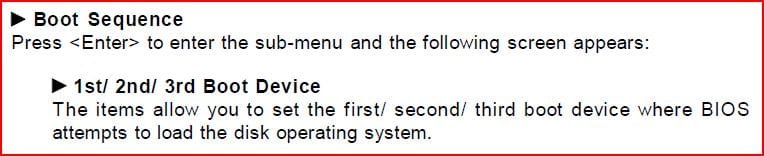
Check with the manual:
 

Attachments

  • Capture.JPG
    Capture.JPG
    56.5 KB · Views: 62

My Computer

OS
ME/XP/Vista/Win7
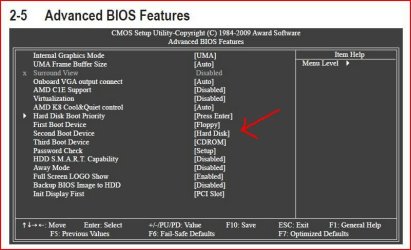
Hi theog,

My boot sequence is virtually the same, other than I have mine set to cd/dvd drive first, hard drive second. For the Hard Disk Boot Priority, I have it set to my SATA first. I will change the first boot device to hard drive and try that. Would it think my IDE hard drive is a cd/dvd drive? And if it did, when it realized there was no OS in it, would it not attempt to boot from the second device, the SATA hard drive with the OS installed?

Thanks for your assistance.
 

My Computer

OS
Windows 7 64bit
CPU
AMD Phenom II X4 955 BE C3
Motherboard
Gigabyte GA-MA785GT-UD3h
Memory
4GB GSKILL DDR3 1333
Graphics Card(s)
on board 4200
Back
Top