
Solved "Save as" default (most recent) folder always changes

golem

New member
Member
VIP
Local time
6:44 PM
Messages
129
Why is it that when there are a number of same size, same type, same extension files on the same page I want to save to a single folder each "save as" I perform prompts me with a different location instead of remembering the last folder saved to? This is my experience when using Firefox.

On the other hand, while using IE (limited experience) it seems to remember the last saved-to location as long as it's within the same browser session AND same tab. If an image is opened in a new tab (or session) it automatically switches the save-to to the default "Pictures" folder.

I'm assuming since both browsers now act differently than they did with previous OS's (XP and lesser) it must be something inherent in Win7's architecture. Is there any way of changing this annoying behavior without resorting to 3rd party download managers?

Searching this question I was only able to locate a couple Microsoft threads with frustrated and, as yet, unsatisfied users.
 

My Computer

Computer type
PC/Desktop
Computer Manufacturer/Model Number
Self Assembly
OS
Windows 10 64
CPU
Intel i5 3570K (4.13GHz w/cool & quiet))
Motherboard
ASUS P8Z77-V LK
Memory
4x-4Gb Crucial Ballistix Sport PC3-12800 (1600)
Graphics Card(s)
GeForce GTX 1060 6GB
Sound Card
Realtek ALC892 (onboard)
Monitor(s) Displays
TCL 50" 4K
Screen Resolution
3840x2160
Hard Drives
Crucial MX500, Intel 330; Adata 480; Sea ST8000MD
PSU
Antec HCG-520M
Cooling
CPU - Coolermaster Hyper 212 P, Case - 2-120mm Scythe
Keyboard
Logitecl compact
Mouse
Logitec M705
Internet Speed
Gigabit
Other Info
1 RX-C525 Rosewill trayless hot-swap mobile rack
Firefox remembers per site where files were stored, and should save files to that same location by default. If you download a file from http://xyz.com then the next time you download from that site, it should remember where the last file downloaded from that site was saved.

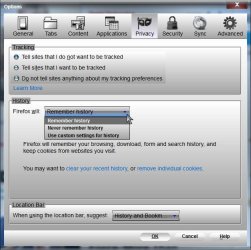
Make sure you don't have FF set to not remember history

Tools> Options> Privacy> History

It should be set to Remember History if you want FF to remember last d/l location.

History.jpg

If you don't want FF to remember history, you might try to add an about:config setting to restore that behavior

Firefox Save Image As Save Per Site Annoyance

In your case, you would want FF to remember per site (true (default) - The last used directory for the website (host) serving the file for download will be preselected in the file picker. If no download directory for the current website has been stored, browser.download.lastDir will be used.)

You could also create a new profile and see if the behavior exists there (assuming you do have Remember History already selected)

https://support.mozilla.org/en-US/kb/profile-manager-create-and-remove-firefox-profiles

A Guy
 

My Computer

Computer type
PC/Desktop
OS
Windows 10 Home x64
CPU
INTEL Core i5-750 Quad-Core 3.37GHz
Motherboard
ASUS P7P55D
Memory
HyperX Fury Black Series 8GB (2 x 4GB) 1866Mhz
Graphics Card(s)
EVGA GeForce GTX 750 Superclocked 1GB 128-Bit GDDR5
Monitor(s) Displays
LG 32MA68HY 32" IPS
Screen Resolution
1920 x 1080
Hard Drives
Samsung 840 Evo 120GB, SEAGATE 500GB Barracuda® 7200.12, SATA 3 Gb/s, 7200 RPM, 16MB cache
PSU
ANTEC TruePower New TP-550, 80 PLUS, 550W
Case
ANTEC Three Hundred Illusion
Cooling
COOLER MASTER Hyper 212 Plus, 4 x 120mm 1 x 140mm Noctua's
Internet Speed
85 + Mbps
Antivirus
Avast
Browser
Vivaldi
You have definitely saved me loads of frustrations A Guy.

FF was already set to Remember History but digging around the config file as per the wiki link you provided I added the savePerSite string and now it once again works in legacy fashion. The last save-to directory is recalled independent of file type or url.

Many thanks for providing the answer to my dilema. ;)
 

My Computer

Computer type
PC/Desktop
Computer Manufacturer/Model Number
Self Assembly
OS
Windows 10 64
CPU
Intel i5 3570K (4.13GHz w/cool & quiet))
Motherboard
ASUS P8Z77-V LK
Memory
4x-4Gb Crucial Ballistix Sport PC3-12800 (1600)
Graphics Card(s)
GeForce GTX 1060 6GB
Sound Card
Realtek ALC892 (onboard)
Monitor(s) Displays
TCL 50" 4K
Screen Resolution
3840x2160
Hard Drives
Crucial MX500, Intel 330; Adata 480; Sea ST8000MD
PSU
Antec HCG-520M
Cooling
CPU - Coolermaster Hyper 212 P, Case - 2-120mm Scythe
Keyboard
Logitecl compact
Mouse
Logitec M705
Internet Speed
Gigabit
Other Info
1 RX-C525 Rosewill trayless hot-swap mobile rack
Great, glad you got it sorted. You're welcome ;)

A Guy
 

My Computer

Computer type
PC/Desktop
OS
Windows 10 Home x64
CPU
INTEL Core i5-750 Quad-Core 3.37GHz
Motherboard
ASUS P7P55D
Memory
HyperX Fury Black Series 8GB (2 x 4GB) 1866Mhz
Graphics Card(s)
EVGA GeForce GTX 750 Superclocked 1GB 128-Bit GDDR5
Monitor(s) Displays
LG 32MA68HY 32" IPS
Screen Resolution
1920 x 1080
Hard Drives
Samsung 840 Evo 120GB, SEAGATE 500GB Barracuda® 7200.12, SATA 3 Gb/s, 7200 RPM, 16MB cache
PSU
ANTEC TruePower New TP-550, 80 PLUS, 550W
Case
ANTEC Three Hundred Illusion
Cooling
COOLER MASTER Hyper 212 Plus, 4 x 120mm 1 x 140mm Noctua's
Internet Speed
85 + Mbps
Antivirus
Avast
Browser
Vivaldi
Back
Top