save frame in movie maker as jpg

kjohnsn

New member
Local time
1:57 PM
Messages
5
My father set up his video camera with a slide viewer to make a VHS tape of the slides. I have copied it to a DVD, then converted the .vob file to an .mpg. Can I clip out a single frame and save it as a .jpg? How? I have Windows Live Movie Maker.
 

My Computer My Computer

At a glance

windows 7 pro 64 bit
Computer type
PC/Desktop
Computer Manufacturer/Model Number
asus
OS
windows 7 pro 64 bit
Browser
ie
Welcome to the Seven Forums.

Converting from one file format (VOB) to another file format (MPG) will usually result in some loss of quality. I would suggest installing the K-Lite Mega Codec Pack. It comes with a version of the Media Player Classic player. That Media Player (along with the K-Lite codecs) will play most any file format. You should be able to play the VOB file directly (without converting it).

Media Player Classic will let you step thru the video file using the left and right arrow keys. Once you find the frame of interest, you can save a screenshot of it via Media Player Classic's menu bar. File > Save Image... You can save the image as JPG or BMP or PNG.

You can get K-Lite from here.

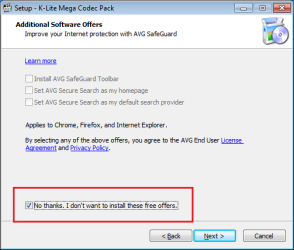
During the install, you can leave everything at the default settings except on these two screens:


Uncheck that last option - unless you just want to go to their website.

K-lite1.png


Check this option to decline junk.

K-lite2.png
 
Last edited:

My Computer My Computer

At a glance

W7 Pro SP1 64biti78GBIntel HD Graphics
Computer type
Laptop
Computer Manufacturer/Model Number
Employer provided Dell Latitude
OS
W7 Pro SP1 64bit
CPU
i7
Memory
8GB
Graphics Card(s)
Intel HD Graphics
Hard Drives
crappy SSD
Antivirus
Employer mandated Symantec Endpoint Protection
Browser
Pale Moon 64bit, IE11 64bit & Chrome 64bit
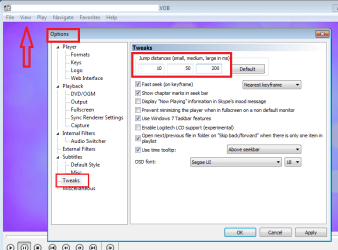
After you install K-Lite with Media Player Classic (MPC), open the MPC player.

Select View from the menu bar...
...then select Options from the menu.
Change the jump settings to look like this:

K-lite3.png

Those settings determine how many milliseconds (ms) to jump each time you press an arrow key:
Right arrow = jump forward 10 ms
CTRL+Right arrow = jump forward 50 ms
ALT+Right arrow = jump forward 200 ms
The left arrow jumps back - using the same modifier keys to make bigger jumps.


You might prefer one more zero :-)
100, 500, 2000
 

My Computer My Computer

At a glance

W7 Pro SP1 64biti78GBIntel HD Graphics
Computer type
Laptop
Computer Manufacturer/Model Number
Employer provided Dell Latitude
OS
W7 Pro SP1 64bit
CPU
i7
Memory
8GB
Graphics Card(s)
Intel HD Graphics
Hard Drives
crappy SSD
Antivirus
Employer mandated Symantec Endpoint Protection
Browser
Pale Moon 64bit, IE11 64bit & Chrome 64bit
These a copies of old slides taken from an old VHS tape. Quality is not an issue; it isn't going to be great no matter what I do.
In Movie Maker, I have no "Files" tab nor any "Save as" options on any tabs. The only Save option is "Save Project as..."
 

My Computer My Computer

At a glance

windows 7 pro 64 bit
Computer type
PC/Desktop
Computer Manufacturer/Model Number
asus
OS
windows 7 pro 64 bit
Browser
ie
Okay, I installed MPC and the codecs. When I try to open a .vob file from my CD, MPC does not find any compatible files. What now?
 

My Computer My Computer

At a glance

windows 7 pro 64 bit
Computer type
PC/Desktop
Computer Manufacturer/Model Number
asus
OS
windows 7 pro 64 bit
Browser
ie
Tried opening the .vob directly from the CD......and IT WORKS! Thanks so much.
 

My Computer My Computer

At a glance

windows 7 pro 64 bit
Computer type
PC/Desktop
Computer Manufacturer/Model Number
asus
OS
windows 7 pro 64 bit
Browser
ie
Now.....is there a way to advance frame by frame?
 

My Computer My Computer

At a glance

windows 7 pro 64 bit
Computer type
PC/Desktop
Computer Manufacturer/Model Number
asus
OS
windows 7 pro 64 bit
Browser
ie

My Computer My Computer

At a glance

W7 Pro SP1 64biti78GBIntel HD Graphics
Computer type
Laptop
Computer Manufacturer/Model Number
Employer provided Dell Latitude
OS
W7 Pro SP1 64bit
CPU
i7
Memory
8GB
Graphics Card(s)
Intel HD Graphics
Hard Drives
crappy SSD
Antivirus
Employer mandated Symantec Endpoint Protection
Browser
Pale Moon 64bit, IE11 64bit & Chrome 64bit
Back
Top