Save sticky notes?

Funnycat

New member
Local time
6:20 PM
Messages
29
Location
Limassol
I did a quick search but found nothing relevant. The question is - is it possible to save sticky notes for further use? I don't want to keep them open all th time and I want to keep some doodles :rolleyes:
I undertstand that I can probably just copy them or printscreen, but is it possible just to save them?
 

My Computer

Computer Manufacturer/Model Number
HP Compaq tc4200
OS
Windows 7 x86 b7048
CPU
Pentium M 2GHz
Memory
1,5GB
Graphics Card(s)
Intel 915GM
Screen Resolution
1024*768
Internet Speed
300kbit/s :(
Oh wait, I just figured that if you right click sticky notes in the taskbar you can still "close window" and afterwards open it and whatever you wrote/drew loads up :D
 

My Computer

Computer Manufacturer/Model Number
HP Compaq tc4200
OS
Windows 7 x86 b7048
CPU
Pentium M 2GHz
Memory
1,5GB
Graphics Card(s)
Intel 915GM
Screen Resolution
1024*768
Internet Speed
300kbit/s :(
But anyway, is it possible to save them as files, if, for example, I take notes on my tablet pc and don't wan to keep all of them on the screen all the time?
 

My Computer

Computer Manufacturer/Model Number
HP Compaq tc4200
OS
Windows 7 x86 b7048
CPU
Pentium M 2GHz
Memory
1,5GB
Graphics Card(s)
Intel 915GM
Screen Resolution
1024*768
Internet Speed
300kbit/s :(
You can find the file here C:\Users\<UserName>\AppData\Roaming\Microsoft\Sticky Notes
The file is called StickyNotes.snt

Note that you need to be able to view hidden files and folders - see http://www.sevenforums.com/tutorials/394-hidden-files-folders-show-hide.html for details.

Forgot to add that irrespective of how many individual notes you have, there is only one file per <UserName>, which contains all the notes in a single file.
 
Last edited:

My Computer

Computer type
PC/Desktop
Computer Manufacturer/Model Number
Dwarf Dwf/11/2012 r09/2013
OS
Windows 8.1 Pro RTM x64
CPU
Intel Core-i5-3570K 4-core @ 3.4GHz (Ivy Bridge) (OC 4.4GHz)
Motherboard
ASRock Z77 Extreme4-M
Memory
4 x 4GB DDR3-1600 Corsair Vengeance CMZ8GX3M2A1600C9B (16GB)
Graphics Card(s)
MSI GeForce GTX770 Gaming OC 2GB
Sound Card
Realtek High Definition on board solution (ALC 898)
Monitor(s) Displays
ViewSonic VA1912w Widescreen (VGA)
Screen Resolution
1440x900
Hard Drives
OCZ Agility 3 SSD 120GB SATA III x2 (RAID 0)
Samsung HD501LJ 500GB SATA II x2
Hitachi HDS721010CLA332 1TB SATA II
Iomega 1.5TB Ext USB 2.0
WD 2.0TB Ext USB 3.0
PSU
XFX Pro Series 850W Semi-Modular
Case
Gigabyte IF233
Cooling
1 x 120mm Front Inlet 1 x 120mm Rear Exhaust
Keyboard
Microsoft Comfort Curve Keyboard 3000 (USB)
Mouse
Microsoft Comfort Mouse 3000 for Business (USB)
Internet Speed
NetGear DG834Gv3 ADSL Modem/Router (Ethernet) ~4.0 Mb/s (O2)
Antivirus
Avast! 8.0.1497
Browser
IE 11
Other Info
Optical Drive: HL-DT-ST BD-RE BH10LS30 SATA Bluray
Lexmark S305 Printer/Scanner/Copier (USB)
WEI Score: 8.1/8.1/8.5/8.5/8.25
Asus Eee PC 1011PX Netbook (Windows 7 x86 Starter)
How do they persist?

Hello! :)

Are they actually written to disk? Or are they gone as soon as i restart, or turn off the computer?

When are they saved? (if they are)

Regards
Lasse
 

My Computer

OS
Windows 7
They are saved, in the file as indicated in a previous post. So, unless you delete the note, it will still be available after shutting down and rebooting.
 

My Computer

Computer Manufacturer/Model Number
HP DV8t quad
OS
Windows 7 Ultimate x64 (Retail)
CPU
i7-Q 720
Motherboard
Motherboard Chipset Intel Ibex Peak-M PM55, Intel Lynnfield
Memory
6 GB
Graphics Card(s)
nVidia GeForce GT 230M (1GB)
Sound Card
IDT High Definition Audio CODEC
Monitor(s) Displays
18.4 inch HP Infinity FHD (Samsung 184HT03-001)
Screen Resolution
1920 x 1080
Hard Drives
Hitachi 500GB 7200 rpm (x2)
Seagate FreeAgent 1.5 TB External USB (x2)
Thermaltake BlacX eSATA/USB 2.0 3.5/2.5 HD dock
Cooling
Zalman NC-2000 notebook cooling pad
Keyboard
laptop
Mouse
Logitech VX Revolution
Other Info
Backup Unit: Lenovo T61p
They are saved, in the file as indicated in a previous post. So, unless you delete the note, it will still be available after shutting down and rebooting.

Cool, I don't have to put them on my fridge anymore. :D
 

My Computer

Computer Manufacturer/Model Number
MasterB/Custom
OS
Windows 7 Professional x64
CPU
QuadCore AMD Phenom II X4 Black Edition 955 3.2 GHz
Motherboard
Asus M4A785TD-V Evo
Memory
8 GB Crucial DDR3
Graphics Card(s)
SAPPHIRE Radeon HD 4890 1GB HDMI New Edition
Sound Card
VIA VT1708S HD Audio 7.1 onboard/ ATI HDMI video card
Monitor(s) Displays
Acer H233H 23'' LCD HDMI
Screen Resolution
1920x1080
Hard Drives
1x 500GB and 1x 1TB 7200RPM 32MB Cache WD Caviar Black
PSU
CORSAIR CMPSU-620HX 620W
Case
COOLER MASTER Storm Scout SGC-2000
Cooling
2x 140mm and 1x 120mm case fans, Stock CPU fan
Keyboard
Logitech MX 3200
Mouse
Logitech MX 3200
Internet Speed
15 Mbps
Other Info
My first build!
I've just been leaving the sticky notes open when I shut down or reboot and they're there when the PC starts up again...

Should I be doing the close window thing first?

Cheers
 

My Computer

OS
Windows 7 Home Premium x64
CPU
i7 5930K
Motherboard
Asus X99-A
Memory
Corsair Dominator, DDR4 16GB
Graphics Card(s)
EVGA GTX 980 SLI
Sound Card
Onboard Realtek HD
Monitor(s) Displays
Dell U3011
Screen Resolution
2560x1600 (16:10, as god intended)
Hard Drives
Samsung 850 EVO 1TB SSD (Boot OS)
2 x Hitachi 7K3000 2TB (Storage)
PSU
Seasonic 1250W
Case
Corsair 900D
Cooling
Corsair H110 280
Keyboard
Logitech Wireless Illuminated keyboard K800
Mouse
Loigitech M950 Performance
Internet Speed
ADSL 2+
Antivirus
MS SE
Browser
Chrome
Delete or close?

I accidentally clicked the x on my sticky note and had a lot of data I needed on it. It didn't ask me so save but when I open the snt file mentioned it's just a default blank note. How can I get my notes back?
 

My Computer

OS
Windows 7
Just a guess, but try navigating to the C:\Users\<UserName>\AppData\Roaming\Microsoft\ directory, right click on the StickyNotes folder, and try to restore previous version.
 

My Computer

OS
XP / Win7 x64 Pro
CPU
Intel Quad-Core Q9450 @ 3.2GHz
Motherboard
Asus P5-E
Memory
2x2GB GSkill DDR2
Graphics Card(s)
NVIDIA GeForce 8600 GTS (EVGA)
Monitor(s) Displays
Dell 2408WFP
Screen Resolution
1920x1200
Good guess and I had not thought of that but when I try it says there is no previous version to be found. :(
 

My Computer

OS
Windows 7

My Computer

Computer type
PC/Desktop
Computer Manufacturer/Model Number
Dwarf Dwf/11/2012 r09/2013
OS
Windows 8.1 Pro RTM x64
CPU
Intel Core-i5-3570K 4-core @ 3.4GHz (Ivy Bridge) (OC 4.4GHz)
Motherboard
ASRock Z77 Extreme4-M
Memory
4 x 4GB DDR3-1600 Corsair Vengeance CMZ8GX3M2A1600C9B (16GB)
Graphics Card(s)
MSI GeForce GTX770 Gaming OC 2GB
Sound Card
Realtek High Definition on board solution (ALC 898)
Monitor(s) Displays
ViewSonic VA1912w Widescreen (VGA)
Screen Resolution
1440x900
Hard Drives
OCZ Agility 3 SSD 120GB SATA III x2 (RAID 0)
Samsung HD501LJ 500GB SATA II x2
Hitachi HDS721010CLA332 1TB SATA II
Iomega 1.5TB Ext USB 2.0
WD 2.0TB Ext USB 3.0
PSU
XFX Pro Series 850W Semi-Modular
Case
Gigabyte IF233
Cooling
1 x 120mm Front Inlet 1 x 120mm Rear Exhaust
Keyboard
Microsoft Comfort Curve Keyboard 3000 (USB)
Mouse
Microsoft Comfort Mouse 3000 for Business (USB)
Internet Speed
NetGear DG834Gv3 ADSL Modem/Router (Ethernet) ~4.0 Mb/s (O2)
Antivirus
Avast! 8.0.1497
Browser
IE 11
Other Info
Optical Drive: HL-DT-ST BD-RE BH10LS30 SATA Bluray
Lexmark S305 Printer/Scanner/Copier (USB)
WEI Score: 8.1/8.1/8.5/8.5/8.25
Asus Eee PC 1011PX Netbook (Windows 7 x86 Starter)
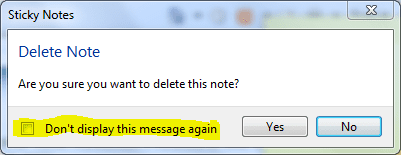
Yea that is cumbersome. It didn't work but that may be because I have already started another note. HOWEVER I noticed in this example that when they closed the note it asked if they were sure they wanted to delete it. How do I turn that option on!!!
 

My Computer

OS
Windows 7
You have probably checked the highlighted box on a previous occasion when you closed the application. I haven't been able to find out how to turn that back on, although it is user independant.
Capture.PNG

Although this is a neat application, useful for making quick notes, I feel that it is something which Microsoft haven't fully finished.
 

My Computer

Computer type
PC/Desktop
Computer Manufacturer/Model Number
Dwarf Dwf/11/2012 r09/2013
OS
Windows 8.1 Pro RTM x64
CPU
Intel Core-i5-3570K 4-core @ 3.4GHz (Ivy Bridge) (OC 4.4GHz)
Motherboard
ASRock Z77 Extreme4-M
Memory
4 x 4GB DDR3-1600 Corsair Vengeance CMZ8GX3M2A1600C9B (16GB)
Graphics Card(s)
MSI GeForce GTX770 Gaming OC 2GB
Sound Card
Realtek High Definition on board solution (ALC 898)
Monitor(s) Displays
ViewSonic VA1912w Widescreen (VGA)
Screen Resolution
1440x900
Hard Drives
OCZ Agility 3 SSD 120GB SATA III x2 (RAID 0)
Samsung HD501LJ 500GB SATA II x2
Hitachi HDS721010CLA332 1TB SATA II
Iomega 1.5TB Ext USB 2.0
WD 2.0TB Ext USB 3.0
PSU
XFX Pro Series 850W Semi-Modular
Case
Gigabyte IF233
Cooling
1 x 120mm Front Inlet 1 x 120mm Rear Exhaust
Keyboard
Microsoft Comfort Curve Keyboard 3000 (USB)
Mouse
Microsoft Comfort Mouse 3000 for Business (USB)
Internet Speed
NetGear DG834Gv3 ADSL Modem/Router (Ethernet) ~4.0 Mb/s (O2)
Antivirus
Avast! 8.0.1497
Browser
IE 11
Other Info
Optical Drive: HL-DT-ST BD-RE BH10LS30 SATA Bluray
Lexmark S305 Printer/Scanner/Copier (USB)
WEI Score: 8.1/8.1/8.5/8.5/8.25
Asus Eee PC 1011PX Netbook (Windows 7 x86 Starter)
Although this is a neat application, useful for making quick notes, I feel that it is something which Microsoft haven't fully finished.
I got that same impression.
 

My Computer

Computer Manufacturer/Model Number
Me.
OS
7 ultimate
CPU
i5 750
Motherboard
P55
Memory
4b g.skill
Graphics Card(s)
GTX 260
Sound Card
integrated
Monitor(s) Displays
22" Acer, 17" Samsung
Hard Drives
1tb, 160, 120
PSU
750 watt
Case
Aerocool Aeroengine2
Cooling
New built, haven't bought aftermarket yet.

My Computer

Computer Manufacturer/Model Number
NA
OS
Windows 7 Professional 64bit
CPU
i7 920
Motherboard
Asus P6T
Memory
6 GB
Graphics Card(s)
Geforce 260
Sound Card
None
Monitor(s) Displays
Dell 2408WFP
Screen Resolution
1920x1200
Hard Drives
System - 640GB WD Caviar Black
Data - 1.5TB WD Caviar Green
PSU
Corsair 800W
Case
Antec Sonata Elite
Cooling
Stock
Mouse
Deathadder
Here is a fix for Sticky Notes

Here is a fix for Sticky Notes
Code:
 http://support.microsoft.com/kb/971605

It worked for me.......:thumbsup:

Later
ASprin624
 

My Computer

OS
Windows 7 Ult.
With thanks to asprin624 (welcome to Windows 7 Forums, by the way), here is the code:

Code:
Windows Registry Editor Version 5.00
[HKEY_CURRENT_USER\Software\Microsoft\Windows\CurrentVersion\Applets\StickyNotes]
"PROMPT_ON_DELETE"=dword:00000001

View attachment stickynotes.reg
 

My Computer

Computer type
PC/Desktop
Computer Manufacturer/Model Number
Dwarf Dwf/11/2012 r09/2013
OS
Windows 8.1 Pro RTM x64
CPU
Intel Core-i5-3570K 4-core @ 3.4GHz (Ivy Bridge) (OC 4.4GHz)
Motherboard
ASRock Z77 Extreme4-M
Memory
4 x 4GB DDR3-1600 Corsair Vengeance CMZ8GX3M2A1600C9B (16GB)
Graphics Card(s)
MSI GeForce GTX770 Gaming OC 2GB
Sound Card
Realtek High Definition on board solution (ALC 898)
Monitor(s) Displays
ViewSonic VA1912w Widescreen (VGA)
Screen Resolution
1440x900
Hard Drives
OCZ Agility 3 SSD 120GB SATA III x2 (RAID 0)
Samsung HD501LJ 500GB SATA II x2
Hitachi HDS721010CLA332 1TB SATA II
Iomega 1.5TB Ext USB 2.0
WD 2.0TB Ext USB 3.0
PSU
XFX Pro Series 850W Semi-Modular
Case
Gigabyte IF233
Cooling
1 x 120mm Front Inlet 1 x 120mm Rear Exhaust
Keyboard
Microsoft Comfort Curve Keyboard 3000 (USB)
Mouse
Microsoft Comfort Mouse 3000 for Business (USB)
Internet Speed
NetGear DG834Gv3 ADSL Modem/Router (Ethernet) ~4.0 Mb/s (O2)
Antivirus
Avast! 8.0.1497
Browser
IE 11
Other Info
Optical Drive: HL-DT-ST BD-RE BH10LS30 SATA Bluray
Lexmark S305 Printer/Scanner/Copier (USB)
WEI Score: 8.1/8.1/8.5/8.5/8.25
Asus Eee PC 1011PX Netbook (Windows 7 x86 Starter)
Glad to be of help.
The wife has a problem with the jump list in the start menu. For some reason the little jump arrows haved disappeared. She did something and now they are all gone. Example in the start menu for sticky notes there was always a small arrow that you could click and it would open a slid window that is now gone.
I have spent days looking in the internet trying to find a fix for this.
It is not only just sticky notes notepad is gone also and any other that have a history you can look at.
Again if you switch to another user they are all there.

strange
Asprin624
 

My Computer

OS
Windows 7 Ult.
Back
Top