Save webpage as .xps?

kbronski

New member
Power User
Local time
7:25 PM
Messages
287
A friend of mine accidentally figured out how to save a webpage as .xps while trying to screenshot, but forgot and I would like to know how they did it. Anyone?
 

My Computer

Computer type
PC/Desktop
Computer Manufacturer/Model Number
Custom
OS
Windows 7 Pro x64
CPU
Intel Core i7-5820k
Motherboard
ASUS X99-PRO
Memory
32GB Kingston HyperX FURY DDR4-2400
Graphics Card(s)
EVGA Geforce GTX970
Monitor(s) Displays
ASUS VC239h
Screen Resolution
1920x1080
Hard Drives
Samsung 850 EVO SSD 250GB x2
750 GB HDD
3TB HDD
PSU
Corsair RM750
Case
Fractal Design Define R5
Cooling
Noctua NH-D15
Keyboard
Corsair Strafe RGB
Mouse
Logitech G502
Which browser do you want to use to do this? I don't know if you can with the default Firefox installation...
 

My Computer

Computer type
PC/Desktop
Computer Manufacturer/Model Number
Antec Lanboy Air
OS
Windows 7 Home Premium x64
CPU
Intel Core i5-2500k
Motherboard
Asus P8Z68-V LX
Memory
4x4GB DDR3-1333
Graphics Card(s)
AMD Radeon HD6870, 1GB DDR5
Monitor(s) Displays
Acer 20"
Screen Resolution
1600x900
Hard Drives
OCZ Agility III 60GB SSD
500GB Seagate HDD
Cooling
Cooler Master Hyper 212 EVO
Internet Speed
50Mbps/5Mbps
Antivirus
Trend Micro Ultimate 2015
Browser
Firefox
Sorry for double-posting - I thought of something.

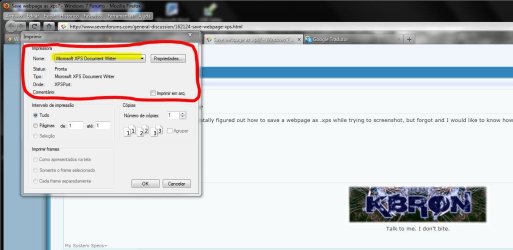
What about going to File>Print... and select the Microsoft XPS Document Writer?
 

My Computer

Computer type
PC/Desktop
Computer Manufacturer/Model Number
Antec Lanboy Air
OS
Windows 7 Home Premium x64
CPU
Intel Core i5-2500k
Motherboard
Asus P8Z68-V LX
Memory
4x4GB DDR3-1333
Graphics Card(s)
AMD Radeon HD6870, 1GB DDR5
Monitor(s) Displays
Acer 20"
Screen Resolution
1600x900
Hard Drives
OCZ Agility III 60GB SSD
500GB Seagate HDD
Cooling
Cooler Master Hyper 212 EVO
Internet Speed
50Mbps/5Mbps
Antivirus
Trend Micro Ultimate 2015
Browser
Firefox
Hi kbronski. :)
Ctrl + P and select Microsoft XPS Document Writer as shown below.


Attachments

  • Capturar.JPG
    Capturar.JPG
    81.6 KB · Views: 21

My Computer

Computer Manufacturer/Model Number
WALLONN7 / LIN BLACK SERIES II
OS
Windows 7 Ultimate x64 SP1
CPU
AMD PHENOM II X6 1090T 3.2GHz
Motherboard
GIGABYTE GA-890FXA-UD7
Memory
8GB G.SKILL RIPJAWS - F3-10666CL7D
Graphics Card(s)
SAPPHIRE ATI RADEON HD 5870 VAPOR X OC
Sound Card
REALTEK DOLBY HOME THEATER
Monitor(s) Displays
LED LG W2486L
Screen Resolution
1080p
Hard Drives
SEAGATE 1TB -ST31000528AS - AHCI MODE - AS SATA
PSU
ZALMAN ZM1000-HP 1000W
Case
THERMALTAKE XASER VI VG4000SWA
Cooling
140MM x3 / 120MM x1 AIR COOLING - THERMALTAKE
Keyboard
MICROSOFT DIGITAL MEDIA KEYBOARD 3000 - USB
Mouse
MICROSOFT BASIC OPTICAL MOUSE 2.0 - USB
Internet Speed
600KBPS
Other Info
MICROSOFT XBOX 360 CONTROLLER
Thank you very much guys. :) That worked great.
 

My Computer

Computer type
PC/Desktop
Computer Manufacturer/Model Number
Custom
OS
Windows 7 Pro x64
CPU
Intel Core i7-5820k
Motherboard
ASUS X99-PRO
Memory
32GB Kingston HyperX FURY DDR4-2400
Graphics Card(s)
EVGA Geforce GTX970
Monitor(s) Displays
ASUS VC239h
Screen Resolution
1920x1080
Hard Drives
Samsung 850 EVO SSD 250GB x2
750 GB HDD
3TB HDD
PSU
Corsair RM750
Case
Fractal Design Define R5
Cooling
Noctua NH-D15
Keyboard
Corsair Strafe RGB
Mouse
Logitech G502
You're welcome! :)
 

My Computer

Computer Manufacturer/Model Number
WALLONN7 / LIN BLACK SERIES II
OS
Windows 7 Ultimate x64 SP1
CPU
AMD PHENOM II X6 1090T 3.2GHz
Motherboard
GIGABYTE GA-890FXA-UD7
Memory
8GB G.SKILL RIPJAWS - F3-10666CL7D
Graphics Card(s)
SAPPHIRE ATI RADEON HD 5870 VAPOR X OC
Sound Card
REALTEK DOLBY HOME THEATER
Monitor(s) Displays
LED LG W2486L
Screen Resolution
1080p
Hard Drives
SEAGATE 1TB -ST31000528AS - AHCI MODE - AS SATA
PSU
ZALMAN ZM1000-HP 1000W
Case
THERMALTAKE XASER VI VG4000SWA
Cooling
140MM x3 / 120MM x1 AIR COOLING - THERMALTAKE
Keyboard
MICROSOFT DIGITAL MEDIA KEYBOARD 3000 - USB
Mouse
MICROSOFT BASIC OPTICAL MOUSE 2.0 - USB
Internet Speed
600KBPS
Other Info
MICROSOFT XBOX 360 CONTROLLER
Back
Top