saving files in windows 7

dennis7490

New member
Local time
8:28 AM
Messages
19
I asked about this before, but no one seemed to know. so, I'm trying a new approach.

when I save a WORD file, it defaults me to a version of "My Documents" where there are no files. this did not happen with XP, and don't ask me how it does this.

I am using OFFICE 2003. If I get OFFICE 2010, will i be able to do something within WORD (2010) as far as saving the file goes, and where it is saved, so I can easily find it?

I spend half my time looking for my files. I did NOT have to do this with XP. All of my files were under MY DOCUMENTS, and it seems to me that Windows 7 has simply confused the issue.

thanks,

Dennis
 

My Computer

OS
windows 7
Sorry, but your question is confusing, to me at least.

You say Word saves to a version of "My Documents" where there are no files. Where exactly is it saving them, what is the actual path (C:\.......). To see, do a Save as from Word, then click on the arrow to the right of the Drop down box labeled Save in:. That will show you exactly where the file is being saved. You should be able to change the location to anywhere you want and normally Word will save there the next time.

Key is to use Save as, rather than Save perhaps?

For me, My Documents is actually C:\Users\myuserid\Documents. Under Windows 7, My Documents is a Junction point that connects you to the real location I listed.

This Wiki has a pretty good explanation of Junction Points and Hard Links: NTFS junction point - Wikipedia, the free encyclopedia
 

My Computer

Computer type
PC/Desktop
Computer Manufacturer/Model Number
Lenovo IdeaCenter 450
OS
Windows 10 Pro X64
CPU
Intel Quad Core i7-4770 @ 3.4Ghz
Memory
16.0GB PC3-12800 DDR3 SDRAM 1600 MHz
Graphics Card(s)
Intel Integrated HD Graphics
Sound Card
Realtek HD Audio
Monitor(s) Displays
HP 22" LCD
Screen Resolution
1680 x 1050
Hard Drives
250GB Samsung EVO SATA-3 SSD
2TB Seagate ST2000DM001 SATA-2
1.5TB Seagate ST3150041AS SATA
Keyboard
Dell USB
Mouse
Lenovo USB
Internet Speed
Cable via Road Runner 3MB Upload, 30MB Download
Antivirus
Windows Defender, MBAM Pro, MBAE
Browser
Seamonkey
Other Info
UEFI/GPT
PLDS DVD-RW DH16AERSH
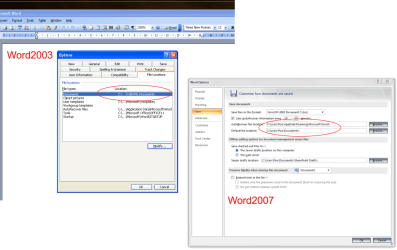
In word2003 & 2007 you can change the default save location.

In 2003 goto "tools" "options" then click on "file locations" tab in 2007 goto "word options" "save"

I'm not to sure with word 2010 but I'm sure there will be an option like this
 

Attachments

  • word2003_2007.png
    word2003_2007.png
    47 KB · Views: 10

My Computer

Computer type
PC/Desktop
Computer Manufacturer/Model Number
Self Built
OS
Windows 7 Ultimate 64bit
CPU
AMD Phenom Quad core 9950 black edition
Motherboard
Gigabyte
Memory
16Gb
Graphics Card(s)
2x XFX Radeon 5850
Sound Card
PCI Express X-Fi Titanium / Logitech G35
Monitor(s) Displays
2x HP 2410i
Screen Resolution
1920x1080
Hard Drives
2x 500Gb Seagate
1x 300Gb Seagate
1x 1Tb Seagate
2x 1Tb Hitatchi
PSU
Jean Tech Storm 700W
Case
Cooler Master COSMOS S
Cooling
Akasa Evo Blue Pro
Keyboard
Logitech G15
Mouse
Mad Catz M.M.O. 7
Internet Speed
12mb
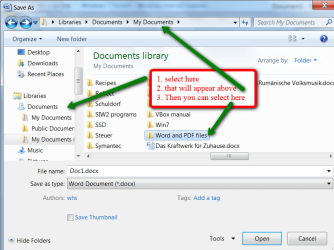
All you have to do is to set the target folder (any one you wish) in the "Save as.." window.
 

Attachments

  • 2010-08-23_2229.png
    2010-08-23_2229.png
    55 KB · Views: 14

My Computer

Computer Manufacturer/Model Number
HP, Dell, Gateway, Toshiba - 4 laptops and 2 desktops
OS
Vista, Windows7, Mint Mate, Zorin, Windows 8
CPU
from 1.6GHz Duo to i7
Monitor(s) Displays
2x HP w2207
Hard Drives
5x HDD, 7x SSD, 12x Externals
Keyboard
with trackball - no mices
Mouse
Trackball mice
Internet Speed
DSL 6000
Exactly what PooMan said, that way it will 'default' to your desired document storage location.
You may also want to consider using the Windows 7 Libraries... works well,,, good feature...
 

My Computer

OS
Windows 7 Professional 64Bit
CPU
Intel® Core i7-930 - 8M Cache, 2.80 GHz, 4.80 GT/s
Motherboard
ASROCK X58 Extreme 3
Memory
6Gb DDR3 1600MHz
Graphics Card(s)
Gigabyte GeForce GTX 470 1280MB - NVIDIA
Sound Card
On Board Realtek HD Audio
Monitor(s) Displays
HP L1950g LCD
Screen Resolution
1280x1024
Hard Drives
2 x SATAII C:500Gb D:1Tb
PSU
750W Antec TruePower
Case
ZALMAN
Cooling
air
Internet Speed
6 Mb/s
How do I take a picture of my window so I can show you what happens. "Save As' does not give me the options shown above.

thanks,

dennis
 

My Computer

OS
windows 7
Dennis

Type snipping tool in search. Its easy and works great.
 

My Computer

Computer type
PC/Desktop
Computer Manufacturer/Model Number
Dell XPS 420
OS
Windows 10, Home Clean Install
CPU
Intel Core2 processsor Q8200(2.33Ghz 1333FSB) Quad Core Tech
Motherboard
Dell
Memory
6 gb
Graphics Card(s)
ATI Radeon 256MB HD3650
Sound Card
Intergrated 7.1 Channel Audio
Monitor(s) Displays
Dell SP2009W 20"
Hard Drives
640 GB Serial ATA Hard drive
Cooling
Fan
Keyboard
Dell USB Keyboard
Mouse
Dell Premium Optical USB
Internet Speed
DSL 2.85
Dennis

Type snipping tool in search. Its easy and works great.
Dennis
Can a new member upload images to this Forum direct or need he have a certain number of posts or been a member for a set period before he can upload? I seem to remeber this long, long ago!
 

My Computer

Computer type
PC/Desktop
OS
Microsoft Windows 7 Home Premium 64-bit 7601 Multiprocessor Free Service Pack 1
CPU
Intel(R) Core(TM) i7-3770 CPU @ 3.40GHz
Motherboard
ASUSTeK COMPUTER INC. P8H77-M
Memory
8.00 GB
Graphics Card(s)
Intel(R) HD Graphics 4000
Sound Card
On Board
Monitor(s) Displays
Dell 24"
Screen Resolution
1920 x 1080
Hard Drives
(1) INTEL SSDSC2CT180A3 ATA Device (2) ST500DM002-1BD142 ATA Device (3) WDC WD3200AAKS-75L9A0 ATA Device (4) Generic- Compact Flash USB Device (5) Generic- MS/MS-Pro USB Device (6) Generic- SD/MMC USB Device (7) Generic- SM/xD-Picture USB
PSU
500w Corsair
Case
Cooler Master
Cooling
3 Fans
Keyboard
Logitech MK300
Mouse
Logitech WOM
Internet Speed
75Mb
Antivirus
Norton 360
Browser
Firefox, Opera, IE
Back
Top