
Saving from an email

CJW

New member
Power User
VIP
Local time
12:04 AM
Messages
439
I used to be able to do this, but for some reason I can no longer get it to work correctly. :confused:

I have an email which has a few animated Gifs (Ex: I went to the bike store & was {animated Happy gif} to see bike was finished). I want to copy & past this email into Word & save it; but when I paste, just the wording shows up & none of the animated gifs. I know this can be done b/c I have done it in the past years ago using the SAME version of Office I am using now. Can anyone help?

Using Office XP Pro. on 7 Pro. (64Bit if it matters)
 

My Computer

Computer type
PC/Desktop
Computer Manufacturer/Model Number
Self built comfuser
OS
10 Pro. 64Bit
CPU
AMD FX 4100, 4-Core Black Edition. Socket AM3+ ~ 3.60GHz
Motherboard
ASUS M5A97 LE R2.0
Memory
2x 4GB Kingston HyperX DDR3-1866 (PC3-14900) - 8GB Total
Graphics Card(s)
ASUS Radeon HD 6670-2GD3
Sound Card
Onboard High Definition Audio Device
Monitor(s) Displays
HP 2009m LCD
Screen Resolution
1600x900, True Color (32bit), 60Hertz
Hard Drives
WD Blue - 1TB, 3D NAND - SATA SSD
PSU
XFX Pro 450W Core Edition - Fully Wired
Case
Antec Super Lanboy
Cooling
Stock CPU fan + 2 (1 front, 1 back) 120mm Antec fans
Keyboard
Logitech MK700/MK710
Mouse
Logitech M705
Internet Speed
Frontier FiOS 50/50
Antivirus
Windows Security
Browser
Vivaldi
Other Info
1x ASUS DRW-24B1ST Multi-DVD Rewriter
1x RocketFish AIO Media Card Reader
1x WD 1TB Passport USB External Drive
Using the Windows 7 drag to the side to fill half the screen feature, drag your email client to one side and word to the other.

Now click and drag the images the email into word (don't highlight just drag).

THis should solve the problem.

Oli
 

My Computer

Computer Manufacturer/Model Number
Apple MacBook 5,1
OS
Windows 7 Profesional x86, Mac OS X 10.6 Snow Leopard
CPU
Intel Core 2 Duo 2.4Ghz
Memory
4GB DDR3
Graphics Card(s)
Nvidia 9400m
Monitor(s) Displays
13.3" Internal + 22" DVI + 21.5" USB
Screen Resolution
1280x800 + 1920x1080 + 1920x1080
Hard Drives
Internal SATA 2.5" 500GB (395GB Mac HFS+, 105GB Windows NTFS)
2.48TB RAID consisting of 5 disks (HFS+)
Case
Aluminium Unibody
Keyboard
Apple Late 2009 Wireless Keyboard (US)
Mouse
Apple Magic Mouse
Internet Speed
6.33Mb/s up. 0.36Mb/s down.
Other Info
Harman Kardon Soundsticks II Speakers
Damn, not working.
I don't use an email client, just online w/Gmail. When I try to click & drag the images from the email into Word, I just get the 'unavailable' mouse pointer & IE stops responding for about 1 sec., but then recovers.

Also, if this helps; when I click any of the animated gifs, another window opens & I'm sent to: smiley . smileycentral . com
 

My Computer

Computer type
PC/Desktop
Computer Manufacturer/Model Number
Self built comfuser
OS
10 Pro. 64Bit
CPU
AMD FX 4100, 4-Core Black Edition. Socket AM3+ ~ 3.60GHz
Motherboard
ASUS M5A97 LE R2.0
Memory
2x 4GB Kingston HyperX DDR3-1866 (PC3-14900) - 8GB Total
Graphics Card(s)
ASUS Radeon HD 6670-2GD3
Sound Card
Onboard High Definition Audio Device
Monitor(s) Displays
HP 2009m LCD
Screen Resolution
1600x900, True Color (32bit), 60Hertz
Hard Drives
WD Blue - 1TB, 3D NAND - SATA SSD
PSU
XFX Pro 450W Core Edition - Fully Wired
Case
Antec Super Lanboy
Cooling
Stock CPU fan + 2 (1 front, 1 back) 120mm Antec fans
Keyboard
Logitech MK700/MK710
Mouse
Logitech M705
Internet Speed
Frontier FiOS 50/50
Antivirus
Windows Security
Browser
Vivaldi
Other Info
1x ASUS DRW-24B1ST Multi-DVD Rewriter
1x RocketFish AIO Media Card Reader
1x WD 1TB Passport USB External Drive
Hi CJW,

I think it'd be best if you saved the animations and inserted them normally. Were you able to do this through GMail earlier or was it a different e-mail provider? And as for Smiley Central, the animations are probably just hyperlinked there.

Thanks,
Harvey Meale
 

My Computer

Computer Manufacturer/Model Number
Dell Inspiron 1545
OS
Windows 7 Home Premium 32-bit, BackTrack 4, Ubuntu
It was while using gmail that I've done this before, no email client.
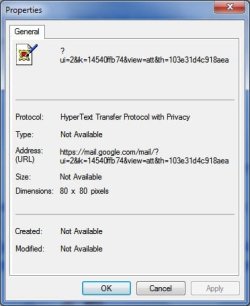
When I R-click any of the animations & select 'Save Target As', my only choice is 'HTML Document'; & if I R-click & choose 'Save Picture As', my only choice is .bmp

Below is the Properties of one of the animations, maybe someone can decipher why I am having such a hard time w/this:
 

Attachments

  • Properties.jpg
    Properties.jpg
    23.2 KB · Views: 0

My Computer

Computer type
PC/Desktop
Computer Manufacturer/Model Number
Self built comfuser
OS
10 Pro. 64Bit
CPU
AMD FX 4100, 4-Core Black Edition. Socket AM3+ ~ 3.60GHz
Motherboard
ASUS M5A97 LE R2.0
Memory
2x 4GB Kingston HyperX DDR3-1866 (PC3-14900) - 8GB Total
Graphics Card(s)
ASUS Radeon HD 6670-2GD3
Sound Card
Onboard High Definition Audio Device
Monitor(s) Displays
HP 2009m LCD
Screen Resolution
1600x900, True Color (32bit), 60Hertz
Hard Drives
WD Blue - 1TB, 3D NAND - SATA SSD
PSU
XFX Pro 450W Core Edition - Fully Wired
Case
Antec Super Lanboy
Cooling
Stock CPU fan + 2 (1 front, 1 back) 120mm Antec fans
Keyboard
Logitech MK700/MK710
Mouse
Logitech M705
Internet Speed
Frontier FiOS 50/50
Antivirus
Windows Security
Browser
Vivaldi
Other Info
1x ASUS DRW-24B1ST Multi-DVD Rewriter
1x RocketFish AIO Media Card Reader
1x WD 1TB Passport USB External Drive
Back
Top