Saving games with clean install?

Omlet

New member
Local time
4:54 PM
Messages
96
I currently have two hard-drives with one of them being solely for Windows. My second hard-drive contains all my games and such. If I were to do a clean install on my OS hard-drive, can I retain my games?
 

My Computer

Computer Manufacturer/Model Number
Custom
OS
Windows 7 Ultimate x64
CPU
AMD Phenom II X6 1090T
Motherboard
ASUS M4N72-E
Memory
Kingston DDR2 (2GB)
Graphics Card(s)
EVGA GTX 470 SC
Sound Card
On-board
Monitor(s) Displays
Acer 24"
Screen Resolution
1600x900
Hard Drives
WD 500 GB
WD 80 GB
PSU
Thermaltake 750
Case
Antec 900
Typically Windows-based games write to the registry. Even if your games are on your secondary drive, information is written to your primary drive. You will most likely need to reinstall all games.
 

My Computer

Computer Manufacturer/Model Number
Dell and Custom
OS
Systems 1 and 2: Windows 7 Enterprise x64, Win 8 Developer
CPU
System 1: i7 [email protected], System 2: AMD FX-4100 Zambezi 3.6G
Motherboard
System 1:Dell 06NWYK System 2: ASUS M5A97 AM3+
Memory
System 1: 8GB System 2: 8GB
Graphics Card(s)
System 1: ATI FirePro V4800 System 2: Radeon HD 6850
Sound Card
System 1: onboard System 2: onboard
Monitor(s) Displays
System1: Viewsonic HDMI 24"
Screen Resolution
System 1: 1920x1080 System 2: 1920x1080
Hard Drives
System 1: Mirrored .5B drives System 2: Seagate Barracuda ST1000DM003 1TB 7200 RPM 64MB Cache SATA 6.0Gb/s
Case
System 1: Dell System 2: Cooler Master
Internet Speed
10 MBPS
Typically Windows-based games write to the registry. Even if your games are on your secondary drive, information is written to your primary drive. You will most likely need to reinstall all games.

That would suck since I have over 500 GB of games that took a good amount of time to install.
 

My Computer

Computer Manufacturer/Model Number
Custom
OS
Windows 7 Ultimate x64
CPU
AMD Phenom II X6 1090T
Motherboard
ASUS M4N72-E
Memory
Kingston DDR2 (2GB)
Graphics Card(s)
EVGA GTX 470 SC
Sound Card
On-board
Monitor(s) Displays
Acer 24"
Screen Resolution
1600x900
Hard Drives
WD 500 GB
WD 80 GB
PSU
Thermaltake 750
Case
Antec 900
There may be a handful that can repair install themselves, or run from its folder, but I wouldnt count on it.
I think the large majority will give a error of some form "such & such is missing, please re-install"

Just as Lemur said.


It does suck a bit but, look at this way.
With a clean install you'd be better off re-installing everything clean anyway.
 

My Computer

Computer Manufacturer/Model Number
Custom (Self Build)
OS
Windows 7 Home Premium 64bit
CPU
Intel Core i7 2700k
Motherboard
eVGA P67 SLI
Memory
8GB Mushkin Redline Ridgebacks @1866
Graphics Card(s)
EVGA GTX570 SC
Sound Card
XiFi Titanium HD
Monitor(s) Displays
LG W2453V
Screen Resolution
1920x1080
Hard Drives
Intel 320 80GB -- Intel X25-V 40GB --WD Black 1TB x2 -- WD Blue 640GB
PSU
Seasonic x750
Case
Corsair 600T SE White
Cooling
eVGA Superclocked CPU Cooler
Keyboard
Saitek Cyborg
Antivirus
Kaspersky
Browser
IE
Other Info
LG BD/DVD
Would backing up the registry work?
 

My Computer

Computer Manufacturer/Model Number
Custom
OS
Windows 7 Ultimate x64
CPU
AMD Phenom II X6 1090T
Motherboard
ASUS M4N72-E
Memory
Kingston DDR2 (2GB)
Graphics Card(s)
EVGA GTX 470 SC
Sound Card
On-board
Monitor(s) Displays
Acer 24"
Screen Resolution
1600x900
Hard Drives
WD 500 GB
WD 80 GB
PSU
Thermaltake 750
Case
Antec 900
Typically Windows-based games write to the registry. Even if your games are on your secondary drive, information is written to your primary drive. You will most likely need to reinstall all games.

That would suck since I have over 500 GB of games that took a good amount of time to install.

Ain't that the truth! The only real advice that I can give would be to find out how and where each specific game saves it's character and/or level data, and how to make backups.

For example, with Diablo 2 Lord of Destruction, if I go to the install folder (default "C:\Program Files\Diablo II"), there is another folder inside called "save". I backup that folder, and then if I reinstall Diablo II later for whatever reason, then I can restore all my characters and maps by restoring that folder.

Each game would be different, but at least you won't loose your progress because of a reinstall, right?
 

My Computer

Computer type
PC/Desktop
Computer Manufacturer/Model Number
Virtual Machine
OS
Windows 7 Professional 32-bit SP1
CPU
AMD A4/A6
Motherboard
Intel Corporation 440BX Desktop Reference Platform
Memory
3.00GB EDO
Graphics Card(s)
VMware SVGA 3D
Sound Card
High Definition Audio Device
Monitor(s) Displays
Generic Non-PnP Monitor on VMware SVGA 3D
Screen Resolution
1440x900
Hard Drives
1 x 60GB VMware Virtual SATA Hard Drive ATA Device
Antivirus
Kaspersky Total Security
Typically Windows-based games write to the registry. Even if your games are on your secondary drive, information is written to your primary drive. You will most likely need to reinstall all games.

That would suck since I have over 500 GB of games that took a good amount of time to install.

Ain't that the truth! The only real advice that I can give would be to find out how and where each specific game saves it's character and/or level data, and how to make backups.

For example, with Diablo 2 Lord of Destruction, if I go to the install folder (default "C:\Program Files\Diablo II"), there is another folder inside called "save". I backup that folder, and then if I reinstall Diablo II later for whatever reason, then I can restore all my characters and maps by restoring that folder.

Each game would be different, but at least you won't loose your progress because of a reinstall, right?

The thing is I have a a separate hard-drive just for games and nothing else. If I were to do a clean install, I would think the games would still work considering no files were altered (the config and save files are usually located in the documents folder, but I can just back that up). The only thing I can see going wrong is a missing registry entry. :shock:
 

My Computer

Computer Manufacturer/Model Number
Custom
OS
Windows 7 Ultimate x64
CPU
AMD Phenom II X6 1090T
Motherboard
ASUS M4N72-E
Memory
Kingston DDR2 (2GB)
Graphics Card(s)
EVGA GTX 470 SC
Sound Card
On-board
Monitor(s) Displays
Acer 24"
Screen Resolution
1600x900
Hard Drives
WD 500 GB
WD 80 GB
PSU
Thermaltake 750
Case
Antec 900
A complete registry back up and restore would defeat the entire purpose of a clean install though.
 

My Computer

Computer Manufacturer/Model Number
Custom (Self Build)
OS
Windows 7 Home Premium 64bit
CPU
Intel Core i7 2700k
Motherboard
eVGA P67 SLI
Memory
8GB Mushkin Redline Ridgebacks @1866
Graphics Card(s)
EVGA GTX570 SC
Sound Card
XiFi Titanium HD
Monitor(s) Displays
LG W2453V
Screen Resolution
1920x1080
Hard Drives
Intel 320 80GB -- Intel X25-V 40GB --WD Black 1TB x2 -- WD Blue 640GB
PSU
Seasonic x750
Case
Corsair 600T SE White
Cooling
eVGA Superclocked CPU Cooler
Keyboard
Saitek Cyborg
Antivirus
Kaspersky
Browser
IE
Other Info
LG BD/DVD
A complete registry back up and restore would defeat the entire purpose of a clean install though.

You indeed have a point. I would do a normal upgrade but I like to start fresh and clean to avoid any issues.
 

My Computer

Computer Manufacturer/Model Number
Custom
OS
Windows 7 Ultimate x64
CPU
AMD Phenom II X6 1090T
Motherboard
ASUS M4N72-E
Memory
Kingston DDR2 (2GB)
Graphics Card(s)
EVGA GTX 470 SC
Sound Card
On-board
Monitor(s) Displays
Acer 24"
Screen Resolution
1600x900
Hard Drives
WD 500 GB
WD 80 GB
PSU
Thermaltake 750
Case
Antec 900
The thing is I have a a separate hard-drive just for games and nothing else. If I were to do a clean install, I would think the games would still work considering no files were altered (the config and save files are usually located in the documents folder, but I can just back that up). The only thing I can see going wrong is a missing registry entry.

That may work, but at the end of the day, a game is nothing more than just another program on the system, and these are never easy to back, if at all possible. There are always registry entries that need replacing, and what about other files that may be required and are located in folders other than the primary install folder? These are all factors that need to be taken into account.

In the rare cases where the registry is easy to find, and all required files are in the same place, like Diablo 2, then your idea of exporting the registry may help, but then only if you restrict yourself to the relevant keys.

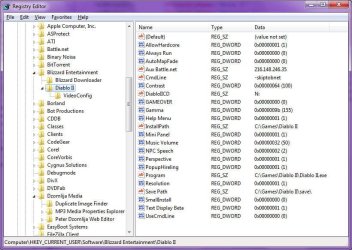
For example, if I want to backup the entire Diablo 2 game folder, I need to export the registry key shown in the following screenshot:

Image1.jpg
Diablo 2 Registry Keys

From there, I only need to backup the main install folder and all it's contents. I can actually away with this, because several months ago, Blizzard Entertainment release the 1.13 patch for Diablo 2, which allow the game to be played without requiring the CD to be present. Their motivation was that most people will want to protect their game discs from damage, and with Diablo 2 being a 10 year old game, will be hard to replace. So they allow the game to be played without the disc. This has the advantage of also making the game easy to backup.

Perhaps if you go to the manufacturers website for any of your games, you can find a similar facility. Possibly even more information on how to properly backup each game?
 

My Computer

Computer type
PC/Desktop
Computer Manufacturer/Model Number
Virtual Machine
OS
Windows 7 Professional 32-bit SP1
CPU
AMD A4/A6
Motherboard
Intel Corporation 440BX Desktop Reference Platform
Memory
3.00GB EDO
Graphics Card(s)
VMware SVGA 3D
Sound Card
High Definition Audio Device
Monitor(s) Displays
Generic Non-PnP Monitor on VMware SVGA 3D
Screen Resolution
1440x900
Hard Drives
1 x 60GB VMware Virtual SATA Hard Drive ATA Device
Antivirus
Kaspersky Total Security
Quite a lot of games still run fine without actually being installed. Just start it from the .exe file in the game folder. I ran Star Wars Galaxies for 5 years without it ever being installed on my PC. I just kept the folder on my second hard drive and backed it up to the newest version before formatting my PC.

Save games can be quite annoying to find, especially when they save them to the hidden AppData folder in your User folder.
 

My Computer

Computer type
PC/Desktop
Computer Manufacturer/Model Number
Custom Built
OS
Windows 8.1 Pro x64
CPU
Intel Core i7 4790k
Motherboard
MSI Z97S Krait Edition
Memory
8GB Corsair Dominator 1600MHz
Graphics Card(s)
MSI TwinFrozr GeForce GTX770
Sound Card
ASUS Xonar DX/XD 7.1
Monitor(s) Displays
Dell 24" S2409W + Dell 20" E207WFP
Screen Resolution
1920x1080 + 1680x1050
Hard Drives
1x 120GB OCZ Agility 3, 1x 750GB Western Digital Caviar Black, 1x 1TB Western Digital Caviar Blue
PSU
Corsair HX850 modular
Case
Fractal Design Define R4
Cooling
Corsair H60 w/ twin Corsair SP120 fans
Keyboard
Logitech G510S Keyboard
Mouse
Logitech G500S Laser Mouse
Internet Speed
40Mbps
Antivirus
Microsoft Security Essentials
Browser
Google Chrome
Other Info
LG Blu-Ray player
Back
Top