

- Local time
- 5:59 PM
- Messages
- 568
Mods, please move this thread if this is the wrong forum. Thanks...
This one irks me to no end...
I have a gigi network at home and it is performing as it should, around 125 MBs transfer speed. Here's the result of transferring a single large file of ISO image via copy/paste from PC2 to PC1:
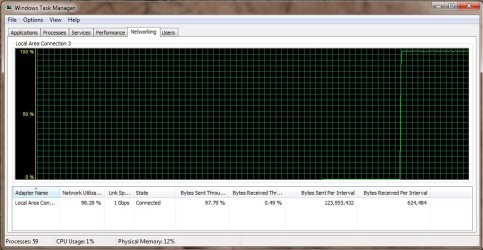
When trying to save an excel spreadsheet on PC1 from PC2, it takes about a minute to save it even if just one line has been added/changed in the spreadsheet. When clicked on save, this is the window that pops up:

The spreadsheet is about 400KB with eleven tabs, even opening the spreadsheet takes about the same time as closing it.
Both PCs have Windows 7 Professional 64-bit, with SP1; the excel version of 2010 is the same as well. Both PCs have 8 GBs memory at least and SATA 3 SSD drives. The folders are shared, initially for the "authenticated users" and for testing purposes for "everyone" with full access to the root of the shared folder. Mapping a network drive on PC2 with user credentials of PC1 didn't make a difference, it still takes about a minute to open or save the same file.
This is prevalent with spreadsheets that have 6 or < number of tabs, regardless of the actual file size. Some of the larger and the all of the smaller files open up just fine over the network. All spreadsheets open up just fine on PC1.
Does anyone have an idea how to fix this?
TIA...
This one irks me to no end...
I have a gigi network at home and it is performing as it should, around 125 MBs transfer speed. Here's the result of transferring a single large file of ISO image via copy/paste from PC2 to PC1:
When trying to save an excel spreadsheet on PC1 from PC2, it takes about a minute to save it even if just one line has been added/changed in the spreadsheet. When clicked on save, this is the window that pops up:
The spreadsheet is about 400KB with eleven tabs, even opening the spreadsheet takes about the same time as closing it.
Both PCs have Windows 7 Professional 64-bit, with SP1; the excel version of 2010 is the same as well. Both PCs have 8 GBs memory at least and SATA 3 SSD drives. The folders are shared, initially for the "authenticated users" and for testing purposes for "everyone" with full access to the root of the shared folder. Mapping a network drive on PC2 with user credentials of PC1 didn't make a difference, it still takes about a minute to open or save the same file.
This is prevalent with spreadsheets that have 6 or < number of tabs, regardless of the actual file size. Some of the larger and the all of the smaller files open up just fine over the network. All spreadsheets open up just fine on PC1.
Does anyone have an idea how to fix this?
TIA...
My Computer
- Computer type
- PC/Desktop
- Computer Manufacturer/Model Number
- Custom built at Home
- OS
- Windows 7 64-bit, Windows 8.1 64-bit, OSX El Capitan, Windows 10 (VMware)
- CPU
- Intel i5-3350P 3.1 GHz
- Motherboard
- Gigabyte GA-Z77X-UP5 TH
- Memory
- 16 GBs GSkill Sniper
- Graphics Card(s)
- Radeon HD 7850
- Sound Card
- VIA HD Audio
- Monitor(s) Displays
- Dell U2410 24"
- Screen Resolution
- 1920x1200
- Hard Drives
- 1 x Intel 520 240 GBs
1 x Seagate 1TBs SATA 2.0,
1 x Seagate 1TBs eSATA 2.0
- PSU
- Thermaltake 850W
- Case
- Antec P183
- Cooling
- Noctua NH-D14 Heatsink 2 x 120mm fans, 4 x 120mm case fans
- Keyboard
- Dell Multimedia keyboard
- Mouse
- Logitech Trackball
- Internet Speed
- 28.5 Mb/s