
Solved saving

dukeofurl

New member
Member
Local time
4:07 PM
Messages
45
Location
95926
I have 3 hard disks. 1 SSD and 2 regular hard disks. 1 of the three, whenever I try to save something there, it tells me that I do not have permission to save there. I am using an administrator level account, but not THE Administrator account... I'm the only person that uses this box.
 

My Computer

Computer type
PC/Desktop
Computer Manufacturer/Model Number
Self
OS
Win 7 x64 Professional SP1
CPU
AMD Phenom X4 940 (3000 MHz)
Motherboard
Asus M4A75-M
Memory
8 Gb (4x2GB) DDR2@6-6-6-18
Graphics Card(s)
Nvidia GeForce 9500 GT (I don't play games)
Sound Card
Sound Card? What's that?
Monitor(s) Displays
Samsung Syncmaster 2343, Recycled Dell 17"
Screen Resolution
2048x1152, 1280x1024
Hard Drives
63GB OCZ-AGILITY-SSD Serial-ATA Device,
733GB SAMSUNG HD753LJ ATA Device,
1465GB Western Digital WD15EADS-00P8B0 ATA Device
PSU
I Forget
Case
Antec 900
Cooling
Stock AMD cooler
Keyboard
Generic PS/2
Mouse
Logitech M510 (Best mouse I've ever owned)
Internet Speed
40 Mbps Comcast Cable Modem
Antivirus
MS Security Essentials, and other stuff, changes a lot
Browser
Firefox, whatever the current version
Obvious question - which one of the three, and is it internal / external. (I assume your SSD is the Win7 drive)
 

My Computer

Computer Manufacturer/Model Number
Toshiba Satellite L500
OS
Windows 7 Home Premium x64 OEM --> RTM clean install
CPU
Intel T4400
Motherboard
? - laptop inbuilt ?
Memory
4Gb
Graphics Card(s)
? - Mobile Intel(R) 4 Series Express Chipset Family ?
Sound Card
Realtek
Monitor(s) Displays
? + extended to a 42" LG55PC plasma tele!
Screen Resolution
1366 * 768
Hard Drives
320Gb 5500rpm
PSU
?
Case
?
Cooling
?
Internet Speed
3Meg, when it works.
Other Info
A LOWLY LAPTOP!
All the drives are internal. It's one of the real drives.

You are correct, the SSD is my boot drive, and not a problem.
 

My Computer

Computer type
PC/Desktop
Computer Manufacturer/Model Number
Self
OS
Win 7 x64 Professional SP1
CPU
AMD Phenom X4 940 (3000 MHz)
Motherboard
Asus M4A75-M
Memory
8 Gb (4x2GB) DDR2@6-6-6-18
Graphics Card(s)
Nvidia GeForce 9500 GT (I don't play games)
Sound Card
Sound Card? What's that?
Monitor(s) Displays
Samsung Syncmaster 2343, Recycled Dell 17"
Screen Resolution
2048x1152, 1280x1024
Hard Drives
63GB OCZ-AGILITY-SSD Serial-ATA Device,
733GB SAMSUNG HD753LJ ATA Device,
1465GB Western Digital WD15EADS-00P8B0 ATA Device
PSU
I Forget
Case
Antec 900
Cooling
Stock AMD cooler
Keyboard
Generic PS/2
Mouse
Logitech M510 (Best mouse I've ever owned)
Internet Speed
40 Mbps Comcast Cable Modem
Antivirus
MS Security Essentials, and other stuff, changes a lot
Browser
Firefox, whatever the current version
OK then, my next question is "try and save something there" - do you mean through any particular program, through all programs, simple copy/paste or send to via explorer...
 

My Computer

Computer Manufacturer/Model Number
Toshiba Satellite L500
OS
Windows 7 Home Premium x64 OEM --> RTM clean install
CPU
Intel T4400
Motherboard
? - laptop inbuilt ?
Memory
4Gb
Graphics Card(s)
? - Mobile Intel(R) 4 Series Express Chipset Family ?
Sound Card
Realtek
Monitor(s) Displays
? + extended to a 42" LG55PC plasma tele!
Screen Resolution
1366 * 768
Hard Drives
320Gb 5500rpm
PSU
?
Case
?
Cooling
?
Internet Speed
3Meg, when it works.
Other Info
A LOWLY LAPTOP!
All programs. They all say a variation of the same thing. Something about "You do not have permission to save there, contact the administrator to obtain permission. Would you like to save to My Documents instead?"
 

My Computer

Computer type
PC/Desktop
Computer Manufacturer/Model Number
Self
OS
Win 7 x64 Professional SP1
CPU
AMD Phenom X4 940 (3000 MHz)
Motherboard
Asus M4A75-M
Memory
8 Gb (4x2GB) DDR2@6-6-6-18
Graphics Card(s)
Nvidia GeForce 9500 GT (I don't play games)
Sound Card
Sound Card? What's that?
Monitor(s) Displays
Samsung Syncmaster 2343, Recycled Dell 17"
Screen Resolution
2048x1152, 1280x1024
Hard Drives
63GB OCZ-AGILITY-SSD Serial-ATA Device,
733GB SAMSUNG HD753LJ ATA Device,
1465GB Western Digital WD15EADS-00P8B0 ATA Device
PSU
I Forget
Case
Antec 900
Cooling
Stock AMD cooler
Keyboard
Generic PS/2
Mouse
Logitech M510 (Best mouse I've ever owned)
Internet Speed
40 Mbps Comcast Cable Modem
Antivirus
MS Security Essentials, and other stuff, changes a lot
Browser
Firefox, whatever the current version
right click one of your drives--select 'properties'--select the 'security' tab--check how the permissions are set.
(?--did this start after installing SP1 ??)
 
Last edited by a moderator:

My Computer

Computer Manufacturer/Model Number
SALEON model 2.2b
OS
win7 ultimate 32bit
CPU
core2 Extreme QX6850-OCd to 3.15 GHz
Motherboard
ASUS P5G41-M LE
Memory
4 GB
Graphics Card(s)
NVidia 8600 GT
Monitor(s) Displays
23" acer
Hard Drives
one SATA 250GB partitioned equally in half
one SATA 160GB-internal storage
PSU
500W Thermaltake
Case
mini tower
permissions.jpg
 

My Computer

Computer type
PC/Desktop
Computer Manufacturer/Model Number
Self
OS
Win 7 x64 Professional SP1
CPU
AMD Phenom X4 940 (3000 MHz)
Motherboard
Asus M4A75-M
Memory
8 Gb (4x2GB) DDR2@6-6-6-18
Graphics Card(s)
Nvidia GeForce 9500 GT (I don't play games)
Sound Card
Sound Card? What's that?
Monitor(s) Displays
Samsung Syncmaster 2343, Recycled Dell 17"
Screen Resolution
2048x1152, 1280x1024
Hard Drives
63GB OCZ-AGILITY-SSD Serial-ATA Device,
733GB SAMSUNG HD753LJ ATA Device,
1465GB Western Digital WD15EADS-00P8B0 ATA Device
PSU
I Forget
Case
Antec 900
Cooling
Stock AMD cooler
Keyboard
Generic PS/2
Mouse
Logitech M510 (Best mouse I've ever owned)
Internet Speed
40 Mbps Comcast Cable Modem
Antivirus
MS Security Essentials, and other stuff, changes a lot
Browser
Firefox, whatever the current version
Hello Dukeofurl,

See if taking ownership of the drive and making sure that your user account is set to have it's permissions set to "Allow" "Full Control" of the drive will allow you to have access afterwards.

Hope this helps,
Shawn
 

My Computer

Computer type
PC/Desktop
Computer Manufacturer/Model Number
Self built custom
OS
64-bit Windows 11 Pro for Workstations
CPU
Intel i7-8700K OC'd to 5 GHz
Motherboard
ASUS ROG Maximus XI Formula Z390
Memory
64 GB (4x16GB) G.SKILL TridentZ RGB DDR4 3600 MHz
Graphics Card(s)
ASUS ROG-STRIX-GTX1080TI-O11G-GAMING
Sound Card
Integrated
Monitor(s) Displays
2 x Samsung Odyssey G7 27"
Screen Resolution
2560x1440
Hard Drives
1TB Samsung 990 PRO M.2,
4TB Samsung 990 PRO PRO M.2,
TerraMaster F8 SSD Plus NAS
PSU
Seasonic Prime Titanium 850W
Case
Thermaltake Core P3
Cooling
Corsair Hydro H115i
Keyboard
Logitech wireless K800
Mouse
Logitech MX Master 4
Internet Speed
2 Gb/s Download and 100 Mb/s Upload
Antivirus
Malwarebyte Anti-Malware Premium
Browser
Google Chrome
Other Info
Logitech Z625 speaker system,
Logitech BRIO 4K Pro webcam,
HP Color LaserJet Pro MFP M477fdn,
APC SMART-UPS RT 1000 XL - SURT1000XLI,
Galaxy S23 Plus phone
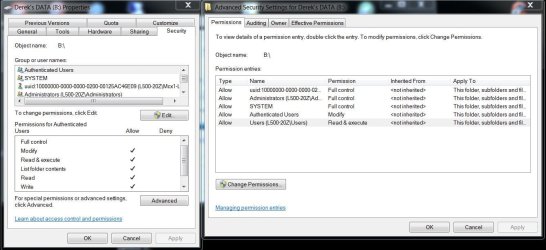
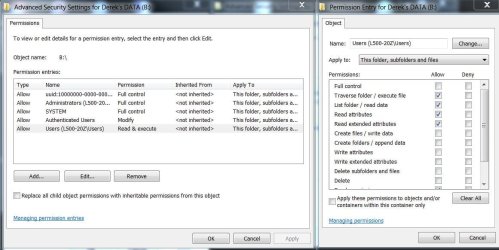
I was going to suggest the same as tman69. Have a look at the attached screenshots.
On the 1st you can see properties (left) & Advanced (right), then if you click Edit (2nd screenshot left) you can assign or deny acces to users (right).

OK?
 

Attachments

  • Capture.JPG
    Capture.JPG
    106 KB · Views: 11
  • Capture2.JPG
    Capture2.JPG
    92.7 KB · Views: 9

My Computer

Computer Manufacturer/Model Number
Toshiba Satellite L500
OS
Windows 7 Home Premium x64 OEM --> RTM clean install
CPU
Intel T4400
Motherboard
? - laptop inbuilt ?
Memory
4Gb
Graphics Card(s)
? - Mobile Intel(R) 4 Series Express Chipset Family ?
Sound Card
Realtek
Monitor(s) Displays
? + extended to a 42" LG55PC plasma tele!
Screen Resolution
1366 * 768
Hard Drives
320Gb 5500rpm
PSU
?
Case
?
Cooling
?
Internet Speed
3Meg, when it works.
Other Info
A LOWLY LAPTOP!
I added the automatic method of taking ownership, with the registry hack thing, it works for files and folders, but you can't take ownership of a drive. I messed around with the permissions though, and it seems to work now. Thanks
 

My Computer

Computer type
PC/Desktop
Computer Manufacturer/Model Number
Self
OS
Win 7 x64 Professional SP1
CPU
AMD Phenom X4 940 (3000 MHz)
Motherboard
Asus M4A75-M
Memory
8 Gb (4x2GB) DDR2@6-6-6-18
Graphics Card(s)
Nvidia GeForce 9500 GT (I don't play games)
Sound Card
Sound Card? What's that?
Monitor(s) Displays
Samsung Syncmaster 2343, Recycled Dell 17"
Screen Resolution
2048x1152, 1280x1024
Hard Drives
63GB OCZ-AGILITY-SSD Serial-ATA Device,
733GB SAMSUNG HD753LJ ATA Device,
1465GB Western Digital WD15EADS-00P8B0 ATA Device
PSU
I Forget
Case
Antec 900
Cooling
Stock AMD cooler
Keyboard
Generic PS/2
Mouse
Logitech M510 (Best mouse I've ever owned)
Internet Speed
40 Mbps Comcast Cable Modem
Antivirus
MS Security Essentials, and other stuff, changes a lot
Browser
Firefox, whatever the current version
I'm happy to hear that you got it sorted. :)
 

My Computer

Computer type
PC/Desktop
Computer Manufacturer/Model Number
Self built custom
OS
64-bit Windows 11 Pro for Workstations
CPU
Intel i7-8700K OC'd to 5 GHz
Motherboard
ASUS ROG Maximus XI Formula Z390
Memory
64 GB (4x16GB) G.SKILL TridentZ RGB DDR4 3600 MHz
Graphics Card(s)
ASUS ROG-STRIX-GTX1080TI-O11G-GAMING
Sound Card
Integrated
Monitor(s) Displays
2 x Samsung Odyssey G7 27"
Screen Resolution
2560x1440
Hard Drives
1TB Samsung 990 PRO M.2,
4TB Samsung 990 PRO PRO M.2,
TerraMaster F8 SSD Plus NAS
PSU
Seasonic Prime Titanium 850W
Case
Thermaltake Core P3
Cooling
Corsair Hydro H115i
Keyboard
Logitech wireless K800
Mouse
Logitech MX Master 4
Internet Speed
2 Gb/s Download and 100 Mb/s Upload
Antivirus
Malwarebyte Anti-Malware Premium
Browser
Google Chrome
Other Info
Logitech Z625 speaker system,
Logitech BRIO 4K Pro webcam,
HP Color LaserJet Pro MFP M477fdn,
APC SMART-UPS RT 1000 XL - SURT1000XLI,
Galaxy S23 Plus phone
Back
Top