
Scanner Event Hijacked By Corel

y0himba

Desktop Freak
Power User
Local time
9:02 PM
Messages
105
Location
In a house.
Hello. I use Corel Paint Shop Pro as my image editor, however I would prefer another program when scanning. Somehow PSP has hijacked the scanner button press event. Now when I press the scan button on my scanner, PSP pops up. The "Always Ask" option is greyed out, so I am looking for another option, maybe a registry edit? I would like to force Windows to ask me what I would like to use...

Any help is much appreciated.
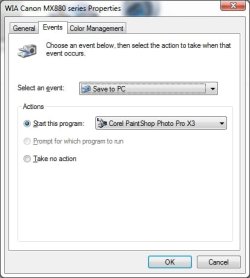
scanner.jpg
 

My Computer My Computer

Computer type
PC/Desktop
Computer Manufacturer/Model Number
Alienware Aurora-R4
OS
Windows 7 Professional x64
CPU
Intel(R) Core(TM) i7-3820 CPU, 4 Cores, 8 Logical Cores
Motherboard
Alienware
Memory
32 GB DDR3 1600
Graphics Card(s)
ATI Radeon HD 8950 3GB vDDR5 & ATI Radeon HD 7950 3GB vDDR5
Sound Card
Realtek 7.1 Audio
Monitor(s) Displays
Dell SP2309W 23 inch
Screen Resolution
2048x1152
Hard Drives
7.3 TB in 4 drives (Raid 0), 2TB NAS backup drive.
PSU
875w
Case
ALX Chasis with active venting
Cooling
Liquid cooled with active venting and fans.
Keyboard
Alienware TactX
Mouse
Alienware TactX
Internet Speed
15mb Cable
Antivirus
Malwarebytes
Browser
Pale Moon (Optimized Mozilla Based)
Other Info
http://www.y0himba.net

My Computers My Computers

System One System Two

  • Computer type
    PC/Desktop
    Computer Manufacturer/Model Number
    HP Pavilion 6751c
    OS
    Win7, Win10, Win11
    Internet Speed
    100 Mbps
    Antivirus
    Norton 360
    Browser
    IE 11
  • Computer type
    PC/Desktop
    System Manufacturer/Model Number
    HP ENVY 750-514 & Dell XPS 8960
    OS
    Win7, Win10, Win11
    Antivirus
    Norton 360
@John: Thank you for the reply, however that control panel "applet" only allows me to associate an extension or file type with a specific program. The only place I can find in windows to set a default scanner event is Devices and Printers-->Right click the device-->Scan Properties-->Events tab

scanner.jpg
 

My Computer My Computer

Computer type
PC/Desktop
Computer Manufacturer/Model Number
Alienware Aurora-R4
OS
Windows 7 Professional x64
CPU
Intel(R) Core(TM) i7-3820 CPU, 4 Cores, 8 Logical Cores
Motherboard
Alienware
Memory
32 GB DDR3 1600
Graphics Card(s)
ATI Radeon HD 8950 3GB vDDR5 & ATI Radeon HD 7950 3GB vDDR5
Sound Card
Realtek 7.1 Audio
Monitor(s) Displays
Dell SP2309W 23 inch
Screen Resolution
2048x1152
Hard Drives
7.3 TB in 4 drives (Raid 0), 2TB NAS backup drive.
PSU
875w
Case
ALX Chasis with active venting
Cooling
Liquid cooled with active venting and fans.
Keyboard
Alienware TactX
Mouse
Alienware TactX
Internet Speed
15mb Cable
Antivirus
Malwarebytes
Browser
Pale Moon (Optimized Mozilla Based)
Other Info
http://www.y0himba.net
I am still trying to figure this out. I can usually Google and work it out myself, but no information is available on this....help, please?
 

My Computer My Computer

Computer type
PC/Desktop
Computer Manufacturer/Model Number
Alienware Aurora-R4
OS
Windows 7 Professional x64
CPU
Intel(R) Core(TM) i7-3820 CPU, 4 Cores, 8 Logical Cores
Motherboard
Alienware
Memory
32 GB DDR3 1600
Graphics Card(s)
ATI Radeon HD 8950 3GB vDDR5 & ATI Radeon HD 7950 3GB vDDR5
Sound Card
Realtek 7.1 Audio
Monitor(s) Displays
Dell SP2309W 23 inch
Screen Resolution
2048x1152
Hard Drives
7.3 TB in 4 drives (Raid 0), 2TB NAS backup drive.
PSU
875w
Case
ALX Chasis with active venting
Cooling
Liquid cooled with active venting and fans.
Keyboard
Alienware TactX
Mouse
Alienware TactX
Internet Speed
15mb Cable
Antivirus
Malwarebytes
Browser
Pale Moon (Optimized Mozilla Based)
Other Info
http://www.y0himba.net
Hello Yohimba,

The Scanner Button settings are changed in the Printer Photo and Imagining software.

You may need to refer to your Printers documentation.

To give you an idea of how this is done, I will use the directions for an HP Scanjet as an example.

Your Printer software should be similar.


HP Scanjet - Changing the Scanjet Scanner Button Settings in the HP Photo and Imaging Software

Change settings for the SCAN button


To open the Director

Click Start , Programs , Hewlett-Packard , point to the scanner, and then click HP Photo & Imaging Director


If your scanner has a SCAN button, use the following procedure to change its settings.
  1. Double-click HP Director , then on the Settings menu, click Button Settings .
  2. Click the Scan Button tab, and change the settings.
To scan to another program

You can make your scans go directly to a program other than the HP Scanning software. When you press the SCAN button, your scans go to the destination program you have selected (for example, a word-processing program).


On a Windows computer:
  1. Double-click HP Director , then on the Settings menu, click Button Settings .
  2. On the Scan Button tab, in the Destination box, specify the destination to which you want to send your scan.
  3. Change other settings as required, and then click OK
Hope this helps,
John
 

My Computers My Computers

System One System Two

  • Computer type
    PC/Desktop
    Computer Manufacturer/Model Number
    HP Pavilion 6751c
    OS
    Win7, Win10, Win11
    Internet Speed
    100 Mbps
    Antivirus
    Norton 360
    Browser
    IE 11
  • Computer type
    PC/Desktop
    System Manufacturer/Model Number
    HP ENVY 750-514 & Dell XPS 8960
    OS
    Win7, Win10, Win11
    Antivirus
    Norton 360
If I try to use the software, there are no other options than Corel. When I installed PSP, they disappeared. I cannot even select "Prompt for which program to run". I removed PSP, but the option remained. I am looking for a registry key to manually remove the option, enable the prompt option, or add my own option. I would prefer that the scanner software that came with the scanner start on the button press, or Irfanview.
 

My Computer My Computer

Computer type
PC/Desktop
Computer Manufacturer/Model Number
Alienware Aurora-R4
OS
Windows 7 Professional x64
CPU
Intel(R) Core(TM) i7-3820 CPU, 4 Cores, 8 Logical Cores
Motherboard
Alienware
Memory
32 GB DDR3 1600
Graphics Card(s)
ATI Radeon HD 8950 3GB vDDR5 & ATI Radeon HD 7950 3GB vDDR5
Sound Card
Realtek 7.1 Audio
Monitor(s) Displays
Dell SP2309W 23 inch
Screen Resolution
2048x1152
Hard Drives
7.3 TB in 4 drives (Raid 0), 2TB NAS backup drive.
PSU
875w
Case
ALX Chasis with active venting
Cooling
Liquid cooled with active venting and fans.
Keyboard
Alienware TactX
Mouse
Alienware TactX
Internet Speed
15mb Cable
Antivirus
Malwarebytes
Browser
Pale Moon (Optimized Mozilla Based)
Other Info
http://www.y0himba.net
Hello,

I downloaded Corel PaintShop Pro X6 Ultimate to test it.

During install a small pop-up window comes up, which is for setting file associations.

File Format Associations

Which file formats do you want the application to open by default?

1) All supported file formats

2) Selected file formats, please, show list

3) None

This is were you choose which file types you want Corel to open by association.

If you select NONE, then when you scan your original default programs will open the files.

To set a particular file for Corel. Click the Start Orb> Default Programs

Set your default programs:

In the left Pane click Corel Paint Shop Pro.

Near the bottom of the page you will have two choices.

1) Set this Program as default

Use this selected Program to open all file types and protocols it can open by default.

2) Choose defaults for this program

Choose which file types and protocols the selected program opens by default.

Also, check this, as well to make settings. Start Orb> Default Programs> Set Associations.

Choose which one by clicking on to select. Click, Change Program.

You'll need to play around with all these settings to setup Corel Paint Shop Pro the way you want it to work.

For now you could reinstall it, then choose NONE for the File Format Associations.

This way you can add a few File types at a time and note the behavior.

Start with the file types you know and work from there.

Read through these tutorials.

http://www.sevenforums.com/tutorials/9154-default-programs-associate-file-type-protocol.html

http://www.sevenforums.com/tutorials/19449-default-file-type-associations-restore.html

http://www.sevenforums.com/tutorials/178296-file-extension-type-unassociate.html


Hope this helps,
John
 
Last edited:

My Computers My Computers

System One System Two

  • Computer type
    PC/Desktop
    Computer Manufacturer/Model Number
    HP Pavilion 6751c
    OS
    Win7, Win10, Win11
    Internet Speed
    100 Mbps
    Antivirus
    Norton 360
    Browser
    IE 11
  • Computer type
    PC/Desktop
    System Manufacturer/Model Number
    HP ENVY 750-514 & Dell XPS 8960
    OS
    Win7, Win10, Win11
    Antivirus
    Norton 360
Ugh, nothing is working. I am going to need to remove PSP after all these years. Thank you to everyone for the replies, they are appreciated.
 

My Computer My Computer

Computer type
PC/Desktop
Computer Manufacturer/Model Number
Alienware Aurora-R4
OS
Windows 7 Professional x64
CPU
Intel(R) Core(TM) i7-3820 CPU, 4 Cores, 8 Logical Cores
Motherboard
Alienware
Memory
32 GB DDR3 1600
Graphics Card(s)
ATI Radeon HD 8950 3GB vDDR5 & ATI Radeon HD 7950 3GB vDDR5
Sound Card
Realtek 7.1 Audio
Monitor(s) Displays
Dell SP2309W 23 inch
Screen Resolution
2048x1152
Hard Drives
7.3 TB in 4 drives (Raid 0), 2TB NAS backup drive.
PSU
875w
Case
ALX Chasis with active venting
Cooling
Liquid cooled with active venting and fans.
Keyboard
Alienware TactX
Mouse
Alienware TactX
Internet Speed
15mb Cable
Antivirus
Malwarebytes
Browser
Pale Moon (Optimized Mozilla Based)
Other Info
http://www.y0himba.net
Hello,

Sorry to hear your having trouble with Corel PaintShop Pro.

You could do a System Restore. Choose a restore point before you first installed Corel.

This should repair any changes made by the installation.

Post back to let us know how your doing.

Hope this helps,
John
 

My Computers My Computers

System One System Two

  • Computer type
    PC/Desktop
    Computer Manufacturer/Model Number
    HP Pavilion 6751c
    OS
    Win7, Win10, Win11
    Internet Speed
    100 Mbps
    Antivirus
    Norton 360
    Browser
    IE 11
  • Computer type
    PC/Desktop
    System Manufacturer/Model Number
    HP ENVY 750-514 & Dell XPS 8960
    OS
    Win7, Win10, Win11
    Antivirus
    Norton 360
Back
Top