

- Local time
- 3:08 PM
- Messages
- 1,375
Hello,
I have recently bought a Canon All-in-one Scanner, Printer and Copier i-SENSYS MF8030Cn, and I am having an issue with it.
It supports two interfaces, USB and Ethernet (network). Over USB, everything works fine, Scanning, Printing, Copying, ect.
But I need the the device on ethernet (network), so I set it up to do so today. When installing the MF drivers for it (printing and scanning), it installs the printer drivers fine, but when it starts to install the scanner drivers, I immediately get the error "Could not install the scanner driver. Try to install again."
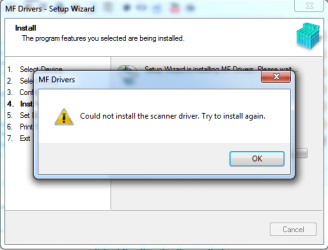
I am getting the exact same error on two different laptops, one is 32 bit, the other 64 bit, same error. Help would be appreciated, thanks.
Slasher
I have recently bought a Canon All-in-one Scanner, Printer and Copier i-SENSYS MF8030Cn, and I am having an issue with it.
It supports two interfaces, USB and Ethernet (network). Over USB, everything works fine, Scanning, Printing, Copying, ect.
But I need the the device on ethernet (network), so I set it up to do so today. When installing the MF drivers for it (printing and scanning), it installs the printer drivers fine, but when it starts to install the scanner drivers, I immediately get the error "Could not install the scanner driver. Try to install again."
I am getting the exact same error on two different laptops, one is 32 bit, the other 64 bit, same error. Help would be appreciated, thanks.
Slasher
My Computer
- Computer Manufacturer/Model Number
- HP Pavilion dv6-2020ev
- OS
- Ubuntu 12.10
- CPU
- Intel Core i7 720QM
- Motherboard
- Its a HP secret...
- Memory
- 4GB RAM
- Graphics Card(s)
- NVIDIA GeForce 230M
- Sound Card
- IDT
- Screen Resolution
- 1366x768
- Hard Drives
- 500 GB
- Mouse
- HP
- Internet Speed
- 4 Mbps
