This is a weird one: I start a scan like I always do.
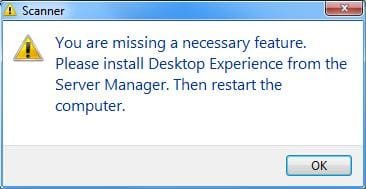
I get the preview, but then instead of finishing, the scanner stops and I get a message:
"Please install Desktop Experience from the server manager."
I don't have a server manager. I am running W7 Ultimate SP1. Also, I have no idea what experience a desktop would give me.
I tried doctoring around with switching W7 features on and off (web services, Media Player) because those were mentioned in connection with a Desktop Experience most frequently, but this changed nothing.
What I HAVE done a few weeks ago, is remove all instances of the built-in Photo Viewer, as it always kept creeping back as default.
Can manually deleting anything called Photo Viewer impact the scanning process?
Any pointers?
Thanks
I get the preview, but then instead of finishing, the scanner stops and I get a message:
"Please install Desktop Experience from the server manager."
I don't have a server manager. I am running W7 Ultimate SP1. Also, I have no idea what experience a desktop would give me.
I tried doctoring around with switching W7 features on and off (web services, Media Player) because those were mentioned in connection with a Desktop Experience most frequently, but this changed nothing.
What I HAVE done a few weeks ago, is remove all instances of the built-in Photo Viewer, as it always kept creeping back as default.
Can manually deleting anything called Photo Viewer impact the scanning process?
Any pointers?
Thanks
My Computer
At a glance
W7 Ultimate x64 SP112
- OS
- W7 Ultimate x64 SP1
- Memory
- 12