Solved Sceen Savers (Full Screen)

Have you got Windows Live Essentials installed?

OK, now I've got Windows Live Essential, and installed Windows Live Photo Gallery.
It now comes up a a selection available which I've done.

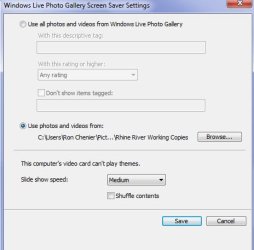
However it says: "This video's computer card can't play Themes".
What is happening now?
 

My Computer

Computer Manufacturer/Model Number
Acer Aspire M5910
OS
Windows 7 Home Premium (x64) (build 7600)
CPU
2.80 gigahertz Intel Core i7 860
Motherboard
Board: Acer Aspire M5910
Memory
8184 Megabytes Usable Installed Memory
Graphics Card(s)
NVIDIA GeForce GT 320 [Display adapter]
Sound Card
NVIDIA High Definition Audio (4x)
Monitor(s) Displays
Acer X203W [Monitor] (20.0"vis, s/n LAN080244200, October 20
Screen Resolution
1280x800
Hard Drives
1728.88 Gigabytes Usable Hard Drive Capacity
1529.51 Gigabytes Hard Drive Free Space
PSU
500 W (PFC, 80Plus-certified, more than 20% efficiency)
Case
Desktop PC Tower
Cooling
?
Keyboard
Acer keyboard (USB Connected)
Mouse
Acer mouse (USB Connected)
Internet Speed
High Speed LAN (Cable Service)
Do you have the latest video card drivers installed, and Aero enabled? As a suggestion, fill in your system specs, so we have a better idea of what hardware we are dealing with.
 

My Computer

OS
Windows 7 Ultimate x64 SP1
CPU
Intel Core i7-2600
Motherboard
Gigabyte GA-P67A-UD3P-B3
Memory
12 GB Patriot Extreme DDR3-1333
Graphics Card(s)
Nvidia GTX 470
Monitor(s) Displays
Dell UltraSharp 2209WA
Hard Drives
OCZ Agility3 240 GB, WD5001AALS, WD7501AALS
PSU
OCZ ModStream 700W
Case
CoolerMaster HAF 912 Advanced
Cooling
CoolerMaster Hyper 212 Plus
Did your PC come with Windows 7 pre installed or did you install it? If you installed it did you run the Windows 7 Upgrade Advisor first?
 

My Computer

Computer type
PC/Desktop
OS
Microsoft Windows 7 Home Premium 64-bit 7601 Multiprocessor Free Service Pack 1
CPU
Intel(R) Core(TM) i7-3770 CPU @ 3.40GHz
Motherboard
ASUSTeK COMPUTER INC. P8H77-M
Memory
8.00 GB
Graphics Card(s)
Intel(R) HD Graphics 4000
Sound Card
On Board
Monitor(s) Displays
Dell 24"
Screen Resolution
1920 x 1080
Hard Drives
(1) INTEL SSDSC2CT180A3 ATA Device (2) ST500DM002-1BD142 ATA Device (3) WDC WD3200AAKS-75L9A0 ATA Device (4) Generic- Compact Flash USB Device (5) Generic- MS/MS-Pro USB Device (6) Generic- SD/MMC USB Device (7) Generic- SM/xD-Picture USB
PSU
500w Corsair
Case
Cooler Master
Cooling
3 Fans
Keyboard
Logitech MK300
Mouse
Logitech WOM
Internet Speed
75Mb
Antivirus
Norton 360
Browser
Firefox, Opera, IE
Do you have the latest video card drivers installed, and Aero enabled? As a suggestion, fill in your system specs, so we have a better idea of what hardware we are dealing with.

Sorry, but I'm not sure where to get this info after entering Control Panel.
Can you guide a bit please?
Thanks.
 

My Computer

Computer Manufacturer/Model Number
Acer Aspire M5910
OS
Windows 7 Home Premium (x64) (build 7600)
CPU
2.80 gigahertz Intel Core i7 860
Motherboard
Board: Acer Aspire M5910
Memory
8184 Megabytes Usable Installed Memory
Graphics Card(s)
NVIDIA GeForce GT 320 [Display adapter]
Sound Card
NVIDIA High Definition Audio (4x)
Monitor(s) Displays
Acer X203W [Monitor] (20.0"vis, s/n LAN080244200, October 20
Screen Resolution
1280x800
Hard Drives
1728.88 Gigabytes Usable Hard Drive Capacity
1529.51 Gigabytes Hard Drive Free Space
PSU
500 W (PFC, 80Plus-certified, more than 20% efficiency)
Case
Desktop PC Tower
Cooling
?
Keyboard
Acer keyboard (USB Connected)
Mouse
Acer mouse (USB Connected)
Internet Speed
High Speed LAN (Cable Service)
I'm not sure where to guide you with this, to be honest. It is your computer, so I'd think you'd be able to fill out the specs just off the top of your head. I guess you could use a program like Speccy, but I always have trouble imagining people paying for a computer without knowing what they are paying for inside.

If you want to go into Device Manager, it would at least show you some of your hardware, including the video card under Display Adapters. Then, as the user of the computer, you'd know if you installed drivers recently for it, or if it has been a long time.
 

My Computer

OS
Windows 7 Ultimate x64 SP1
CPU
Intel Core i7-2600
Motherboard
Gigabyte GA-P67A-UD3P-B3
Memory
12 GB Patriot Extreme DDR3-1333
Graphics Card(s)
Nvidia GTX 470
Monitor(s) Displays
Dell UltraSharp 2209WA
Hard Drives
OCZ Agility3 240 GB, WD5001AALS, WD7501AALS
PSU
OCZ ModStream 700W
Case
CoolerMaster HAF 912 Advanced
Cooling
CoolerMaster Hyper 212 Plus
I'm not sure where to guide you with this, to be honest. It is your computer, so I'd think you'd be able to fill out the specs just off the top of your head. I guess you could use a program like Speccy, but I always have trouble imagining people paying for a computer without knowing what they are paying for inside.

If you want to go into Device Manager, it would at least show you some of your hardware, including the video card under Display Adapters. Then, as the user of the computer, you'd know if you installed drivers recently for it, or if it has been a long time.

Ok...found it.
NVIDIA GeForce GT320 (dated 9/7/2010) Ver 8.17.12.5896
Devide working properly
Asked for an update and Windows says my driver is up to date.

BTW, I have bought many computers in my life and usually know pretty much what I'm buying, but sometimes it get to be a bit much. As I am not a "gamer" per say I don't always look at the value of a video card. I use my computer almost 100% for research purposes and gather tens of thousands of bits of info. Video cards seldom come into play.

But thanks for helping trying to sort out this nagging (for lack of a better word) little problem.

Ron
 

My Computer

Computer Manufacturer/Model Number
Acer Aspire M5910
OS
Windows 7 Home Premium (x64) (build 7600)
CPU
2.80 gigahertz Intel Core i7 860
Motherboard
Board: Acer Aspire M5910
Memory
8184 Megabytes Usable Installed Memory
Graphics Card(s)
NVIDIA GeForce GT 320 [Display adapter]
Sound Card
NVIDIA High Definition Audio (4x)
Monitor(s) Displays
Acer X203W [Monitor] (20.0"vis, s/n LAN080244200, October 20
Screen Resolution
1280x800
Hard Drives
1728.88 Gigabytes Usable Hard Drive Capacity
1529.51 Gigabytes Hard Drive Free Space
PSU
500 W (PFC, 80Plus-certified, more than 20% efficiency)
Case
Desktop PC Tower
Cooling
?
Keyboard
Acer keyboard (USB Connected)
Mouse
Acer mouse (USB Connected)
Internet Speed
High Speed LAN (Cable Service)
Did your PC come with Windows 7 pre installed or did you install it? If you installed it did you run the Windows 7 Upgrade Advisor first?

My computer came with Windows 7 pre-installed.
 

My Computer

Computer Manufacturer/Model Number
Acer Aspire M5910
OS
Windows 7 Home Premium (x64) (build 7600)
CPU
2.80 gigahertz Intel Core i7 860
Motherboard
Board: Acer Aspire M5910
Memory
8184 Megabytes Usable Installed Memory
Graphics Card(s)
NVIDIA GeForce GT 320 [Display adapter]
Sound Card
NVIDIA High Definition Audio (4x)
Monitor(s) Displays
Acer X203W [Monitor] (20.0"vis, s/n LAN080244200, October 20
Screen Resolution
1280x800
Hard Drives
1728.88 Gigabytes Usable Hard Drive Capacity
1529.51 Gigabytes Hard Drive Free Space
PSU
500 W (PFC, 80Plus-certified, more than 20% efficiency)
Case
Desktop PC Tower
Cooling
?
Keyboard
Acer keyboard (USB Connected)
Mouse
Acer mouse (USB Connected)
Internet Speed
High Speed LAN (Cable Service)

My Computer

Computer type
PC/Desktop
OS
Microsoft Windows 7 Home Premium 64-bit 7601 Multiprocessor Free Service Pack 1
CPU
Intel(R) Core(TM) i7-3770 CPU @ 3.40GHz
Motherboard
ASUSTeK COMPUTER INC. P8H77-M
Memory
8.00 GB
Graphics Card(s)
Intel(R) HD Graphics 4000
Sound Card
On Board
Monitor(s) Displays
Dell 24"
Screen Resolution
1920 x 1080
Hard Drives
(1) INTEL SSDSC2CT180A3 ATA Device (2) ST500DM002-1BD142 ATA Device (3) WDC WD3200AAKS-75L9A0 ATA Device (4) Generic- Compact Flash USB Device (5) Generic- MS/MS-Pro USB Device (6) Generic- SD/MMC USB Device (7) Generic- SM/xD-Picture USB
PSU
500w Corsair
Case
Cooler Master
Cooling
3 Fans
Keyboard
Logitech MK300
Mouse
Logitech WOM
Internet Speed
75Mb
Antivirus
Norton 360
Browser
Firefox, Opera, IE
Hi Tegiro
Lets get your sytem specs in the right place. It really is important and can save hours of time in the future if you have other queries.
I always use Belarc Adivsor. It's free and very quick and easy to use.
Download and install it from here:
Belarc Advisor - Free Personal PC Audit
This will produce sheet showing all your hadware and software.
When you have that shhet open click the User CP button at the top of this Forum and click "Edit System Specs" Then you can copy and paste all the details from Belarc.
Check the result by clicking the "My System Specs" arrow head at the bottom left of each of your posts.

That only needs to be done once. You can always update the details if you add new hardware in the future.
That really will help all the helpers to help you.
Just as a tail end, where did you buy the PC from and when as it seems a bit strange that you should buy a PC with the OS installed but the hardware on the PC is not man enough to run all the aspects of the OS. If that were me I would complain bitterly to the vendor but the UK may be different to the US in this respect.
 

My Computer

Computer type
PC/Desktop
OS
Microsoft Windows 7 Home Premium 64-bit 7601 Multiprocessor Free Service Pack 1
CPU
Intel(R) Core(TM) i7-3770 CPU @ 3.40GHz
Motherboard
ASUSTeK COMPUTER INC. P8H77-M
Memory
8.00 GB
Graphics Card(s)
Intel(R) HD Graphics 4000
Sound Card
On Board
Monitor(s) Displays
Dell 24"
Screen Resolution
1920 x 1080
Hard Drives
(1) INTEL SSDSC2CT180A3 ATA Device (2) ST500DM002-1BD142 ATA Device (3) WDC WD3200AAKS-75L9A0 ATA Device (4) Generic- Compact Flash USB Device (5) Generic- MS/MS-Pro USB Device (6) Generic- SD/MMC USB Device (7) Generic- SM/xD-Picture USB
PSU
500w Corsair
Case
Cooler Master
Cooling
3 Fans
Keyboard
Logitech MK300
Mouse
Logitech WOM
Internet Speed
75Mb
Antivirus
Norton 360
Browser
Firefox, Opera, IE
Have just checked and there is a later driver version than the one you have.
Go to:
nvidia (omega 1.6177) (q) Driver Downloads - PC Pitstop Driver Library
scrolldown to find you GT320 card and download driver version 8.17.12.6658

See if that helps!

I guess its not always good to trust Windows' jugdement!
I downloaded the new version of GT320 and installed it.
Rebooted PC but still same little problem.

As an aside, my desktop image that I use covers the whole screen. But if I select it in a group of other photos (screen savers) it does not cover the whole screen, leaving black borders on both sides
 

My Computer

Computer Manufacturer/Model Number
Acer Aspire M5910
OS
Windows 7 Home Premium (x64) (build 7600)
CPU
2.80 gigahertz Intel Core i7 860
Motherboard
Board: Acer Aspire M5910
Memory
8184 Megabytes Usable Installed Memory
Graphics Card(s)
NVIDIA GeForce GT 320 [Display adapter]
Sound Card
NVIDIA High Definition Audio (4x)
Monitor(s) Displays
Acer X203W [Monitor] (20.0"vis, s/n LAN080244200, October 20
Screen Resolution
1280x800
Hard Drives
1728.88 Gigabytes Usable Hard Drive Capacity
1529.51 Gigabytes Hard Drive Free Space
PSU
500 W (PFC, 80Plus-certified, more than 20% efficiency)
Case
Desktop PC Tower
Cooling
?
Keyboard
Acer keyboard (USB Connected)
Mouse
Acer mouse (USB Connected)
Internet Speed
High Speed LAN (Cable Service)
Can you please respond to my post above #29. I really can't help you unless you give me the answers!
 

My Computer

Computer type
PC/Desktop
OS
Microsoft Windows 7 Home Premium 64-bit 7601 Multiprocessor Free Service Pack 1
CPU
Intel(R) Core(TM) i7-3770 CPU @ 3.40GHz
Motherboard
ASUSTeK COMPUTER INC. P8H77-M
Memory
8.00 GB
Graphics Card(s)
Intel(R) HD Graphics 4000
Sound Card
On Board
Monitor(s) Displays
Dell 24"
Screen Resolution
1920 x 1080
Hard Drives
(1) INTEL SSDSC2CT180A3 ATA Device (2) ST500DM002-1BD142 ATA Device (3) WDC WD3200AAKS-75L9A0 ATA Device (4) Generic- Compact Flash USB Device (5) Generic- MS/MS-Pro USB Device (6) Generic- SD/MMC USB Device (7) Generic- SM/xD-Picture USB
PSU
500w Corsair
Case
Cooler Master
Cooling
3 Fans
Keyboard
Logitech MK300
Mouse
Logitech WOM
Internet Speed
75Mb
Antivirus
Norton 360
Browser
Firefox, Opera, IE
Hi Tegiro
Lets get your sytem specs in the right place. It really is important and can save hours of time in the future if you have other queries.
I always use Belarc Adivsor. It's free and very quick and easy to use.
Download and install it from here:
Belarc Advisor - Free Personal PC Audit
This will produce sheet showing all your hadware and software.
When you have that shhet open click the User CP button at the top of this Forum and click "Edit System Specs" Then you can copy and paste all the details from Belarc.
Check the result by clicking the "My System Specs" arrow head at the bottom left of each of your posts.

That only needs to be done once. You can always update the details if you add new hardware in the future.
That really will help all the helpers to help you.
Just as a tail end, where did you buy the PC from and when as it seems a bit strange that you should buy a PC with the OS installed but the hardware on the PC is not man enough to run all the aspects of the OS. If that were me I would complain bitterly to the vendor but the UK may be different to the US in this respect.

Hi michell65,

Boy, that was an interesting process. Got it done correctly I hope. Would this shed a bit more light on my little problem?
BTW I purchased my system from a local chain of stores called Audiotronics, in Ottawa, Canada. (Not USA!)
This was a floor model I purchased at a bargain price. The sales rep did remove some software and reconfigured the unit.

Thanks for your patience.
 

My Computer

Computer Manufacturer/Model Number
Acer Aspire M5910
OS
Windows 7 Home Premium (x64) (build 7600)
CPU
2.80 gigahertz Intel Core i7 860
Motherboard
Board: Acer Aspire M5910
Memory
8184 Megabytes Usable Installed Memory
Graphics Card(s)
NVIDIA GeForce GT 320 [Display adapter]
Sound Card
NVIDIA High Definition Audio (4x)
Monitor(s) Displays
Acer X203W [Monitor] (20.0"vis, s/n LAN080244200, October 20
Screen Resolution
1280x800
Hard Drives
1728.88 Gigabytes Usable Hard Drive Capacity
1529.51 Gigabytes Hard Drive Free Space
PSU
500 W (PFC, 80Plus-certified, more than 20% efficiency)
Case
Desktop PC Tower
Cooling
?
Keyboard
Acer keyboard (USB Connected)
Mouse
Acer mouse (USB Connected)
Internet Speed
High Speed LAN (Cable Service)
Well the system pec looks fine. I'm no expert on Graphics cards but i do see that your monitor is set to 1280 x 800 whereas is it capable of 1680 x 1050. Right click on your desktop and choose "Screen Resolution" What is the recommended resolution? If necessary try to set to 1680 x 1050 and see if that improves things!
P.S. Sorry for delay in replying, I am always pushed for time on Saturdays.
EDIT: Earlier you sere asked if you were running Aero - are you?
 

My Computer

Computer type
PC/Desktop
OS
Microsoft Windows 7 Home Premium 64-bit 7601 Multiprocessor Free Service Pack 1
CPU
Intel(R) Core(TM) i7-3770 CPU @ 3.40GHz
Motherboard
ASUSTeK COMPUTER INC. P8H77-M
Memory
8.00 GB
Graphics Card(s)
Intel(R) HD Graphics 4000
Sound Card
On Board
Monitor(s) Displays
Dell 24"
Screen Resolution
1920 x 1080
Hard Drives
(1) INTEL SSDSC2CT180A3 ATA Device (2) ST500DM002-1BD142 ATA Device (3) WDC WD3200AAKS-75L9A0 ATA Device (4) Generic- Compact Flash USB Device (5) Generic- MS/MS-Pro USB Device (6) Generic- SD/MMC USB Device (7) Generic- SM/xD-Picture USB
PSU
500w Corsair
Case
Cooler Master
Cooling
3 Fans
Keyboard
Logitech MK300
Mouse
Logitech WOM
Internet Speed
75Mb
Antivirus
Norton 360
Browser
Firefox, Opera, IE
Well the system pec looks fine. I'm no expert on Graphics cards but i do see that your monitor is set to 1280 x 800 whereas is it capable of 1680 x 1050. Right click on your desktop and choose "Screen Resolution" What is the recommended resolution? If necessary try to set to 1680 x 1050 and see if that improves things!
P.S. Sorry for delay in replying, I am always pushed for time on Saturdays.
EDIT: Earlier you sere asked if you were running Aero - are you?


Glad my specs are in good order.
I checked the recdommende resolution for my monitor and it says 168-x1050.
However using this "recommended" resolution setting places everything on the screen so small that i have to tweak it so things are more legible and manageable.

I've tried various resolutions settings but still screen saver photos do not fill the screen.
Here is a sample of what I see:
 

Attachments

  • Screen saver  with black side borders.jpg
    Screen saver with black side borders.jpg
    63.1 KB · Views: 3

My Computer

Computer Manufacturer/Model Number
Acer Aspire M5910
OS
Windows 7 Home Premium (x64) (build 7600)
CPU
2.80 gigahertz Intel Core i7 860
Motherboard
Board: Acer Aspire M5910
Memory
8184 Megabytes Usable Installed Memory
Graphics Card(s)
NVIDIA GeForce GT 320 [Display adapter]
Sound Card
NVIDIA High Definition Audio (4x)
Monitor(s) Displays
Acer X203W [Monitor] (20.0"vis, s/n LAN080244200, October 20
Screen Resolution
1280x800
Hard Drives
1728.88 Gigabytes Usable Hard Drive Capacity
1529.51 Gigabytes Hard Drive Free Space
PSU
500 W (PFC, 80Plus-certified, more than 20% efficiency)
Case
Desktop PC Tower
Cooling
?
Keyboard
Acer keyboard (USB Connected)
Mouse
Acer mouse (USB Connected)
Internet Speed
High Speed LAN (Cable Service)
What you see in the sample above is quite normal. The image is only 800px wide and your screen resolution is more than that. You wont get your screensaver photos to fill all the screen unless you can select Windows Live Photo Viewer in the screen saver box. Can you do that when the screen resolution is set to the recommended level?
I keep asking you if you are running Aero but cannot find your response to this question!
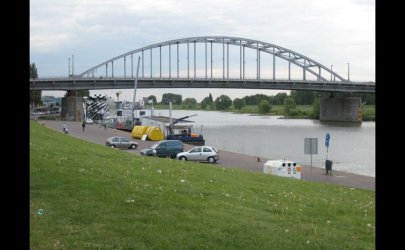
BTW Where is the location of that photo. It looks like a UK location
 

My Computer

Computer type
PC/Desktop
OS
Microsoft Windows 7 Home Premium 64-bit 7601 Multiprocessor Free Service Pack 1
CPU
Intel(R) Core(TM) i7-3770 CPU @ 3.40GHz
Motherboard
ASUSTeK COMPUTER INC. P8H77-M
Memory
8.00 GB
Graphics Card(s)
Intel(R) HD Graphics 4000
Sound Card
On Board
Monitor(s) Displays
Dell 24"
Screen Resolution
1920 x 1080
Hard Drives
(1) INTEL SSDSC2CT180A3 ATA Device (2) ST500DM002-1BD142 ATA Device (3) WDC WD3200AAKS-75L9A0 ATA Device (4) Generic- Compact Flash USB Device (5) Generic- MS/MS-Pro USB Device (6) Generic- SD/MMC USB Device (7) Generic- SM/xD-Picture USB
PSU
500w Corsair
Case
Cooler Master
Cooling
3 Fans
Keyboard
Logitech MK300
Mouse
Logitech WOM
Internet Speed
75Mb
Antivirus
Norton 360
Browser
Firefox, Opera, IE
What you see in the sample above is quite normal. The image is only 800px wide and your screen resolution is more than that. You wont get your screensaver photos to fill all the screen unless you can select Windows Live Photo Viewer in the screen saver box. Can you do that when the screen resolution is set to the recommended level?
I keep asking you if you are running Aero but cannot find your response to this question!
BTW Where is the location of that photo. It looks like a UK location

Hi mitchell65,

Sorry...I guess in the heat of the moment I keep forgeting to let you know if I'm running Aero. No I am not, I don't have this program and don't know what it does.

I changed my resolution to the recommended settings of 1680x1050.
Windows Photo Live is in the Screen Saver box and selected.
Re-booted PC and still it does not make a difference.

I am beginning to think this will be the way I shall have to live with my new computer. I know a lot of thought and ideas have been suggested but they don't seem to fix my little problem. I say "little" problem because this is not affecting what i use my PC for, it is just a "nice" thing I thought could be altered. On my old Pc I never had this problem and I thought it was the way I had set up my new PC.
So if there really seems to be no solution I am sure there are more important things to do that try to solve "my" problem.
Thanks again for all your help.

Tegiro/Ron
 

My Computer

Computer Manufacturer/Model Number
Acer Aspire M5910
OS
Windows 7 Home Premium (x64) (build 7600)
CPU
2.80 gigahertz Intel Core i7 860
Motherboard
Board: Acer Aspire M5910
Memory
8184 Megabytes Usable Installed Memory
Graphics Card(s)
NVIDIA GeForce GT 320 [Display adapter]
Sound Card
NVIDIA High Definition Audio (4x)
Monitor(s) Displays
Acer X203W [Monitor] (20.0"vis, s/n LAN080244200, October 20
Screen Resolution
1280x800
Hard Drives
1728.88 Gigabytes Usable Hard Drive Capacity
1529.51 Gigabytes Hard Drive Free Space
PSU
500 W (PFC, 80Plus-certified, more than 20% efficiency)
Case
Desktop PC Tower
Cooling
?
Keyboard
Acer keyboard (USB Connected)
Mouse
Acer mouse (USB Connected)
Internet Speed
High Speed LAN (Cable Service)
Windows Photo Live is in the Screen Saver box and selected.
That's good just go back to Post #17 and choose the theme correctly to Pan and Zoom.
You do have Aero. Just go to personalize and choose an Aero theme!
 

My Computer

Computer type
PC/Desktop
OS
Microsoft Windows 7 Home Premium 64-bit 7601 Multiprocessor Free Service Pack 1
CPU
Intel(R) Core(TM) i7-3770 CPU @ 3.40GHz
Motherboard
ASUSTeK COMPUTER INC. P8H77-M
Memory
8.00 GB
Graphics Card(s)
Intel(R) HD Graphics 4000
Sound Card
On Board
Monitor(s) Displays
Dell 24"
Screen Resolution
1920 x 1080
Hard Drives
(1) INTEL SSDSC2CT180A3 ATA Device (2) ST500DM002-1BD142 ATA Device (3) WDC WD3200AAKS-75L9A0 ATA Device (4) Generic- Compact Flash USB Device (5) Generic- MS/MS-Pro USB Device (6) Generic- SD/MMC USB Device (7) Generic- SM/xD-Picture USB
PSU
500w Corsair
Case
Cooler Master
Cooling
3 Fans
Keyboard
Logitech MK300
Mouse
Logitech WOM
Internet Speed
75Mb
Antivirus
Norton 360
Browser
Firefox, Opera, IE
Windows Photo Live is in the Screen Saver box and selected.
That's good just go back to Post #17 and choose the theme correctly to Pan and Zoom.
You do have Aero. Just go to personalize and choose an Aero theme!

I did not know the names of the Themes and you are right I do have Areo, sorry about that. So I went to query/answer #17.
I selected the Canada Theme but cannot find any Pan and Zoom anywhere when selecting the Theme. But the following selections in the Personalization: Desktop Background are available and I tried some to see what happens.
Fill
Fit
Stretch
Tile
Centre

I've tried both Fill and Stretch and still my screen savers have those borders.
I've tried almost all Resolutuion settings and 1600x1200 was the only resolution setting that displayed my screen saver photos reasonably well, with no borders.
However there is a slight distortion horizontaly. That setting so far is the only one that allows the photos to cover the whole screen. Interesting!
 

My Computer

Computer Manufacturer/Model Number
Acer Aspire M5910
OS
Windows 7 Home Premium (x64) (build 7600)
CPU
2.80 gigahertz Intel Core i7 860
Motherboard
Board: Acer Aspire M5910
Memory
8184 Megabytes Usable Installed Memory
Graphics Card(s)
NVIDIA GeForce GT 320 [Display adapter]
Sound Card
NVIDIA High Definition Audio (4x)
Monitor(s) Displays
Acer X203W [Monitor] (20.0"vis, s/n LAN080244200, October 20
Screen Resolution
1280x800
Hard Drives
1728.88 Gigabytes Usable Hard Drive Capacity
1529.51 Gigabytes Hard Drive Free Space
PSU
500 W (PFC, 80Plus-certified, more than 20% efficiency)
Case
Desktop PC Tower
Cooling
?
Keyboard
Acer keyboard (USB Connected)
Mouse
Acer mouse (USB Connected)
Internet Speed
High Speed LAN (Cable Service)
Hi Tegiro
Glad you found Aero. I am guessing that when you first had Windows 7 you didn't take the opportunity to "Take the Windows 7 Guide" That's a shame as many of your queries would have been answered for you there. I would suggest that sometime you take the time to Google "Windows 7 Tour" and similar. Microsoft have many good guides out there. That in no way means I am discouraging you to post queries here. I, and many others are only too pleased to help if we can.
Back to your problem.
It appears that you are getting a little mixed up with Screen savers and Desktop back grounds. The Canada theme you mentioned is a desktop back ground theme, nothing to do with the screensaver problem!
Try this;
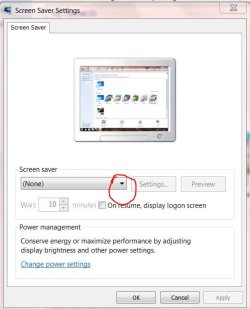
Right click on your desktop and choose "Personalize". The "Screen Saver"In this screenshot:
SS1.JPG
Click the arrow head circled in Red and choose "Windows Live Photo Gallery" form the drop down menu.
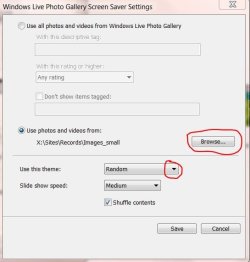
Click the "Setting" button. Then is this screenshot:
SS2.JPG
Click the button for "Use photos and videos from:" then click the Browse button and navigate to the folder containing the photos you wish to use for your screen saver. The in the same widow, under "Use this theme" click the arrow circled in red in the screenshot and choose "Pan and Zoom"
Then click "Save"
Then close any open windows by clicking OK on each one.
Then reboot PC and test you screensaver. If it doesn't work then I'm afraid you graphics card is not up to it and you have the choice of buying a suitable card or not having this facility!
Please post back with th results!
 

My Computer

Computer type
PC/Desktop
OS
Microsoft Windows 7 Home Premium 64-bit 7601 Multiprocessor Free Service Pack 1
CPU
Intel(R) Core(TM) i7-3770 CPU @ 3.40GHz
Motherboard
ASUSTeK COMPUTER INC. P8H77-M
Memory
8.00 GB
Graphics Card(s)
Intel(R) HD Graphics 4000
Sound Card
On Board
Monitor(s) Displays
Dell 24"
Screen Resolution
1920 x 1080
Hard Drives
(1) INTEL SSDSC2CT180A3 ATA Device (2) ST500DM002-1BD142 ATA Device (3) WDC WD3200AAKS-75L9A0 ATA Device (4) Generic- Compact Flash USB Device (5) Generic- MS/MS-Pro USB Device (6) Generic- SD/MMC USB Device (7) Generic- SM/xD-Picture USB
PSU
500w Corsair
Case
Cooler Master
Cooling
3 Fans
Keyboard
Logitech MK300
Mouse
Logitech WOM
Internet Speed
75Mb
Antivirus
Norton 360
Browser
Firefox, Opera, IE
Hi Tegiro
Glad you found Aero. I am guessing that when you first had Windows 7 you didn't take the opportunity to "Take the Windows 7 Guide" That's a shame as many of your queries would have been answered for you there. I would suggest that sometime you take the time to Google "Windows 7 Tour" and similar. Microsoft have many good guides out there. That in no way means I am discouraging you to post queries here. I, and many others are only too pleased to help if we can.
Back to your problem.
It appears that you are getting a little mixed up with Screen savers and Desktop back grounds. The Canada theme you mentioned is a desktop back ground theme, nothing to do with the screensaver problem!
Try this;
Right click on your desktop and choose "Personalize". The "Screen Saver"In this screenshot:
View attachment 140751
Click the arrow head circled in Red and choose "Windows Live Photo Gallery" form the drop down menu.
Click the "Setting" button. Then is this screenshot:
View attachment 140752
Click the button for "Use photos and videos from:" then click the Browse button and navigate to the folder containing the photos you wish to use for your screen saver. The in the same widow, under "Use this theme" click the arrow circled in red in the screenshot and choose "Pan and Zoom"
Then click "Save"
Then close any open windows by clicking OK on each one.
Then reboot PC and test you screensaver. If it doesn't work then I'm afraid you graphics card is not up to it and you have the choice of buying a suitable card or not having this facility!
Please post back with th results!

I have not taken the windows 7 Tour guide, but I will spend some time viewing it. It might give some pointers I'm sure.
My problem seems to be that I do not get the same screen results as you do.
I have set the Desktop backgrounds with no problems, selecting the Canada set of photos. I know my problem resides with the Screen Savers, that is the origin of this thread. However following all the steps you prescribe (and all the ones i try) do not give me the same screen as you have attached. My screen still says (This video card can't play themes). So why is it I can play Themes, I've selected one.
Please see my screen shot.
 

Attachments

  • ScreenShot.jpg
    ScreenShot.jpg
    40.8 KB · Views: 1

My Computer

Computer Manufacturer/Model Number
Acer Aspire M5910
OS
Windows 7 Home Premium (x64) (build 7600)
CPU
2.80 gigahertz Intel Core i7 860
Motherboard
Board: Acer Aspire M5910
Memory
8184 Megabytes Usable Installed Memory
Graphics Card(s)
NVIDIA GeForce GT 320 [Display adapter]
Sound Card
NVIDIA High Definition Audio (4x)
Monitor(s) Displays
Acer X203W [Monitor] (20.0"vis, s/n LAN080244200, October 20
Screen Resolution
1280x800
Hard Drives
1728.88 Gigabytes Usable Hard Drive Capacity
1529.51 Gigabytes Hard Drive Free Space
PSU
500 W (PFC, 80Plus-certified, more than 20% efficiency)
Case
Desktop PC Tower
Cooling
?
Keyboard
Acer keyboard (USB Connected)
Mouse
Acer mouse (USB Connected)
Internet Speed
High Speed LAN (Cable Service)
Back
Top